---
title: Vectra
description: ''
slug: /help/docs/integrations/automation-integrations/vectra/
canonical: https://www.sumologic.com/help/docs/integrations/automation-integrations/vectra/
---
import useBaseUrl from '@docusaurus/useBaseUrl';
 ***Version: 1.2
Updated: April 30, 2026***
The integration with Vectra allows users to retrieve information about detections, hosts, accounts sensor info, system health info and do an advanced search.
Vectra AI detects and prioritises high-fidelity alerts in real time and responds with automated enforcement or alerts to security personnel. Security teams use this information for threat hunting and retrospective investigations via a subscription service.
## Actions
* **List Detections** (*Enrichment*) - Security detection events.
* **List Hosts** (*Enrichment*) - Host information.
* **List Accounts** (*Enrichment*) - List accounts.
* **Get Detection** (*Enrichment*) - Detection Information.
* **Get Host** (*Enrichment*) - Host information.
* **Advanced Search** (*Enrichment*) - Advanced search on hosts, accounts, and detections.
* **Sensors Info** (*Enrichment*) - Sensor information.
* **System Health Info** (*Enrichment*) - System Health information.
## Vectra configuration
1. Sign in to [Vectra](https://apitest.vectracloudlab.com).
1. In the main page, click on the section **My Profile**.
***Version: 1.2
Updated: April 30, 2026***
The integration with Vectra allows users to retrieve information about detections, hosts, accounts sensor info, system health info and do an advanced search.
Vectra AI detects and prioritises high-fidelity alerts in real time and responds with automated enforcement or alerts to security personnel. Security teams use this information for threat hunting and retrospective investigations via a subscription service.
## Actions
* **List Detections** (*Enrichment*) - Security detection events.
* **List Hosts** (*Enrichment*) - Host information.
* **List Accounts** (*Enrichment*) - List accounts.
* **Get Detection** (*Enrichment*) - Detection Information.
* **Get Host** (*Enrichment*) - Host information.
* **Advanced Search** (*Enrichment*) - Advanced search on hosts, accounts, and detections.
* **Sensors Info** (*Enrichment*) - Sensor information.
* **System Health Info** (*Enrichment*) - System Health information.
## Vectra configuration
1. Sign in to [Vectra](https://apitest.vectracloudlab.com).
1. In the main page, click on the section **My Profile**.
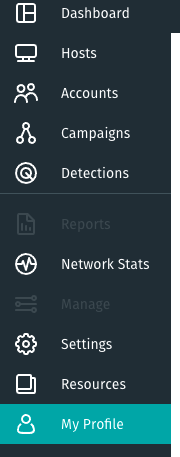 1. Click on the copy button in [API Token](https://support.vectra.ai/vectra/article/KB-VS-1711) (or click generate a new token and then copy button).
## Configure Vectra in Automation Service and Cloud SOAR
import IntegrationsAuth from '../../reuse/integrations-authentication.md';
import IntegrationCertificate from '../../reuse/automation-service/integration-certificate.md';
import IntegrationEngine from '../../reuse/automation-service/integration-engine.md';
import IntegrationLabel from '../../reuse/automation-service/integration-label.md';
import IntegrationProxy from '../../reuse/automation-service/integration-proxy.md';
import IntegrationTimeout from '../../reuse/automation-service/integration-timeout.md';
*
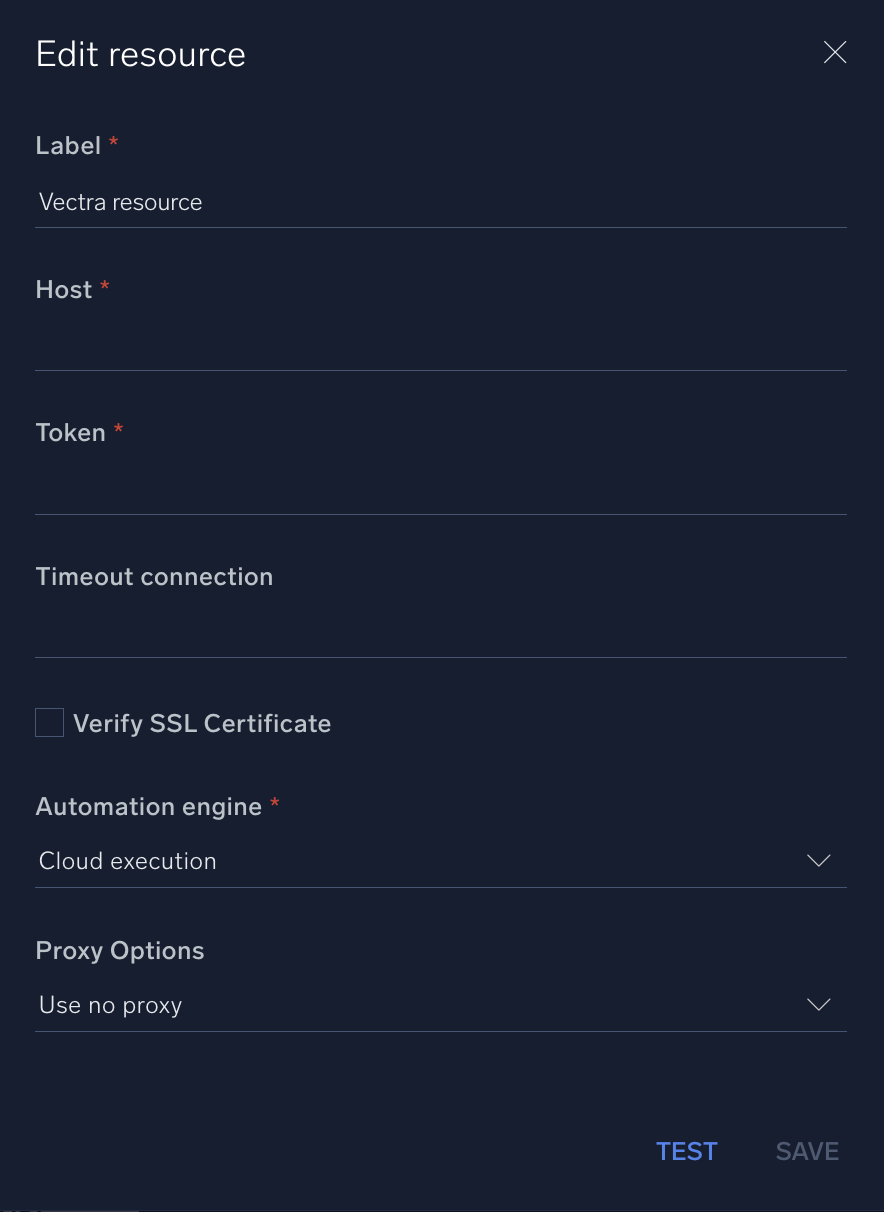
* **Host**. Enter your Vectra host address, for example `https://apitest.vectracloudlab.com/api/v2.2/`.
* **Token**. Enter the [Vectra API token](https://support.vectra.ai/vectra/article/KB-VS-1711) you [copied earlier](#vectra-configuration).
*
*
*
*
1. Click on the copy button in [API Token](https://support.vectra.ai/vectra/article/KB-VS-1711) (or click generate a new token and then copy button).
## Configure Vectra in Automation Service and Cloud SOAR
import IntegrationsAuth from '../../reuse/integrations-authentication.md';
import IntegrationCertificate from '../../reuse/automation-service/integration-certificate.md';
import IntegrationEngine from '../../reuse/automation-service/integration-engine.md';
import IntegrationLabel from '../../reuse/automation-service/integration-label.md';
import IntegrationProxy from '../../reuse/automation-service/integration-proxy.md';
import IntegrationTimeout from '../../reuse/automation-service/integration-timeout.md';
*
* **Host**. Enter your Vectra host address, for example `https://apitest.vectracloudlab.com/api/v2.2/`.
* **Token**. Enter the [Vectra API token](https://support.vectra.ai/vectra/article/KB-VS-1711) you [copied earlier](#vectra-configuration).
*
*
*
*
 For information about Vectra, see [Vectra documentation.](https://support.vectra.ai/vectra/knowledge)
## Change Log
| Version | Date | Description |
|:--|:--|:--|
| v1.2 | April 30, 2026 | Upgraded the `python3_generic` Docker image (Python 3.8) to `python3_12_generic` (Python 3.12) to address Python 3.8 end-of-life and improve security and performance. |
| v1.1 | July 7, 2023 | Updated the integration with Environmental Variables. |
| | December 15, 2021 | Initial release of the Vectra integration. |
## Additional resources
For Vectra, Sumo Logic offers the [Vectra source](/docs/send-data/hosted-collectors/cloud-to-cloud-integration-framework/vectra-source/) and the [Vectra app](/docs/integrations/saas-cloud/vectra/) to collect and visualize your Vectra data.
For information about Vectra, see [Vectra documentation.](https://support.vectra.ai/vectra/knowledge)
## Change Log
| Version | Date | Description |
|:--|:--|:--|
| v1.2 | April 30, 2026 | Upgraded the `python3_generic` Docker image (Python 3.8) to `python3_12_generic` (Python 3.12) to address Python 3.8 end-of-life and improve security and performance. |
| v1.1 | July 7, 2023 | Updated the integration with Environmental Variables. |
| | December 15, 2021 | Initial release of the Vectra integration. |
## Additional resources
For Vectra, Sumo Logic offers the [Vectra source](/docs/send-data/hosted-collectors/cloud-to-cloud-integration-framework/vectra-source/) and the [Vectra app](/docs/integrations/saas-cloud/vectra/) to collect and visualize your Vectra data.