---
title: VMWare vSphere
description: ''
slug: /help/docs/integrations/automation-integrations/vmware-vsphere/
canonical: https://www.sumologic.com/help/docs/integrations/automation-integrations/vmware-vsphere/
---
import useBaseUrl from '@docusaurus/useBaseUrl';
 ***Version: 1.4
Updated: Sep 19, 2023***
Utilize and manipulate virtual machines during an incident investigation with VMWare vSphere.
## Actions
* **Get Events** (*Enrichment*) - Gather events from vSphere.
* **Get Snapshots** (*Enrichment*) - Get VM snapshots.
* **Get VMs** (*Enrichment*) - Get list of available virtual machine.
* **Create Snapshot** (C*ontainment*) - Create a new snapshot.
* **Hard Reboot** (C*ontainment*) - Execute a hard reboot of a system.
* **Power Off** (C*ontainment*) - Power off a system.
* **Power On** (C*ontainment*) - Power on a system.
* **Revert To Snapshot** (C*ontainment*) - Roll back to a previous snapshot.
* **Soft Reboot** (C*ontainment*) - Execute a soft reboot of a system.
* **Suspend** (C*ontainment*) - Suspend a virtual machine.
## External libraries
* [VMWare vSphere](https://github.com/vmware/pyvmomi/blob/master/LICENSE.txt)
## Minimum permissions required
The following permissions are required for the integration:
* **Read-Only**. Allows reading details of virtual machines in the vSphere inventory.
* For further details on how to create the role, see [vSphere Permissions and User Management Tasks](https://docs.vmware.com/en/VMware-vSphere/7.0/com.vmware.vsphere.security.doc/GUID-5372F580-5C23-4E9C-8A4E-EF1B4DD9033E.html).
* For the **HOST**, use the _IP_ or _Domain_ of the vSphere node.
* The port should be set to 443.
## Configure VMware vSphere in Automation Service and Cloud SOAR
import IntegrationsAuth from '../../reuse/integrations-authentication.md';
import IntegrationCertificate from '../../reuse/automation-service/integration-certificate.md';
import IntegrationEngine from '../../reuse/automation-service/integration-engine.md';
import IntegrationLabel from '../../reuse/automation-service/integration-label.md';
import IntegrationProxy from '../../reuse/automation-service/integration-proxy.md';
import IntegrationTimeout from '../../reuse/automation-service/integration-timeout.md';
*
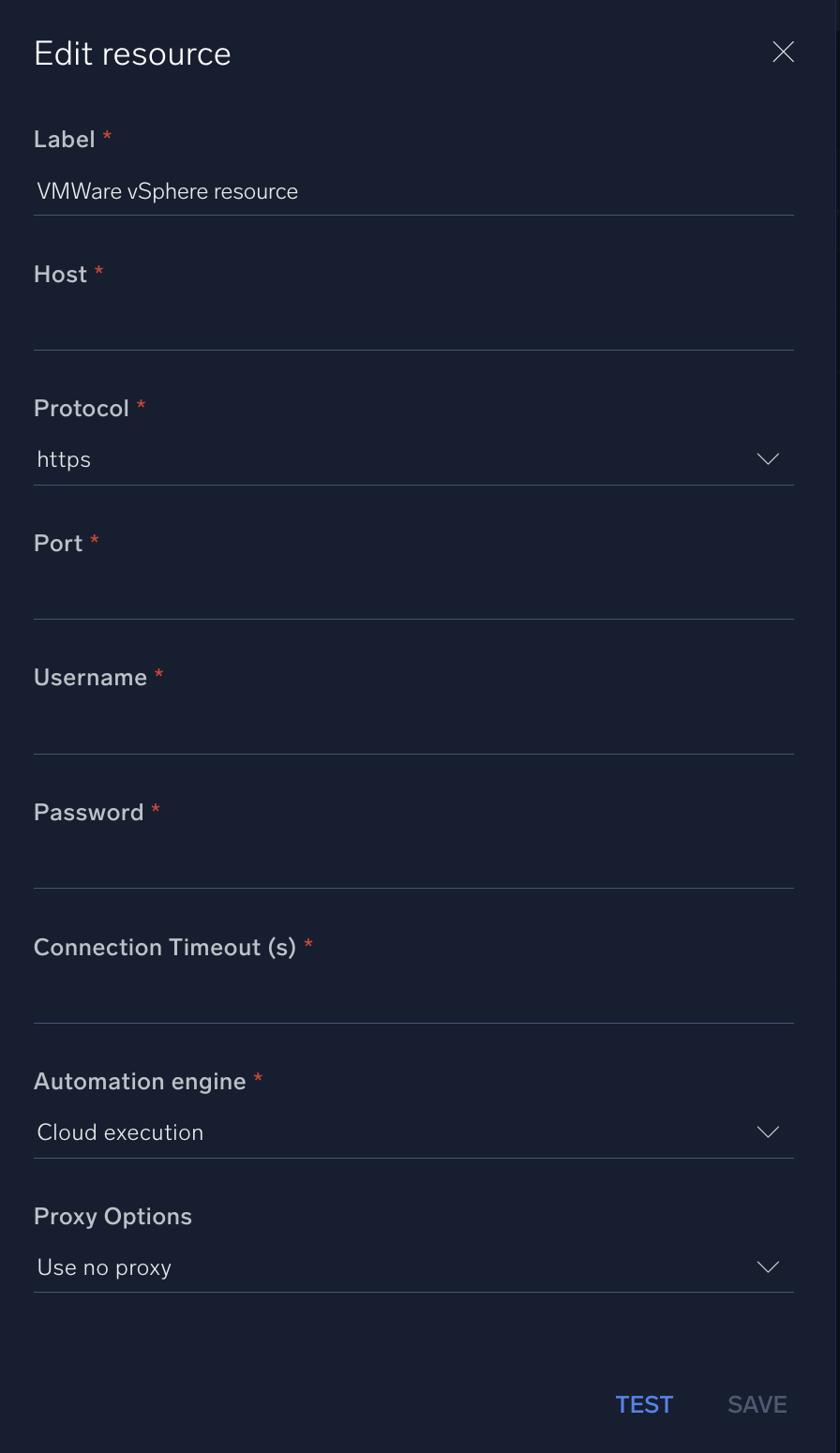
* **Host**. Enter your [VMware vSphere host address](https://techdocs.broadcom.com/us/en/vmware-cis/vsphere/vsphere/8-0/configuring-vcenter-server-8-0/configuring-vcenter-server-using-the-vsphere-client/configuring-vcenter-server-in-the-vsphere-client/configure-runtime-settings-for-vcenter-server-in-the-vsphere-client.html).
* **Protocol**. Select the protocol:
* **HTTPS**
* **HTTP**
* **Port**. Enter your [VMware vSphere port](https://techdocs.broadcom.com/us/en/vmware-cis/vsphere/vsphere/8-0/configuring-vcenter-server-8-0/configuring-vcenter-server-using-the-vsphere-client/configuring-vcenter-server-in-the-vsphere-client/view-port-settings-in-the-vsphere-client.html).
* **Username**. Enter the username of a VMware vSphere admin user authorized to authenticate the integration.
* **Password**. Enter the password for the admin user.
*
*
*
*
***Version: 1.4
Updated: Sep 19, 2023***
Utilize and manipulate virtual machines during an incident investigation with VMWare vSphere.
## Actions
* **Get Events** (*Enrichment*) - Gather events from vSphere.
* **Get Snapshots** (*Enrichment*) - Get VM snapshots.
* **Get VMs** (*Enrichment*) - Get list of available virtual machine.
* **Create Snapshot** (C*ontainment*) - Create a new snapshot.
* **Hard Reboot** (C*ontainment*) - Execute a hard reboot of a system.
* **Power Off** (C*ontainment*) - Power off a system.
* **Power On** (C*ontainment*) - Power on a system.
* **Revert To Snapshot** (C*ontainment*) - Roll back to a previous snapshot.
* **Soft Reboot** (C*ontainment*) - Execute a soft reboot of a system.
* **Suspend** (C*ontainment*) - Suspend a virtual machine.
## External libraries
* [VMWare vSphere](https://github.com/vmware/pyvmomi/blob/master/LICENSE.txt)
## Minimum permissions required
The following permissions are required for the integration:
* **Read-Only**. Allows reading details of virtual machines in the vSphere inventory.
* For further details on how to create the role, see [vSphere Permissions and User Management Tasks](https://docs.vmware.com/en/VMware-vSphere/7.0/com.vmware.vsphere.security.doc/GUID-5372F580-5C23-4E9C-8A4E-EF1B4DD9033E.html).
* For the **HOST**, use the _IP_ or _Domain_ of the vSphere node.
* The port should be set to 443.
## Configure VMware vSphere in Automation Service and Cloud SOAR
import IntegrationsAuth from '../../reuse/integrations-authentication.md';
import IntegrationCertificate from '../../reuse/automation-service/integration-certificate.md';
import IntegrationEngine from '../../reuse/automation-service/integration-engine.md';
import IntegrationLabel from '../../reuse/automation-service/integration-label.md';
import IntegrationProxy from '../../reuse/automation-service/integration-proxy.md';
import IntegrationTimeout from '../../reuse/automation-service/integration-timeout.md';
*
* **Host**. Enter your [VMware vSphere host address](https://techdocs.broadcom.com/us/en/vmware-cis/vsphere/vsphere/8-0/configuring-vcenter-server-8-0/configuring-vcenter-server-using-the-vsphere-client/configuring-vcenter-server-in-the-vsphere-client/configure-runtime-settings-for-vcenter-server-in-the-vsphere-client.html).
* **Protocol**. Select the protocol:
* **HTTPS**
* **HTTP**
* **Port**. Enter your [VMware vSphere port](https://techdocs.broadcom.com/us/en/vmware-cis/vsphere/vsphere/8-0/configuring-vcenter-server-8-0/configuring-vcenter-server-using-the-vsphere-client/configuring-vcenter-server-in-the-vsphere-client/view-port-settings-in-the-vsphere-client.html).
* **Username**. Enter the username of a VMware vSphere admin user authorized to authenticate the integration.
* **Password**. Enter the password for the admin user.
*
*
*
*
 For information about VMware vSphere, see [VMware vSphere documentation](https://techdocs.broadcom.com/us/en/vmware-cis/vsphere.html).
## Change Log
| Version | Date | Description |
|:--|:--|:--|
| v1.4 | September 19, 2023 | Updated the integration's versioning. |
| v1.3 | September 4, 2023 | Fixed a bug where an error would occur if the timeout was not specified. |
| v1.2 | August 17, 2023 | Updated the integration with Environmental Variables. |
| | September 6, 2019 | Added a link to the VMWare vSphere external library. |
| | August 30, 2019 | Initial release of the VMWare vSphere integration. |
For information about VMware vSphere, see [VMware vSphere documentation](https://techdocs.broadcom.com/us/en/vmware-cis/vsphere.html).
## Change Log
| Version | Date | Description |
|:--|:--|:--|
| v1.4 | September 19, 2023 | Updated the integration's versioning. |
| v1.3 | September 4, 2023 | Fixed a bug where an error would occur if the timeout was not specified. |
| v1.2 | August 17, 2023 | Updated the integration with Environmental Variables. |
| | September 6, 2019 | Added a link to the VMWare vSphere external library. |
| | August 30, 2019 | Initial release of the VMWare vSphere integration. |