---
title: ZeroFox V2
description: ''
slug: /help/docs/integrations/automation-integrations/zerofox-v2/
canonical: https://www.sumologic.com/help/docs/integrations/automation-integrations/zerofox-v2/
---
import useBaseUrl from '@docusaurus/useBaseUrl';
 ***Version: 1.1.1
Updated: October 6, 2026***
Query data and utilize actions in the [ZeroFox](https://www.zerofox.com/) platform, including CTI enrichment lookups, alert management, and automated threat intelligence feeds.
## Actions
* **Indicator Lookup** *(Enrichment)* - Searches the ZeroFox CTI indicators feed for threat intelligence on IPs, domains, URLs, and file hashes, returning confidence levels, threat types, TTPs, and ASN data.
* **Malware Lookup** *(Enrichment)* - Searches the ZeroFox CTI malware and ransomware datasets by hash, family name, or C2 infrastructure, returning sample details and extracted C2 endpoints.
* **Vulnerability Lookup** *(Enrichment)* - Searches ZeroFox CTI for vulnerability intelligence by CVE, product, or vendor, returning CVSS scores, remediation guidance, and optionally associated exploit code.
* **Phishing Domain Lookup** *(Enrichment)* - Searches the ZeroFox CTI phishing dataset by domain pattern, hosting IP, or TLS certificate fingerprint, returning phishing site details with hosting and certificate context.
* **Threat Actor Profile Lookup** *(Enrichment)* - Searches ZeroFox CTI for MITRE ATT&CK-anchored threat actor profiles by name, technique, tactic, target industry, or country.
* **Botnet Credential Lookup** *(Enrichment)* - Searches the ZeroFox CTI botnet compromised credentials dataset searchable by username, email, IP, domain, botnet family, or country code.
* **C2 Infrastructure Lookup** *(Enrichment)* - Searches the ZeroFox CTI C2 domains dataset for command-and-control infrastructure, returning associated domains, ports, and IP addresses, filterable by domain, port, or tag.
* **Compromised Credential Lookup** *(Enrichment)* - Searches the ZeroFox CTI compromised credentials dataset for breach and combolist credential records by email, domain, or breach ID.
* **Get Alert Details** *(Enrichment)* - Retrieves a specific alert with enriched context, including AI/ML insights, metadata, WHOIS enrichment, breach data, offending content, scan results, and session cookie data.
* **List Alerts** *(Enrichment)* - Returns alerts matching given filters and parameters.
* **List Users** *(Enrichment)* - Lists all users.
* **Request Takedown** *(Containment)* - Requests takedown of an existing alert.
* **Alerts Daemon** *(Daemon)* - Polls for new ZeroFox platform alerts and ingests them for automated triage.
* **Indicator Feed Daemon** *(Daemon)* - Polls the ZeroFox CTI indicators feed for new and updated indicators of compromise.
* **Vulnerability Daemon** *(Daemon)* - Polls the ZeroFox CTI vulnerabilities feed for new and updated CVE records.
## Permissions
The following ZeroFox feed permissions are required depending on the actions you want to use:
* **Network & Vulnerability Intelligence Feeds**
* C2 Infrastructure Lookup
* Botnet Infected Host IPs
* Phishing URLs
* Malware
* Ransomware
* Disruption TLDs and URLs
* Vulnerabilities
* Exploit Scripts
* Consolidated Indicators
* **Identity & Fraud Threat Intelligence Feeds**
* Botnet Credential Lookup
* Compromised Credential Lookup
* Breaches
* **Deep & Dark Web Intelligence Feeds**
* Advanced Dark Web (ZeroFox Analyst Reports)
* Threat Actors
* Discord
* Telegram
* Dark Web
## Configure ZeroFox in Automation Service and Cloud SOAR
import IntegrationsAuth from '../../reuse/integrations-authentication.md';
import IntegrationCertificate from '../../reuse/automation-service/integration-certificate.md';
import IntegrationEngine from '../../reuse/automation-service/integration-engine.md';
import IntegrationLabel from '../../reuse/automation-service/integration-label.md';
import IntegrationProxy from '../../reuse/automation-service/integration-proxy.md';
import IntegrationTimeout from '../../reuse/automation-service/integration-timeout.md';
*
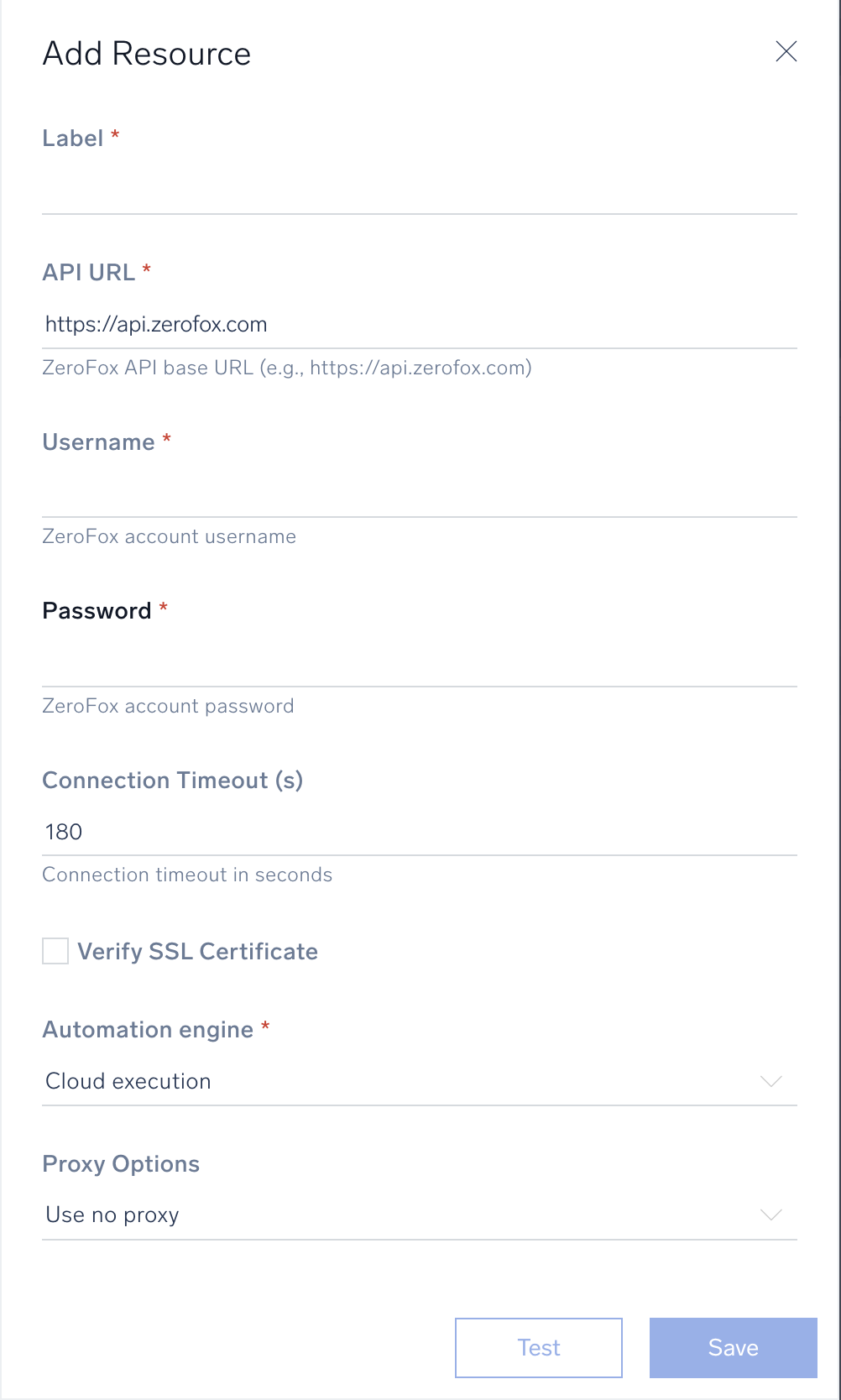
* **API URL**. Enter your ZeroFox API URL, for example, `https://api.zerofox.com`.
* **Username**. Enter your ZeroFox account username.
* **Password**. Enter your ZeroFox account password.
* **Connection Timeout (s)**. Optionally set a connection timeout in seconds. Default is `180`.
* **Verify SSL Certificate**. Select to verify the SSL certificate for secure connections.
*
*
*
*
***Version: 1.1.1
Updated: October 6, 2026***
Query data and utilize actions in the [ZeroFox](https://www.zerofox.com/) platform, including CTI enrichment lookups, alert management, and automated threat intelligence feeds.
## Actions
* **Indicator Lookup** *(Enrichment)* - Searches the ZeroFox CTI indicators feed for threat intelligence on IPs, domains, URLs, and file hashes, returning confidence levels, threat types, TTPs, and ASN data.
* **Malware Lookup** *(Enrichment)* - Searches the ZeroFox CTI malware and ransomware datasets by hash, family name, or C2 infrastructure, returning sample details and extracted C2 endpoints.
* **Vulnerability Lookup** *(Enrichment)* - Searches ZeroFox CTI for vulnerability intelligence by CVE, product, or vendor, returning CVSS scores, remediation guidance, and optionally associated exploit code.
* **Phishing Domain Lookup** *(Enrichment)* - Searches the ZeroFox CTI phishing dataset by domain pattern, hosting IP, or TLS certificate fingerprint, returning phishing site details with hosting and certificate context.
* **Threat Actor Profile Lookup** *(Enrichment)* - Searches ZeroFox CTI for MITRE ATT&CK-anchored threat actor profiles by name, technique, tactic, target industry, or country.
* **Botnet Credential Lookup** *(Enrichment)* - Searches the ZeroFox CTI botnet compromised credentials dataset searchable by username, email, IP, domain, botnet family, or country code.
* **C2 Infrastructure Lookup** *(Enrichment)* - Searches the ZeroFox CTI C2 domains dataset for command-and-control infrastructure, returning associated domains, ports, and IP addresses, filterable by domain, port, or tag.
* **Compromised Credential Lookup** *(Enrichment)* - Searches the ZeroFox CTI compromised credentials dataset for breach and combolist credential records by email, domain, or breach ID.
* **Get Alert Details** *(Enrichment)* - Retrieves a specific alert with enriched context, including AI/ML insights, metadata, WHOIS enrichment, breach data, offending content, scan results, and session cookie data.
* **List Alerts** *(Enrichment)* - Returns alerts matching given filters and parameters.
* **List Users** *(Enrichment)* - Lists all users.
* **Request Takedown** *(Containment)* - Requests takedown of an existing alert.
* **Alerts Daemon** *(Daemon)* - Polls for new ZeroFox platform alerts and ingests them for automated triage.
* **Indicator Feed Daemon** *(Daemon)* - Polls the ZeroFox CTI indicators feed for new and updated indicators of compromise.
* **Vulnerability Daemon** *(Daemon)* - Polls the ZeroFox CTI vulnerabilities feed for new and updated CVE records.
## Permissions
The following ZeroFox feed permissions are required depending on the actions you want to use:
* **Network & Vulnerability Intelligence Feeds**
* C2 Infrastructure Lookup
* Botnet Infected Host IPs
* Phishing URLs
* Malware
* Ransomware
* Disruption TLDs and URLs
* Vulnerabilities
* Exploit Scripts
* Consolidated Indicators
* **Identity & Fraud Threat Intelligence Feeds**
* Botnet Credential Lookup
* Compromised Credential Lookup
* Breaches
* **Deep & Dark Web Intelligence Feeds**
* Advanced Dark Web (ZeroFox Analyst Reports)
* Threat Actors
* Discord
* Telegram
* Dark Web
## Configure ZeroFox in Automation Service and Cloud SOAR
import IntegrationsAuth from '../../reuse/integrations-authentication.md';
import IntegrationCertificate from '../../reuse/automation-service/integration-certificate.md';
import IntegrationEngine from '../../reuse/automation-service/integration-engine.md';
import IntegrationLabel from '../../reuse/automation-service/integration-label.md';
import IntegrationProxy from '../../reuse/automation-service/integration-proxy.md';
import IntegrationTimeout from '../../reuse/automation-service/integration-timeout.md';
*
* **API URL**. Enter your ZeroFox API URL, for example, `https://api.zerofox.com`.
* **Username**. Enter your ZeroFox account username.
* **Password**. Enter your ZeroFox account password.
* **Connection Timeout (s)**. Optionally set a connection timeout in seconds. Default is `180`.
* **Verify SSL Certificate**. Select to verify the SSL certificate for secure connections.
*
*
*
*
 For information about ZeroFox, see [ZeroFox documentation](https://www.zerofox.com/resources/#).
## Change Log
| Version | Date | Description |
|:--|:--|:--|
| 1.1.1 | October 6, 2026 | Improved integration tracking and vendor compatibility. |
| 1.1.0 | October 1, 2026 | Added new CTI enrichment actions: **Indicator Lookup**, **Malware Lookup**, **Vulnerability Lookup**, **Phishing Domain Lookup**, **Threat Actor Profile Lookup**, **Botnet Credential Lookup**, **C2 Infrastructure Lookup**, and **Compromised Credential Lookup**. Added new daemon actions: **Alerts Daemon**, **Indicator Feed Daemon**, and **Vulnerability Daemon**. Enhanced **Get Alert Details** with sub-resource enrichment options. Updated authentication to use Bearer JWT token flow. |
| 1.0.0 | April 24, 2026 | Initial release of the ZeroFox V2 integration. |
## Additional resources
For ZeroFox V2, Sumo Logic offers the [ZeroFox Threat Intel source](/docs/send-data/hosted-collectors/cloud-to-cloud-integration-framework/zerofox-intel-source/) and the [ZeroFox app](https://drive.google.com/file/d/13svc5FP0WP3WAES6DvXhK1O8WRiPenf3/edit) to collect your ZeroFox data.
For information about ZeroFox, see [ZeroFox documentation](https://www.zerofox.com/resources/#).
## Change Log
| Version | Date | Description |
|:--|:--|:--|
| 1.1.1 | October 6, 2026 | Improved integration tracking and vendor compatibility. |
| 1.1.0 | October 1, 2026 | Added new CTI enrichment actions: **Indicator Lookup**, **Malware Lookup**, **Vulnerability Lookup**, **Phishing Domain Lookup**, **Threat Actor Profile Lookup**, **Botnet Credential Lookup**, **C2 Infrastructure Lookup**, and **Compromised Credential Lookup**. Added new daemon actions: **Alerts Daemon**, **Indicator Feed Daemon**, and **Vulnerability Daemon**. Enhanced **Get Alert Details** with sub-resource enrichment options. Updated authentication to use Bearer JWT token flow. |
| 1.0.0 | April 24, 2026 | Initial release of the ZeroFox V2 integration. |
## Additional resources
For ZeroFox V2, Sumo Logic offers the [ZeroFox Threat Intel source](/docs/send-data/hosted-collectors/cloud-to-cloud-integration-framework/zerofox-intel-source/) and the [ZeroFox app](https://drive.google.com/file/d/13svc5FP0WP3WAES6DvXhK1O8WRiPenf3/edit) to collect your ZeroFox data.