---
id: docker-opentelemetry
title: Docker - OpenTelemetry Collector
sidebar_label: Docker - OTel Collector
description: Learn about the Sumo Logic OpenTelemetry app for Docker.
slug: /help/docs/integrations/containers-orchestration/opentelemetry/docker-opentelemetry/
canonical: https://www.sumologic.com/help/docs/integrations/containers-orchestration/opentelemetry/docker-opentelemetry/
---
import useBaseUrl from '@docusaurus/useBaseUrl';
import Tabs from '@theme/Tabs';
import TabItem from '@theme/TabItem';
}) The Sumo Logic app for Docker is a unified logs and metrics app that enables you to monitor Docker deployments. The app provides preconfigured dashboards that include information about container state and resource usage, including information on CPU, memory, block I/O, and network.
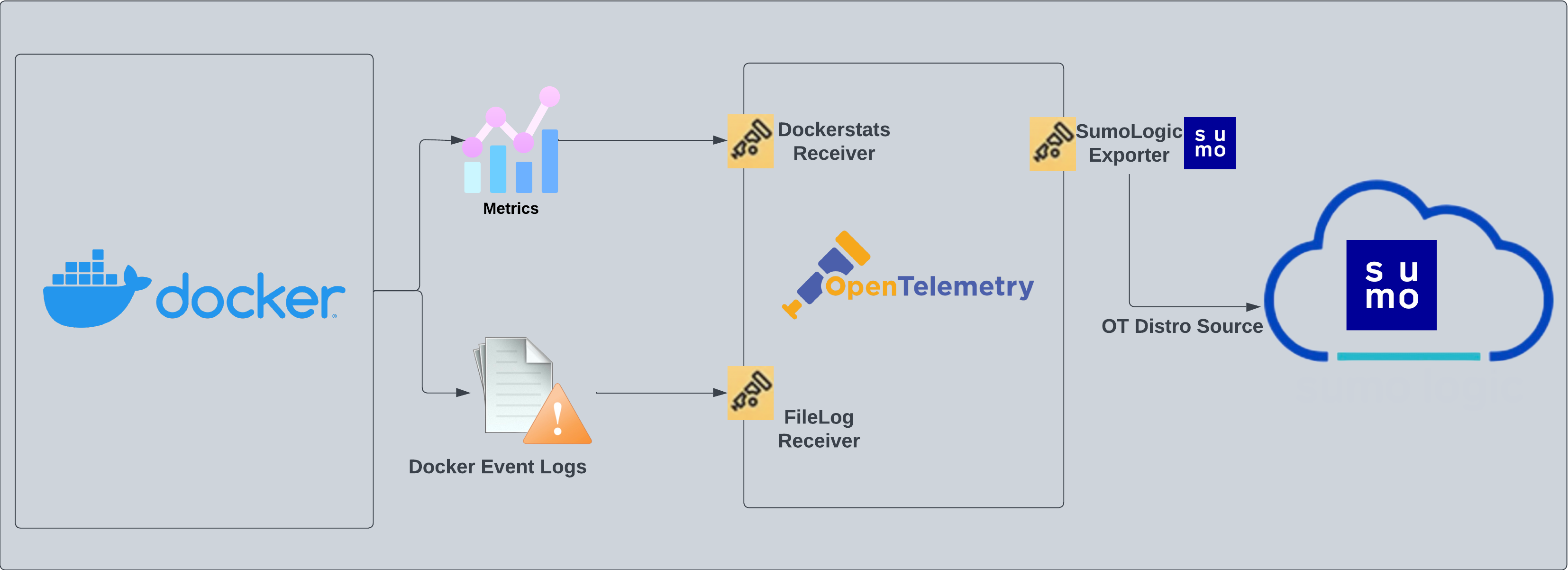
The Sumo Logic OpenTelemetry collector will run on the same host as Docker and collects Docker metric and container event logs.
- Docker metrics are collected using the [Dockerstats receiver](https://github.com/open-telemetry/opentelemetry-collector-contrib/tree/main/receiver/dockerstatsreceiver) and sent to Sumo Logic through the [Sumo Logic OpenTelemetry Exporter](https://github.com/open-telemetry/opentelemetry-collector-contrib/tree/main/exporter/sumologicexporter).
- Docker container event logs are sent to Sumo Logic through OpenTelemetry [filelog receiver](https://github.com/open-telemetry/opentelemetry-collector-contrib/tree/main/receiver/filelogreceiver).
:::info
The Sumo Logic app for Docker supports Docker version `23.0.2`.
:::
The Sumo Logic app for Docker is a unified logs and metrics app that enables you to monitor Docker deployments. The app provides preconfigured dashboards that include information about container state and resource usage, including information on CPU, memory, block I/O, and network.
The Sumo Logic OpenTelemetry collector will run on the same host as Docker and collects Docker metric and container event logs.
- Docker metrics are collected using the [Dockerstats receiver](https://github.com/open-telemetry/opentelemetry-collector-contrib/tree/main/receiver/dockerstatsreceiver) and sent to Sumo Logic through the [Sumo Logic OpenTelemetry Exporter](https://github.com/open-telemetry/opentelemetry-collector-contrib/tree/main/exporter/sumologicexporter).
- Docker container event logs are sent to Sumo Logic through OpenTelemetry [filelog receiver](https://github.com/open-telemetry/opentelemetry-collector-contrib/tree/main/receiver/filelogreceiver).
:::info
The Sumo Logic app for Docker supports Docker version `23.0.2`.
:::
 :::info
This app includes [built-in monitors](#docker-alerts). For details on creating custom monitors, refer to [Create monitors for Docker app](#create-monitors-for-docker-app).
:::
## Fields creation in Sumo Logic for Docker
Following are the tags which will be created as part of the Docker app installation, if not already present.
* `sumo.datasource`. Has a fixed value of **docker**.
## Prerequisites
This section provides instructions for configuring metrics and log collection for the Sumo Logic app for Docker.
### Metric collection
Metrics are collected through the [Docker Stats Receiver](https://github.com/open-telemetry/opentelemetry-collector-contrib/blob/main/receiver/dockerstatsreceiver/README.md) of OpenTelemetry. This requires Docker API version 1.22+ and only Linux is supported.
### Log collection
To collect the Docker container event logs, the following command needs to be executed on the host machine and needs to be kept running, for monitoring all the Docker container-related events. The following command also needs a JSON file path where these container events can be dumped.
```
docker events -f 'type=container' --format '{{json .}}' > & disown
```
Path to this JSON file will be required in the [next step](#step-2-configure-the-source-template), where events are sent to Sumo Logic through a filelog receiver and seen as part of the **Docker - Overview** dashboard. Also, you can add additional parameters to this command to send events for specific containers. [Learn more](https://docs.docker.com/engine/reference/commandline/events/).
## Collection configuration and app installation
Follow these steps to set up and deploy the source template to collect data in Sumo Logic from a remotely managed OpenTelemetry collector.
### Step 1: Set up remotely managed OpenTelemetry collector
import OtelCollectorInstallation from '../../../reuse/apps/opentelemetry/otel-collector-installation.md';
:::note
If you want to configure your source locally, you can do so by downloading the YAML file. For details, see [Configure OpenTelemetry collectors locally](/docs/integrations/sumo-apps/opentelemetry-collector-insights/#configure-opentelemetry-collectors-locally).
:::
### Step 2: Configure the source template
import DockerConfigureSourceTemplate from '../../../reuse/send-data/docker-configure-source-template.md';
import TimestampParsing from '../../../reuse/apps/opentelemetry/timestamp-parsing.md';
import ProcessingRules from '../../../reuse/opentelemetry/processing-rules.md';
### Step 3: Push the source template to the desired remotely managed collectors
import DataConfiguration from '../../../reuse/apps/opentelemetry/data-configuration.md';
## Sample log message
```json
{
"status":"start",
"id":"51f87a02dbcebbfe85bd3f9edb092132b6ac8ee873d541cdc059c70e17e52835",
"from":"hello-world",
"Type":"container",
"Action":"start",
"Actor":
{
"ID":"51f87a02dbcebbfe85bd3f9edb092132b6ac8ee873d541cdc059c70e17e52835",
"Attributes":
{
"image":"hello-world",
"name":"agitated_ardinghelli"
}
},
"scope":"local",
"time":"1683892564",
"timeNano":"timestamp_2"
}
```
## Sample metrics
```json
{
"queryId":"A",
"_source":"docker-otel",
"_metricId":"ijgj8tTQV9UGOJWs2k_aew",
"container.hostname":"6ebcc74fe914",
"_sourceName":"Http Input",
"host.id":"ea5f7c340247429887f632c6b6fa6c53",
"os.type":"linux",
"sumo.datasource":"docker",
"container.runtime":"docker",
"container.name":"docker-apache",
"_sourceCategory":"Labs/docker-otel",
"deployment.environment":"dockerEnvtest1",
"_contentType":"Carbon2",
"host.name":"ip-172-31-20-114.ec2.internal",
"metric":"container.cpu.percent",
"_collectorId":"000000000D7C5F4F",
"container.image.name":"httpd",
"_sourceId":"0000000048C9E05B",
"unit":"1",
"container.id":"6ebcc74fe914fbe88fcf93c289921d675fd7d57e4c835fc0e72ef067583500ea",
"_collector":"Labs - docker-otel",
"max":30,
"min":10,
"avg":20.36,
"sum":570.1,
"latest":20,
"count":28
}
```
## Sample queries
### Log query
This sample log query is from the **Docker Events Over Time** panel in the **Docker - Overview** dashboard.
```sumo title="Log query"
sumo.datasource=docker
| json field=_raw "status" as state
| json field=_raw "Type" as type
| json field=_raw "Actor.Attributes.image" as image
| json field=_raw "Actor.Attributes.name" as name
| timeslice 1h
| where image matches "{{container.image.name}}" AND state matches "{{state}}" AND name matches "{{container.name}}"
|count by _timeslice, state
| transpose row _timeslice column state
| fillmissing timeslice(1h)
```
### Metrics query
This sample metrics query is from the **Top 5 Containers by CPU Usage** panel in the **Docker - Overview** dashboard.
```sql
sumo.datasource=docker container.image.name={{container.image.name}} container.name={{container.name}} metric=container.cpu.usage.total
| avg by container.name
| topk(5,avg)
```
## Viewing Docker dashboards
All dashboards have a set of filters that you can apply to the entire dashboard. Use these filters to drill down and examine the data to a granular level.
- You can change the time range for a dashboard or panel by selecting a predefined interval from a drop-down list, choosing a recently used time range, or specifying custom dates and times. [Learn more](/docs/dashboards/set-custom-time-ranges/).
- You can use template variables to drill down and examine the data on a granular level. For more information, see [Filtering Dashboards with Template Variables](/docs/dashboards/filter-template-variables/).
### Overview
:::info
This app includes [built-in monitors](#docker-alerts). For details on creating custom monitors, refer to [Create monitors for Docker app](#create-monitors-for-docker-app).
:::
## Fields creation in Sumo Logic for Docker
Following are the tags which will be created as part of the Docker app installation, if not already present.
* `sumo.datasource`. Has a fixed value of **docker**.
## Prerequisites
This section provides instructions for configuring metrics and log collection for the Sumo Logic app for Docker.
### Metric collection
Metrics are collected through the [Docker Stats Receiver](https://github.com/open-telemetry/opentelemetry-collector-contrib/blob/main/receiver/dockerstatsreceiver/README.md) of OpenTelemetry. This requires Docker API version 1.22+ and only Linux is supported.
### Log collection
To collect the Docker container event logs, the following command needs to be executed on the host machine and needs to be kept running, for monitoring all the Docker container-related events. The following command also needs a JSON file path where these container events can be dumped.
```
docker events -f 'type=container' --format '{{json .}}' > & disown
```
Path to this JSON file will be required in the [next step](#step-2-configure-the-source-template), where events are sent to Sumo Logic through a filelog receiver and seen as part of the **Docker - Overview** dashboard. Also, you can add additional parameters to this command to send events for specific containers. [Learn more](https://docs.docker.com/engine/reference/commandline/events/).
## Collection configuration and app installation
Follow these steps to set up and deploy the source template to collect data in Sumo Logic from a remotely managed OpenTelemetry collector.
### Step 1: Set up remotely managed OpenTelemetry collector
import OtelCollectorInstallation from '../../../reuse/apps/opentelemetry/otel-collector-installation.md';
:::note
If you want to configure your source locally, you can do so by downloading the YAML file. For details, see [Configure OpenTelemetry collectors locally](/docs/integrations/sumo-apps/opentelemetry-collector-insights/#configure-opentelemetry-collectors-locally).
:::
### Step 2: Configure the source template
import DockerConfigureSourceTemplate from '../../../reuse/send-data/docker-configure-source-template.md';
import TimestampParsing from '../../../reuse/apps/opentelemetry/timestamp-parsing.md';
import ProcessingRules from '../../../reuse/opentelemetry/processing-rules.md';
### Step 3: Push the source template to the desired remotely managed collectors
import DataConfiguration from '../../../reuse/apps/opentelemetry/data-configuration.md';
## Sample log message
```json
{
"status":"start",
"id":"51f87a02dbcebbfe85bd3f9edb092132b6ac8ee873d541cdc059c70e17e52835",
"from":"hello-world",
"Type":"container",
"Action":"start",
"Actor":
{
"ID":"51f87a02dbcebbfe85bd3f9edb092132b6ac8ee873d541cdc059c70e17e52835",
"Attributes":
{
"image":"hello-world",
"name":"agitated_ardinghelli"
}
},
"scope":"local",
"time":"1683892564",
"timeNano":"timestamp_2"
}
```
## Sample metrics
```json
{
"queryId":"A",
"_source":"docker-otel",
"_metricId":"ijgj8tTQV9UGOJWs2k_aew",
"container.hostname":"6ebcc74fe914",
"_sourceName":"Http Input",
"host.id":"ea5f7c340247429887f632c6b6fa6c53",
"os.type":"linux",
"sumo.datasource":"docker",
"container.runtime":"docker",
"container.name":"docker-apache",
"_sourceCategory":"Labs/docker-otel",
"deployment.environment":"dockerEnvtest1",
"_contentType":"Carbon2",
"host.name":"ip-172-31-20-114.ec2.internal",
"metric":"container.cpu.percent",
"_collectorId":"000000000D7C5F4F",
"container.image.name":"httpd",
"_sourceId":"0000000048C9E05B",
"unit":"1",
"container.id":"6ebcc74fe914fbe88fcf93c289921d675fd7d57e4c835fc0e72ef067583500ea",
"_collector":"Labs - docker-otel",
"max":30,
"min":10,
"avg":20.36,
"sum":570.1,
"latest":20,
"count":28
}
```
## Sample queries
### Log query
This sample log query is from the **Docker Events Over Time** panel in the **Docker - Overview** dashboard.
```sumo title="Log query"
sumo.datasource=docker
| json field=_raw "status" as state
| json field=_raw "Type" as type
| json field=_raw "Actor.Attributes.image" as image
| json field=_raw "Actor.Attributes.name" as name
| timeslice 1h
| where image matches "{{container.image.name}}" AND state matches "{{state}}" AND name matches "{{container.name}}"
|count by _timeslice, state
| transpose row _timeslice column state
| fillmissing timeslice(1h)
```
### Metrics query
This sample metrics query is from the **Top 5 Containers by CPU Usage** panel in the **Docker - Overview** dashboard.
```sql
sumo.datasource=docker container.image.name={{container.image.name}} container.name={{container.name}} metric=container.cpu.usage.total
| avg by container.name
| topk(5,avg)
```
## Viewing Docker dashboards
All dashboards have a set of filters that you can apply to the entire dashboard. Use these filters to drill down and examine the data to a granular level.
- You can change the time range for a dashboard or panel by selecting a predefined interval from a drop-down list, choosing a recently used time range, or specifying custom dates and times. [Learn more](/docs/dashboards/set-custom-time-ranges/).
- You can use template variables to drill down and examine the data on a granular level. For more information, see [Filtering Dashboards with Template Variables](/docs/dashboards/filter-template-variables/).
### Overview
}) - **Number of Docker Hosts**. The total number of Docker hosts monitored.
- **Number of Containers Started**. The total number of containers started.
- **Number of Containers Paused**. The total number of containers paused.
- **Number of Containers Stopped**. The total number of containers stopped.
- **Number of Containers Killed**. The total number of containers killed.
- **Docker Events Over Time**. Count of specific Docker container events (such as pause, stop, die, restart, start, kill, unpause) per time slice.
- **Containers by State**. A table that lists container events that occurred, time the event occurred, the container image, the container name, and the event type.
- **Container Events - One Day Time Comparison**. A table that lists the count of a particular event (such as pause, stop, die, restart, start, kill, unpause) for an image/container combination over the last 24 hours and compares it with the previous 24 hours time range.
- **Top 5 Containers by CPU Usage**. CPU usage by the five containers that have used the most CPU.
- **Top 5 Containers by Tx Bytes**. Bytes transmitted by the top five containers that have transmitted the most bytes.
- **Top 5 Containers by Rx Bytes**. Bytes received by the five containers that have received the most bytes.
- **Top 5 Containers by Memory Usage**. Memory usage by the top five containers that used the most memory.
### CPU Usage
- **Number of Docker Hosts**. The total number of Docker hosts monitored.
- **Number of Containers Started**. The total number of containers started.
- **Number of Containers Paused**. The total number of containers paused.
- **Number of Containers Stopped**. The total number of containers stopped.
- **Number of Containers Killed**. The total number of containers killed.
- **Docker Events Over Time**. Count of specific Docker container events (such as pause, stop, die, restart, start, kill, unpause) per time slice.
- **Containers by State**. A table that lists container events that occurred, time the event occurred, the container image, the container name, and the event type.
- **Container Events - One Day Time Comparison**. A table that lists the count of a particular event (such as pause, stop, die, restart, start, kill, unpause) for an image/container combination over the last 24 hours and compares it with the previous 24 hours time range.
- **Top 5 Containers by CPU Usage**. CPU usage by the five containers that have used the most CPU.
- **Top 5 Containers by Tx Bytes**. Bytes transmitted by the top five containers that have transmitted the most bytes.
- **Top 5 Containers by Rx Bytes**. Bytes received by the five containers that have received the most bytes.
- **Top 5 Containers by Memory Usage**. Memory usage by the top five containers that used the most memory.
### CPU Usage
}) - **Total CPU Consumed by Container in Kernel Mode**. Total CPU consumed in kernel mode by each container.
- **CPU Usage by Image Name**. CPU consumed by container image name per timeslice.
- **CPU Usage in Kernel Mode**. CPU consumed in kernel mode by each container per timeslice.
- **CPU Usage in User Mode**. CPU consumed in user mode by each container per timeslice.
- **Time for Which Container was Throttled**. Duration for which each container's CPU was throttleds.
- **Count of Periods with Throttling Active**. A chart that shows how many times each container's CPU was throttled.
### Memory Usage
- **Total CPU Consumed by Container in Kernel Mode**. Total CPU consumed in kernel mode by each container.
- **CPU Usage by Image Name**. CPU consumed by container image name per timeslice.
- **CPU Usage in Kernel Mode**. CPU consumed in kernel mode by each container per timeslice.
- **CPU Usage in User Mode**. CPU consumed in user mode by each container per timeslice.
- **Time for Which Container was Throttled**. Duration for which each container's CPU was throttleds.
- **Count of Periods with Throttling Active**. A chart that shows how many times each container's CPU was throttled.
### Memory Usage
}) - **Number of Times Container Hit Memory Limit**. Number of times that each container reached its memory limit.
- **Memory Limit by Container**. Memory limit for each container.
- **Percentage of Memory Used by Container**. Percentage of memory used by each container.
- **Current and Max Memory Usage**. Current and maximum memory used by each container.
- **Count of Page Faults by Container**. Number of page faults for each container.
- **Memory that Cannot be Reclaimed**. Amount of memory that cannot be reclaimed for each container.
- **Number of Bytes Transferred to/from the Disk**. Number of bytes transferred to and from disk by each container
### Network Usage
- **Number of Times Container Hit Memory Limit**. Number of times that each container reached its memory limit.
- **Memory Limit by Container**. Memory limit for each container.
- **Percentage of Memory Used by Container**. Percentage of memory used by each container.
- **Current and Max Memory Usage**. Current and maximum memory used by each container.
- **Count of Page Faults by Container**. Number of page faults for each container.
- **Memory that Cannot be Reclaimed**. Amount of memory that cannot be reclaimed for each container.
- **Number of Bytes Transferred to/from the Disk**. Number of bytes transferred to and from disk by each container
### Network Usage
}) - **Average Rx Bytes by Container**. Displays the average number of bytes received per timeslice by each container.
- **Average Tx Bytes by Container**. Displays the average number of bytes transmitted per timeslice by each container.
- **Count of Rx Dropped Packets**. Count of received packets dropped by each container per timeslice.
- **Count of Rx Error Packets**. Count of error packets received per timeslice by each container.
- **Average Rx Packets by Container**. Average packets received per timeslice by each container.
- **Average Tx Packets by Container**. Average packets transmitted per timeslice by each container.
- **Count of Tx Dropped Packets**. Count of packets dropped during transmission per timeslice by each container.
- **Count of Tx Error Packets**. Count of error packets transmitted per timeslice by each container.
## Create monitors for Docker app
import CreateMonitors from '../../../reuse/apps/create-monitors.md';
### Docker alerts
| Alert Name | Alert Description and conditions | Alert Condition | Recover Condition |
|:--|:--|:--|:--|
| `Docker - High CPU Consumption by Container Alert` | This alert gets fired when cpu utilization exceeds 90% for any container. | Count > 90 | Count < = 90 |
| `Docker - High Memory Consumption by Container Alert` | This alert gets fired when memory utilization exceeds 90% for any container. | Count > 90 | Count < = 90 |
- **Average Rx Bytes by Container**. Displays the average number of bytes received per timeslice by each container.
- **Average Tx Bytes by Container**. Displays the average number of bytes transmitted per timeslice by each container.
- **Count of Rx Dropped Packets**. Count of received packets dropped by each container per timeslice.
- **Count of Rx Error Packets**. Count of error packets received per timeslice by each container.
- **Average Rx Packets by Container**. Average packets received per timeslice by each container.
- **Average Tx Packets by Container**. Average packets transmitted per timeslice by each container.
- **Count of Tx Dropped Packets**. Count of packets dropped during transmission per timeslice by each container.
- **Count of Tx Error Packets**. Count of error packets transmitted per timeslice by each container.
## Create monitors for Docker app
import CreateMonitors from '../../../reuse/apps/create-monitors.md';
### Docker alerts
| Alert Name | Alert Description and conditions | Alert Condition | Recover Condition |
|:--|:--|:--|:--|
| `Docker - High CPU Consumption by Container Alert` | This alert gets fired when cpu utilization exceeds 90% for any container. | Count > 90 | Count < = 90 |
| `Docker - High Memory Consumption by Container Alert` | This alert gets fired when memory utilization exceeds 90% for any container. | Count > 90 | Count < = 90 |