---
id: couchbase-opentelemetry
title: Couchbase - OpenTelemetry Collector
sidebar_label: Couchbase - OTel Collector
description: Learn about the Sumo Logic OpenTelemetry app for Couchbase.
slug: /help/docs/integrations/databases/opentelemetry/couchbase-opentelemetry/
canonical: https://www.sumologic.com/help/docs/integrations/databases/opentelemetry/couchbase-opentelemetry/
---
import useBaseUrl from '@docusaurus/useBaseUrl';
import Tabs from '@theme/Tabs';
import TabItem from '@theme/TabItem';
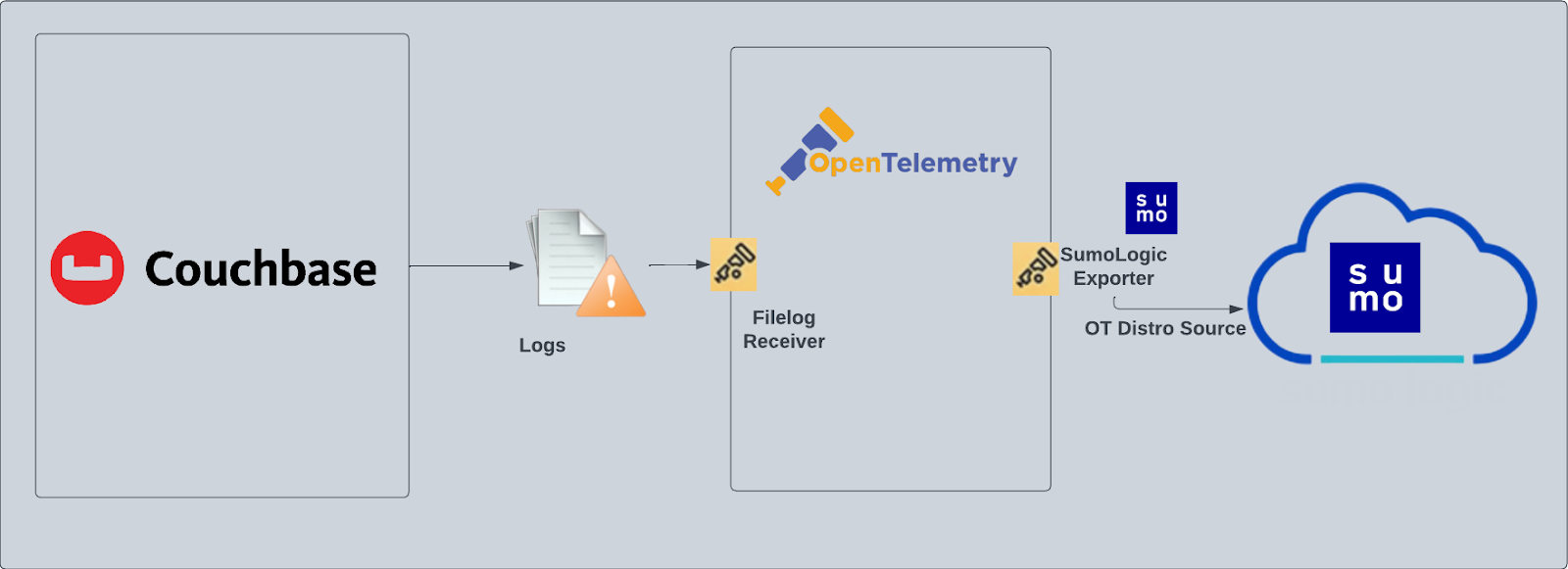
[Couchbase](https://developer.couchbase.com/what-is-couchbase/), a modern database for enterprise applications, is a distributed document database with a powerful search engine and in-built operational and analytical capabilities. It brings the power of NoSQL to the edge and provides fast, efficient bidirectional synchronization of data between the edge and the cloud.
The Sumo Logic app for Couchbase helps you monitor activity in Couchbase. The pre-configured dashboards provide insight into the Error, events and HTTP Access pattern that help you understand your clusters.
Couchbase logs are sent to Sumo Logic through OpenTelemetry [filelog receiver](https://github.com/open-telemetry/opentelemetry-collector-contrib/tree/main/receiver/filelogreceiver).
This App has been tested with Couchbase version 7.0.2.
## Fields creation in Sumo Logic for Couchbase
Following are the [Fields](/docs/manage/fields/) which will be created as part of Couchbase App install if not already present:
* `db.cluster.name`. User configured. Enter a name to identify this Couchbase cluster. This cluster name will be shown in the Sumo Logic dashboards.
* `db.system`. Has a fixed value of `couchbase`.
* `deployment.environment`. User configured. Through this Couchbase cluster is identified by the environment where it resides. For example: dev, prod or qa.
* `sumo.datasource`. Has a fixed value of `couchbase`.
## Prerequisite
By default, the Couchbase will write the log to the log directory that was configured during installation. For example, on Linux, the log directory would be `/opt/couchbase/var/lib/couchbase/logs`. By default, the Audit log is disabled, you must enable the audit log following [these instructions](https://docs.couchbase.com/server/current/manage/manage-security/manage-auditing.html). Query log, error log, the access log will be enabled by default.
import LogsCollectionPrereqisites from '../../../reuse/apps/logs-collection-prereqisites.md';
For Windows systems, log files which are collected should be accessible by the SYSTEM group. Use the following set of PowerShell commands if the SYSTEM group does not have access.
```
$NewAcl = Get-Acl -Path ""
# Set properties
$identity = "NT AUTHORITY\SYSTEM"
$fileSystemRights = "ReadAndExecute"
$type = "Allow"
# Create new rule
$fileSystemAccessRuleArgumentList = $identity, $fileSystemRights, $type
$fileSystemAccessRule = New-Object -TypeName System.Security.AccessControl.FileSystemAccessRule -ArgumentList $fileSystemAccessRuleArgumentList
# Apply new rule
$NewAcl.SetAccessRule($fileSystemAccessRule)
Set-Acl -Path "" -AclObject $NewAcl
```
## Collection configuration and app installation
import ConfigAppInstall from '../../../reuse/apps/opentelemetry/config-app-install.md';
### Step 1: Set up Collector
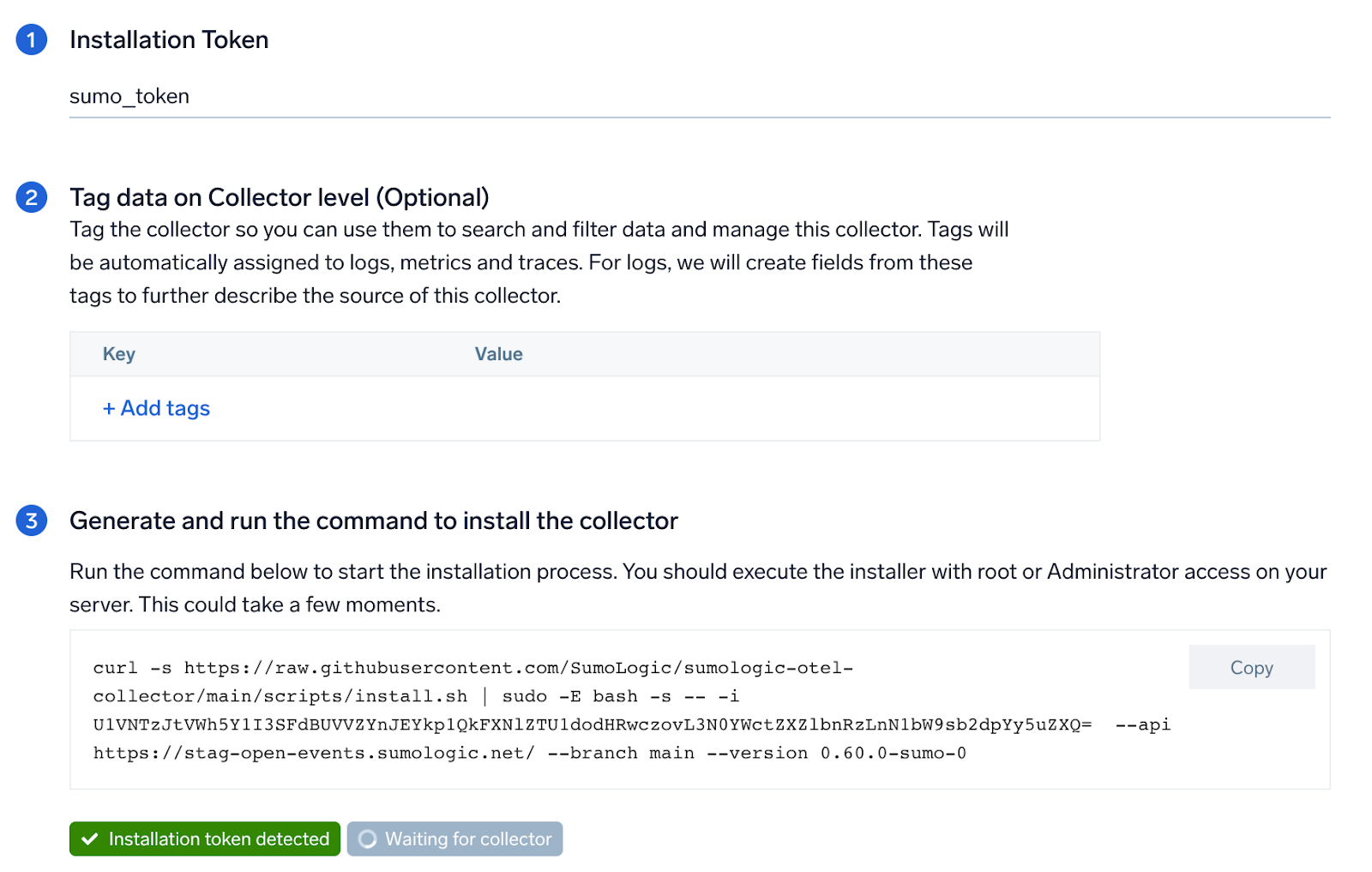
If you want to use an existing OTel Collector, this step can be skipped by selecting the option of using an existing Collector.
If you want to create a new Collector please select **Add a new Collector** option.
Select the platform for which you want to install the Sumo OpenTelemetry Collector.
This will generate a command which can be executed in the machine which needs to get monitored. Once executed it will install the Sumo Logic OpenTelemetry Collector agent.
### Step 2: Configure integration
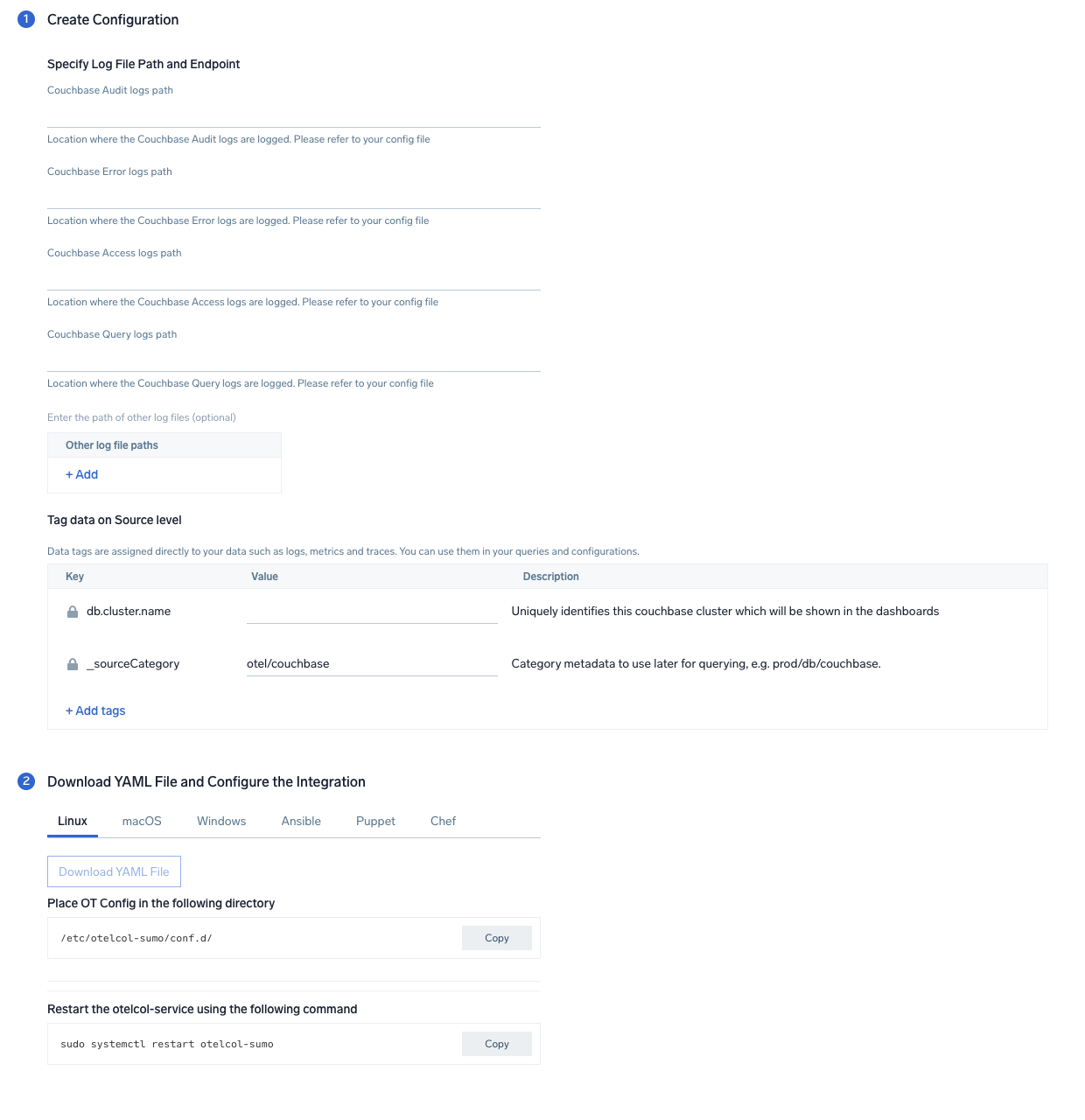
In this step, you will configure the yaml file required for Couchbase Log Collection. Path of the log file configured to capture couchbase logs needs to be given here.
The files are typically located in folder `/opt/couchbase/var/lib/couchbase/logs`.
* For Audit Log: `/opt/couchbase/var/lib/couchbase/logs/audit.log`
* For Error Log: `/opt/couchbase/var/lib/couchbase/logs/error.log`
* For Access Log: `/opt/couchbase/var/lib/couchbase/logs/http_access.log`
* For Query Log: `/opt/couchbase/var/lib/couchbase/logs/query.log`
You can add any custom fields which you want to tag along with the data ingested in Sumo.
Click on the **Download YAML File** button to get the yaml file.
import CollectorVersionNote from '../../../reuse/apps/opentelemetry/collector-version-note.md';
### Step 3: Send logs to Sumo
import LogsIntro from '../../../reuse/apps/opentelemetry/send-logs-intro.md';
1. Copy the yaml file to `/etc/otelcol-sumo/conf.d/` folder in the Couchbase instance which needs to be monitored.
2. restart the collector using:
```sh
sudo systemctl restart otelcol-sumo
```
1. Copy the yaml file to `C:\ProgramData\Sumo Logic\OpenTelemetry Collector\config\conf.d` folder in the machine which needs to be monitored.
2. Restart the collector using:
```sh
Restart-Service -Name OtelcolSumo
```
1. Copy the yaml file to `/etc/otelcol-sumo/conf.d/` folder in the Couchbase instance which needs to be monitored.
2. Restart the otelcol-sumo process using:
```sh
otelcol-sumo --config /etc/otelcol-sumo/sumologic.yaml --config "glob:/etc/otelcol-sumo/conf.d/*.yaml"
```
import ChefNoEnv from '../../../reuse/apps/opentelemetry/chef-without-env.md';
import AnsibleNoEnv from '../../../reuse/apps/opentelemetry/ansible-without-env.md';
import PuppetNoEnv from '../../../reuse/apps/opentelemetry/puppet-without-env.md';
import LogsOutro from '../../../reuse/apps/opentelemetry/send-logs-outro.md';
## Sample log messages
```
_time=09/Jan/2023:04:50:03 +0000+07:00 _level=ERROR _msg=Failed to perform INSERT on key key1 for Keyspace default:beer-sample.inventory.hotel. Error - Duplicate Key key1
```
## Sample queries
Following query is from **Average Latency of All HTTP Requests** panel from Couchbase Overview dashboard:
```sumo
%"db.cluster.name"=* %"deployment.environment"=* %"sumo.datasource"="couchbase"
| json "log" as _rawlog nodrop
| if(isEmpty(_rawlog),_raw,_rawlog) as _raw
| parse regex "(?\d{1,3}\.\d{1,3}\.\d{1,3}\.\d{1,3})\s+\-\s+(?\S+)\s+\[(?
})
}) [Couchbase](https://developer.couchbase.com/what-is-couchbase/), a modern database for enterprise applications, is a distributed document database with a powerful search engine and in-built operational and analytical capabilities. It brings the power of NoSQL to the edge and provides fast, efficient bidirectional synchronization of data between the edge and the cloud.
The Sumo Logic app for Couchbase helps you monitor activity in Couchbase. The pre-configured dashboards provide insight into the Error, events and HTTP Access pattern that help you understand your clusters.
Couchbase logs are sent to Sumo Logic through OpenTelemetry [filelog receiver](https://github.com/open-telemetry/opentelemetry-collector-contrib/tree/main/receiver/filelogreceiver).
This App has been tested with Couchbase version 7.0.2.
[Couchbase](https://developer.couchbase.com/what-is-couchbase/), a modern database for enterprise applications, is a distributed document database with a powerful search engine and in-built operational and analytical capabilities. It brings the power of NoSQL to the edge and provides fast, efficient bidirectional synchronization of data between the edge and the cloud.
The Sumo Logic app for Couchbase helps you monitor activity in Couchbase. The pre-configured dashboards provide insight into the Error, events and HTTP Access pattern that help you understand your clusters.
Couchbase logs are sent to Sumo Logic through OpenTelemetry [filelog receiver](https://github.com/open-telemetry/opentelemetry-collector-contrib/tree/main/receiver/filelogreceiver).
This App has been tested with Couchbase version 7.0.2.
 ## Fields creation in Sumo Logic for Couchbase
Following are the [Fields](/docs/manage/fields/) which will be created as part of Couchbase App install if not already present:
* `db.cluster.name`. User configured. Enter a name to identify this Couchbase cluster. This cluster name will be shown in the Sumo Logic dashboards.
* `db.system`. Has a fixed value of `couchbase`.
* `deployment.environment`. User configured. Through this Couchbase cluster is identified by the environment where it resides. For example: dev, prod or qa.
* `sumo.datasource`. Has a fixed value of `couchbase`.
## Prerequisite
By default, the Couchbase will write the log to the log directory that was configured during installation. For example, on Linux, the log directory would be `/opt/couchbase/var/lib/couchbase/logs`. By default, the Audit log is disabled, you must enable the audit log following [these instructions](https://docs.couchbase.com/server/current/manage/manage-security/manage-auditing.html). Query log, error log, the access log will be enabled by default.
import LogsCollectionPrereqisites from '../../../reuse/apps/logs-collection-prereqisites.md';
## Fields creation in Sumo Logic for Couchbase
Following are the [Fields](/docs/manage/fields/) which will be created as part of Couchbase App install if not already present:
* `db.cluster.name`. User configured. Enter a name to identify this Couchbase cluster. This cluster name will be shown in the Sumo Logic dashboards.
* `db.system`. Has a fixed value of `couchbase`.
* `deployment.environment`. User configured. Through this Couchbase cluster is identified by the environment where it resides. For example: dev, prod or qa.
* `sumo.datasource`. Has a fixed value of `couchbase`.
## Prerequisite
By default, the Couchbase will write the log to the log directory that was configured during installation. For example, on Linux, the log directory would be `/opt/couchbase/var/lib/couchbase/logs`. By default, the Audit log is disabled, you must enable the audit log following [these instructions](https://docs.couchbase.com/server/current/manage/manage-security/manage-auditing.html). Query log, error log, the access log will be enabled by default.
import LogsCollectionPrereqisites from '../../../reuse/apps/logs-collection-prereqisites.md';
 ### Step 2: Configure integration
In this step, you will configure the yaml file required for Couchbase Log Collection. Path of the log file configured to capture couchbase logs needs to be given here.
The files are typically located in folder `/opt/couchbase/var/lib/couchbase/logs`.
* For Audit Log: `/opt/couchbase/var/lib/couchbase/logs/audit.log`
* For Error Log: `/opt/couchbase/var/lib/couchbase/logs/error.log`
* For Access Log: `/opt/couchbase/var/lib/couchbase/logs/http_access.log`
* For Query Log: `/opt/couchbase/var/lib/couchbase/logs/query.log`
You can add any custom fields which you want to tag along with the data ingested in Sumo.
Click on the **Download YAML File** button to get the yaml file.
import CollectorVersionNote from '../../../reuse/apps/opentelemetry/collector-version-note.md';
### Step 2: Configure integration
In this step, you will configure the yaml file required for Couchbase Log Collection. Path of the log file configured to capture couchbase logs needs to be given here.
The files are typically located in folder `/opt/couchbase/var/lib/couchbase/logs`.
* For Audit Log: `/opt/couchbase/var/lib/couchbase/logs/audit.log`
* For Error Log: `/opt/couchbase/var/lib/couchbase/logs/error.log`
* For Access Log: `/opt/couchbase/var/lib/couchbase/logs/http_access.log`
* For Query Log: `/opt/couchbase/var/lib/couchbase/logs/query.log`
You can add any custom fields which you want to tag along with the data ingested in Sumo.
Click on the **Download YAML File** button to get the yaml file.
import CollectorVersionNote from '../../../reuse/apps/opentelemetry/collector-version-note.md';
 ### Step 3: Send logs to Sumo
import LogsIntro from '../../../reuse/apps/opentelemetry/send-logs-intro.md';
### Step 3: Send logs to Sumo
import LogsIntro from '../../../reuse/apps/opentelemetry/send-logs-intro.md';