---
id: elasticsearch-opentelemetry
title: Elasticsearch - OpenTelemetry Collector
sidebar_label: Elasticsearch - OTel Collector
description: Learn about the Sumo Logic OpenTelemetry app for Elasticsearch.
slug: /help/docs/integrations/databases/opentelemetry/elasticsearch-opentelemetry/
canonical: https://www.sumologic.com/help/docs/integrations/databases/opentelemetry/elasticsearch-opentelemetry/
---
import useBaseUrl from '@docusaurus/useBaseUrl';
import Tabs from '@theme/Tabs';
import TabItem from '@theme/TabItem';
})
}) The [Elasticsearch](https://www.elastic.co/what-is/elasticsearch) app is a unified logs and metrics app that helps you monitor the availability, performance, health, and resource utilization of your Elasticsearch clusters. Preconfigured dashboards provide insight into cluster health, resource utilization, sharding, garbage collection, and search, index, and cache performance.
We use the OpenTelemetry collector to collect Elasticsearch metrics and logs.
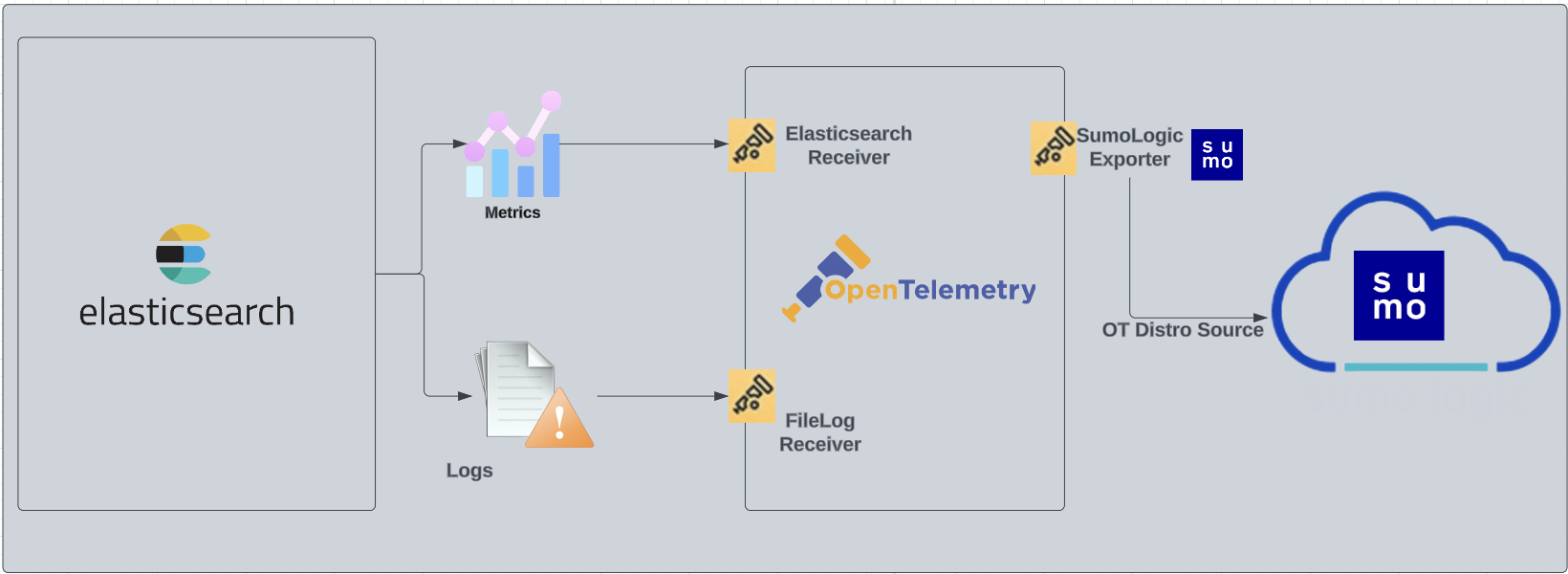
The diagram below illustrates the components of the Elasticsearch collection for each database server. OpenTelemetry collector runs on the same host as Elasticsearch, and uses the [Elasticsearch Receiver](https://github.com/open-telemetry/opentelemetry-collector-contrib/blob/main/receiver/elasticsearchreceiver/) to obtain Elasticsearch metrics, and the [Sumo Logic OpenTelemetry Exporter](https://github.com/open-telemetry/opentelemetry-collector-contrib/tree/main/exporter/sumologicexporter) to send the metrics to Sumo Logic. Elasticsearch logs are sent to Sumo Logic through a [filelog receiver](https://github.com/open-telemetry/opentelemetry-collector-contrib/tree/main/receiver/filelogreceiver).
The [Elasticsearch](https://www.elastic.co/what-is/elasticsearch) app is a unified logs and metrics app that helps you monitor the availability, performance, health, and resource utilization of your Elasticsearch clusters. Preconfigured dashboards provide insight into cluster health, resource utilization, sharding, garbage collection, and search, index, and cache performance.
We use the OpenTelemetry collector to collect Elasticsearch metrics and logs.
The diagram below illustrates the components of the Elasticsearch collection for each database server. OpenTelemetry collector runs on the same host as Elasticsearch, and uses the [Elasticsearch Receiver](https://github.com/open-telemetry/opentelemetry-collector-contrib/blob/main/receiver/elasticsearchreceiver/) to obtain Elasticsearch metrics, and the [Sumo Logic OpenTelemetry Exporter](https://github.com/open-telemetry/opentelemetry-collector-contrib/tree/main/exporter/sumologicexporter) to send the metrics to Sumo Logic. Elasticsearch logs are sent to Sumo Logic through a [filelog receiver](https://github.com/open-telemetry/opentelemetry-collector-contrib/tree/main/receiver/filelogreceiver).
 :::info
This app includes [built-in monitors](#elasticsearch-alerts). For details on creating custom monitors, refer to [Create monitors for Elasticsearch app](#create-monitors-for-elasticsearch-app).
:::
## Fields Create in Sumo Logic for Elasticsearch
Following are the [Fields](/docs/manage/fields/) which will be created as part of Elasticsearch app installation, if not already present:
- `db.cluster.name`. User configured. Enter a name to identify this Elasticsearch cluster. This cluster name will be shown in the Sumo Logic dashboards.
- `db.system`. Has a fixed value of **elasticsearch**.
- `sumo.datasource`. Has a fixed value of **elasticsearch**.
- `db.node.name`. Has the value of host name of the machine which is being monitored.
## Prerequisites
### For metrics collection
This receiver supports Elasticsearch versions 7.9+.
If Elasticsearch security features are enabled, you must have either the monitor or manage cluster privilege. See the [Elasticsearch docs](https://www.elastic.co/guide/en/elasticsearch/reference/current/authorization.html) for more information on authorization and [Security privileges](https://www.elastic.co/guide/en/elasticsearch/reference/current/security-privileges.html).
### For logs collection
Elasticsearch supports logging via local text log files. Elasticsearch logs have four levels of verbosity. To select a level, set `loglevel` to one of:
* **debug**. A lot of information, useful for development/testing.
* **verbose**. Includes information not often needed, but logs less than debug.
* **notice** (default value). Moderately verbose, ideal for production environments.
* **warning**. Only important/critical messages are logged.
All logging settings are located in [Elasticsearch.conf](https://www.elastic.co/guide/en/elasticsearch/reference/current/logging.html). By default, Elasticsearch logs are stored in `/var/log/elasticsearch/ELK-.log`. The default directory for log files is listed in the Elasticsearch.conf file.
import LogsCollectionPrereqisites from '../../../reuse/apps/logs-collection-prereqisites.md';
For Windows systems, log files which are collected should be accessible by the SYSTEM group. Use the following set of PowerShell commands if the SYSTEM group does not have access.
```
$NewAcl = Get-Acl -Path ""
# Set properties
$identity = "NT AUTHORITY\SYSTEM"
$fileSystemRights = "ReadAndExecute"
$type = "Allow"
# Create new rule
$fileSystemAccessRuleArgumentList = $identity, $fileSystemRights, $type
$fileSystemAccessRule = New-Object -TypeName System.Security.AccessControl.FileSystemAccessRule -ArgumentList $fileSystemAccessRuleArgumentList
# Apply new rule
$NewAcl.SetAccessRule($fileSystemAccessRule)
Set-Acl -Path "" -AclObject $NewAcl
```
## Collection configuration and app installation
Follow these steps to set up and deploy the source template to collect data in Sumo Logic from a remotely managed OpenTelemetry collector.
### Step 1: Set up remotely managed OpenTelemetry collector
import OtelCollectorInstallation from '../../../reuse/apps/opentelemetry/otel-collector-installation.md';
:::note
If you want to configure your source locally, you can do so by downloading the YAML file. For details, see [Configure OpenTelemetry collectors locally](/docs/integrations/sumo-apps/opentelemetry-collector-insights/#configure-opentelemetry-collectors-locally).
:::
### Step 2: Configure the source template
import ElasticsearchConfigureSourceTemplate from '../../../reuse/send-data/elasticsearch-configure-source-template.md';
import TimestampParsing from '../../../reuse/apps/opentelemetry/timestamp-parsing.md';
import ProcessingRules from '../../../reuse/opentelemetry/processing-rules.md';
### Step 3: Push the source template to the desired remotely managed collectors
import DataConfiguration from '../../../reuse/apps/opentelemetry/data-configuration.md';
## Sample log messages
```json
{
"type":"server",
"timestamp":"2021-07-12T11:42:25,862+07:00",
"level":"INFO",
"component":"o.e.x.s.a.s.FileRolesStore",
"cluster.name":"elasticsearch",
"node.name":"v103-157-218-134.3stech.vn",
"message":"parsed [0] roles from file [/etc/elasticsearch/roles.yml]"
}
```
## Sample metrics
```json
{
"queryId":"A",
"_source":"sumo_hosted_collector_otel_elasticsearch",
"state":"completed",
"thread_pool_name":"analyze",
"elasticsearch.node.name":"ip-172-31-86-95",
"elasticsearch.cluster.name":"elasticsearch",
"metric":"elasticsearch.node.thread_pool.tasks.finished",
"db.cluster.name":"elastic_otel_cluster",
"_collectorId":"000000000C5B7100",
"deployment.environment":"otel_elastic_dev",
"_sourceId":"0000000000000000",
"unit":"{tasks}",
"db.system":"elasticsearch",
"_sourceHost":"sumoOtelelasticsearch",
"_collector":"sumo_hosted_collector_otel_elasticsearch",
"max":0,
"min":0,
"avg":0,
"sum":0,
"latest":0,
"count":2
}
```
## Sample queries
### Sample logs query
This is a sample log query from the **Errors** panel.
```sumo
db.system=elasticsearch %"deployment.environment"={{deployment.environment}} db.cluster.name={{db.cluster.name}} ERROR | json "log" as _rawlog nodrop
| if (isEmpty(_rawlog), _raw, _rawlog) as _raw
| json field=_raw "timestamp" as timestamp
| json field=_raw "level" as level
| json field=_raw "component" as es_component
| json field=_raw "message" as message
| where level = "ERROR"
| count
```
### Sample metrics query
This is a sample metrics query from the **JVM Memory Used (MB)** panel.
```sql
deployment.environment=* metric=jvm.memory.heap.used db.cluster.name=* db.node.name=* | sum by db.cluster.name, db.node.name
```
## Viewing Elasticsearch dashboards
All dashboards have a set of filters that you can apply to the entire dashboard. Use these filters to drill down and examine the data to a granular level.
- You can change the time range for a dashboard or panel by selecting a predefined interval from a drop-down list, choosing a recently used time range, or specifying custom dates and times. [Learn more](/docs/dashboards/set-custom-time-ranges/).
- You can use template variables to drill down and examine the data on a granular level. For more information, see [Filtering Dashboards with Template Variables](/docs/dashboards/filter-template-variables/).
### Overview
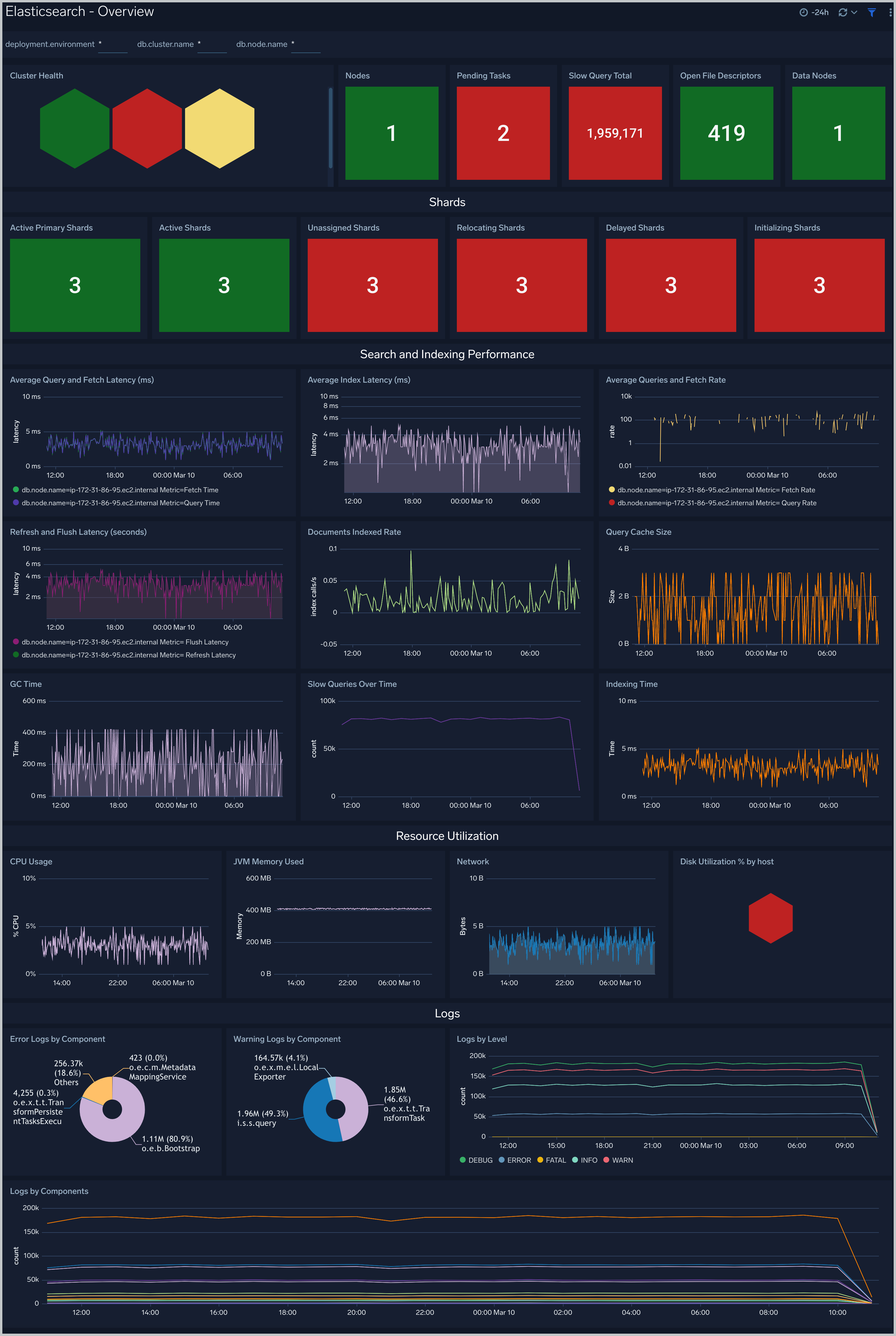
The **Elasticsearch - Overview** dashboard provides the health of Elasticsearch clusters, shards analysis, resource utilization of Elasticsearch host and clusters, search and indexing performance.
:::info
This app includes [built-in monitors](#elasticsearch-alerts). For details on creating custom monitors, refer to [Create monitors for Elasticsearch app](#create-monitors-for-elasticsearch-app).
:::
## Fields Create in Sumo Logic for Elasticsearch
Following are the [Fields](/docs/manage/fields/) which will be created as part of Elasticsearch app installation, if not already present:
- `db.cluster.name`. User configured. Enter a name to identify this Elasticsearch cluster. This cluster name will be shown in the Sumo Logic dashboards.
- `db.system`. Has a fixed value of **elasticsearch**.
- `sumo.datasource`. Has a fixed value of **elasticsearch**.
- `db.node.name`. Has the value of host name of the machine which is being monitored.
## Prerequisites
### For metrics collection
This receiver supports Elasticsearch versions 7.9+.
If Elasticsearch security features are enabled, you must have either the monitor or manage cluster privilege. See the [Elasticsearch docs](https://www.elastic.co/guide/en/elasticsearch/reference/current/authorization.html) for more information on authorization and [Security privileges](https://www.elastic.co/guide/en/elasticsearch/reference/current/security-privileges.html).
### For logs collection
Elasticsearch supports logging via local text log files. Elasticsearch logs have four levels of verbosity. To select a level, set `loglevel` to one of:
* **debug**. A lot of information, useful for development/testing.
* **verbose**. Includes information not often needed, but logs less than debug.
* **notice** (default value). Moderately verbose, ideal for production environments.
* **warning**. Only important/critical messages are logged.
All logging settings are located in [Elasticsearch.conf](https://www.elastic.co/guide/en/elasticsearch/reference/current/logging.html). By default, Elasticsearch logs are stored in `/var/log/elasticsearch/ELK-.log`. The default directory for log files is listed in the Elasticsearch.conf file.
import LogsCollectionPrereqisites from '../../../reuse/apps/logs-collection-prereqisites.md';
For Windows systems, log files which are collected should be accessible by the SYSTEM group. Use the following set of PowerShell commands if the SYSTEM group does not have access.
```
$NewAcl = Get-Acl -Path ""
# Set properties
$identity = "NT AUTHORITY\SYSTEM"
$fileSystemRights = "ReadAndExecute"
$type = "Allow"
# Create new rule
$fileSystemAccessRuleArgumentList = $identity, $fileSystemRights, $type
$fileSystemAccessRule = New-Object -TypeName System.Security.AccessControl.FileSystemAccessRule -ArgumentList $fileSystemAccessRuleArgumentList
# Apply new rule
$NewAcl.SetAccessRule($fileSystemAccessRule)
Set-Acl -Path "" -AclObject $NewAcl
```
## Collection configuration and app installation
Follow these steps to set up and deploy the source template to collect data in Sumo Logic from a remotely managed OpenTelemetry collector.
### Step 1: Set up remotely managed OpenTelemetry collector
import OtelCollectorInstallation from '../../../reuse/apps/opentelemetry/otel-collector-installation.md';
:::note
If you want to configure your source locally, you can do so by downloading the YAML file. For details, see [Configure OpenTelemetry collectors locally](/docs/integrations/sumo-apps/opentelemetry-collector-insights/#configure-opentelemetry-collectors-locally).
:::
### Step 2: Configure the source template
import ElasticsearchConfigureSourceTemplate from '../../../reuse/send-data/elasticsearch-configure-source-template.md';
import TimestampParsing from '../../../reuse/apps/opentelemetry/timestamp-parsing.md';
import ProcessingRules from '../../../reuse/opentelemetry/processing-rules.md';
### Step 3: Push the source template to the desired remotely managed collectors
import DataConfiguration from '../../../reuse/apps/opentelemetry/data-configuration.md';
## Sample log messages
```json
{
"type":"server",
"timestamp":"2021-07-12T11:42:25,862+07:00",
"level":"INFO",
"component":"o.e.x.s.a.s.FileRolesStore",
"cluster.name":"elasticsearch",
"node.name":"v103-157-218-134.3stech.vn",
"message":"parsed [0] roles from file [/etc/elasticsearch/roles.yml]"
}
```
## Sample metrics
```json
{
"queryId":"A",
"_source":"sumo_hosted_collector_otel_elasticsearch",
"state":"completed",
"thread_pool_name":"analyze",
"elasticsearch.node.name":"ip-172-31-86-95",
"elasticsearch.cluster.name":"elasticsearch",
"metric":"elasticsearch.node.thread_pool.tasks.finished",
"db.cluster.name":"elastic_otel_cluster",
"_collectorId":"000000000C5B7100",
"deployment.environment":"otel_elastic_dev",
"_sourceId":"0000000000000000",
"unit":"{tasks}",
"db.system":"elasticsearch",
"_sourceHost":"sumoOtelelasticsearch",
"_collector":"sumo_hosted_collector_otel_elasticsearch",
"max":0,
"min":0,
"avg":0,
"sum":0,
"latest":0,
"count":2
}
```
## Sample queries
### Sample logs query
This is a sample log query from the **Errors** panel.
```sumo
db.system=elasticsearch %"deployment.environment"={{deployment.environment}} db.cluster.name={{db.cluster.name}} ERROR | json "log" as _rawlog nodrop
| if (isEmpty(_rawlog), _raw, _rawlog) as _raw
| json field=_raw "timestamp" as timestamp
| json field=_raw "level" as level
| json field=_raw "component" as es_component
| json field=_raw "message" as message
| where level = "ERROR"
| count
```
### Sample metrics query
This is a sample metrics query from the **JVM Memory Used (MB)** panel.
```sql
deployment.environment=* metric=jvm.memory.heap.used db.cluster.name=* db.node.name=* | sum by db.cluster.name, db.node.name
```
## Viewing Elasticsearch dashboards
All dashboards have a set of filters that you can apply to the entire dashboard. Use these filters to drill down and examine the data to a granular level.
- You can change the time range for a dashboard or panel by selecting a predefined interval from a drop-down list, choosing a recently used time range, or specifying custom dates and times. [Learn more](/docs/dashboards/set-custom-time-ranges/).
- You can use template variables to drill down and examine the data on a granular level. For more information, see [Filtering Dashboards with Template Variables](/docs/dashboards/filter-template-variables/).
### Overview
The **Elasticsearch - Overview** dashboard provides the health of Elasticsearch clusters, shards analysis, resource utilization of Elasticsearch host and clusters, search and indexing performance.
 ### Total Operations Stats
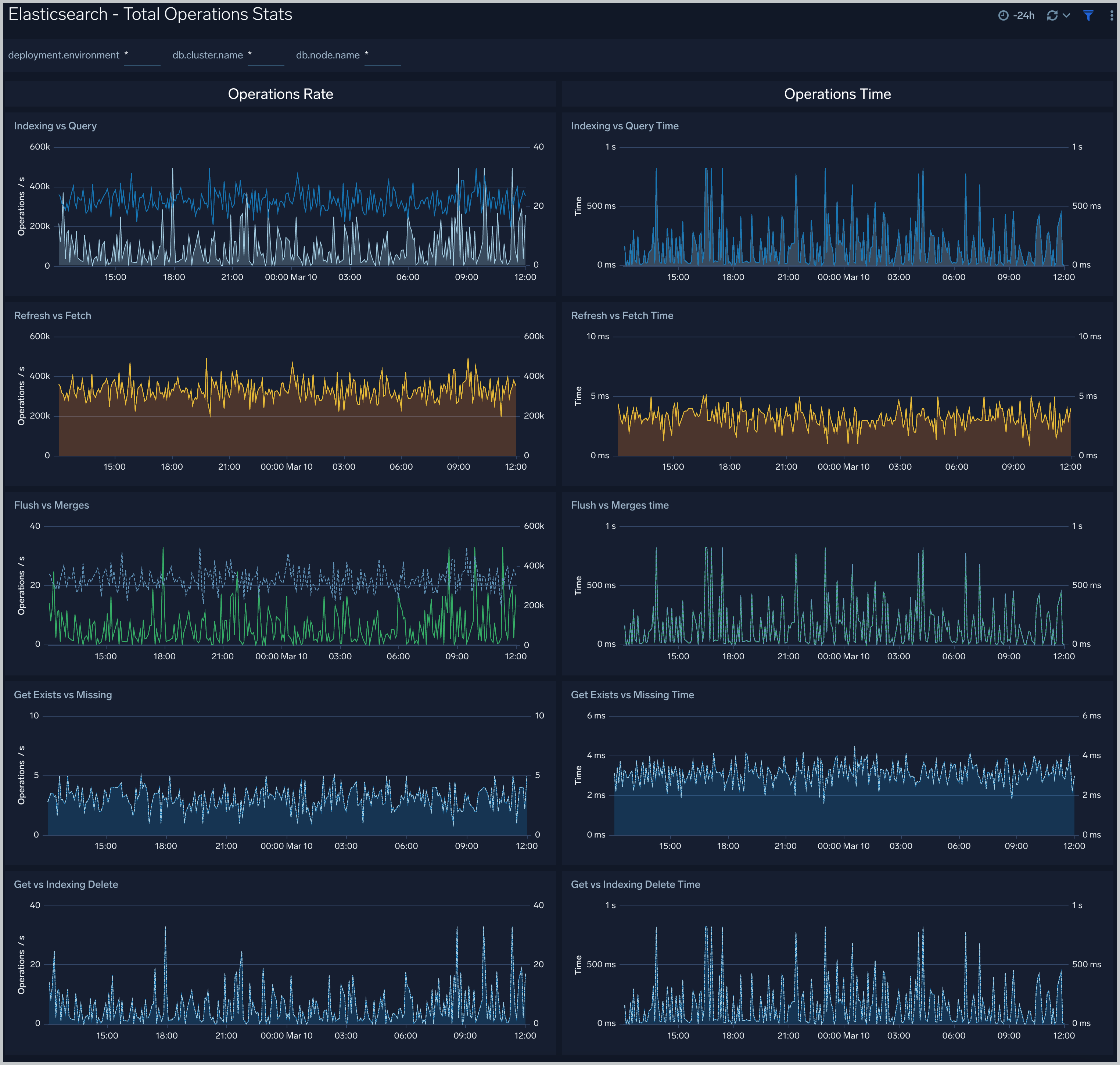
The **Elasticsearch - Total Operations stats** dashboard provides information on the operations of the Elasticsearch system.
### Total Operations Stats
The **Elasticsearch - Total Operations stats** dashboard provides information on the operations of the Elasticsearch system.
 ### Thread Pool
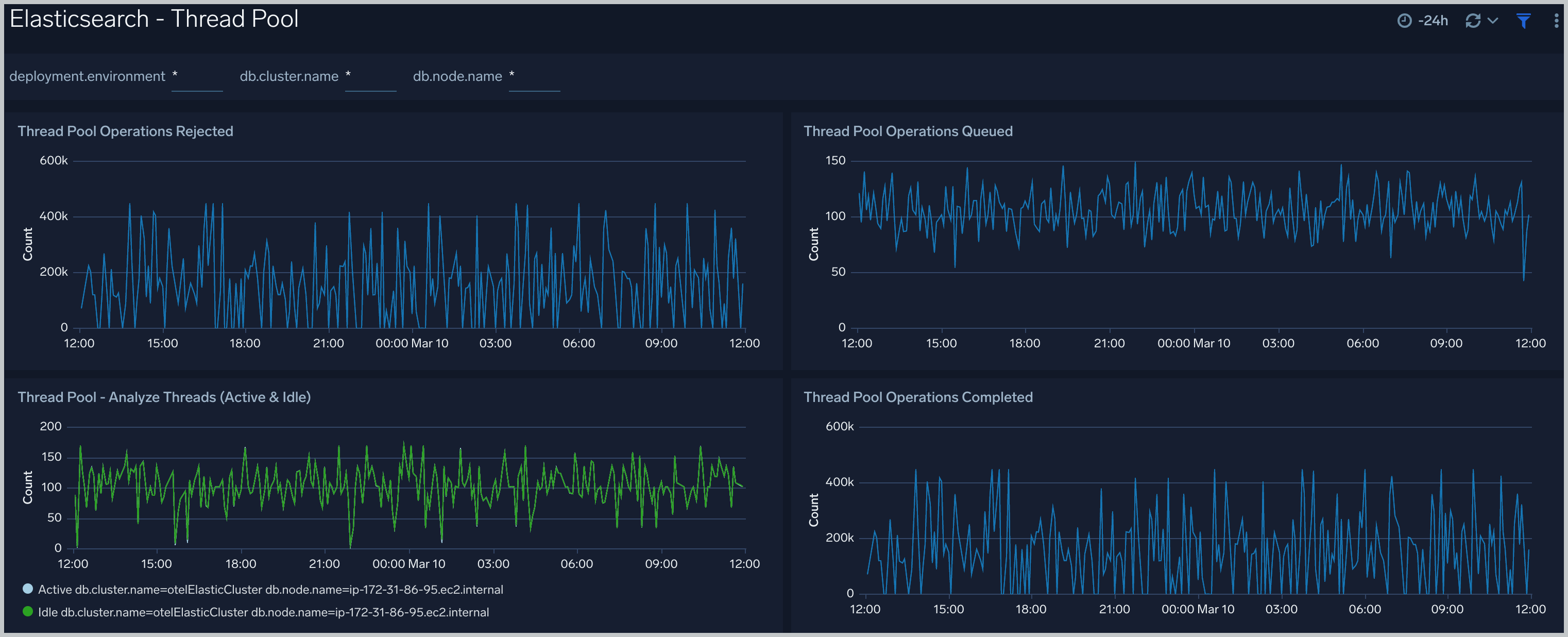
The **Elasticsearch - Thread Pool** dashboard analyzes thread pools operations to manage memory consumption of nodes in the cluster.
### Thread Pool
The **Elasticsearch - Thread Pool** dashboard analyzes thread pools operations to manage memory consumption of nodes in the cluster.
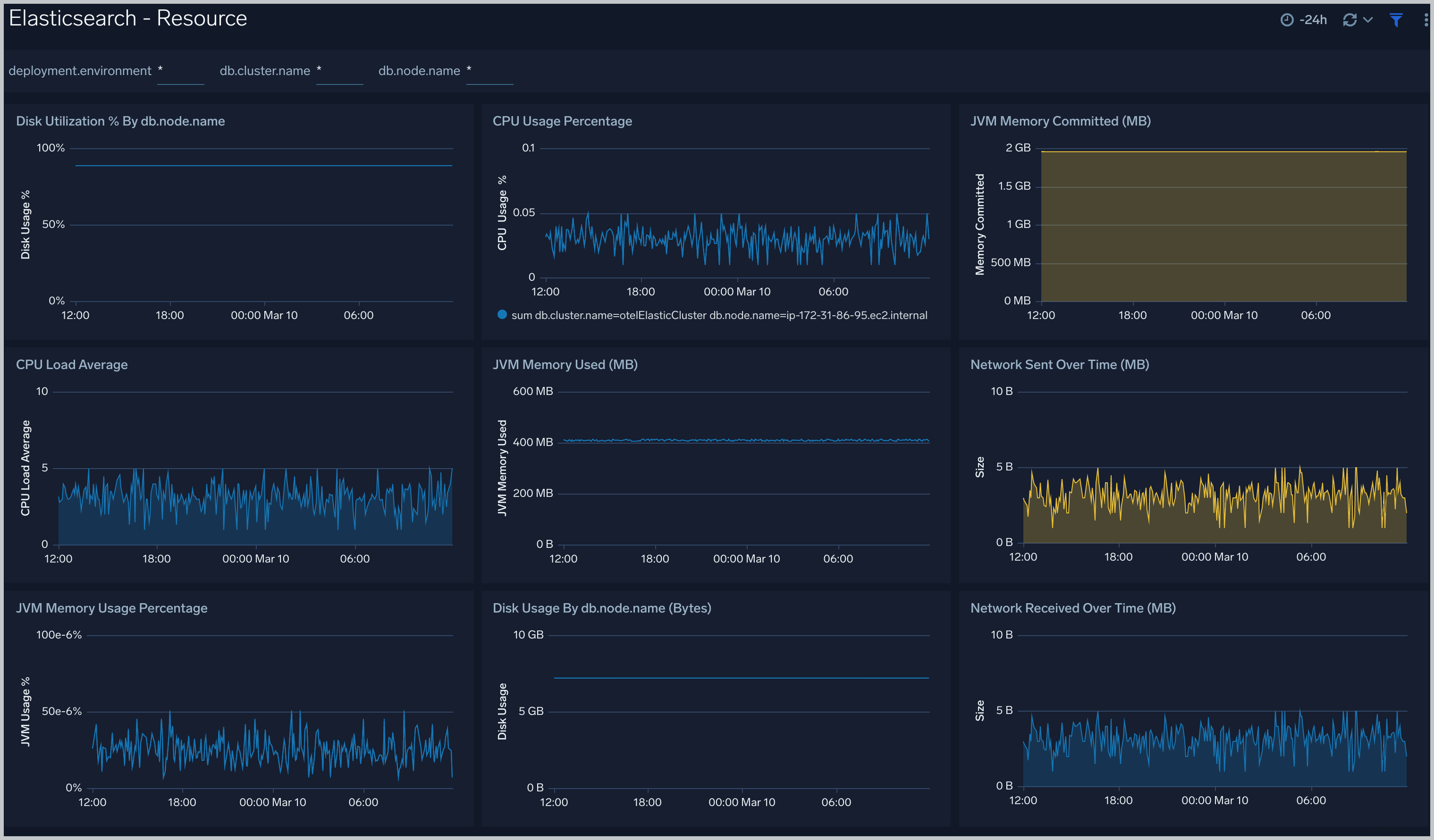
 ### Resource
The **Elasticsearch - Resource** dashboard monitors JVM Memory, Network, Disk, Network and CPU of Elasticsearch node.
### Resource
The **Elasticsearch - Resource** dashboard monitors JVM Memory, Network, Disk, Network and CPU of Elasticsearch node.
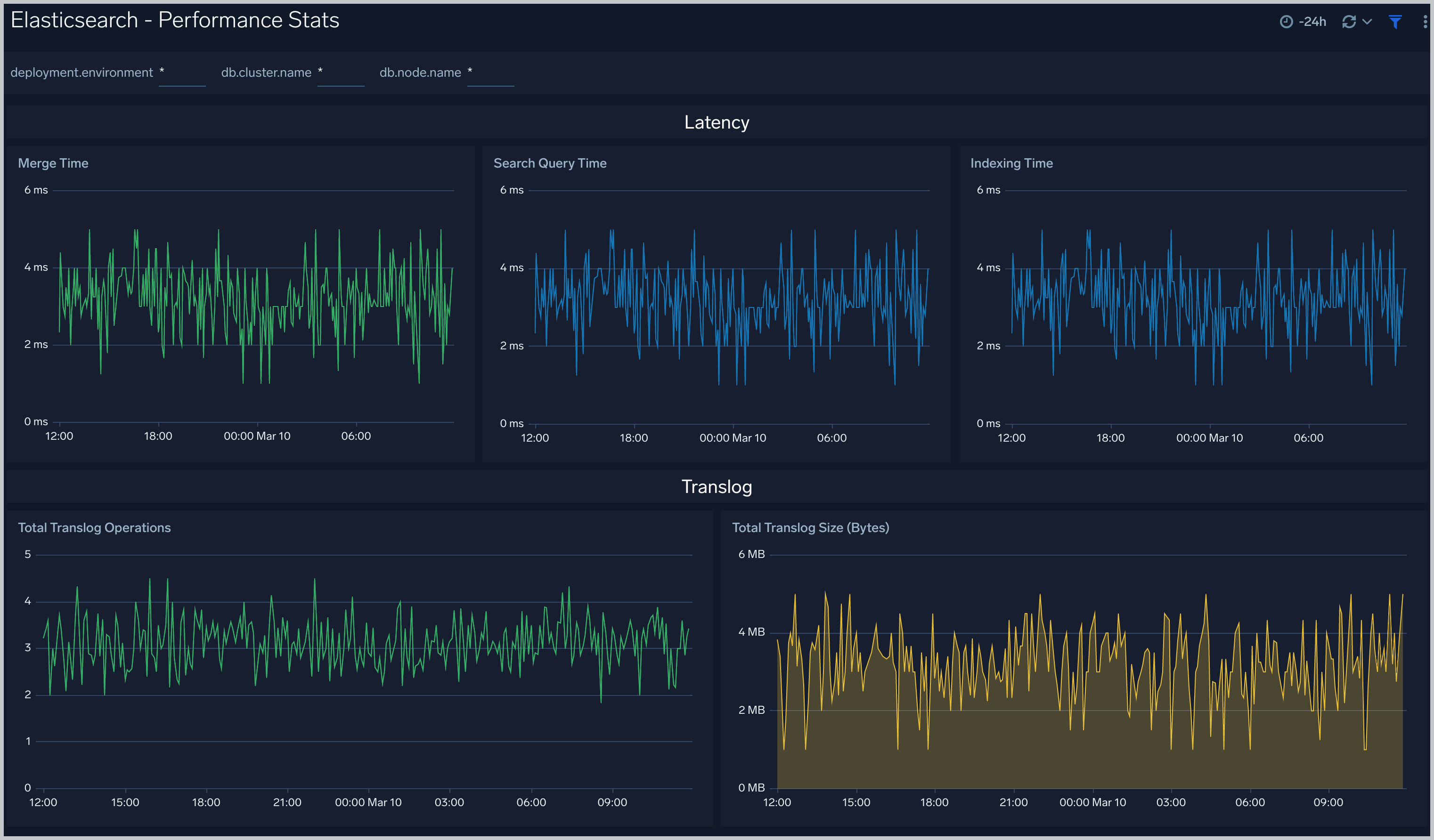
 ### Performance Stats
The **Elasticsearch - Performance Stats** dashboard performance statistics such as latency and Translog operations and size.
### Performance Stats
The **Elasticsearch - Performance Stats** dashboard performance statistics such as latency and Translog operations and size.
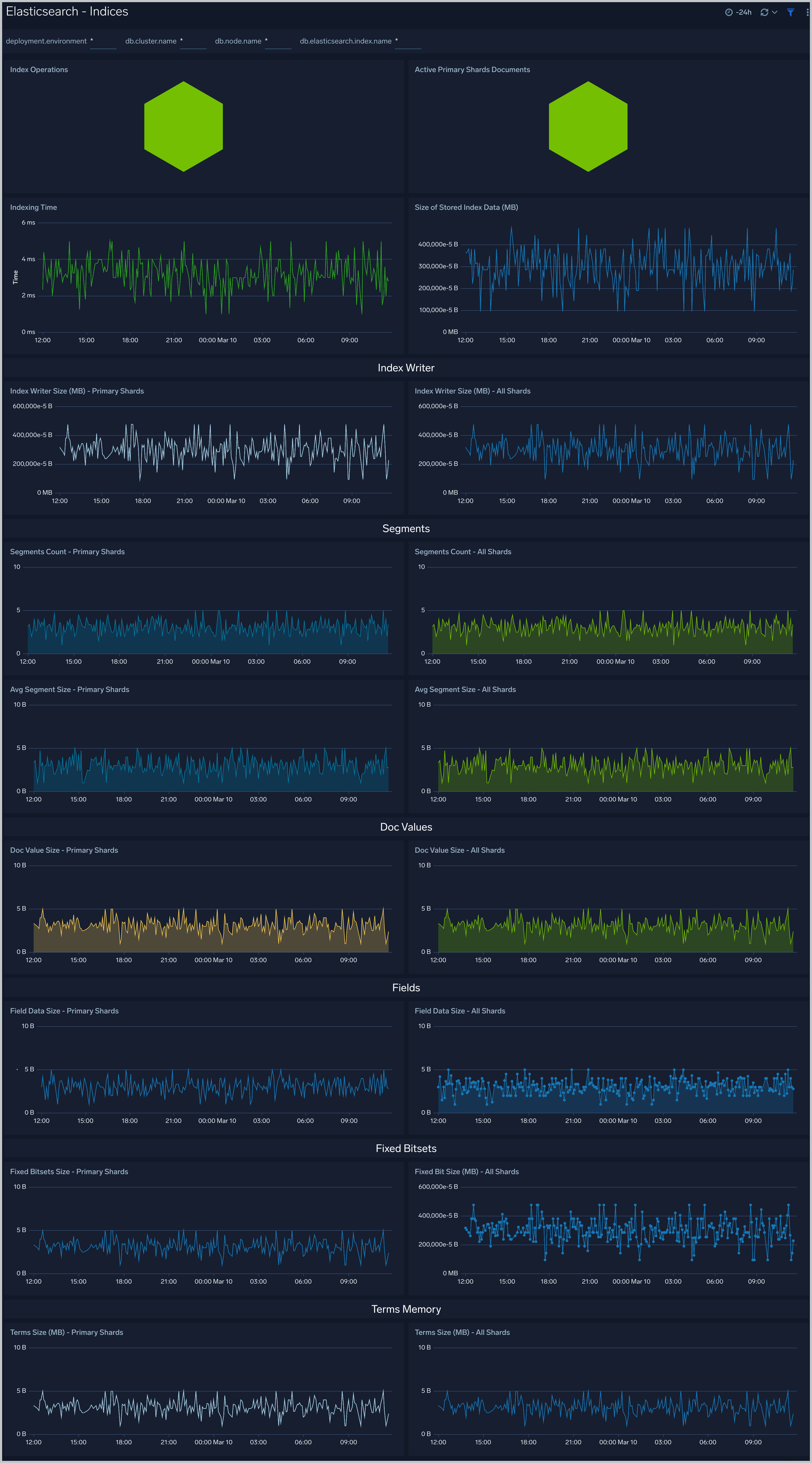
 ### Indices
The **Elasticsearch - Indices** dashboard monitors Index operations, size and latency. It also provides analytics on doc values, fields, fixed bitsets, and terms memory.
### Indices
The **Elasticsearch - Indices** dashboard monitors Index operations, size and latency. It also provides analytics on doc values, fields, fixed bitsets, and terms memory.
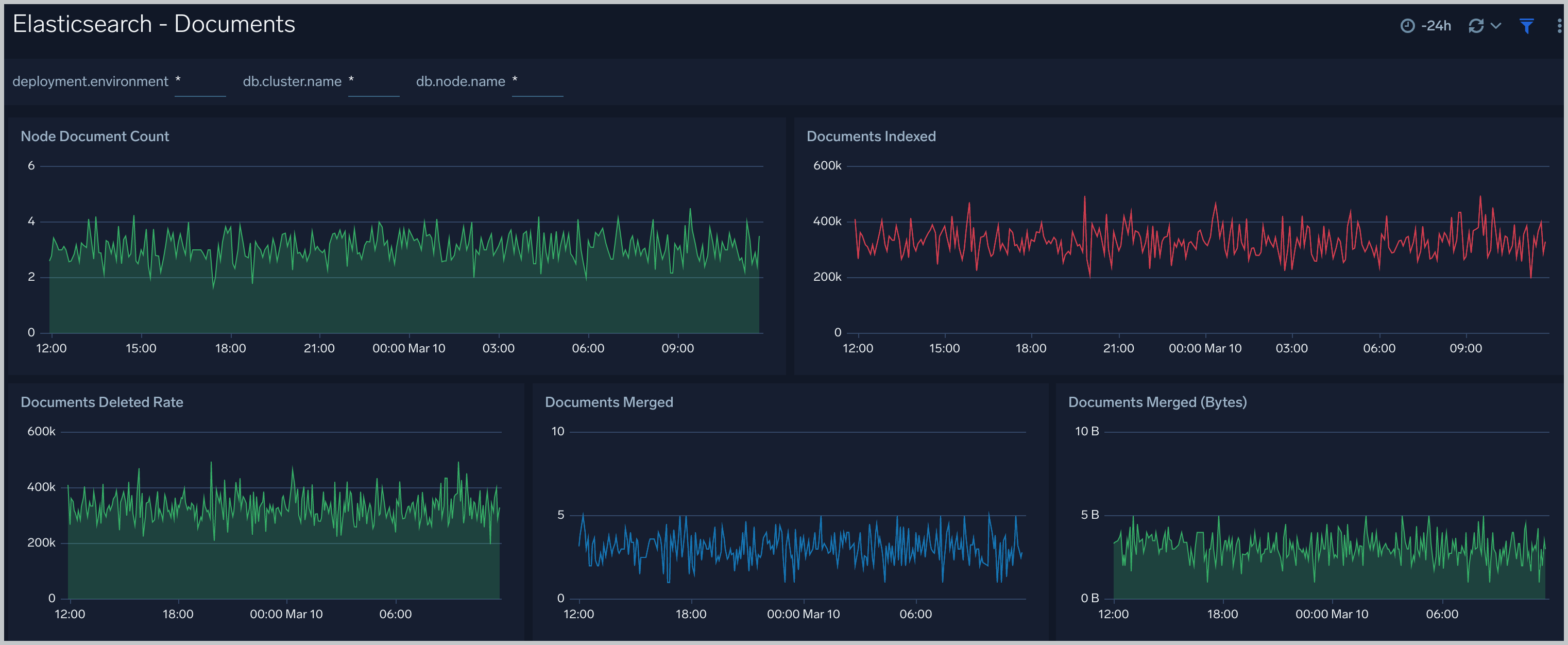
 ### Documents
The **Elasticsearch - Documents** dashboard provides analytics and monitoring on Elasticsearch documents.
### Documents
The **Elasticsearch - Documents** dashboard provides analytics and monitoring on Elasticsearch documents.
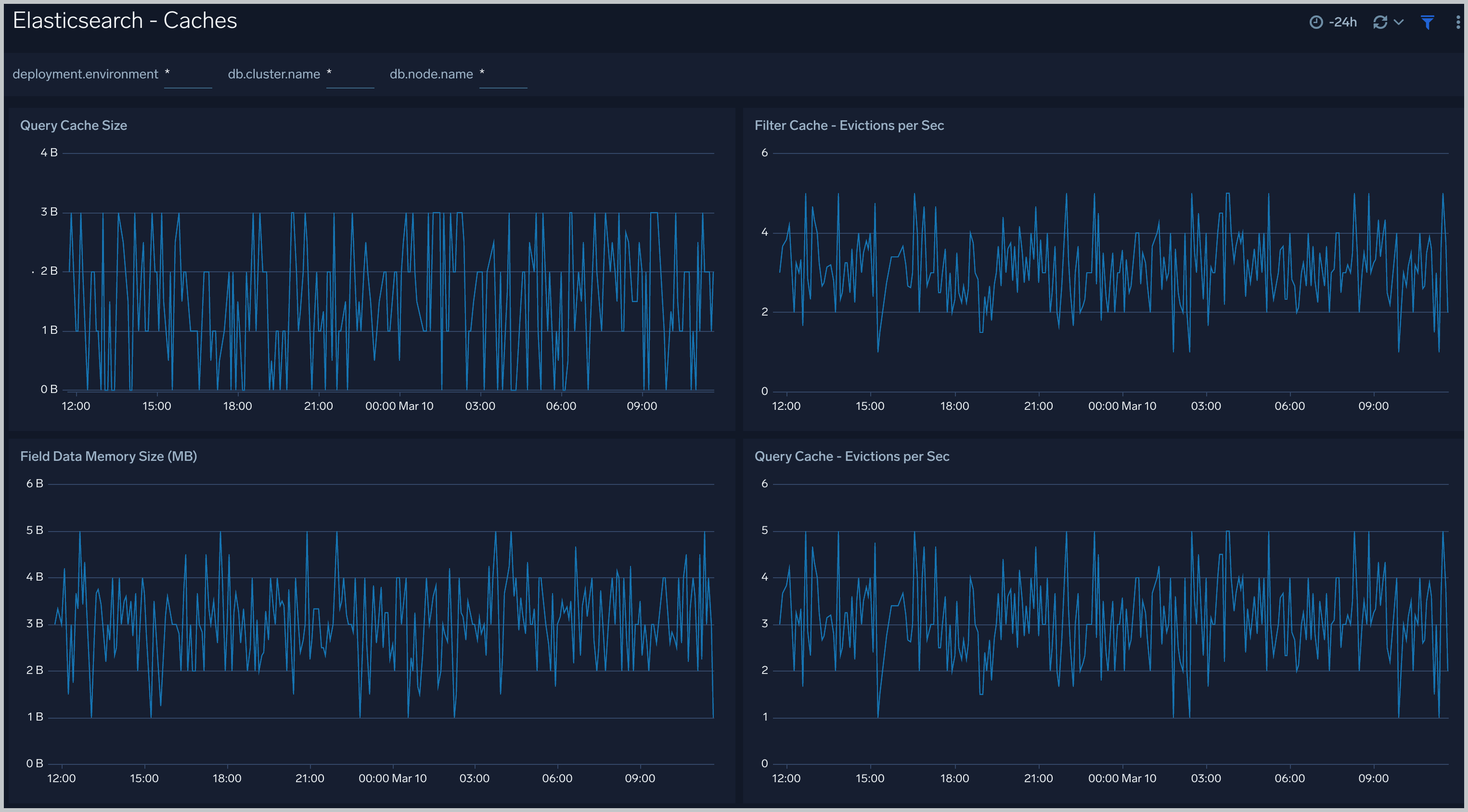
 ### Caches
The **Elasticsearch - Caches** dashboard allows you to monitor query cache size, evictions and field data memory size.
### Caches
The **Elasticsearch - Caches** dashboard allows you to monitor query cache size, evictions and field data memory size.
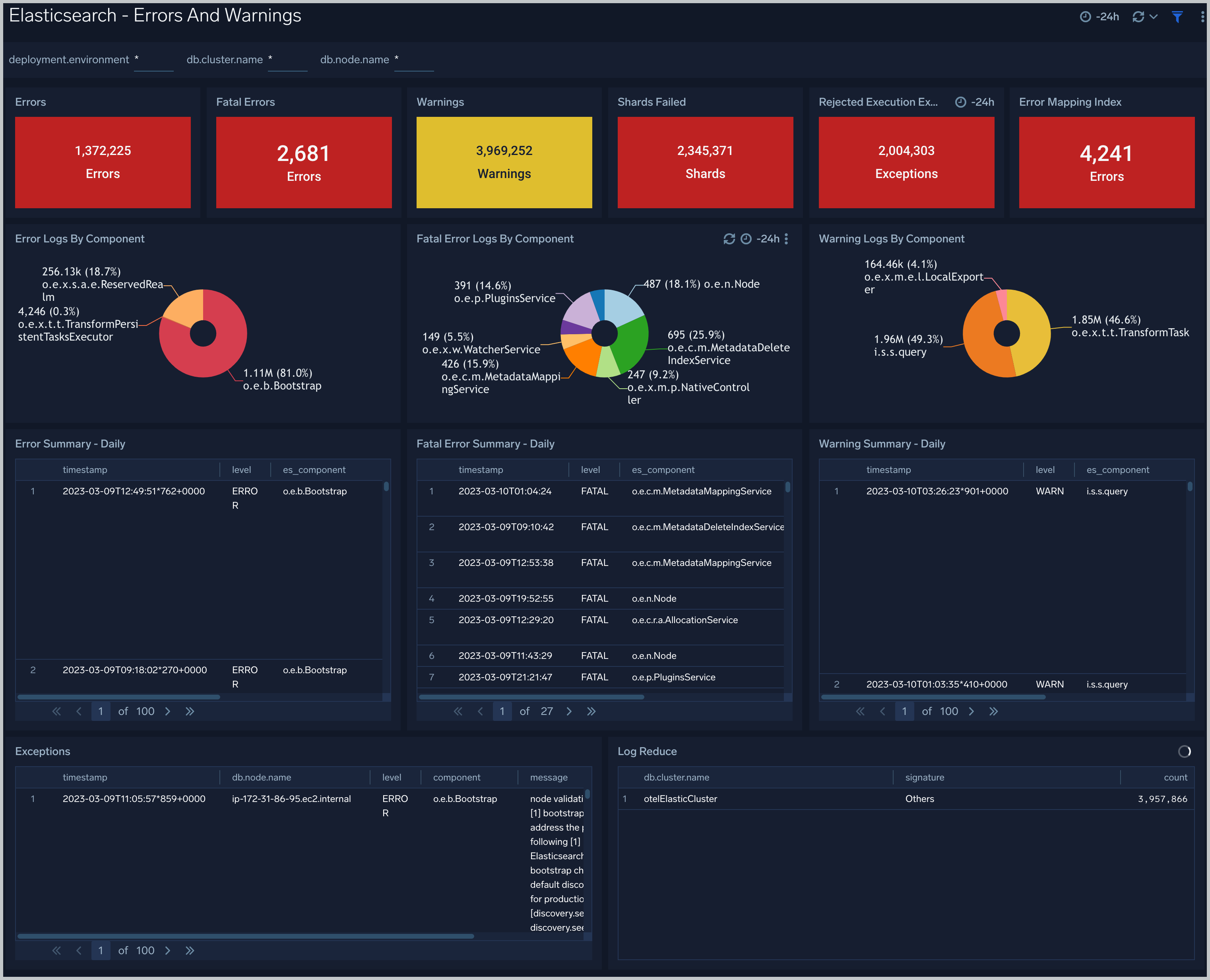
 ### Errors And Warnings
The **Elasticsearch - Errors And Warnings** dashboard shows errors and warnings by Elasticsearch components.
### Errors And Warnings
The **Elasticsearch - Errors And Warnings** dashboard shows errors and warnings by Elasticsearch components.
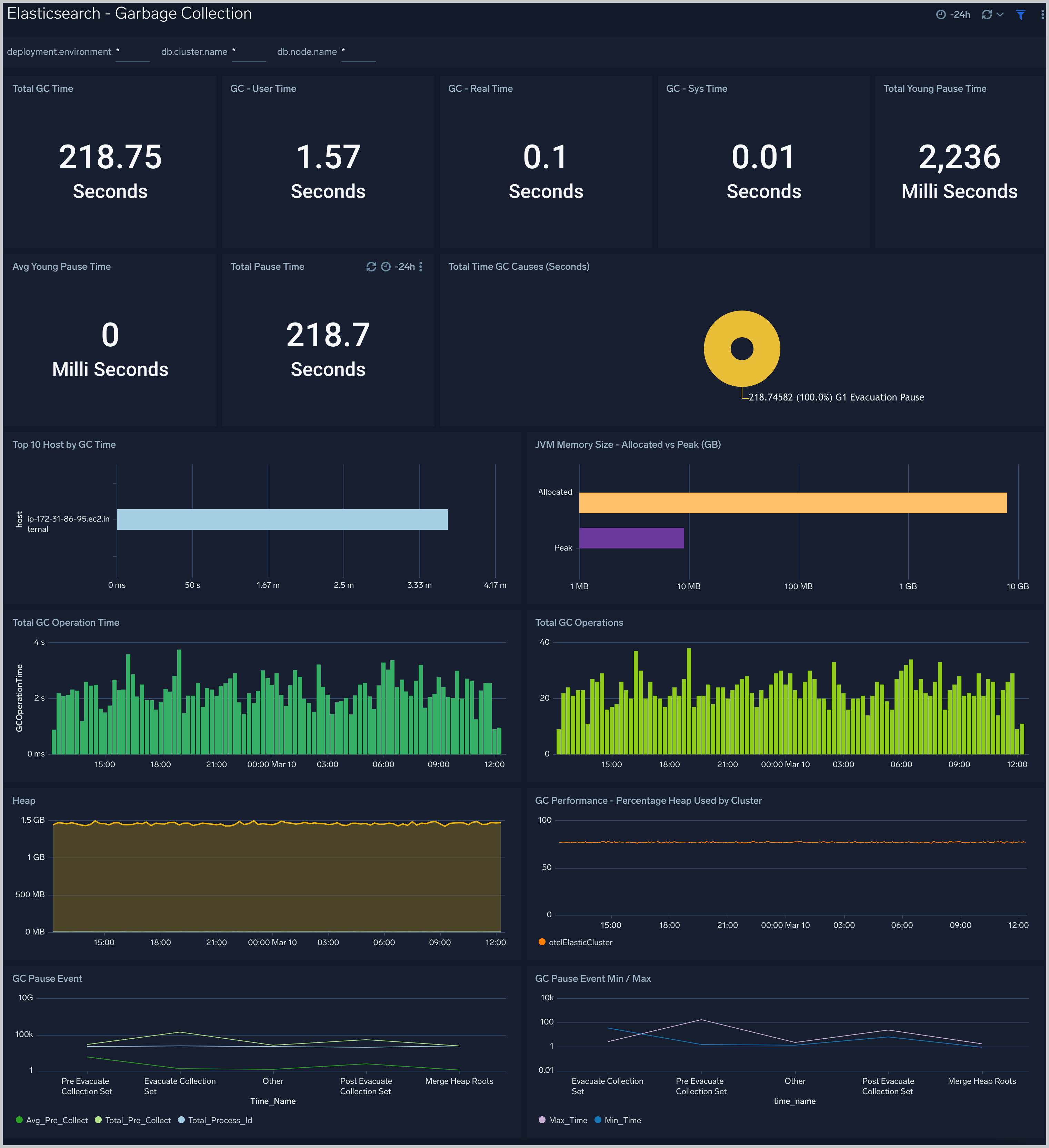
 ### Garbage Collection
The **Elasticsearch - Garbage Collector** dashboard provides information on the garbage collection of the Java Virtual Machine.
### Garbage Collection
The **Elasticsearch - Garbage Collector** dashboard provides information on the garbage collection of the Java Virtual Machine.
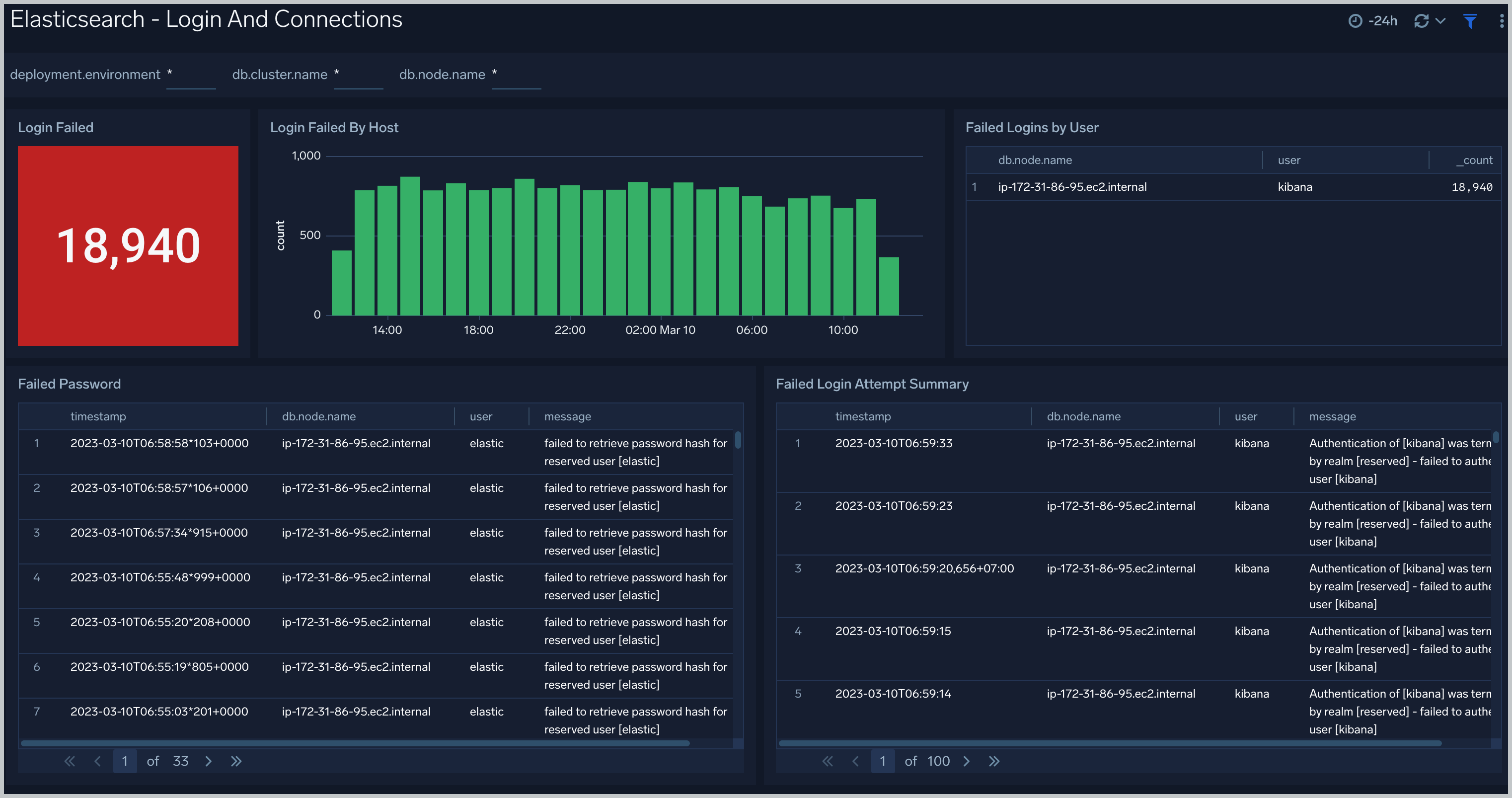
 ### Login And Connections
The **Elasticsearch - Login And Connections** dashboard shows geo location of client connection requests, failed connection logins and count of failed login attempts.
### Login And Connections
The **Elasticsearch - Login And Connections** dashboard shows geo location of client connection requests, failed connection logins and count of failed login attempts.
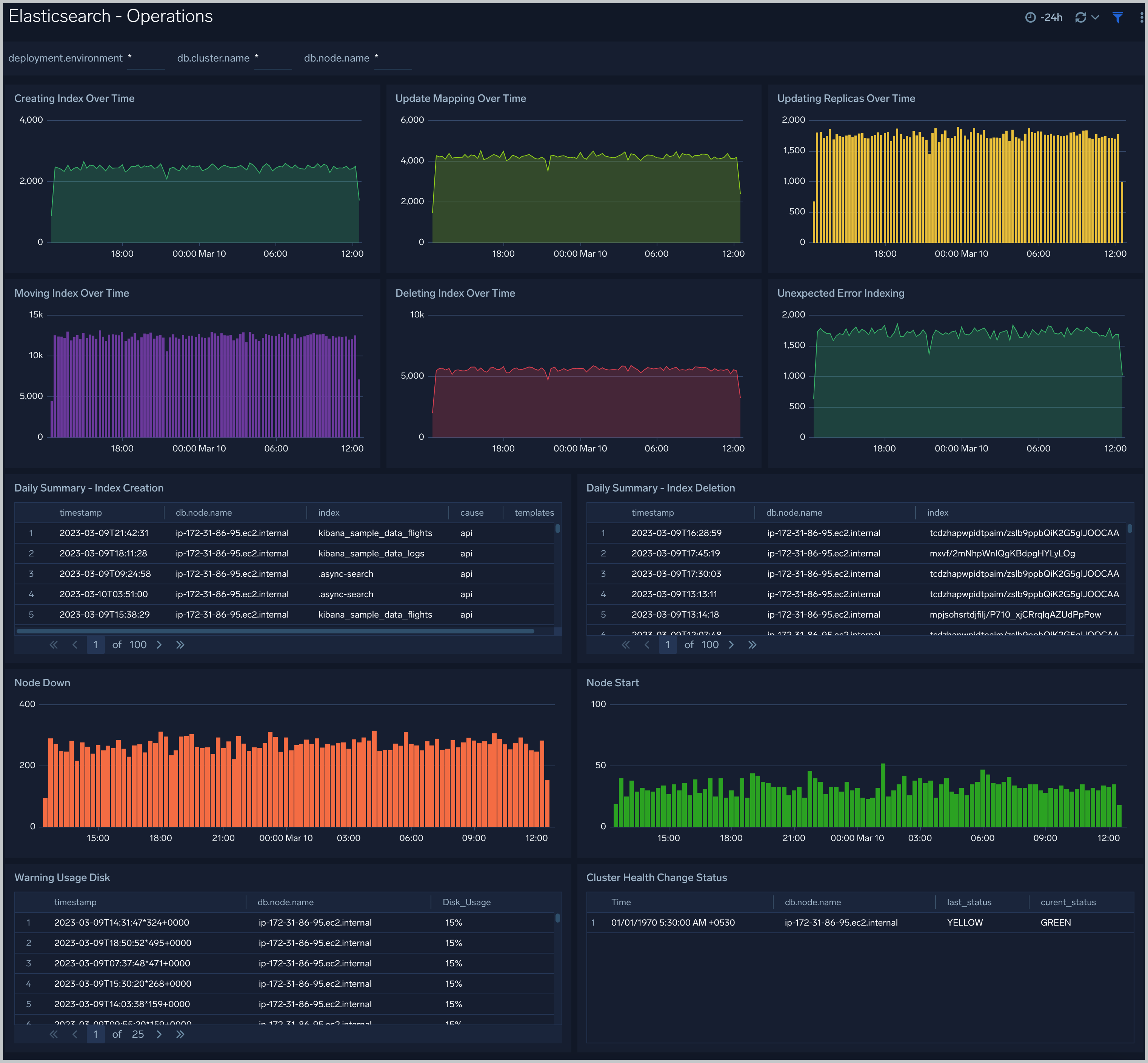
 ### Operations
The **Elasticsearch - Operations** dashboard allows you to monitor server stats and events such as node up/down, index creation/deletion. It also provides disk usage and cluster health status.
### Operations
The **Elasticsearch - Operations** dashboard allows you to monitor server stats and events such as node up/down, index creation/deletion. It also provides disk usage and cluster health status.
 ### Queries
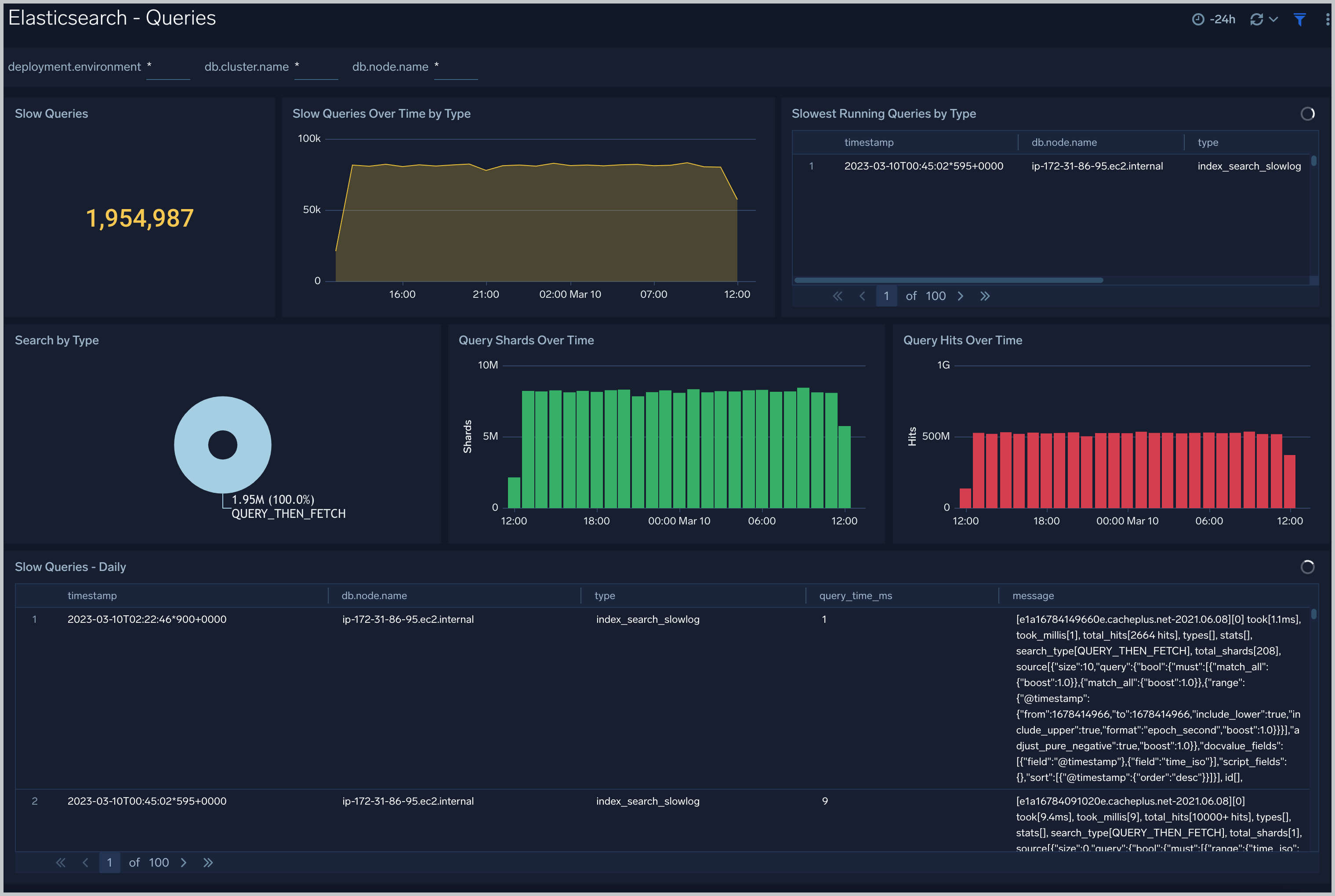
The **Elasticsearch - Queries** dashboard shows Elasticsearch provides analytics on slow queries, and query shards.
### Queries
The **Elasticsearch - Queries** dashboard shows Elasticsearch provides analytics on slow queries, and query shards.
 ## Create monitors for Elasticsearch app
import CreateMonitors from '../../../reuse/apps/create-monitors.md';
### Elasticsearch alerts
| Alert Name | Alert Description and conditions | Alert Condition | Recover Condition |
|:--|:--|:--|:--|
| `Elasticsearch - Cluster Red Alert` | Elasticsearch Cluster red health status. | Count > = 1 | Count < 1 |
| `Elasticsearch - Cluster Yellow Alert` | Elasticsearch Cluster yellow health status. | Count > 1 | Count < = 1 |
| `Elasticsearch - Disk Out of Space Alert` | This alerts gets triggered when disk usage is over 90%. | Count > 90 | Count < = 90 |
| `Elasticsearch - Error Log Too Many Alert` | This alert gets triggered when error logs exceeds threshold. | Count > = 1000 | Count < 1000 |
| `Elasticsearch - Healthy Data Nodes Alert` | This alert gets triggered when missing data node in Elasticsearch cluster. | Count < = 1 | Count > 1 |
| `Elasticsearch - Heap Usage Too High Alert` | This alert gets triggered when heap usage is over 90%. | Count > 90 | Count < = 90 |
| `Elasticsearch - Initializing Shards Too Long Alert` | This alerts gets triggered when shard initialization takes more than 5 min. | Count > = 5 | Count < 5 |
| `Elasticsearch - Pending Tasks Alert` | This alert gets triggered when Elasticsearch has pending tasks. | Count > = 5 | Count < 5 |
| `Elasticsearch - Query Time Slow Alert` | This alert gets triggered when slow query time greater than 5 ms. | Count >= 1 | Count < 1 |
| `Elasticsearch - Query Time Too Slow Alert` | This alert gets triggered when Slow Query Too High (10 ms). | Count > = 1 | Count < 1 |
| `Elasticsearch - Relocating Shards Too Long Alert` | This alert gets triggered when shards relocation take more than 5 min. | Count > = 5 | Count < 5 |
| `Elasticsearch - Too Many Slow Query Alert` | This alert gets triggered when too many slow queries are found in 5 minutes window. | Count > = 10 | Count < 10 |
| `Elasticsearch - Unassigned Shards Alert` | This alert gets triggered when Elasticsearch has unassigned shards. | Count > 5 | Count < = 5 |
## Create monitors for Elasticsearch app
import CreateMonitors from '../../../reuse/apps/create-monitors.md';
### Elasticsearch alerts
| Alert Name | Alert Description and conditions | Alert Condition | Recover Condition |
|:--|:--|:--|:--|
| `Elasticsearch - Cluster Red Alert` | Elasticsearch Cluster red health status. | Count > = 1 | Count < 1 |
| `Elasticsearch - Cluster Yellow Alert` | Elasticsearch Cluster yellow health status. | Count > 1 | Count < = 1 |
| `Elasticsearch - Disk Out of Space Alert` | This alerts gets triggered when disk usage is over 90%. | Count > 90 | Count < = 90 |
| `Elasticsearch - Error Log Too Many Alert` | This alert gets triggered when error logs exceeds threshold. | Count > = 1000 | Count < 1000 |
| `Elasticsearch - Healthy Data Nodes Alert` | This alert gets triggered when missing data node in Elasticsearch cluster. | Count < = 1 | Count > 1 |
| `Elasticsearch - Heap Usage Too High Alert` | This alert gets triggered when heap usage is over 90%. | Count > 90 | Count < = 90 |
| `Elasticsearch - Initializing Shards Too Long Alert` | This alerts gets triggered when shard initialization takes more than 5 min. | Count > = 5 | Count < 5 |
| `Elasticsearch - Pending Tasks Alert` | This alert gets triggered when Elasticsearch has pending tasks. | Count > = 5 | Count < 5 |
| `Elasticsearch - Query Time Slow Alert` | This alert gets triggered when slow query time greater than 5 ms. | Count >= 1 | Count < 1 |
| `Elasticsearch - Query Time Too Slow Alert` | This alert gets triggered when Slow Query Too High (10 ms). | Count > = 1 | Count < 1 |
| `Elasticsearch - Relocating Shards Too Long Alert` | This alert gets triggered when shards relocation take more than 5 min. | Count > = 5 | Count < 5 |
| `Elasticsearch - Too Many Slow Query Alert` | This alert gets triggered when too many slow queries are found in 5 minutes window. | Count > = 10 | Count < 10 |
| `Elasticsearch - Unassigned Shards Alert` | This alert gets triggered when Elasticsearch has unassigned shards. | Count > 5 | Count < = 5 |