---
id: microsoft-graph-identity-protection
title: Microsoft Graph Identity Protection
sidebar_label: Microsoft Graph Identity Protection
description: The Sumo Logic App for Microsoft Graph Identity Protection provides organizations with advanced security monitoring and analytics capabilities for their Microsoft Graph Identity Protection data.
slug: /help/docs/integrations/microsoft-azure/microsoft-graph-identity-protection/
canonical: https://www.sumologic.com/help/docs/integrations/microsoft-azure/microsoft-graph-identity-protection/
---
import useBaseUrl from '@docusaurus/useBaseUrl';
}) The Microsoft Graph Identity Protection App for Sumo Logic provides organizations with advanced security monitoring and analytics capabilities for their Microsoft Graph Identity Protection data. The app leverages Sumo Logic's [cloud-to-cloud source](/docs/send-data/hosted-collectors/cloud-to-cloud-integration-framework/microsoft-graph-identity-protection-source) to collect and analyze data from the Microsoft Graph Identity Protection Source, allowing organizations to proactively identify potential security risks and take action to mitigate them.
With the Microsoft Graph Identity Protection App, organizations can easily monitor and analyze events related to risky sign-ins, unusual user behavior, and security alerts generated by the Identity Protection API. The app provides a comprehensive view of these events, allowing security teams to quickly identify potential security incidents and take action to protect their organization.
Key features of the Microsoft Graph Identity Protection App include:
* **Real-time monitoring.** The app provides real-time monitoring of events related to the Microsoft Graph Identity Protection Source, allowing you to quickly detect potential security incidents.
* **Advanced analytics.** The app includes a wide range of pre-built dashboards, and visualizations, that enable organizations to analyze their Microsoft Graph Identity Protection data in real-time, and gain insights into user behavior, sign-in patterns, and .risky detections. The App displays the distribution of risks by level, state, processing status, type, activity, etc which allows you to categorize risks by various criteria and helps to identify critical and frequently occurring risks.
* **Investigation capabilities.** The app provides advanced search and analytics capabilities that allow security teams to investigate security incidents, identify the root cause of security events, and take steps to improve their organization's overall security posture.
## Log types
The App uses Microsoft Graph Identity Protection Source to collect [Risky Users](https://docs.microsoft.com/en-us/graph/api/riskyuser-list?view=graph-rest-1.0) and [Risk Detections](https://docs.microsoft.com/en-us/graph/api/riskdetection-list?view=graph-rest-1.0) data from Microsoft Graph Identity Protection API.
To learn about the Microsoft Graph Identity Protection API fields, see the [Risky Users](https://learn.microsoft.com/en-us/graph/api/resources/riskyuser?view=graph-rest-1.0#properties) and [Risk Detections](https://learn.microsoft.com/en-us/graph/api/resources/riskdetection?view=graph-rest-1.0#properties) documentation.
### Sample log messages
This section contains log messages for both `Risky Users` and `Risk detections` sources.
```json title="Risky Users Log"
{
"id": "a531defa-b587-4015-8837-748db116239a",
"isDeleted": false,
"isProcessing": false,
"riskLevel": "high",
"riskState": "atRisk",
"riskDetail": "none",
"riskLastUpdatedDateTime": "2022-07-08T20:07:11.9432076Z",
"userDisplayName": "hitarth",
"userPrincipalName": "hitarth@sumo.onmicrosoft.com"
}
```
```json title="Risk detections Log"
{
"id": "127c7061f52a6f0302f08b166e5cb2281ca160cf58d4738569407b1231978490",
"requestId": "4495be88-4c61-4a8d-adc0-084db564e401",
"correlationId": "9671a08c-4ed4-4dd7-aef5-e106833ee501",
"riskEventType": "anonymizedIPAddress",
"riskState": "atRisk",
"riskLevel": "high",
"riskDetail": "none",
"source": "IdentityProtection",
"detectionTimingType": "realtime",
"activity": "signin",
"tokenIssuerType": "AzureAD",
"ipAddress": "167.86.94.107",
"activityDateTime": "2022-07-07T11:43:34.0566973Z",
"detectedDateTime": "2022-07-07T11:43:34.0566973Z",
"lastUpdatedDateTime": "2022-07-07T11:44:50.286276Z",
"userId": "a531defa-b587-40d5-8837-748db116339a",
"userDisplayName": "hitarth",
"userPrincipalName": "hitarth@sumo.onmicrosoft.com",
"additionalInfo": "[{\"Key\":\"userAgent\",\"Value\":\"Mozilla/5.0 (Android 9; Mobile; rv:78.0) Gecko/78.0 Firefox/78.0\"}]",
"location": {
"city": "Vadodara",
"state": "Gujarat",
"countryOrRegion": "IN",
"geoCoordinates": {
"latitude": 48.1089,
"longitude": 11.6074
}
}
}
```
### Sample queries
This section contains the sample queries of both the `Risky Users` and `Risk detections`.
```sumo title="Risky Users by Status"
_sourceCategory=msgip-app-src !riskEventType
| json "id", "userPrincipalName", "isDeleted", "isProcessing", "riskLevel", "riskState", "riskDetail", "riskLastUpdatedDateTime" as user_id, user, is_deleted, is_processing, risk_level, risk_state, risk_action, risk_last_updated_date_time nodrop
| topk(1, risk_last_updated_date_time) by user_id
| "{{user_status}}" as user_status_filter
| if(user_status_filter matches "active", "false", user_status_filter) as user_status_filter
| if(user_status_filter matches "deleted", "true", user_status_filter) as user_status_filter
| where is_deleted matches user_status_filter
| "{{processing_state}}" as processing_state_filter
| if(processing_state_filter matches "processing", "true", processing_state_filter) as processing_state_filter
| if(processing_state_filter matches "not processing", "false", processing_state_filter) as processing_state_filter
| where is_processing matches processing_state_filter
| where risk_level matches "{{risk_level}}"
| where risk_state matches "{{risk_state}}"
| where risk_action matches "{{risk_action}}"
| if(is_deleted matches "true", "deleted", "active") as user_status
| count(user_id) by user_status
| sort by _count
```
```sumo title="Risk by Level"
_sourceCategory=msgip-app-src riskEventType
| json "activity", "activityDateTime", "detectedDateTime", "detectionTimingType", "id", "ipAddress", "lastUpdatedDateTime", "location", "location.geoCoordinates.latitude", "location.geoCoordinates.longitude", "riskDetail", "riskEventType", "riskLevel", "riskState", "source", "tokenIssuerType", "userPrincipalName", "userId" as activity, activity_date_time, detected_date_time, detection_timing_type, risk_id, ip_address, last_updated_date_time, location, latitude, longitude, risk_action, risk_event_type, risk_level, risk_state, source, token_issuer_type, user, user_id nodrop
| concat(location.city, ", ", location.state, ", ", location.countryOrRegion) as location
| topk(1, last_updated_date_time) by risk_id
| where activity matches "{{activity}}"
| where risk_event_type matches "{{risk_event_type}}"
| where risk_level matches "{{risk_level}}"
| where risk_state matches "{{risk_state}}"
| where risk_action matches "{{risk_action}}"
| where location matches "{{location}}"
| count(risk_id) by risk_level
| sort by _count
```
## Collection configuration and app installation
import CollectionConfiguration from '../../reuse/apps/collection-configuration.md';
:::important
Use the [Cloud-to-Cloud Integration for Microsoft Graph Identity Protection](/docs/send-data/hosted-collectors/cloud-to-cloud-integration-framework/microsoft-graph-identity-protection-source) to create the source and use the same source category while installing the app. By following these steps, you can ensure that your Microsoft Graph Identity Protection app is properly integrated and configured to collect and analyze your Microsoft Graph Identity Protection data.
:::
### Create a new collector and install the app
import AppCollectionOPtion1 from '../../reuse/apps/app-collection-option-1.md';
### Use an existing collector and install the app
import AppCollectionOPtion2 from '../../reuse/apps/app-collection-option-2.md';
### Use an existing source and install the app
import AppCollectionOPtion3 from '../../reuse/apps/app-collection-option-3.md';
## Viewing Microsoft Graph Identity Protection dashboards
import ViewDashboards from '../../reuse/apps/view-dashboards.md';
### Risk Detections
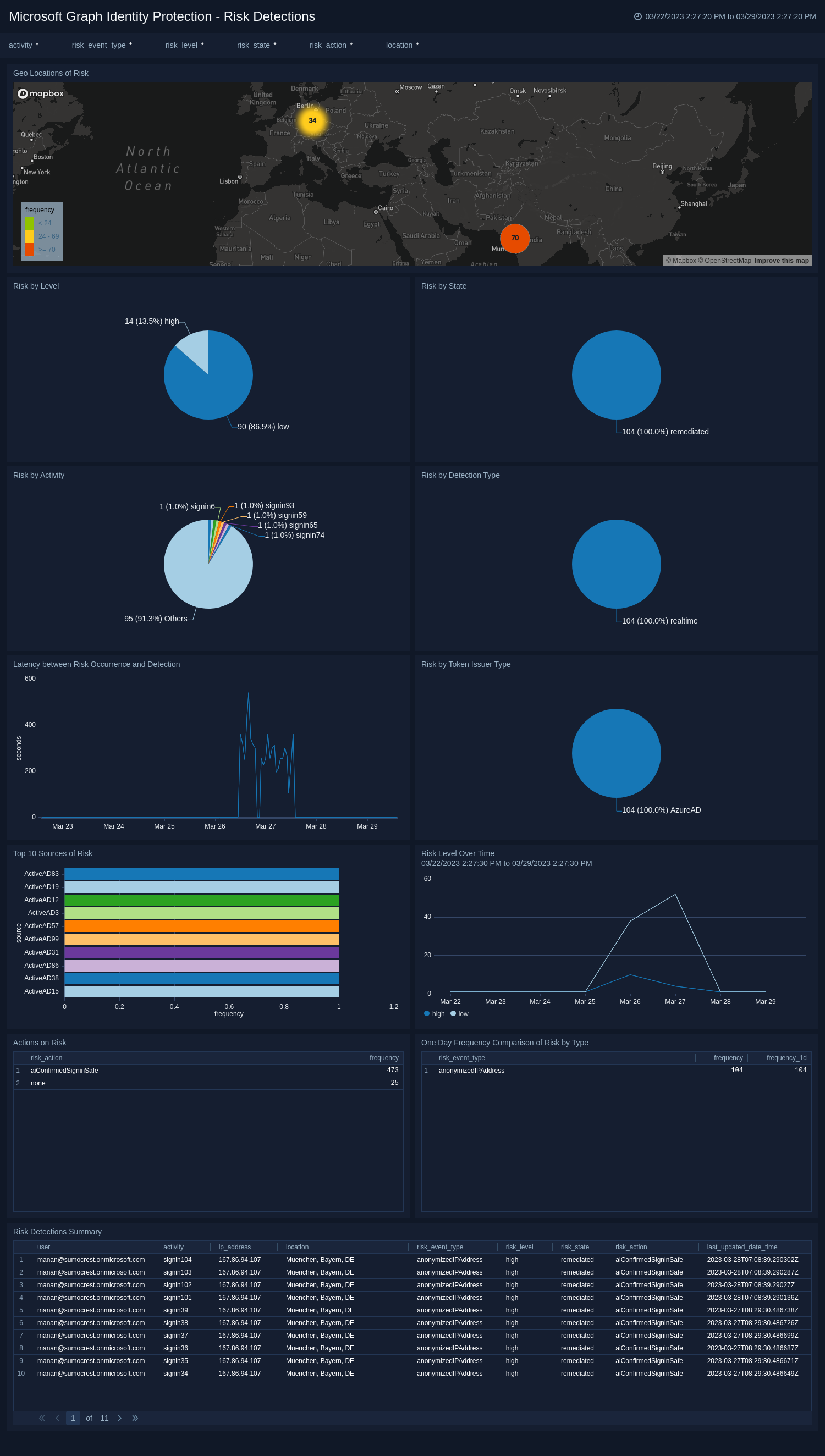
**Microsoft Graph Identity Protection - Risk Detections**.
This dashboard provides insights into the risks detected in the organization. It displays the geo-location of risks, and the distribution of risks by state, type, level, activity, and token issuer type. It also shows the latency chart which helps to identify the delay between risk occurrence and detection time. It displays the table with information about the frequency of risks by type with a one-day comparison, a summary of all the risks, and a list of various actions performed to mitigate the risks with their frequency.
The Microsoft Graph Identity Protection App for Sumo Logic provides organizations with advanced security monitoring and analytics capabilities for their Microsoft Graph Identity Protection data. The app leverages Sumo Logic's [cloud-to-cloud source](/docs/send-data/hosted-collectors/cloud-to-cloud-integration-framework/microsoft-graph-identity-protection-source) to collect and analyze data from the Microsoft Graph Identity Protection Source, allowing organizations to proactively identify potential security risks and take action to mitigate them.
With the Microsoft Graph Identity Protection App, organizations can easily monitor and analyze events related to risky sign-ins, unusual user behavior, and security alerts generated by the Identity Protection API. The app provides a comprehensive view of these events, allowing security teams to quickly identify potential security incidents and take action to protect their organization.
Key features of the Microsoft Graph Identity Protection App include:
* **Real-time monitoring.** The app provides real-time monitoring of events related to the Microsoft Graph Identity Protection Source, allowing you to quickly detect potential security incidents.
* **Advanced analytics.** The app includes a wide range of pre-built dashboards, and visualizations, that enable organizations to analyze their Microsoft Graph Identity Protection data in real-time, and gain insights into user behavior, sign-in patterns, and .risky detections. The App displays the distribution of risks by level, state, processing status, type, activity, etc which allows you to categorize risks by various criteria and helps to identify critical and frequently occurring risks.
* **Investigation capabilities.** The app provides advanced search and analytics capabilities that allow security teams to investigate security incidents, identify the root cause of security events, and take steps to improve their organization's overall security posture.
## Log types
The App uses Microsoft Graph Identity Protection Source to collect [Risky Users](https://docs.microsoft.com/en-us/graph/api/riskyuser-list?view=graph-rest-1.0) and [Risk Detections](https://docs.microsoft.com/en-us/graph/api/riskdetection-list?view=graph-rest-1.0) data from Microsoft Graph Identity Protection API.
To learn about the Microsoft Graph Identity Protection API fields, see the [Risky Users](https://learn.microsoft.com/en-us/graph/api/resources/riskyuser?view=graph-rest-1.0#properties) and [Risk Detections](https://learn.microsoft.com/en-us/graph/api/resources/riskdetection?view=graph-rest-1.0#properties) documentation.
### Sample log messages
This section contains log messages for both `Risky Users` and `Risk detections` sources.
```json title="Risky Users Log"
{
"id": "a531defa-b587-4015-8837-748db116239a",
"isDeleted": false,
"isProcessing": false,
"riskLevel": "high",
"riskState": "atRisk",
"riskDetail": "none",
"riskLastUpdatedDateTime": "2022-07-08T20:07:11.9432076Z",
"userDisplayName": "hitarth",
"userPrincipalName": "hitarth@sumo.onmicrosoft.com"
}
```
```json title="Risk detections Log"
{
"id": "127c7061f52a6f0302f08b166e5cb2281ca160cf58d4738569407b1231978490",
"requestId": "4495be88-4c61-4a8d-adc0-084db564e401",
"correlationId": "9671a08c-4ed4-4dd7-aef5-e106833ee501",
"riskEventType": "anonymizedIPAddress",
"riskState": "atRisk",
"riskLevel": "high",
"riskDetail": "none",
"source": "IdentityProtection",
"detectionTimingType": "realtime",
"activity": "signin",
"tokenIssuerType": "AzureAD",
"ipAddress": "167.86.94.107",
"activityDateTime": "2022-07-07T11:43:34.0566973Z",
"detectedDateTime": "2022-07-07T11:43:34.0566973Z",
"lastUpdatedDateTime": "2022-07-07T11:44:50.286276Z",
"userId": "a531defa-b587-40d5-8837-748db116339a",
"userDisplayName": "hitarth",
"userPrincipalName": "hitarth@sumo.onmicrosoft.com",
"additionalInfo": "[{\"Key\":\"userAgent\",\"Value\":\"Mozilla/5.0 (Android 9; Mobile; rv:78.0) Gecko/78.0 Firefox/78.0\"}]",
"location": {
"city": "Vadodara",
"state": "Gujarat",
"countryOrRegion": "IN",
"geoCoordinates": {
"latitude": 48.1089,
"longitude": 11.6074
}
}
}
```
### Sample queries
This section contains the sample queries of both the `Risky Users` and `Risk detections`.
```sumo title="Risky Users by Status"
_sourceCategory=msgip-app-src !riskEventType
| json "id", "userPrincipalName", "isDeleted", "isProcessing", "riskLevel", "riskState", "riskDetail", "riskLastUpdatedDateTime" as user_id, user, is_deleted, is_processing, risk_level, risk_state, risk_action, risk_last_updated_date_time nodrop
| topk(1, risk_last_updated_date_time) by user_id
| "{{user_status}}" as user_status_filter
| if(user_status_filter matches "active", "false", user_status_filter) as user_status_filter
| if(user_status_filter matches "deleted", "true", user_status_filter) as user_status_filter
| where is_deleted matches user_status_filter
| "{{processing_state}}" as processing_state_filter
| if(processing_state_filter matches "processing", "true", processing_state_filter) as processing_state_filter
| if(processing_state_filter matches "not processing", "false", processing_state_filter) as processing_state_filter
| where is_processing matches processing_state_filter
| where risk_level matches "{{risk_level}}"
| where risk_state matches "{{risk_state}}"
| where risk_action matches "{{risk_action}}"
| if(is_deleted matches "true", "deleted", "active") as user_status
| count(user_id) by user_status
| sort by _count
```
```sumo title="Risk by Level"
_sourceCategory=msgip-app-src riskEventType
| json "activity", "activityDateTime", "detectedDateTime", "detectionTimingType", "id", "ipAddress", "lastUpdatedDateTime", "location", "location.geoCoordinates.latitude", "location.geoCoordinates.longitude", "riskDetail", "riskEventType", "riskLevel", "riskState", "source", "tokenIssuerType", "userPrincipalName", "userId" as activity, activity_date_time, detected_date_time, detection_timing_type, risk_id, ip_address, last_updated_date_time, location, latitude, longitude, risk_action, risk_event_type, risk_level, risk_state, source, token_issuer_type, user, user_id nodrop
| concat(location.city, ", ", location.state, ", ", location.countryOrRegion) as location
| topk(1, last_updated_date_time) by risk_id
| where activity matches "{{activity}}"
| where risk_event_type matches "{{risk_event_type}}"
| where risk_level matches "{{risk_level}}"
| where risk_state matches "{{risk_state}}"
| where risk_action matches "{{risk_action}}"
| where location matches "{{location}}"
| count(risk_id) by risk_level
| sort by _count
```
## Collection configuration and app installation
import CollectionConfiguration from '../../reuse/apps/collection-configuration.md';
:::important
Use the [Cloud-to-Cloud Integration for Microsoft Graph Identity Protection](/docs/send-data/hosted-collectors/cloud-to-cloud-integration-framework/microsoft-graph-identity-protection-source) to create the source and use the same source category while installing the app. By following these steps, you can ensure that your Microsoft Graph Identity Protection app is properly integrated and configured to collect and analyze your Microsoft Graph Identity Protection data.
:::
### Create a new collector and install the app
import AppCollectionOPtion1 from '../../reuse/apps/app-collection-option-1.md';
### Use an existing collector and install the app
import AppCollectionOPtion2 from '../../reuse/apps/app-collection-option-2.md';
### Use an existing source and install the app
import AppCollectionOPtion3 from '../../reuse/apps/app-collection-option-3.md';
## Viewing Microsoft Graph Identity Protection dashboards
import ViewDashboards from '../../reuse/apps/view-dashboards.md';
### Risk Detections
**Microsoft Graph Identity Protection - Risk Detections**.
This dashboard provides insights into the risks detected in the organization. It displays the geo-location of risks, and the distribution of risks by state, type, level, activity, and token issuer type. It also shows the latency chart which helps to identify the delay between risk occurrence and detection time. It displays the table with information about the frequency of risks by type with a one-day comparison, a summary of all the risks, and a list of various actions performed to mitigate the risks with their frequency.
 ### Risky Users
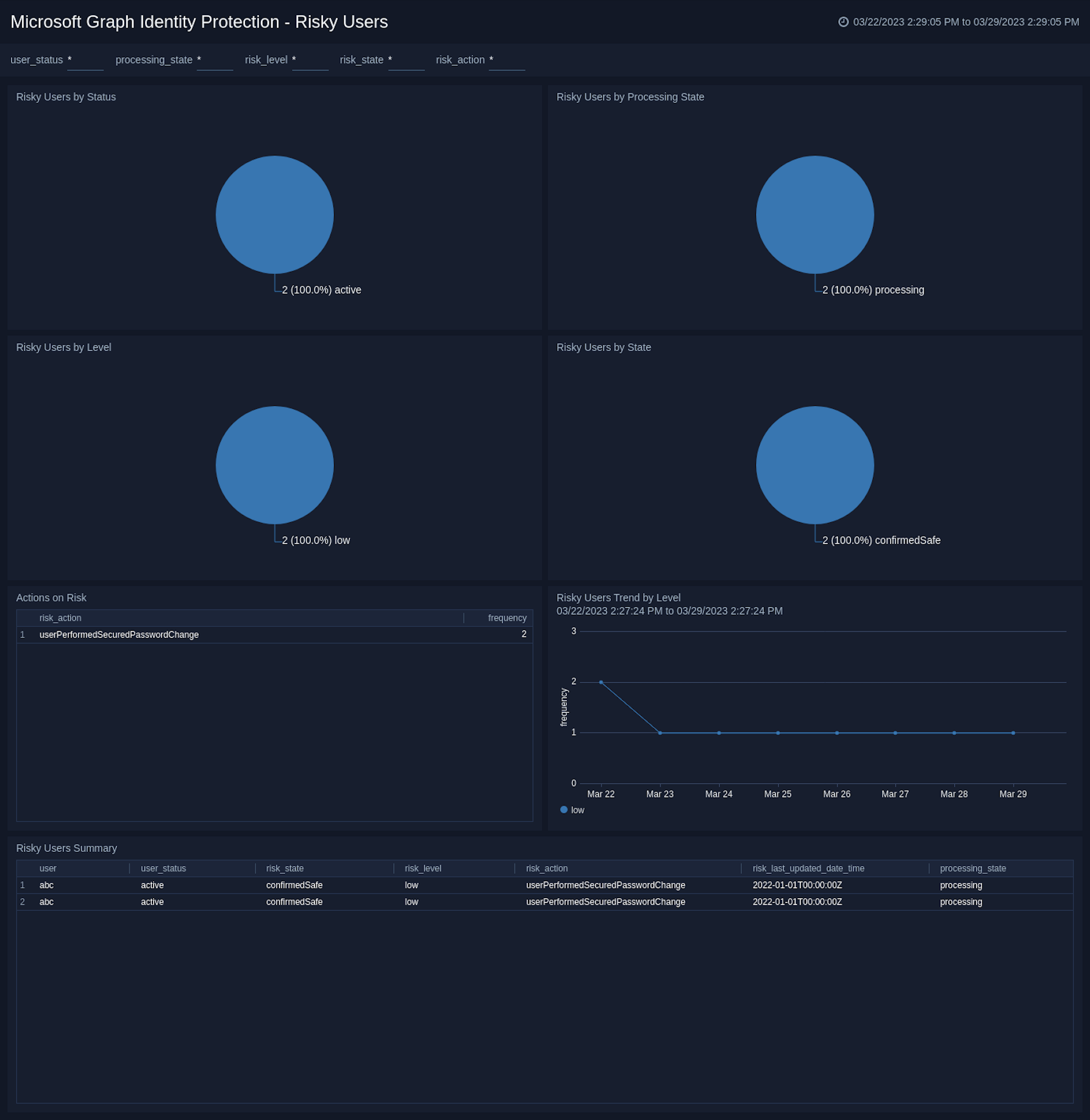
**Microsoft Graph Identity Protection - Risky Users**.
This dashboard helps to monitor and manage the risky users of your organization. It visualizes the distribution of risky users by status, level, state, and processing state. It also provides a list of various actions performed to mitigate the risks with their frequency. It displays the table of summary of all the risky users.
### Risky Users
**Microsoft Graph Identity Protection - Risky Users**.
This dashboard helps to monitor and manage the risky users of your organization. It visualizes the distribution of risky users by status, level, state, and processing state. It also provides a list of various actions performed to mitigate the risks with their frequency. It displays the table of summary of all the risky users.
 ## Upgrade/Downgrade the Microsoft Graph Identity Protection app (Optional)
import AppUpdate from '../../reuse/apps/app-update.md';
## Uninstalling the Microsoft Graph Identity Protection app (Optional)
import AppUninstall from '../../reuse/apps/app-uninstall.md';
## Upgrade/Downgrade the Microsoft Graph Identity Protection app (Optional)
import AppUpdate from '../../reuse/apps/app-update.md';
## Uninstalling the Microsoft Graph Identity Protection app (Optional)
import AppUninstall from '../../reuse/apps/app-uninstall.md';