---
id: linux-opentelemetry
title: PCI Compliance for Linux - OpenTelemetry
sidebar_label: Linux - OTel Collector
dashboard: The Sumo Logic app for Payment Card Industry (PCI) Compliance for Linux - OpenTelemetry offers dashboards to monitor systems, account and users activity to ensure that login activity and privileged users are within the expected ranges.
slug: /help/docs/integrations/pci-compliance/opentelemetry/linux-opentelemetry/
canonical: https://www.sumologic.com/help/docs/integrations/pci-compliance/opentelemetry/linux-opentelemetry/
---
import useBaseUrl from '@docusaurus/useBaseUrl';
import Tabs from '@theme/Tabs';
import TabItem from '@theme/TabItem';
}) The PCI Compliance for Linux - OpenTelemetry is a unified log app that sends Linux log data to Sumo Logic via OpenTelemetry [filelog receiver](https://github.com/open-telemetry/opentelemetry-collector-contrib/tree/main/receiver/filelogreceiver). The app's preconfigured dashboards help you to monitor system, account, and user activity to ensure that login activity and privileged users are within the expected ranges.
:::info
The PCI Compliance for Linux app covers PCI requirements 02, 07, 08, and 10.
:::
The PCI Compliance for Linux - OpenTelemetry is a unified log app that sends Linux log data to Sumo Logic via OpenTelemetry [filelog receiver](https://github.com/open-telemetry/opentelemetry-collector-contrib/tree/main/receiver/filelogreceiver). The app's preconfigured dashboards help you to monitor system, account, and user activity to ensure that login activity and privileged users are within the expected ranges.
:::info
The PCI Compliance for Linux app covers PCI requirements 02, 07, 08, and 10.
:::
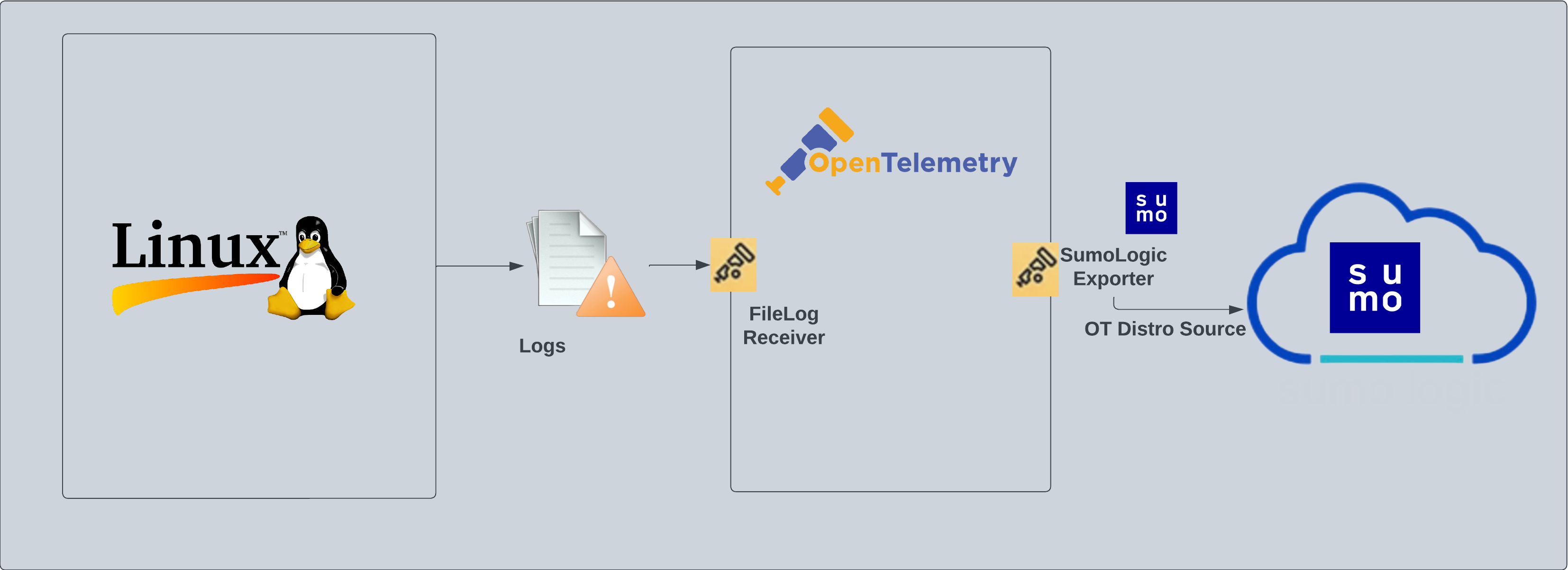 ## Fields created in Sumo Logic for Linux PCI Compliance
Following tag will be created as part of Linux app installation, if not already present.
- `sumo.datasource`. Has a fixed value of **linux**.
## Prereqisites
This app is based on the following log files from the Ubuntu Linux machine.
- auth.log
- syslog
- daemon.log
- dpkg.log
- kern.log
- CentOS, Amazon Linux, and Red Hat
- audit/audit.log
- secure
- messages
- yum.log
:::note
If you've already configured collection of these log files (for example, during Linux or Linux - Cloud Security Monitoring and Analytics app setup), then no additional log file collection is required. If any of the log files are missing, you can configure the missing file collection in the next step.
:::
### For logs collection
import LogsCollectionPrereqisites from '../../../reuse/apps/logs-collection-prereqisites.md';
## Collection configuration and app installation
:::note
You can skip this section if you have already set up the logs collection through [Linux](/docs/integrations/hosts-operating-systems/opentelemetry/linux-opentelemetry/) or [Linux - Cloud Security Monitoring and Analytics](/docs/integrations/cloud-security-monitoring-analytics/opentelemetry/linux-opentelemetry) app installation. Additional collection is not required as the logs used by this app are already ingested into Sumo Logic.
:::
import ConfigAppInstall from '../../../reuse/apps/opentelemetry/config-app-install.md';
### Step 1: Set up Collector
import SetupColl from '../../../reuse/apps/opentelemetry/set-up-collector.md';
## Fields created in Sumo Logic for Linux PCI Compliance
Following tag will be created as part of Linux app installation, if not already present.
- `sumo.datasource`. Has a fixed value of **linux**.
## Prereqisites
This app is based on the following log files from the Ubuntu Linux machine.
- auth.log
- syslog
- daemon.log
- dpkg.log
- kern.log
- CentOS, Amazon Linux, and Red Hat
- audit/audit.log
- secure
- messages
- yum.log
:::note
If you've already configured collection of these log files (for example, during Linux or Linux - Cloud Security Monitoring and Analytics app setup), then no additional log file collection is required. If any of the log files are missing, you can configure the missing file collection in the next step.
:::
### For logs collection
import LogsCollectionPrereqisites from '../../../reuse/apps/logs-collection-prereqisites.md';
## Collection configuration and app installation
:::note
You can skip this section if you have already set up the logs collection through [Linux](/docs/integrations/hosts-operating-systems/opentelemetry/linux-opentelemetry/) or [Linux - Cloud Security Monitoring and Analytics](/docs/integrations/cloud-security-monitoring-analytics/opentelemetry/linux-opentelemetry) app installation. Additional collection is not required as the logs used by this app are already ingested into Sumo Logic.
:::
import ConfigAppInstall from '../../../reuse/apps/opentelemetry/config-app-install.md';
### Step 1: Set up Collector
import SetupColl from '../../../reuse/apps/opentelemetry/set-up-collector.md';
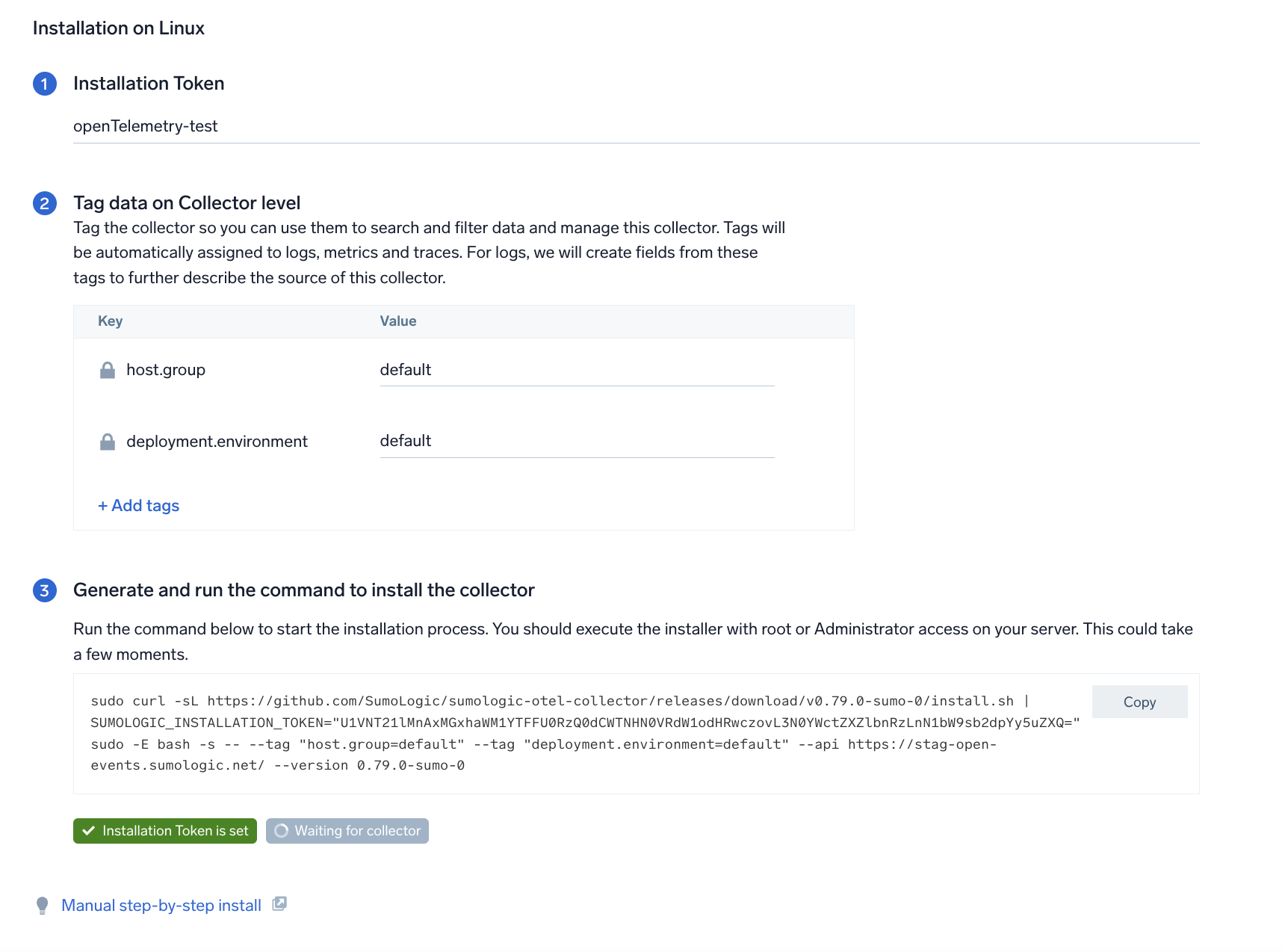 ### Step 2: Configure integration
In this step, you will configure the yaml required for Linux Collection. The app requires path for system log file based on the Linux version used.
#### Required Logs for Ubuntu
The following logs, located in the `/var/log` folder, are required for using the Sumo Logic app for PCI compliance for Linux with Ubuntu.
- auth.log
- syslog
- daemon.log
- dpkg.log
- kern.log
#### Required Logs for CentOS, Amazon Linux, and Red Hat
The following logs, located in the `/var/log` folder, are required for using the Sumo Logic app for PCI compliance for Linux with CentOS, Amazon Linux, and Red Hat.
- audit/audit.log
- secure
- Messages
- yum.log
Click on the **Download YAML File** button to get the yaml file.
import CollectorVersionNote from '../../../reuse/apps/opentelemetry/collector-version-note.md';
### Step 2: Configure integration
In this step, you will configure the yaml required for Linux Collection. The app requires path for system log file based on the Linux version used.
#### Required Logs for Ubuntu
The following logs, located in the `/var/log` folder, are required for using the Sumo Logic app for PCI compliance for Linux with Ubuntu.
- auth.log
- syslog
- daemon.log
- dpkg.log
- kern.log
#### Required Logs for CentOS, Amazon Linux, and Red Hat
The following logs, located in the `/var/log` folder, are required for using the Sumo Logic app for PCI compliance for Linux with CentOS, Amazon Linux, and Red Hat.
- audit/audit.log
- secure
- Messages
- yum.log
Click on the **Download YAML File** button to get the yaml file.
import CollectorVersionNote from '../../../reuse/apps/opentelemetry/collector-version-note.md';
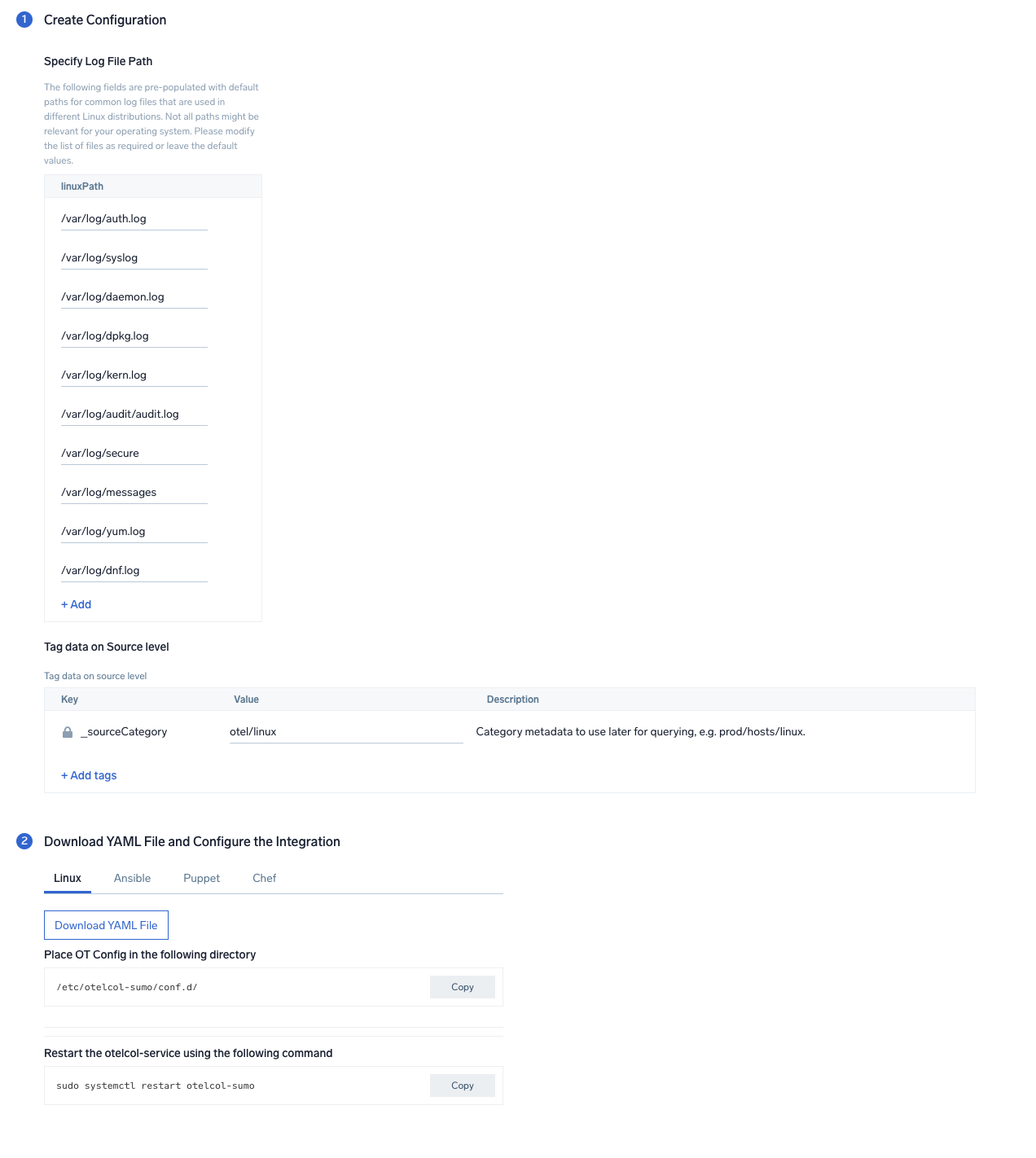 :::note
By default, the path for Linux log files required for all the distros are pre-populated in the UI. (Optional) Unwanted file paths can be removed from the list if the files are not available on your Linux distribution. The collection will work even if not all the files are present in your system.
:::
### Step 3: Send logs to Sumo Logic
import LogsIntro from '../../../reuse/apps/opentelemetry/send-logs-intro.md';
1. Copy the YAML file to `/etc/otelcol-sumo/conf.d/` folder in the Linux instance which needs to be monitored.
2. Restart the collector using:
```sh
sudo systemctl restart otelcol-sumo
```
import ChefNoEnv from '../../../reuse/apps/opentelemetry/chef-without-env.md';
import AnsibleNoEnv from '../../../reuse/apps/opentelemetry/ansible-without-env.md';
import PuppetNoEnv from '../../../reuse/apps/opentelemetry/puppet-without-env.md';
import LogsOutro from '../../../reuse/apps/opentelemetry/send-logs-outro.md';
## Sample log messages
```
Jun 28 07:46:03 bruno-supercomputer useradd[1602]: new account added - account=root1, uid=1002, gid=100, home=/home/root1, shell=/bin/bash, by=0
```
## Sample queries
```sql
sumo.datasource=linux deployment.environment=* host.group=* host.name=* "useradd" and ("new user" or "new account")
| parse regex "\S*\s+\d+\s+\d+:\d+:\d+\s+(?<_sourceHost>\S+)\s+\w*" nodrop
| parse regex "\S*\s+\d+\s+\d+:\d+:\d+\s+(?\S*)\s+(?\w*)(?:\[\d+\]:|:)\s*(?.+)$" nodrop
| parse field=msg "name=*, UID=" as dest_user nodrop
| parse field=msg "name=*, UID=*, GID=*, home=*, shell=*" as dest_user, UID, GID, home, shell nodrop
| parse field=msg ", shell=*\"" as shell nodrop
| parse field=msg "account=*, uid=*, gid=*, home=*, shell=*" as dest_user, UID, GID, home, shell nodrop
| parse field=msg "account=*, uid=" as dest_user nodrop
| "Local Server" as type | _sourceHost as dest_ip
| timeslice 15m
|where if ("{{dest_host}}" = "*", true, dest_host matches "{{dest_host}}") AND if ("{{dest_user}}" = "*", true, dest_user matches "{{dest_user}}") AND if ("{{process}}" = "*", true, process matches "{{process}}")
|count as eventCount by _timeslice, dest_host, dest_user, process, UID, GID, home, shell, type
| fields -eventCount
| sort by _timeslice
```
## Viewing PCI Compliance for Linux dashboards
import FilterDashboards from '../../../reuse/filter-dashboards.md';
### Account, User, System Monitoring
The **PCI Compliance for Linux - PCI Requirements 02, 07, 08, 10 - Account, User, System Monitoring** dashboard meets PCI Requirements 02, 07, 08 and 10 by monitoring user accounts and services. This dashboard provides information about user accounts created and deleted, stopped services, running services, and active services over time.
Use this dashboard to:
- Monitor administrative actions (create and delete users) performed by end users.
- Ensure proper services are running on all systems.
- Detect attempts to change the system time.
- Verify the status of critical systems.
:::note
By default, the path for Linux log files required for all the distros are pre-populated in the UI. (Optional) Unwanted file paths can be removed from the list if the files are not available on your Linux distribution. The collection will work even if not all the files are present in your system.
:::
### Step 3: Send logs to Sumo Logic
import LogsIntro from '../../../reuse/apps/opentelemetry/send-logs-intro.md';
1. Copy the YAML file to `/etc/otelcol-sumo/conf.d/` folder in the Linux instance which needs to be monitored.
2. Restart the collector using:
```sh
sudo systemctl restart otelcol-sumo
```
import ChefNoEnv from '../../../reuse/apps/opentelemetry/chef-without-env.md';
import AnsibleNoEnv from '../../../reuse/apps/opentelemetry/ansible-without-env.md';
import PuppetNoEnv from '../../../reuse/apps/opentelemetry/puppet-without-env.md';
import LogsOutro from '../../../reuse/apps/opentelemetry/send-logs-outro.md';
## Sample log messages
```
Jun 28 07:46:03 bruno-supercomputer useradd[1602]: new account added - account=root1, uid=1002, gid=100, home=/home/root1, shell=/bin/bash, by=0
```
## Sample queries
```sql
sumo.datasource=linux deployment.environment=* host.group=* host.name=* "useradd" and ("new user" or "new account")
| parse regex "\S*\s+\d+\s+\d+:\d+:\d+\s+(?<_sourceHost>\S+)\s+\w*" nodrop
| parse regex "\S*\s+\d+\s+\d+:\d+:\d+\s+(?\S*)\s+(?\w*)(?:\[\d+\]:|:)\s*(?.+)$" nodrop
| parse field=msg "name=*, UID=" as dest_user nodrop
| parse field=msg "name=*, UID=*, GID=*, home=*, shell=*" as dest_user, UID, GID, home, shell nodrop
| parse field=msg ", shell=*\"" as shell nodrop
| parse field=msg "account=*, uid=*, gid=*, home=*, shell=*" as dest_user, UID, GID, home, shell nodrop
| parse field=msg "account=*, uid=" as dest_user nodrop
| "Local Server" as type | _sourceHost as dest_ip
| timeslice 15m
|where if ("{{dest_host}}" = "*", true, dest_host matches "{{dest_host}}") AND if ("{{dest_user}}" = "*", true, dest_user matches "{{dest_user}}") AND if ("{{process}}" = "*", true, process matches "{{process}}")
|count as eventCount by _timeslice, dest_host, dest_user, process, UID, GID, home, shell, type
| fields -eventCount
| sort by _timeslice
```
## Viewing PCI Compliance for Linux dashboards
import FilterDashboards from '../../../reuse/filter-dashboards.md';
### Account, User, System Monitoring
The **PCI Compliance for Linux - PCI Requirements 02, 07, 08, 10 - Account, User, System Monitoring** dashboard meets PCI Requirements 02, 07, 08 and 10 by monitoring user accounts and services. This dashboard provides information about user accounts created and deleted, stopped services, running services, and active services over time.
Use this dashboard to:
- Monitor administrative actions (create and delete users) performed by end users.
- Ensure proper services are running on all systems.
- Detect attempts to change the system time.
- Verify the status of critical systems.
}) ### Login Activity
The **PCI Compliance for Linux - PCI Requirements 02, 10 - Login Activity** dashboard meets PCI Requirements 02 and 10 by tracking login activity. This dashboard provides information about failed and successful logins of users and super-user.
Use this dashboard to:
- Monitor access to the cardholder data environment.
- Monitor failed and successful user logins.
### Login Activity
The **PCI Compliance for Linux - PCI Requirements 02, 10 - Login Activity** dashboard meets PCI Requirements 02 and 10 by tracking login activity. This dashboard provides information about failed and successful logins of users and super-user.
Use this dashboard to:
- Monitor access to the cardholder data environment.
- Monitor failed and successful user logins.
}) ### Privileged Activity
The **PCI Compliance for Linux - PCI Requirements 10 - Privileged Activity** dashboard meets PCI Requirement 10. This dashboard provides information about total sudo attempts, failed sudo attempts, top 10 users and hosts that have issued sudo attempts, recent sudo attempts, and sudo attempts over time.
Use this dashboard to:
- Monitor successful and failed access attempts to systems with administrative privileges.
- Monitor actions performed by users with administrative privileges.
### Privileged Activity
The **PCI Compliance for Linux - PCI Requirements 10 - Privileged Activity** dashboard meets PCI Requirement 10. This dashboard provides information about total sudo attempts, failed sudo attempts, top 10 users and hosts that have issued sudo attempts, recent sudo attempts, and sudo attempts over time.
Use this dashboard to:
- Monitor successful and failed access attempts to systems with administrative privileges.
- Monitor actions performed by users with administrative privileges.
}) ## Create monitors for PCI Compliance for Linux app
import CreateMonitors from '../../../reuse/apps/create-monitors.md';
### PCI Compliance for Linux alerts
| Name | Description | Alert Condition | Recover Condition |
|:--|:--|:--|:--|
| `PCI Linux - Excessive Failed Authentication` | This alert is triggered when multiple failed login attempts are detected over a 5-minute period, indicating potential brute force attempts and addressing PCI Requirement `10.2.4` for invalid logical access attempts. | Count > 5 | Count < = 5 |
| `PCI Linux - Privileged User Account Changes` | This alert is triggered when privileged user accounts (UID < 1000 or root accounts) are created, deleted, or modified, addressing PCI Requirement `10.2.5` for changes to identification and authentication mechanisms. | Count > 0 | Count < = 0 |
| `PCI Linux - Unauthorized Sudo Elevation` | This alert is triggered when unauthorized users attempt to use sudo is detected, which addresses PCI Requirement `7.2.0` for implementing an access control system among system components with multiple users. | Count > 2 | Count < = 2 |
## Create monitors for PCI Compliance for Linux app
import CreateMonitors from '../../../reuse/apps/create-monitors.md';
### PCI Compliance for Linux alerts
| Name | Description | Alert Condition | Recover Condition |
|:--|:--|:--|:--|
| `PCI Linux - Excessive Failed Authentication` | This alert is triggered when multiple failed login attempts are detected over a 5-minute period, indicating potential brute force attempts and addressing PCI Requirement `10.2.4` for invalid logical access attempts. | Count > 5 | Count < = 5 |
| `PCI Linux - Privileged User Account Changes` | This alert is triggered when privileged user accounts (UID < 1000 or root accounts) are created, deleted, or modified, addressing PCI Requirement `10.2.5` for changes to identification and authentication mechanisms. | Count > 0 | Count < = 0 |
| `PCI Linux - Unauthorized Sudo Elevation` | This alert is triggered when unauthorized users attempt to use sudo is detected, which addresses PCI Requirement `7.2.0` for implementing an access control system among system components with multiple users. | Count > 2 | Count < = 2 |