---
id: chatgpt-compliance
title: ChatGPT Compliance
sidebar_label: ChatGPT Compliance
description: The Sumo Logic app for ChatGPT Compliance gives you a unified view of AI usage, enabling transparent oversight, data protection, and adherence to corporate governance standards.
slug: /help/docs/integrations/saas-cloud/chatgpt-compliance/
canonical: https://www.sumologic.com/help/docs/integrations/saas-cloud/chatgpt-compliance/
---
import useBaseUrl from '@docusaurus/useBaseUrl';
}) The Sumo Logic app for ChatGPT Compliance enables you to uphold security, transparency, and accountability in your use of AI-powered conversations across teams and departments by centralizing compliance and audit data from ChatGPT Workspace environments. You can monitor the usage, review conversation activity, and ensure adherence to corporate governance and data protection standards.
This app provides visibility into how ChatGPT is used across your organization, identifying interaction patterns, data-sharing behaviors, and potential policy or compliance risks by leveraging detailed metadata, content insights, and audit trails. This transparency supports proactive oversight, risk mitigation, and regulatory alignment.
Comprehensive dashboards and visualizations provide a holistic view of your organization’s AI interaction posture, highlighting activity trends, message-level insights, and data sensitivity indicators, to help compliance teams detect irregularities, enforce responsible AI policies, and protect proprietary information, while enabling leadership to strengthen governance, safeguard data integrity, and maintain trust in responsible technology use.
## Log types
This app uses Sumo Logic’s [ChatGPT Compliance Source](/docs/send-data/hosted-collectors/cloud-to-cloud-integration-framework/chatgpt-compliance-source/) to collect the conversation logs from the ChatGPT Compliance platform.
## Sample log message
The Sumo Logic app for ChatGPT Compliance enables you to uphold security, transparency, and accountability in your use of AI-powered conversations across teams and departments by centralizing compliance and audit data from ChatGPT Workspace environments. You can monitor the usage, review conversation activity, and ensure adherence to corporate governance and data protection standards.
This app provides visibility into how ChatGPT is used across your organization, identifying interaction patterns, data-sharing behaviors, and potential policy or compliance risks by leveraging detailed metadata, content insights, and audit trails. This transparency supports proactive oversight, risk mitigation, and regulatory alignment.
Comprehensive dashboards and visualizations provide a holistic view of your organization’s AI interaction posture, highlighting activity trends, message-level insights, and data sensitivity indicators, to help compliance teams detect irregularities, enforce responsible AI policies, and protect proprietary information, while enabling leadership to strengthen governance, safeguard data integrity, and maintain trust in responsible technology use.
## Log types
This app uses Sumo Logic’s [ChatGPT Compliance Source](/docs/send-data/hosted-collectors/cloud-to-cloud-integration-framework/chatgpt-compliance-source/) to collect the conversation logs from the ChatGPT Compliance platform.
## Sample log message
Conversation Log
```json
{
"event_id": "7c9e3b1d-4d74-4f6c-a84f-5f9d0baf6d91",
"type": "CONVERSATION_MESSAGE",
"timestamp": "2026-03-18T14:27:45.123456Z",
"principal": {
"id": "workspace-9a8b7c6d",
"type": "CHATGPT_WORKSPACE"
},
"actor": {
"type": "ACCOUNT_USER",
"user_id": "user-XyZ987654321",
"user_email": "analyst@example.com"
},
"message": {
"id": "msg-789456",
"author": {
"type": "assistant",
"model": "gpt-5.2-pro",
"tools_used": [
"browser",
"python"
]
},
"content": {
"type": "text",
"value": "I reviewed the uploaded report and found three key risks. See the cited report and reference URLs below.",
"annotations": [
{
"type": "url_citation",
"urls": [
"https://docs.example.com/risk-framework",
"https://status.example.com/incidents/123"
]
},
{
"type": "file_citation",
"files": [
{
"id": "file-risk-report-001",
"name": "enterprise-risk-report.pdf"
}
]
},
{
"type": "quotation",
"file_id": "file-risk-report-001",
"file_name": "enterprise-risk-report.pdf",
"quote": "Third-party vendor outages remain a significant operational risk."
}
]
},
"files": [
{
"id": "file-risk-report-001",
"name": "enterprise-risk-report.pdf"
},
{
"id": "file-spreadsheet-002",
"name": "risk-register.xlsx"
}
]
},
"conversation": {
"id": "convo-20260318-001",
"title": "Enterprise Risk Assessment Review",
"gpt_id": "g-risk-assistant",
"gpt_name": "Risk Analysis Assistant",
"project_id": "proj-risk-001",
"project_name": "Risk Management Program",
"created_at": "2026-03-18T13:55:10Z",
"is_pinned": true,
"is_temporary_chat": false
}
}
```
## Sample queries
```sumo title="Messages by Content Type"
_sourceCategory=GPT
// Common parsing fields
| json "actor.user_id","actor.user_email","timestamp","message.author.type","message.author.model","message.author.tools_used[*]","message.content.type","message.content.value","conversation.gpt_id" as user_id,user_email,timestamp,author_type,model,tools_used,message_type,message_value,gpt_id nodrop
// Dashboard Variable Check
| where user_email = "{{user}}" or "{{user}}" = "*"
| where author_type = "{{author_type}}" or "{{author_type}}" = "*"
| where "{{tool}}"="*" or tools_used contains "{{tool}}"
| where model = "{{model}}" or "{{model}}" = "*"
| where gpt_id = "{{custom_gpt}}" or "{{custom_gpt}}" = "*"
// Panel Logic
| where !isBlank(message_type)
| count by message_id, message_type
| count by message_type
| sort by _count, message_type
```
```sumo title="Messages by Author Type"
_sourceCategory=GPT
// Common parsing fields
| json "actor.user_id","actor.user_email","timestamp","message.author.type","message.author.model","message.author.tools_used[*]","message.content.type","message.content.value","conversation.gpt_id" as user_id,user_email,timestamp,author_type,model,tools_used,message_type,message_value,gpt_id nodrop
// Dashboard Variable Check
| where user_email = "{{user}}" or "{{user}}" = "*"
| where "{{tool}}"="*" or tools_used contains "{{tool}}"
| where model = "{{model}}" or "{{model}}" = "*"
| where gpt_id = "{{custom_gpt}}" or "{{custom_gpt}}" = "*"
| where message_type = "{{message_type}}" or "{{message_type}}" = "*"
// Panel Logic
| where !isBlank(author_type)
| count by message_id, author_type
| count by author_type
| sort by _count, author_type
```
```sumo title="Top 10 Users by Conversations"
_sourceCategory=GPT
// Common parsing fields
| json "actor.user_id","actor.user_email","timestamp","message.author.type","message.author.model","message.author.tools_used[*]","message.content.type","message.content.value","conversation.gpt_id","conversation.gpt_name","message.id","conversation.id" as user_id,user_email,timestamp,author_type,model,tools_used,message_type,message_value,gpt_id,gpt_name,message_id,id nodrop
// Dashboard Variable Check
| where author_type = "{{author_type}}" or "{{author_type}}" = "*"
| where "{{tool}}"="*" or tools_used contains "{{tool}}"
| where model = "{{model}}" or "{{model}}" = "*"
| where gpt_id = "{{custom_gpt}}" or "{{custom_gpt}}" = "*"
| where message_type = "{{message_type}}" or "{{message_type}}" = "*"
// Panel Logic
| where !isBlank(user_id) and !isBlank(user_email)
| count by id, user_id, user_email
| count as frequency by user_id, user_email
| sort by frequency
| limit 10
```
## Collection configuration and app installation
import CollectionConfiguration from '../../reuse/apps/collection-configuration.md';
:::important
Use the [Cloud-to-Cloud Integration for ChatGPT Compliance](/docs/send-data/hosted-collectors/cloud-to-cloud-integration-framework/chatgpt-compliance-source/) to create the source and use the same source category while installing the app. By following these steps, you can ensure that your ChatGPT Compliance app is properly integrated and configured to collect and analyze your ChatGPT Compliance data.
:::
### Create a new collector and install the app
import AppCollectionOPtion1 from '../../reuse/apps/app-collection-option-1.md';
### Use an existing collector and install the app
import AppCollectionOPtion2 from '../../reuse/apps/app-collection-option-2.md';
### Use an existing source and install the app
import AppCollectionOPtion3 from '../../reuse/apps/app-collection-option-3.md';
## Viewing the ChatGPT Compliance dashboards
import ViewDashboards from '../../reuse/apps/view-dashboards.md';
### Security
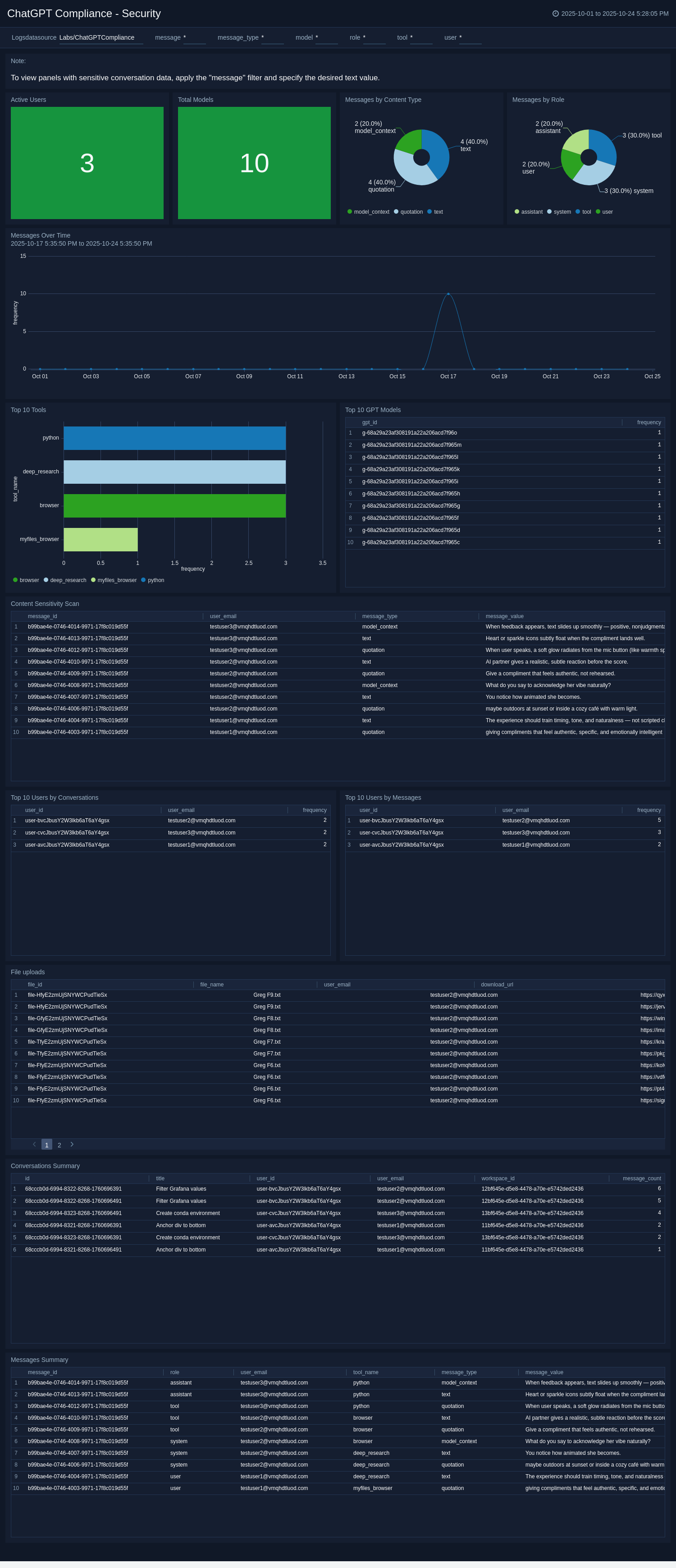
The **ChatGPT Compliance – Security** dashboard offers a comprehensive view of ChatGPT usage and interaction patterns across your organization, enabling compliance and security teams to monitor activity, assess AI adoption, and uphold responsible data governance. Interactive visualizations reveal key metrics, including active users, model utilization, message volume, and content types.
Panels like *Top 10 Users by Conversations* and *Top 10 Users by Messages* highlight the most active participants, enabling administrators to identify behavioral trends and usage patterns, supporting policy alignment and informed decisions on model governance and optimization. Time-series views, such as the *Messages Over Time* panel, track engagement over time to detect spikes or anomalies. Meanwhile, *File Uploads*, *Conversations Summaries*, and *Messages Summaries* centralize interaction metrics for streamlined monitoring and audit readiness. The *Content Sensitivity Scan* further strengthens oversight by flagging messages with potentially sensitive or regulated data for prompt risk mitigation.
By unifying user activity, data sensitivity, and model usage insights in a single dynamic interface, this dashboard delivers the visibility and control needed to ensure transparency, responsible AI use, and compliance across your organization.
 ## Upgrading/Downgrading the ChatGPT Compliance app (Optional)
import AppUpdate from '../../reuse/apps/app-update.md';
## Uninstalling the ChatGPT Compliance app (Optional)
import AppUninstall from '../../reuse/apps/app-uninstall.md';
## Upgrading/Downgrading the ChatGPT Compliance app (Optional)
import AppUpdate from '../../reuse/apps/app-update.md';
## Uninstalling the ChatGPT Compliance app (Optional)
import AppUninstall from '../../reuse/apps/app-uninstall.md';