---
id: cyberark-epm
title: CyberArk EPM
sidebar_label: CyberArk EPM
description: The Sumo Logic app for CyberArk EPM provides visibility into endpoint privilege events, policy enforcement, script activity, and identity risk.
slug: /help/docs/integrations/saas-cloud/cyberark-epm/
canonical: https://www.sumologic.com/help/docs/integrations/saas-cloud/cyberark-epm/
---
import useBaseUrl from '@docusaurus/useBaseUrl';
}) The Sumo Logic app for CyberArk EPM provides comprehensive visibility into endpoint privilege management events, policy enforcement outcomes, script activity, administrative audit trails, and user and endpoint risk signals. The app consists of seven predefined dashboards covering overview, administrative audit, application trust, privilege elevation, policy compliance, endpoint risk, and script monitoring.
## Log types
This app uses Sumo Logic's [CyberArk EPM Source](/docs/send-data/hosted-collectors/cloud-to-cloud-integration-framework/cyberark-source/) to collect endpoint privilege and policy audit logs from CyberArk EPM.
The app analyzes these event streams:
- Administrative audit events.
- Detailed raw events.
- Aggregated policy audit events.
- Policy audit raw events.
- Aggregated events.
### Sample log message
```json
{
"eventType": "StartElevated",
"policyAction": "Elevate",
"policyName": "Allow Approved IT Tools",
"userName": "jane.doe",
"userIsAdmin": "false",
"computerName": "WS-1024",
"fileName": "powershell.exe",
"filePath": "C:\\Windows\\System32\\WindowsPowerShell\\v1.0\\powershell.exe",
"publisher": "Microsoft Corporation",
"sourceType": "Internet",
"applicationType": "Executable",
"arguments": "-ExecutionPolicy Bypass -File install.ps1",
"lastEventDate": "2026-05-28T14:32:10Z"
}
```
### Sample queries
```sumo title="Total Elevation Events"
_sourceCategory=Labs/CyberArkEPM eventType StartElevated
| json "eventType", "userName", "computerName", "publisher", "sourceType" as event_type, user_name, computer_name, publisher, source_type nodrop
| where event_type = "StartElevated"
| count
```
## Collection configuration and app installation
import CollectionConfiguration from '../../reuse/apps/collection-configuration.md';
:::important
Use the [Cloud-to-Cloud Integration for CyberArk EPM](/docs/send-data/hosted-collectors/cloud-to-cloud-integration-framework/cyberark-source/) to create the source and use the same source category while installing the app. By following these steps, you can ensure that your CyberArk EPM app is properly integrated and configured to collect and analyze your CyberArk EPM data.
:::
### Create a new collector and install the app
import AppCollectionOPtion1 from '../../reuse/apps/app-collection-option-1.md';
### Use an existing collector and install the app
import AppCollectionOPtion2 from '../../reuse/apps/app-collection-option-2.md';
### Use an existing source and install the app
import AppCollectionOPtion3 from '../../reuse/apps/app-collection-option-3.md';
## Viewing CyberArk EPM dashboards
import ViewDashboards from '../../reuse/apps/view-dashboards.md';
### Overview
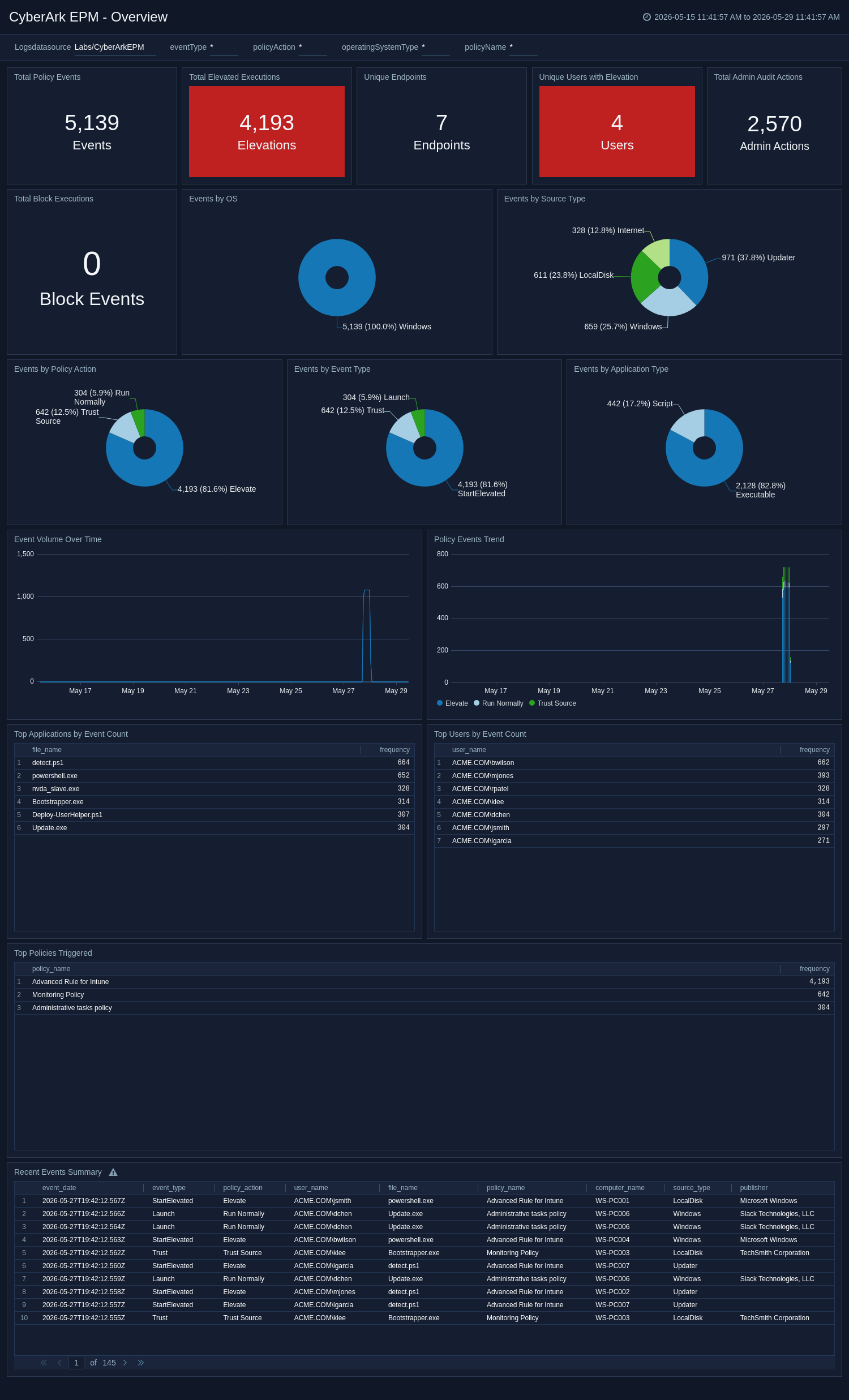
The **CyberArk EPM - Overview** dashboard provides a high-level security posture view of all EPM activity across log types, including total events, policy actions, event type distribution, application types, source types, event volume trends, and top users and applications.
The Sumo Logic app for CyberArk EPM provides comprehensive visibility into endpoint privilege management events, policy enforcement outcomes, script activity, administrative audit trails, and user and endpoint risk signals. The app consists of seven predefined dashboards covering overview, administrative audit, application trust, privilege elevation, policy compliance, endpoint risk, and script monitoring.
## Log types
This app uses Sumo Logic's [CyberArk EPM Source](/docs/send-data/hosted-collectors/cloud-to-cloud-integration-framework/cyberark-source/) to collect endpoint privilege and policy audit logs from CyberArk EPM.
The app analyzes these event streams:
- Administrative audit events.
- Detailed raw events.
- Aggregated policy audit events.
- Policy audit raw events.
- Aggregated events.
### Sample log message
```json
{
"eventType": "StartElevated",
"policyAction": "Elevate",
"policyName": "Allow Approved IT Tools",
"userName": "jane.doe",
"userIsAdmin": "false",
"computerName": "WS-1024",
"fileName": "powershell.exe",
"filePath": "C:\\Windows\\System32\\WindowsPowerShell\\v1.0\\powershell.exe",
"publisher": "Microsoft Corporation",
"sourceType": "Internet",
"applicationType": "Executable",
"arguments": "-ExecutionPolicy Bypass -File install.ps1",
"lastEventDate": "2026-05-28T14:32:10Z"
}
```
### Sample queries
```sumo title="Total Elevation Events"
_sourceCategory=Labs/CyberArkEPM eventType StartElevated
| json "eventType", "userName", "computerName", "publisher", "sourceType" as event_type, user_name, computer_name, publisher, source_type nodrop
| where event_type = "StartElevated"
| count
```
## Collection configuration and app installation
import CollectionConfiguration from '../../reuse/apps/collection-configuration.md';
:::important
Use the [Cloud-to-Cloud Integration for CyberArk EPM](/docs/send-data/hosted-collectors/cloud-to-cloud-integration-framework/cyberark-source/) to create the source and use the same source category while installing the app. By following these steps, you can ensure that your CyberArk EPM app is properly integrated and configured to collect and analyze your CyberArk EPM data.
:::
### Create a new collector and install the app
import AppCollectionOPtion1 from '../../reuse/apps/app-collection-option-1.md';
### Use an existing collector and install the app
import AppCollectionOPtion2 from '../../reuse/apps/app-collection-option-2.md';
### Use an existing source and install the app
import AppCollectionOPtion3 from '../../reuse/apps/app-collection-option-3.md';
## Viewing CyberArk EPM dashboards
import ViewDashboards from '../../reuse/apps/view-dashboards.md';
### Overview
The **CyberArk EPM - Overview** dashboard provides a high-level security posture view of all EPM activity across log types, including total events, policy actions, event type distribution, application types, source types, event volume trends, and top users and applications.
 ### Administrative Audit
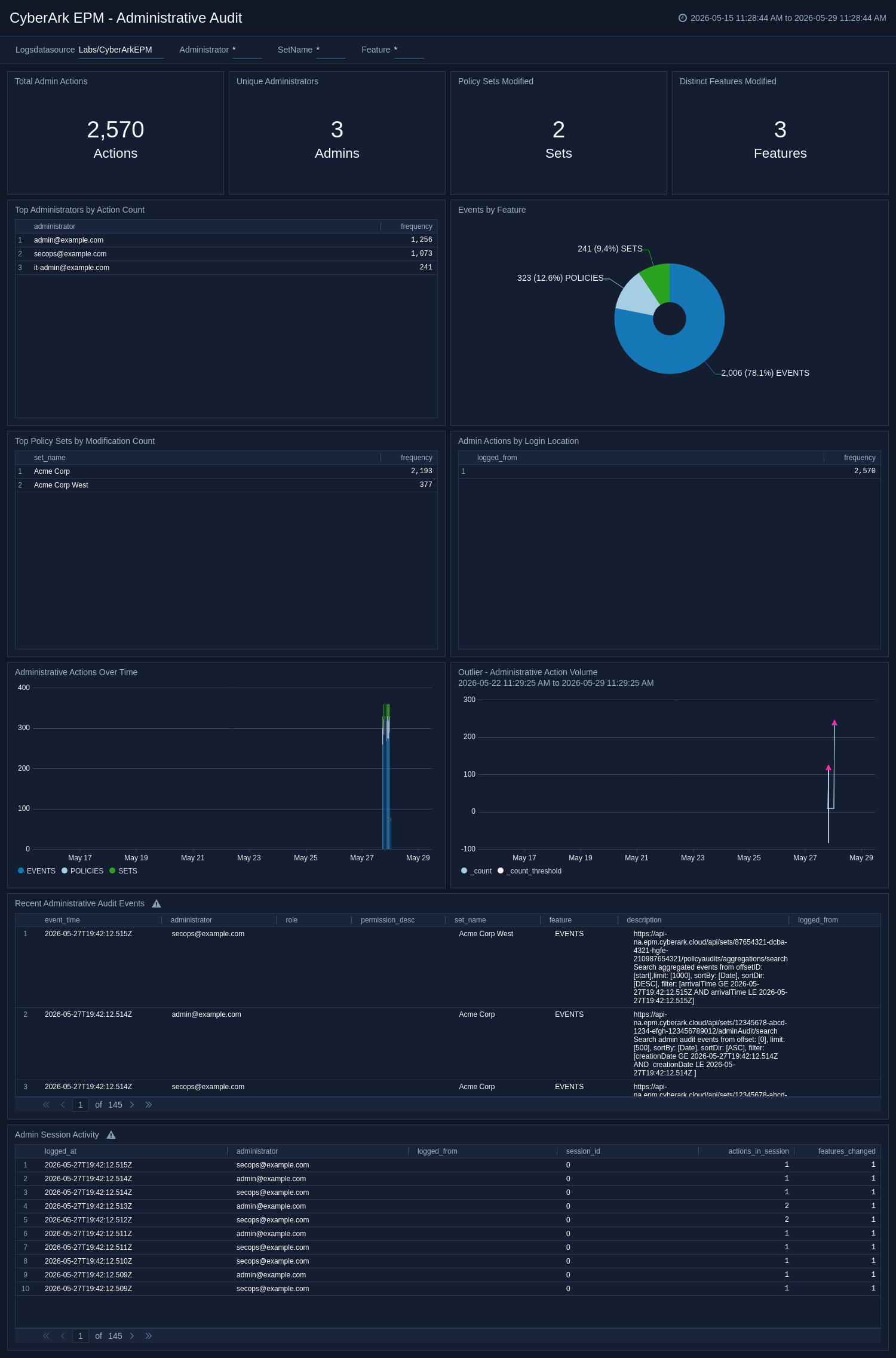
The **CyberArk EPM - Administrative Audit** dashboard monitors administrative actions in the CyberArk EPM console, tracks policy set changes and role-based access modifications, and provides visibility into who makes configuration changes and from where.
### Administrative Audit
The **CyberArk EPM - Administrative Audit** dashboard monitors administrative actions in the CyberArk EPM console, tracks policy set changes and role-based access modifications, and provides visibility into who makes configuration changes and from where.
 ### Application Control & Trust
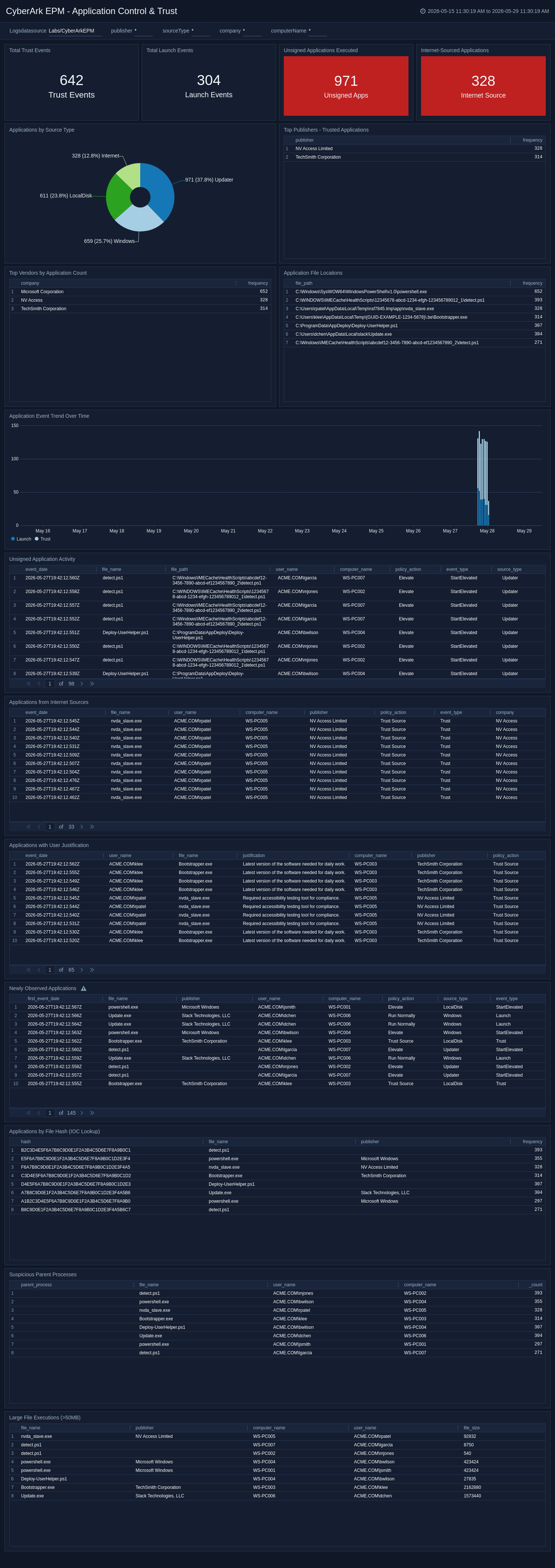
The **CyberArk EPM - Application Control & Trust** dashboard monitors application trust decisions, tracks software from untrusted sources, identifies unsigned or unknown applications being executed, and detects newly introduced software across endpoints.
### Application Control & Trust
The **CyberArk EPM - Application Control & Trust** dashboard monitors application trust decisions, tracks software from untrusted sources, identifies unsigned or unknown applications being executed, and detects newly introduced software across endpoints.
 ### Privilege Elevation Activity
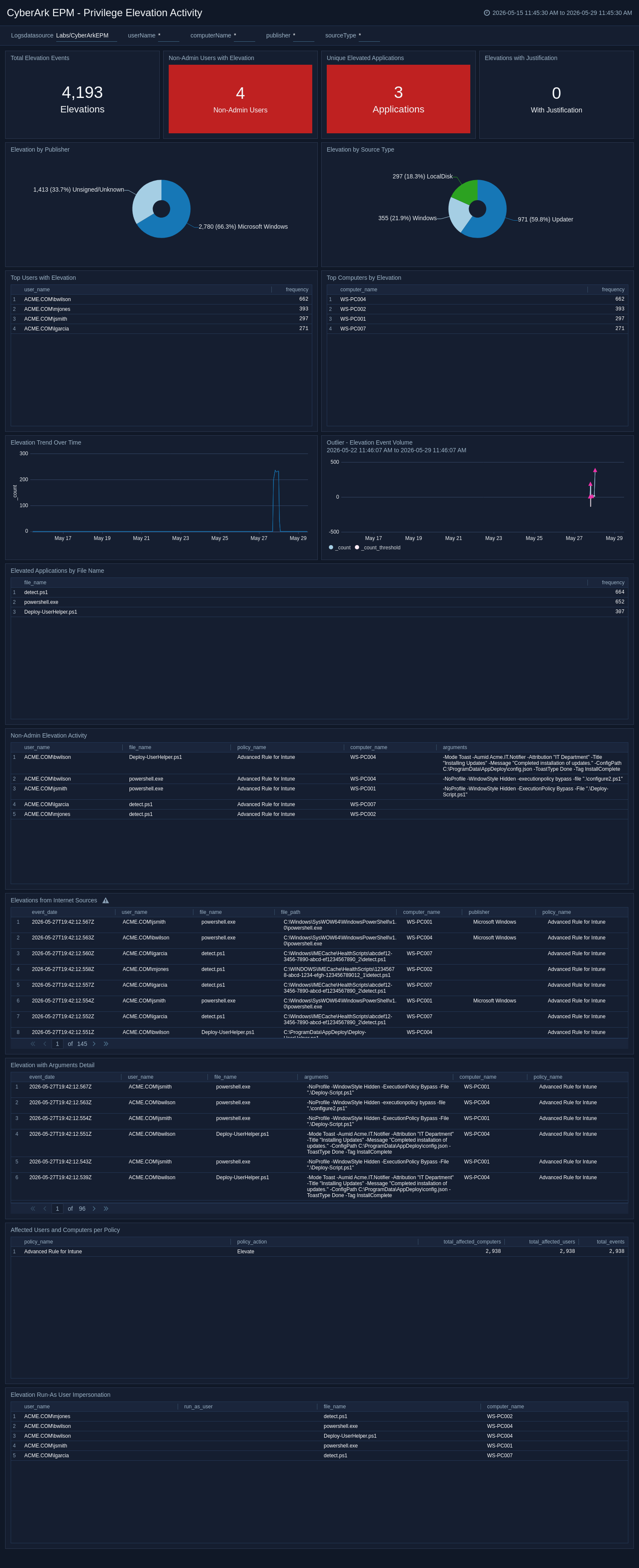
The **CyberArk EPM - Privilege Elevation Activity** dashboard provides deep visibility into privilege elevation activity, including who is elevating, which applications are elevated, source and publisher context, non-admin escalation patterns, and unusual elevation spikes.
### Privilege Elevation Activity
The **CyberArk EPM - Privilege Elevation Activity** dashboard provides deep visibility into privilege elevation activity, including who is elevating, which applications are elevated, source and publisher context, non-admin escalation patterns, and unusual elevation spikes.
 ### Policy Enforcement & Compliance
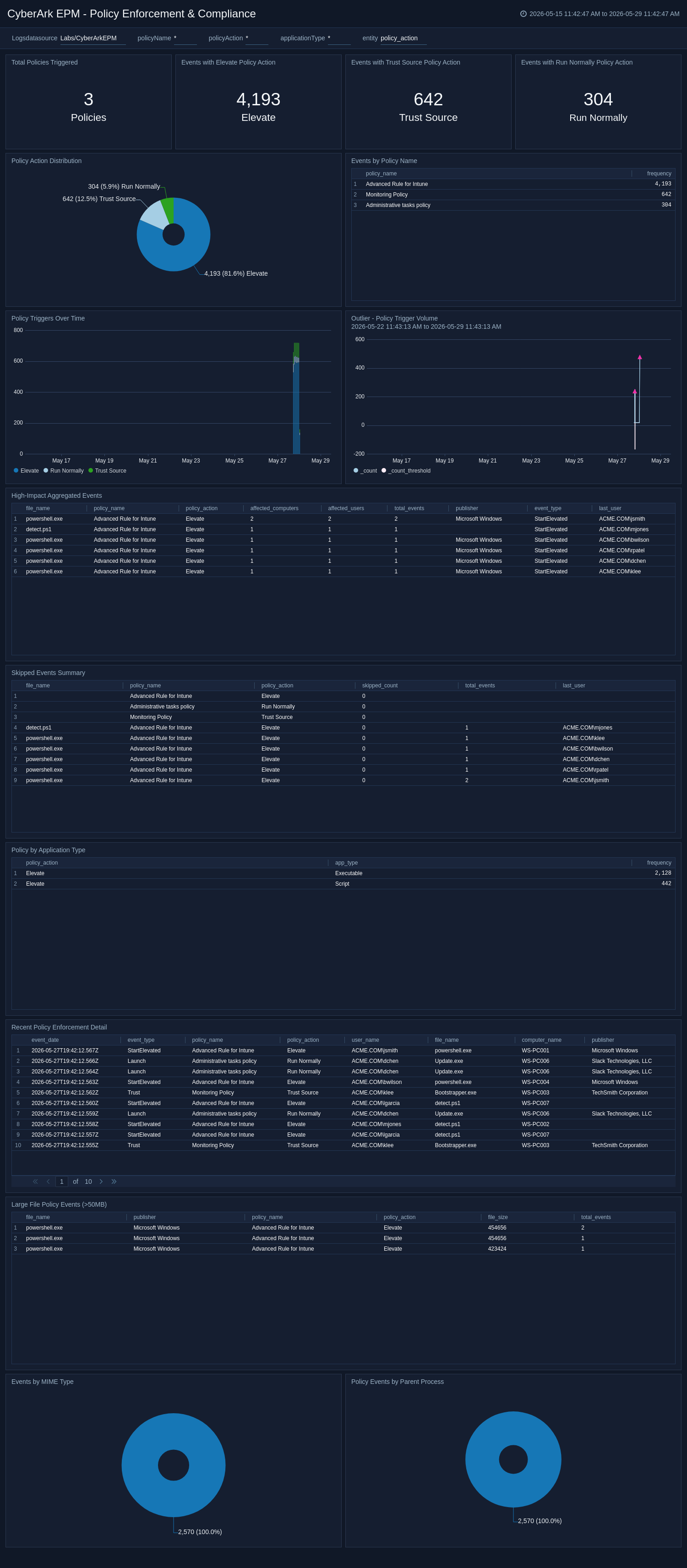
The **CyberArk EPM - Policy Enforcement & Compliance** dashboard monitors policy effectiveness, identifies enforcement gaps, tracks policy action behavior, and surfaces high-impact aggregated events that affect many users or endpoints.
### Policy Enforcement & Compliance
The **CyberArk EPM - Policy Enforcement & Compliance** dashboard monitors policy effectiveness, identifies enforcement gaps, tracks policy action behavior, and surfaces high-impact aggregated events that affect many users or endpoints.
 ### Endpoint and User Risk Analysis
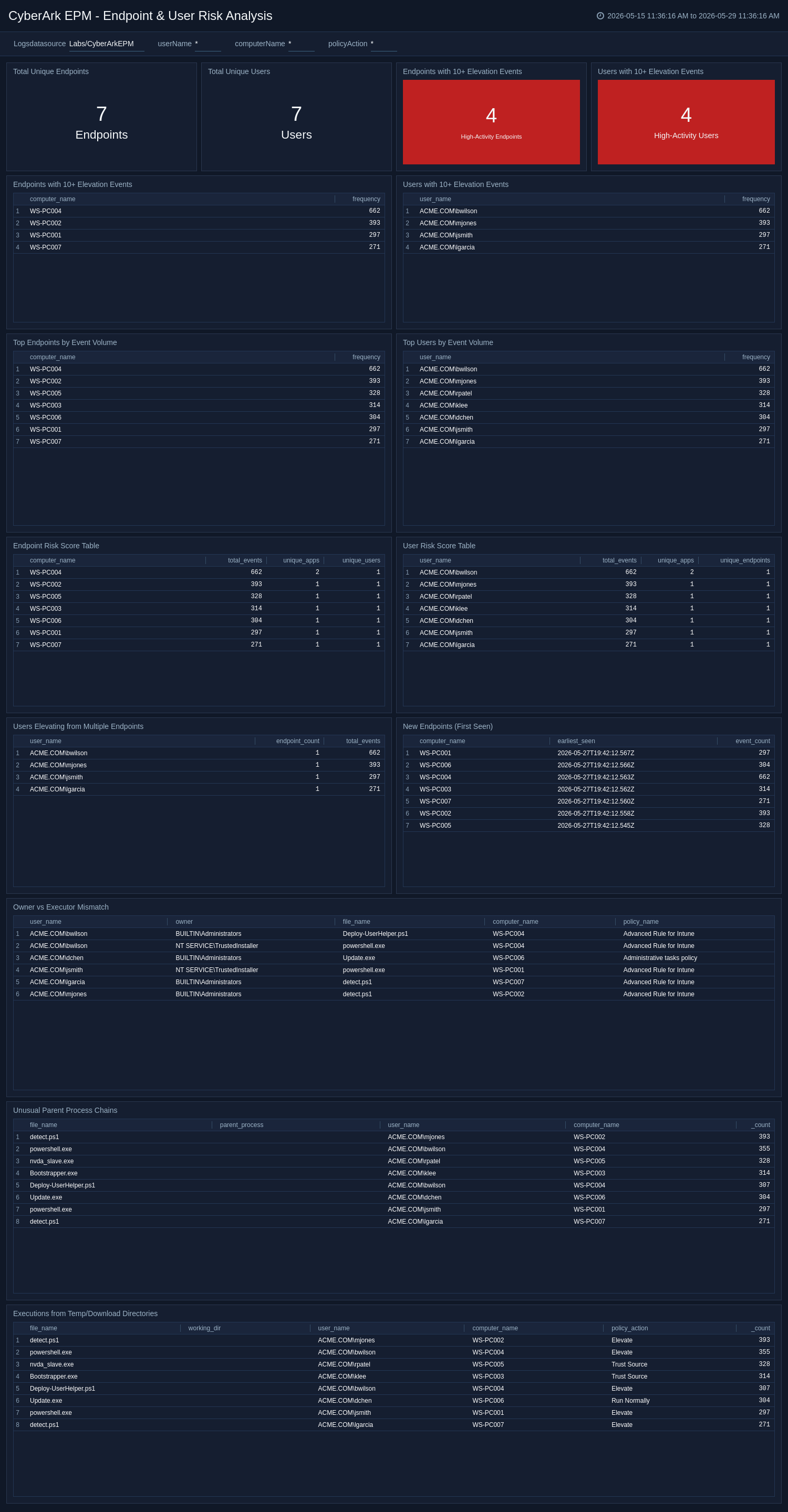
The **CyberArk EPM - Endpoint & User Risk Analysis** dashboard identifies high-risk endpoints and users based on event volume, diversity of applications elevated, lateral movement indicators, and anomalous behavior to support investigation and threat hunting.
### Endpoint and User Risk Analysis
The **CyberArk EPM - Endpoint & User Risk Analysis** dashboard identifies high-risk endpoints and users based on event volume, diversity of applications elevated, lateral movement indicators, and anomalous behavior to support investigation and threat hunting.
 ### Script and PowerShell Monitoring
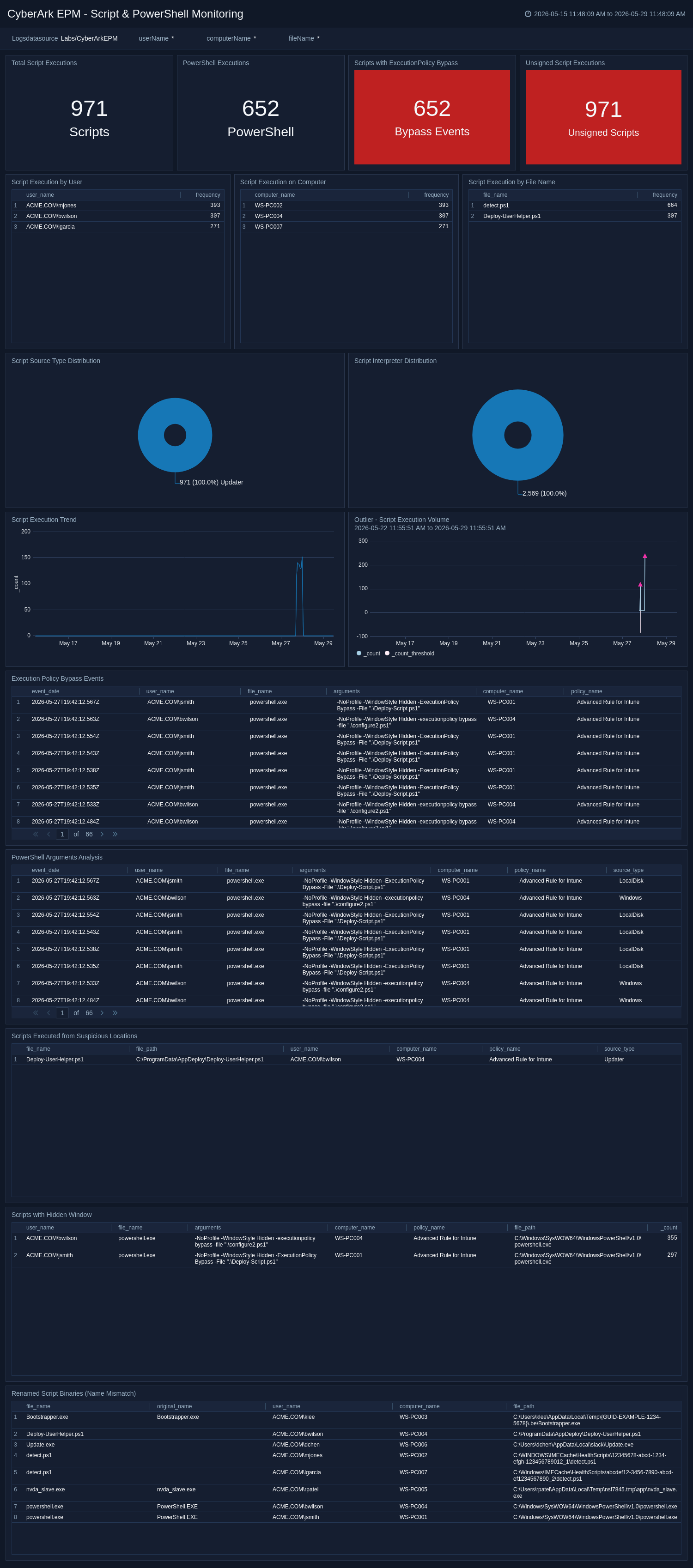
The **CyberArk EPM - Script & PowerShell Monitoring** dashboard focuses on script execution activity, especially PowerShell, and helps detect execution policy bypass attempts, suspicious arguments, unusual script locations, hidden-window evasion, and unsigned script execution.
### Script and PowerShell Monitoring
The **CyberArk EPM - Script & PowerShell Monitoring** dashboard focuses on script execution activity, especially PowerShell, and helps detect execution policy bypass attempts, suspicious arguments, unusual script locations, hidden-window evasion, and unsigned script execution.
 ## Create monitors for the CyberArk EPM app
import CreateMonitors from '../../reuse/apps/create-monitors.md';
### CyberArk EPM app alerts
| Name | Description | Alert Condition | Recover Condition |
|:--|:--|:--|:--|
| `CyberArk EPM - High-Impact Aggregated Events` | This alert is triggered when aggregated policy events affect many users or endpoints. This may indicate broad policy impact, rapid propagation of risky behavior, or large-scale activity that needs immediate review. | Count > 0 | Count < = 0 |
| `CyberArk EPM - Scripts Executed from Suspicious Locations` | This alert is triggered when scripts are executed from unusual directories outside standard Windows or Program Files paths. This may indicate evasive script execution or malicious tooling staged in non-standard locations. | Count > 0 | Count < = 0 |
| `CyberArk EPM - Suspicious Parent Processes Event` | This alert is triggered when process launches are associated with uncommon parent processes instead of typical system parents. This may indicate abnormal process chains or potential abuse of scripting and command interpreters. | Count > 0 | Count < = 0 |
| `CyberArk EPM - Unsigned Application Activity` | This alert is triggered when unsigned or unknown applications execute in your environment. This may indicate unauthorized software, untrusted binaries, or potential malware activity. | Count > 0 | Count < = 0 |
| `CyberArk EPM - Users Elevating from Multiple Endpoints` | This alert is triggered when a user performs elevation activity across multiple endpoints in the monitor window. This may indicate credential misuse, lateral movement, or unusual operational behavior. | Total events > 0 | Total events < = 0 |
| `CyberArk EPM - Execution Policy Bypass Events` | This alert is triggered when script execution arguments include Execution Policy bypass patterns. This may indicate an attempt to circumvent script controls and should be investigated for malicious intent. | Count > 0 | Count < = 0 |
| `CyberArk EPM - Elevation Run-As User Impersonation` | This alert is triggered when elevated processes run under a different account than the initiating user. This may indicate impersonation behavior, privilege misuse, or unauthorized account context switching. | Count > 0 | Count < = 0 |
## Upgrade/Downgrade the CyberArk EPM app (Optional)
import AppUpdate from '../../reuse/apps/app-update.md';
## Uninstalling the CyberArk EPM app (Optional)
import AppUninstall from '../../reuse/apps/app-uninstall.md';
## Create monitors for the CyberArk EPM app
import CreateMonitors from '../../reuse/apps/create-monitors.md';
### CyberArk EPM app alerts
| Name | Description | Alert Condition | Recover Condition |
|:--|:--|:--|:--|
| `CyberArk EPM - High-Impact Aggregated Events` | This alert is triggered when aggregated policy events affect many users or endpoints. This may indicate broad policy impact, rapid propagation of risky behavior, or large-scale activity that needs immediate review. | Count > 0 | Count < = 0 |
| `CyberArk EPM - Scripts Executed from Suspicious Locations` | This alert is triggered when scripts are executed from unusual directories outside standard Windows or Program Files paths. This may indicate evasive script execution or malicious tooling staged in non-standard locations. | Count > 0 | Count < = 0 |
| `CyberArk EPM - Suspicious Parent Processes Event` | This alert is triggered when process launches are associated with uncommon parent processes instead of typical system parents. This may indicate abnormal process chains or potential abuse of scripting and command interpreters. | Count > 0 | Count < = 0 |
| `CyberArk EPM - Unsigned Application Activity` | This alert is triggered when unsigned or unknown applications execute in your environment. This may indicate unauthorized software, untrusted binaries, or potential malware activity. | Count > 0 | Count < = 0 |
| `CyberArk EPM - Users Elevating from Multiple Endpoints` | This alert is triggered when a user performs elevation activity across multiple endpoints in the monitor window. This may indicate credential misuse, lateral movement, or unusual operational behavior. | Total events > 0 | Total events < = 0 |
| `CyberArk EPM - Execution Policy Bypass Events` | This alert is triggered when script execution arguments include Execution Policy bypass patterns. This may indicate an attempt to circumvent script controls and should be investigated for malicious intent. | Count > 0 | Count < = 0 |
| `CyberArk EPM - Elevation Run-As User Impersonation` | This alert is triggered when elevated processes run under a different account than the initiating user. This may indicate impersonation behavior, privilege misuse, or unauthorized account context switching. | Count > 0 | Count < = 0 |
## Upgrade/Downgrade the CyberArk EPM app (Optional)
import AppUpdate from '../../reuse/apps/app-update.md';
## Uninstalling the CyberArk EPM app (Optional)
import AppUninstall from '../../reuse/apps/app-uninstall.md';