---
id: microsoft-graph-azure-ad-reporting
title: Microsoft Graph Azure AD Reporting
sidebar_label: Microsoft Graph Azure AD Reporting
description: The Sumo Logic app for MS Graph Azure AD Reporting helps you to monitor and analyze user activity, sign-in patterns and provisioning activities.
slug: /help/docs/integrations/saas-cloud/microsoft-graph-azure-ad-reporting/
canonical: https://www.sumologic.com/help/docs/integrations/saas-cloud/microsoft-graph-azure-ad-reporting/
---
import useBaseUrl from '@docusaurus/useBaseUrl';
}) The Sumo Logic app for Microsoft Graph Azure AD Reporting enables you to access and monitor data, including audit information, user activity, sign-in patterns, and provisioning activities. It helps you to gain insights into how your organization uses Azure AD and identify potential security issues.
Key features of the Microsoft Graph Azure AD Reporting app include:
- **Analyze Audit Activities**. Provides real-time user activity for every resource category and shows the distribution of audits by operations and services.
- **Monitor Sign-In activities**. Monitor sign-in activities for your organization, including the number of successful and failed sign-ins, sign-ins by user location, sign-ins by application, and sign-ins from risky countries.
- **Identify Suspicious Activities**. Identify suspicious activity, such as sign-ins from unfamiliar/risky locations or multiple sign-in attempts.
- **Analyze Provisioning Activities**. Provides distribution of provisioning activities by status, actions, and initiators. It also shows the most frequent service principals used while provisioning.
## Log types
This app uses Microsoft Graph Azure AD Reporting Source to collect [Audit](https://learn.microsoft.com/en-us/graph/api/resources/directoryaudit?view=graph-rest-1.0), [Sign-in](https://learn.microsoft.com/en-us/graph/api/resources/signin?view=graph-rest-1.0), and [Provisioning](https://learn.microsoft.com/en-us/graph/api/resources/provisioningobjectsummary?view=graph-rest-1.0) activities.
## Sample log messages
The Sumo Logic app for Microsoft Graph Azure AD Reporting enables you to access and monitor data, including audit information, user activity, sign-in patterns, and provisioning activities. It helps you to gain insights into how your organization uses Azure AD and identify potential security issues.
Key features of the Microsoft Graph Azure AD Reporting app include:
- **Analyze Audit Activities**. Provides real-time user activity for every resource category and shows the distribution of audits by operations and services.
- **Monitor Sign-In activities**. Monitor sign-in activities for your organization, including the number of successful and failed sign-ins, sign-ins by user location, sign-ins by application, and sign-ins from risky countries.
- **Identify Suspicious Activities**. Identify suspicious activity, such as sign-ins from unfamiliar/risky locations or multiple sign-in attempts.
- **Analyze Provisioning Activities**. Provides distribution of provisioning activities by status, actions, and initiators. It also shows the most frequent service principals used while provisioning.
## Log types
This app uses Microsoft Graph Azure AD Reporting Source to collect [Audit](https://learn.microsoft.com/en-us/graph/api/resources/directoryaudit?view=graph-rest-1.0), [Sign-in](https://learn.microsoft.com/en-us/graph/api/resources/signin?view=graph-rest-1.0), and [Provisioning](https://learn.microsoft.com/en-us/graph/api/resources/provisioningobjectsummary?view=graph-rest-1.0) activities.
## Sample log messages
Audit Activity Message
```json
{
"_logType": "Directory Audit",
"activityDateTime": "2026-03-24T07:25:02.8022947Z",
"activityDisplayName": "Update device",
"additionalDetails": [
{ "key": "DeviceId", "value": "9ca12f52-e67b-438d-81a6-d027566a4e" },
{ "key": "DeviceOSType", "value": "iOS" },
{ "key": "DeviceTrustType", "value": "Workplace" }
],
"category": "Device",
"correlationId": "91996e57-0c2e-47ef-9b87-0c00c571b9f45",
"id": "Directory_91996e57-0c2e-47ef-9b87-0c0c571b9f45_HB0Y8_85919415",
"initiatedBy": {
"app": {
"appId": null,
"displayName": "Intune Application Protection CA Client",
"servicePrincipalId": "78b7a0c0-9d95-4b82-868e-1ec35530eb02",
"servicePrincipalName": null
},
"user": null
},
"loggedByService": "Core Directory",
"operationType": "Update",
"result": "success",
"resultReason": "",
"targetResources": [
{
"displayName": "iPhone 15 Plus",
"groupType": null,
"id": "46bb479d-f2bb-49c2-88d6-0d8dfaa6ade",
"modifiedProperties": [
{
"displayName": "Included Updated Properties",
"newValue": "\"\"",
"oldValue": null
},
{
"displayName": "TargetId.DeviceTrustType",
"newValue": "\"Workplace\"",
"oldValue": null
}
],
"type": "Device",
"userPrincipalName": null
}
]
}
```
Sign-In Activity
```json
{
"_logType": "Signin",
"appDisplayName": "mindspark_app_services",
"appId": "6b843aee-b82c-42de-813b-b46bdaffae5c",
"appliedConditionalAccessPolicies": [
{
"displayName": "Microsoft-managed: Multifactor authentication and reauthentication for risky sign-ins",
"enforcedGrantControls": [],
"enforcedSessionControls": [],
"id": "3ad74680-bec7-4a49-86e9-e8ba134cf257",
"result": "notEnabled"
},
{
"displayName": "D365 and Crossbeam App Access: Service Accounts Only",
"enforcedGrantControls": [],
"enforcedSessionControls": ["SignInFrequency"],
"id": "3207786d-92a3-4040-b0eb-3399d0871c6f",
"result": "reportOnlyNotApplied"
},
{
"displayName": "Block legacy authentication - test",
"enforcedGrantControls": ["Block"],
"enforcedSessionControls": [],
"id": "f061d024-7f81-49c4-a887-995d08fd8b9a",
"result": "reportOnlyNotApplied"
}
],
"clientAppUsed": "Browser",
"conditionalAccessStatus": "success",
"correlationId": "1955ee1b-09b0-4107-a6bf-e3b4769838dd",
"createdDateTime": "2026-03-24T07:27:02Z",
"deviceDetail": {
"browser": "Edge 146.0.0",
"deviceId": "dbef03a1-c879-4155-83ed-73fe8415f669",
"displayName": "W365-IND-648VX",
"isCompliant": true,
"isManaged": true,
"operatingSystem": "Windows10",
"trustType": "Azure AD joined"
},
"id": "7a556bdc-1fe5-4a4d-88d0-706231e51800",
"ipAddress": "165.85.134.184",
"isInteractive": true,
"location": {
"city": "Singapore",
"countryOrRegion": "SG",
"geoCoordinates": {
"altitude": null,
"latitude": 1.28795,
"longitude": 103.85178
},
"state": "Central Singapore"
},
"resourceDisplayName": "Microsoft Graph",
"resourceId": "00000003-0000-0000-c000-000000000000",
"riskDetail": "none",
"riskEventTypes": [],
"riskEventTypes_v2": [],
"riskLevelAggregated": "none",
"riskLevelDuringSignIn": "none",
"riskState": "none",
"status": {
"additionalDetails": null,
"errorCode": 0,
"failureReason": "Other."
},
"userDisplayName": "Mallaiah Sangi",
"userId": "78e2ab33-67d5-4467-832a-f17b62ecd364",
"userPrincipalName": "mallaiah_sangi@test.com"
}
```
Provisioning Activity
```json
{
"_logType": "Provisioning",
"activityDateTime": "2026-03-24T07:23:47Z",
"changeId": "eea3cad8-26b3-4bb9-8719-ce4affe92801",
"cycleId": "8b52ae4b-53a8-41ef-ae7f-19435028c52a",
"durationInMilliseconds": 91009,
"id": "b504b5fb-38b8-8887-884d-fc4d48f1afab",
"initiatedBy": {
"displayName": "Azure AD Provisioning Service",
"id": "",
"initiatorType": "system"
},
"jobId": "airtable.7584ba9cdd9147459b7eb4de9da3be7b.fa64de6e-a5fe-40fe-bd5c-eb15a3638d3d",
"modifiedProperties": [
{ "displayName": "active", "newValue": "True", "oldValue": null },
{
"displayName": "displayName",
"newValue": "Craig Ranger",
"oldValue": null
},
{
"displayName": "userName",
"newValue": "craig_ranger@test.com",
"oldValue": null
},
{ "displayName": "name.givenName", "newValue": "Craig", "oldValue": null },
{
"displayName": "name.familyName",
"newValue": "Ranger",
"oldValue": null
},
{
"displayName": "name.formatted",
"newValue": "Craig Ranger",
"oldValue": null
}
],
"provisioningAction": "create",
"provisioningStatusInfo": {
"errorInformation": {
"additionalDetails": null,
"errorCategory": "nonServiceFailure",
"errorCode": "SystemForCrossDomainIdentityManagementServiceIncompatibleFiltering",
"reason": "StatusCode: Conflict\r\nMessage: Processing of the HTTP request resulted in an exception. Please see the HTTP response returned by the 'Response' property of this exception for details.\r\nWeb Response: \r\n{\"schemas\":[\"urn:ietf:params:scim:api:messages:2.0:Error\"],\"detail\":\"unclaimed user already exists for that email address. Please claim user instead of provisioning them.\",\"status\":409,\"scimType\":\"uniqueness\"}. This operation was retried 1 times. It will be retried again after this date: 2026-03-24T13:23:44.9198514Z UTC",
"recommendedAction": null
},
"status": "failure"
},
"provisioningSteps": [
{
"description": "We are retrying an operation that previously failed.\r\nIdentifier: craig_ranger@test .com\r\nObject type: User\r\nDirectory: Microsoft Entra ID",
"details": {
"CountProcessed": "0",
"CreationTime": "2026-03-24T07:17:42.9099941Z",
"Identifier": "b028a46a-9c4a-424a-954b-521d60f8e8da",
"ModificationType": "Add",
"NextAttempt": "3/24/2026 7:17:42 AM",
"Origin": "Source",
"TypeName": "EscrowedEntryDefault"
},
"name": "EntryEscrowRetry",
"provisioningStepType": "import",
"status": "success"
},
{
"description": "Failed to create User 'craig_ranger@test.com' in Airtable",
"details": {
"ReportableIdentifier": "craig_ranger@test .com",
"active": "True",
"addresses[type eq \"work\"]country": "United States of America",
"addresses[type eq \"work\"]formatted": "US - TX - Home Office",
"addresses[type eq \"work\"]locality": "Austin",
"addresses[type eq \"work\"]postalCode": "78701",
"addresses[type eq \"work\"]region": "Texas",
"addresses[type eq \"work\"]streetAddress": "123 Main Street",
"displayName": "Craig Ranger",
"emails[type eq \"work\"]value": "Craig_Ranger@test .com",
"externalId": "b028a46a-9c4a-424a-954b-521d60f8e8da",
"namefamilyName": "Ranger",
"nameformatted": "Craig Ranger",
"namegivenName": "Craig",
"nickName": "CRanger",
"preferredLanguage": "en_US",
"title": "Manager - Services Endpoint",
"urnietfparamsscimschemasextensionenterprise20UsercostCenter": "test Services",
"urnietfparamsscimschemasextensionenterprise20Userdepartment": "test Services",
"urnietfparamsscimschemasextensionenterprise20UseremployeeNumber": "016277",
"userName": "craig_ranger@test .com"
},
"name": "EntryExportAdd",
"provisioningStepType": "export",
"status": "failure"
}
],
"servicePrincipal": {
"displayName": "Airtable - test Corp",
"id": "e394395f-7b85-4a43-a1be-365854c5a110"
},
"sourceIdentity": {
"details": {
"DisplayName": "Craig Ranger",
"UserPrincipalName": "craig_ranger@test .com",
"id": "b028a46a-9c4a-424a-954b-521d60f8e8da",
"odatatype": "User"
},
"displayName": "Craig Ranger",
"id": "b028a46a-9c4a-424a-954b-521d60f8e8da",
"identityType": "User"
},
"sourceSystem": {
"details": {},
"displayName": "Microsoft Entra ID",
"id": "05040880-a6d8-4899-bed4-b8056957edd0"
},
"targetIdentity": {
"details": {},
"displayName": "",
"id": "",
"identityType": "User"
},
"targetSystem": {
"details": {
"ApplicationId": "365401e1-2c0d-4990-b174-f48844df4fba",
"ServicePrincipalDisplayName": "Airtable - test Corp",
"ServicePrincipalId": "e394395f-7b85-4a43-a1be-365854c5a110"
},
"displayName": "Airtable",
"id": "3e0cc32f-582d-4c52-8114-c1e199bb982c"
},
"tenantId": "7584ba9c-dd91-4745-9b7e-b4de9da3be7b"
}
```
## Sample queries
View Sample Queries
```sumo title="Total Audits"
_sourceCategory={{Logsdatasource}} (activityDisplayName "Directory Audit")
| json "_logType","id","initiatedBy.user","result","operationType","category","loggedByService","activityDisplayName","targetResources[*].displayName","targetResources[*].type" as log_type,id,initiator_user,result,operation_type,category,logged_by_service,activity,targeted_resource_names,targeted_resource_types nodrop
| where log_type matches "Directory Audit"
// global filter
| if (isNull(initiator_user),"app","user") as initiator
| where if("{{initiator_type}}"="*",true,initiator matches "{{initiator_type}}")
| where if("{{result}}"="*",true,result matches "{{result}}")
| where if("{{operation_type}}"="*",true,operation_type matches "{{operation_type}}")
| where if("{{category}}"="*",true,category matches "{{category}}")
| where if("{{service}}"="*",true,logged_by_service matches "{{service}}")
| where if("{{activity}}"="*",true,activity matches "{{activity}}")
| extract field=targeted_resource_names "\"?(?[\w\s\-&.,]*)\"?[,\n\]]" multi
| where if("{{targeted_resource_name}}" = "*",true,targeted_resource_name matches "{{targeted_resource_name}}")
| extract field=targeted_resource_types "\"?(?[\w\s\-&.,]*)\"?[,\n\]]" multi
| where if("{{targeted_resource_type}}" = "*",true,targeted_resource_type matches "{{targeted_resource_type}}")
| where if("{{logged_by_service}}"="*",true,logged_by_service matches "{{logged_by_service}}")
// panel specific
| count by id
| count
```
```sumo title="Failed Sign-Ins"
_sourceCategory={{Logsdatasource}} Signin userDisplayName userPrincipalName failureReason
| json "_logType","id","clientAppUsed","conditionalAccessStatus","riskLevelAggregated","riskDetail","riskState","status.errorCode","deviceDetail.operatingSystem","location.countryOrRegion","isInteractive","appDisplayName","resourceDisplayName","userPrincipalName" as log_type,id,client_app_used,conditional_access_status,risk_level,risk_detail,risk_state,error_code,device_os,country,is_interactive,app_display_name,resource_name,user_principal nodrop
| where log_type matches "Signin"
| where !(error_code matches "0")
// Global filter
| where if("{{client_app_used}}"="*",true,client_app_used matches "{{client_app_used}}")
| where if("{{conditional_access_policy_status}}"="*",true,conditional_access_status matches "{{conditional_access_policy_status}}")
| where if("{{risk_level}}"="*",true,risk_level matches "{{risk_level}}")
| where if("{{risk_detail}}"="*",true,risk_detail matches "{{risk_detail}}")
| where if("{{risk_state}}"="*",true,risk_state matches "{{risk_state}}")
| where if("{{device_os}}"="*",true,device_os matches "{{device_os}}")
| where if("{{country}}"="*",true,country matches "{{country}}")
| where if("{{is_interactive}}" = "*",true,is_interactive matches "{{is_interactive}}")
| where if("{{app_display_name}}"="*",true,app_display_name matches "{{app_display_name}}")
| where if("{{resource_name}}"="*",true,resource_name matches "{{resource_name}}")
| where if("{{error_code}}"="*",true,error_code matches "{{error_code}}")
| where if("{{user_principal}}"="*",true,user_principal matches "{{user_principal}}")
// panel specific
| count by id
| count
```
```sumo title="Activities Failure Rate Percentage"
_sourceCategory={{Logsdatasource}} (Provisioning provisioningAction provisioningSteps provisioningStatusInfo)
| json "_logType","id","initiatedBy.initiatorType","provisioningAction","provisioningStatusInfo.status","servicePrincipal.displayName","targetSystem.displayName","sourceIdentity.identityType","targetIdentity.identityType","tenantId","provisioningStatusInfo.errorInformation.errorCategory","provisioningStatusInfo.errorInformation.errorCode" as log_type,id,initiated_by,provisioning_action,provisioning_status,service_principal,target_system_name,source_identity_type,target_identity_type,tenant_id,error_category,error_code nodrop
| where log_type matches "Provisioning"
// global filter
| where if("{{initiated_by}}" = "*",true,initiated_by matches "{{initiated_by}}")
| where if("{{provisioning_action}}"="*",true,provisioning_action matches "{{provisioning_action}}")
| where if("{{provisioning_status}}"="*",true,provisioning_status matches "{{provisioning_status}}")
| where if("{{service_principal}}"="*",true,service_principal matches "{{service_principal}}")
| where if("{{target_system}}"="*",true,target_system_name matches "{{target_system}}")
| where if("{{source_identity_type}}"="*",true,source_identity_type matches "{{source_identity_type}}")
| where if("{{target_identity_type}}"="*",true,target_identity_type matches "{{target_identity_type}}")
| where if("{{tenant_id}}"="*",true,tenant_id matches"{{tenant_id}}")
| where if("{{error_code}}"="*",true,error_code matches "{{error_code}}")
| where if("{{error_category}}"="*",true,error_category matches "{{error_category}}")
// Panel specific
| where !isBlank(provisioning_status)
| count by id,provisioning_status
| if (provisioning_status matches "failure", 1, 0) as is_failure
| sum(is_failure) as total_failures, count as total_events
| round((total_failures * 100)/total_events,2) as failure_rate_pct
| concat(failure_rate_pct,"%") as percentage
| fields percentage
```
## Collection configuration and app installation
import CollectionConfiguration from '../../reuse/apps/collection-configuration.md';
:::important
Use the [Cloud-to-Cloud Integration for Microsoft Graph Azure AD Reporting](/docs/send-data/hosted-collectors/cloud-to-cloud-integration-framework/microsoft-graph-azure-ad-reporting-source) to create the source and use the same source category while installing the app. By following these steps, you can ensure that your Microsoft Graph Azure AD Reporting app is properly integrated and configured to collect and analyze your Microsoft Graph Azure AD Reporting data.
:::
### Create a new collector and install the app
import AppCollectionOPtion1 from '../../reuse/apps/app-collection-option-1.md';
### Use an existing collector and install the app
import AppCollectionOPtion2 from '../../reuse/apps/app-collection-option-2.md';
### Use an existing source and install the app
import AppCollectionOPtion3 from '../../reuse/apps/app-collection-option-3.md';
## Viewing Microsoft Graph Azure AD Reporting dashboards
import ViewDashboards from '../../reuse/apps/view-dashboards.md';
### Audits
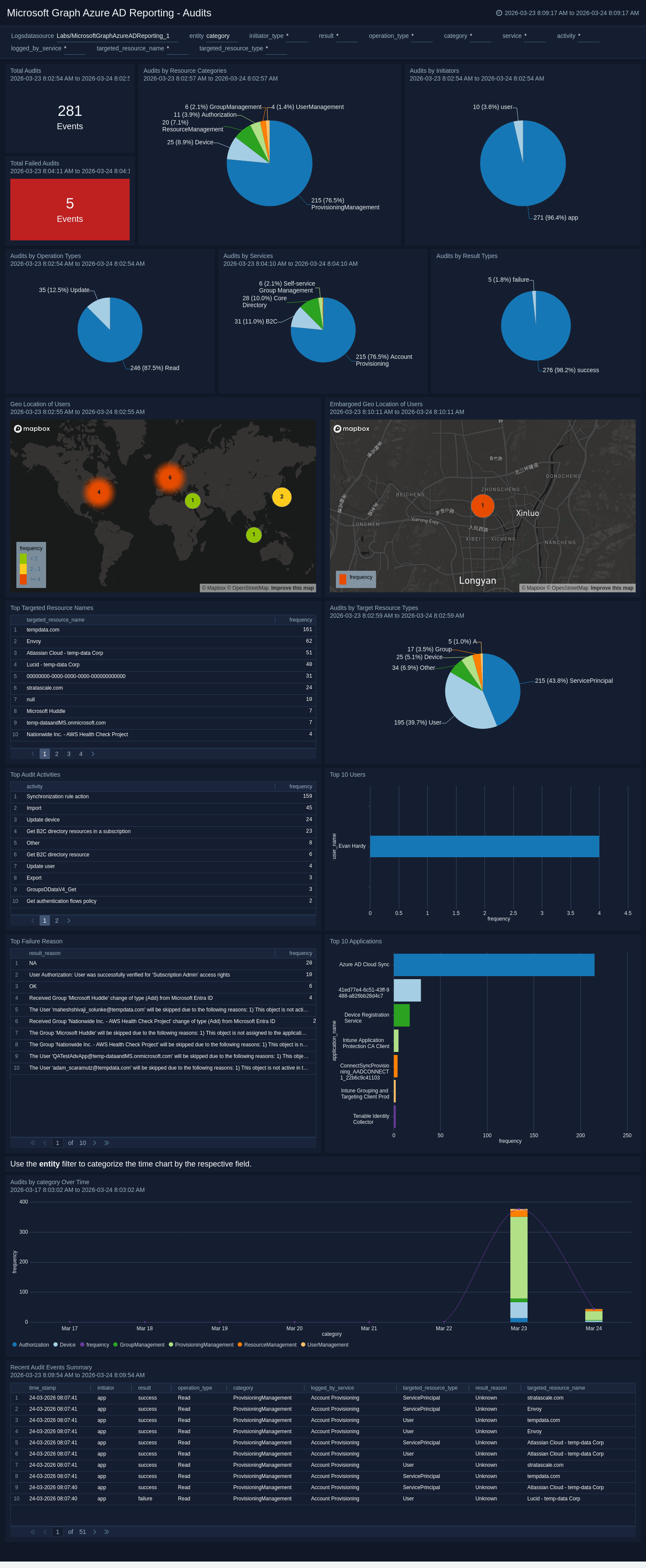
The **Microsoft Graph Azure AD Reporting - Audits** dashboard delivers a comprehensive view of directory audit activities, breaking down events by operation types, resource categories, services, initiators, and result types while surfacing top targeted resources and most active users. Geographic context maps audit activity and flags events from embargoed regions, while time-series trend analysis helps detect anomalies in administrative operations. Failure reason tracking and recent audit event summaries enable teams to investigate suspicious actions and troubleshoot configuration issues effectively.
 ### Sign-Ins
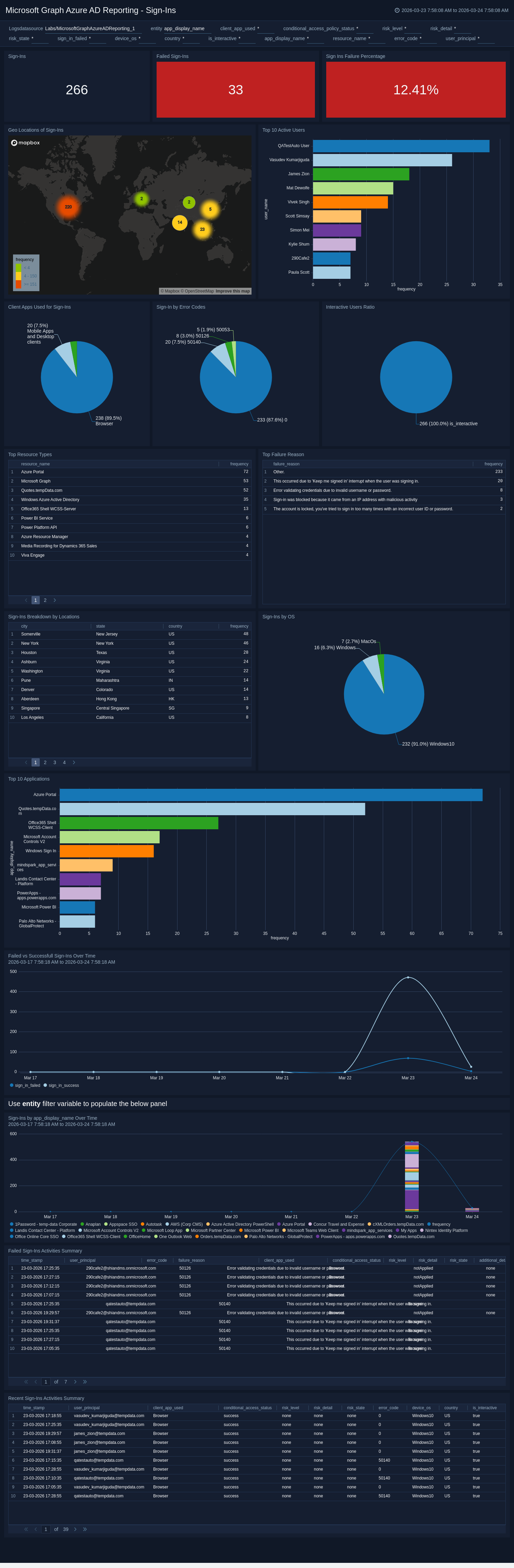
The **Microsoft Graph Azure AD Reporting - Sign-Ins** dashboard provides a broad operational view of all authentication activities, tracking total sign-ins, failure rates, and trends over time while breaking down data by client applications, operating systems, geographic locations, and error codes. It highlights the most active users and applications, distinguishes between interactive and non-interactive sign-ins, and maps authentication activity globally to identify regional patterns. Detailed summaries of recent and failed sign-in events, along with top failure reasons, guide administrators toward targeted fixes to improve the overall sign-in experience.
### Sign-Ins
The **Microsoft Graph Azure AD Reporting - Sign-Ins** dashboard provides a broad operational view of all authentication activities, tracking total sign-ins, failure rates, and trends over time while breaking down data by client applications, operating systems, geographic locations, and error codes. It highlights the most active users and applications, distinguishes between interactive and non-interactive sign-ins, and maps authentication activity globally to identify regional patterns. Detailed summaries of recent and failed sign-in events, along with top failure reasons, guide administrators toward targeted fixes to improve the overall sign-in experience.
 ### Sign-Ins Security Overview
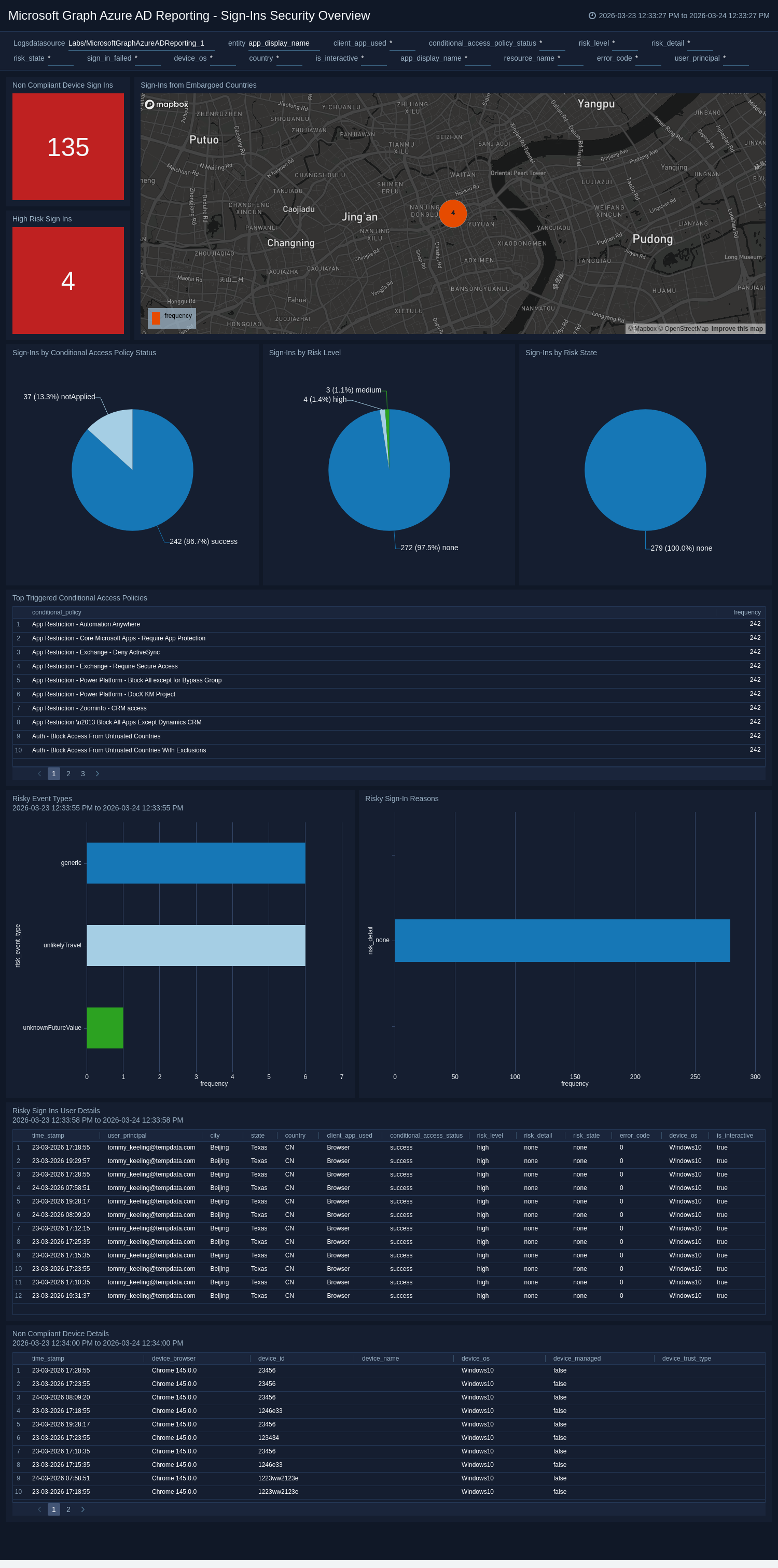
The **Microsoft Graph Azure AD Reporting - Sign-Ins Security Overview** dashboard provides a security-focused view of authentication activities, highlighting risky sign-in events, risk levels, and sign-ins from embargoed countries to help analysts rapidly identify compromised accounts. It tracks conditional access policy effectiveness, non-compliant device sign-ins, and risk state transitions to assess how well security controls are enforcing access policies. Detailed panels for high-risk sign-ins and risky user details support granular investigation and incident response workflows.
### Sign-Ins Security Overview
The **Microsoft Graph Azure AD Reporting - Sign-Ins Security Overview** dashboard provides a security-focused view of authentication activities, highlighting risky sign-in events, risk levels, and sign-ins from embargoed countries to help analysts rapidly identify compromised accounts. It tracks conditional access policy effectiveness, non-compliant device sign-ins, and risk state transitions to assess how well security controls are enforcing access policies. Detailed panels for high-risk sign-ins and risky user details support granular investigation and incident response workflows.
 ### Provisioning Overview
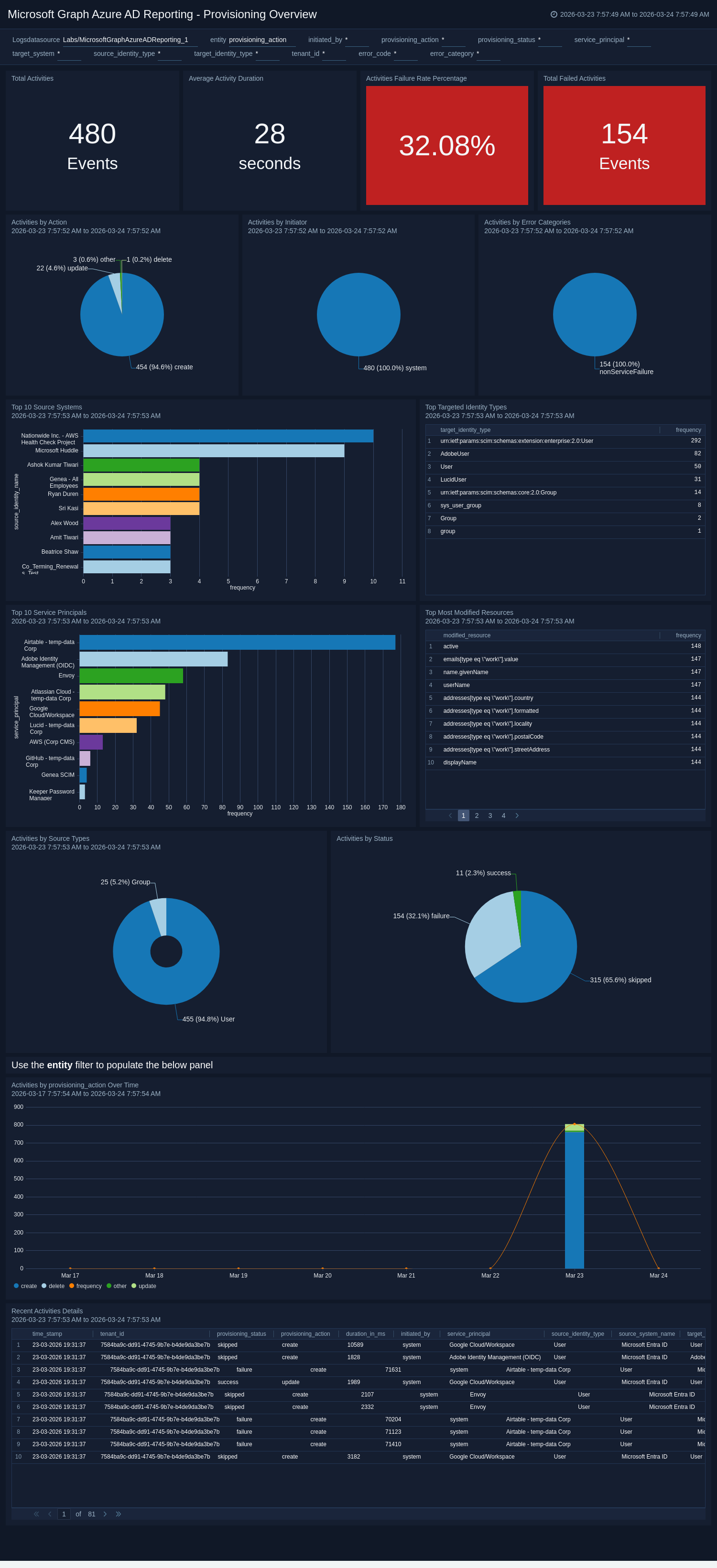
The **Microsoft Graph Azure AD Reporting - Provisioning Overview** dashboard provides a holistic view of identity provisioning activities, presenting key metrics including total activities, failure rates, average duration, and breakdowns by action, initiator, status, and error categories. It highlights top service principals, source systems, targeted identity types, and most modified resources to reveal which integrations and objects are most active. Time-series trend analysis and recent activity details enable teams to identify performance degradations and troubleshoot provisioning issues in real time.
### Provisioning Overview
The **Microsoft Graph Azure AD Reporting - Provisioning Overview** dashboard provides a holistic view of identity provisioning activities, presenting key metrics including total activities, failure rates, average duration, and breakdowns by action, initiator, status, and error categories. It highlights top service principals, source systems, targeted identity types, and most modified resources to reveal which integrations and objects are most active. Time-series trend analysis and recent activity details enable teams to identify performance degradations and troubleshoot provisioning issues in real time.
 ### Provisioning Error Analysis
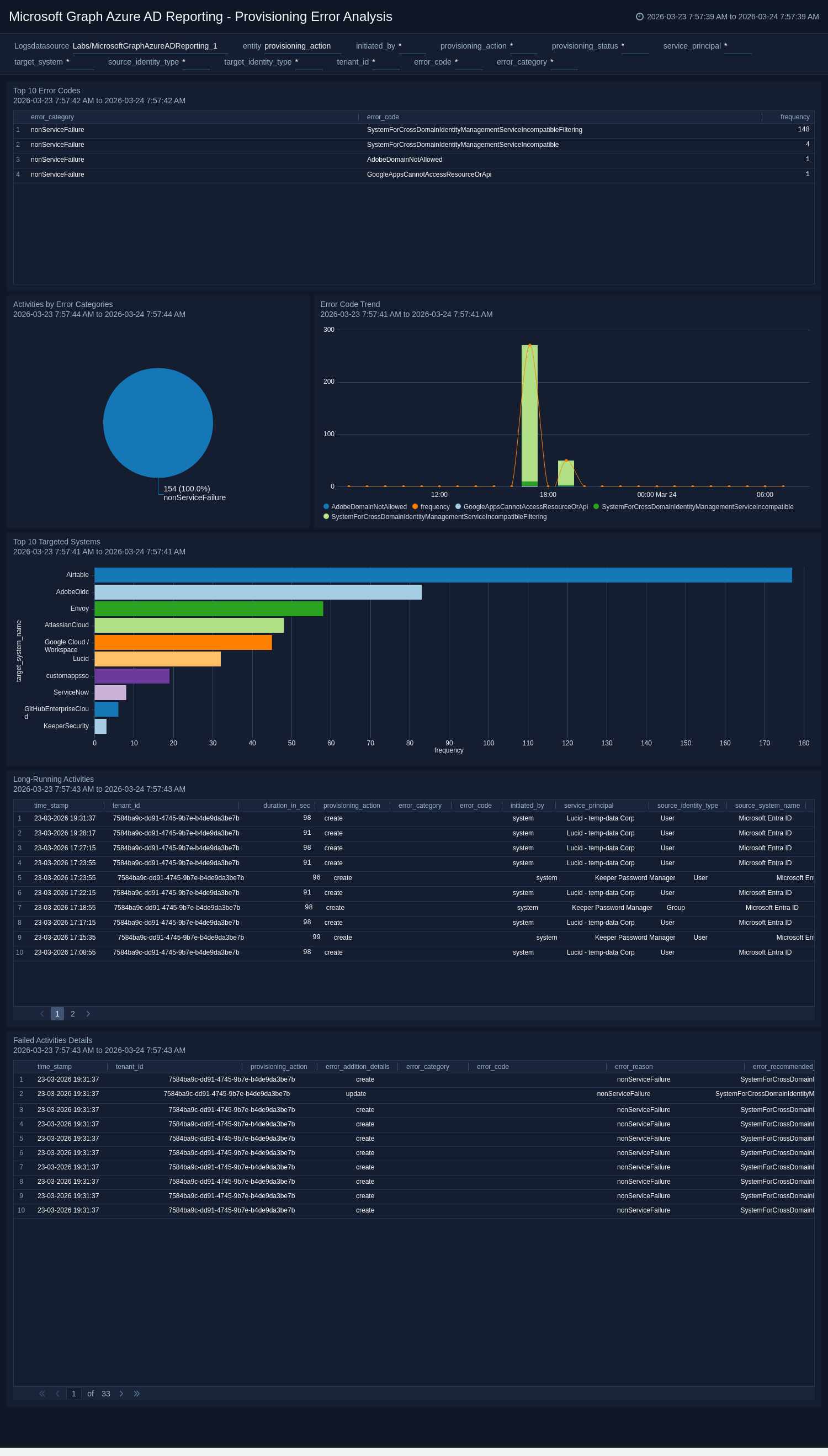
The **Microsoft Graph Azure AD Reporting - Provisioning Error Analysis** dashboard offers a deep-dive view into provisioning failures, identifying top targeted systems, most frequent error codes, and error categories to reveal systemic issues such as schema mismatches or permission problems. The error code trend panel visualizes how errors evolve over time, helping teams assess whether issues are recurring or resolving after remediation efforts. Failed activity details and long-running activity panels provide event-level context for troubleshooting individual failures and surfacing performance bottlenecks.
### Provisioning Error Analysis
The **Microsoft Graph Azure AD Reporting - Provisioning Error Analysis** dashboard offers a deep-dive view into provisioning failures, identifying top targeted systems, most frequent error codes, and error categories to reveal systemic issues such as schema mismatches or permission problems. The error code trend panel visualizes how errors evolve over time, helping teams assess whether issues are recurring or resolving after remediation efforts. Failed activity details and long-running activity panels provide event-level context for troubleshooting individual failures and surfacing performance bottlenecks.
 ## Create monitors for Microsoft Graph Azure AD Reporting app
import CreateMonitors from '../../reuse/apps/create-monitors.md';
### Microsoft Graph Azure AD Reporting Alerts
| Name | Description | Alert Condition |
|:--|:--|:--|
| `Microsoft Graph Azure AD Reporting - Abnormal Multi-Device Sign-In Activity Detected` | This alert is triggered when abnormal sign-in patterns occur, such as a single user account being used across multiple unique devices within a short timeframe. This indicates potential credential misuse, session hijacking, or unauthorized access from multiple threat actors. | Count > 5 |
| `Microsoft Graph Azure AD Reporting - Audit Activity Detected from Embargoed Geo Location` | This alert is triggered when administrative or audit activity originates from embargoed or restricted regions, indicating potential policy violations or suspicious access. | Count > 0 |
| `Microsoft Graph Azure AD Reporting - High-Risk Sign-In Detected` | This alert is triggered when a user sign-in is flagged as high risk by Azure AD Identity Protection, indicating possible credential compromise or unauthorized use. | Count > 0 |
| `Microsoft Graph Azure AD Reporting - Multiple Consecutive Failed Sign-Ins Detected` | This alert is triggered when repeated failed sign-in attempts occur for a single user or account, indicating potential brute-force or credential guessing activity. | Count > 5 |
| `Microsoft Graph Azure AD Reporting - Repeated Failed Operations on Source System` | This alert is triggered when multiple failed activities are performed from the same source, indicating potential misuse or misconfiguration that requires investigation. | Count > 5 |
| `Microsoft Graph Azure AD Reporting - Repeated Failed Operations on Target Resource` | This alert is triggered when multiple failed activities are performed on the same target, indicating potential targeted attacks or repeated access issues. | Count > 5 |
| `Microsoft Graph Azure AD Reporting - Sign-In Attempt from Embargoed Location` | This alert is triggered when a sign-in attempt originates from an embargoed or restricted region, indicating potential unauthorized access or policy violations. | Count > 0 |
## Upgrade/Downgrade the Microsoft Graph Azure AD Reporting app (Optional)
import AppUpdate from '../../reuse/apps/app-update.md';
## Uninstalling the Microsoft Graph Azure AD Reporting app (Optional)
import AppUninstall from '../../reuse/apps/app-uninstall.md';
## Create monitors for Microsoft Graph Azure AD Reporting app
import CreateMonitors from '../../reuse/apps/create-monitors.md';
### Microsoft Graph Azure AD Reporting Alerts
| Name | Description | Alert Condition |
|:--|:--|:--|
| `Microsoft Graph Azure AD Reporting - Abnormal Multi-Device Sign-In Activity Detected` | This alert is triggered when abnormal sign-in patterns occur, such as a single user account being used across multiple unique devices within a short timeframe. This indicates potential credential misuse, session hijacking, or unauthorized access from multiple threat actors. | Count > 5 |
| `Microsoft Graph Azure AD Reporting - Audit Activity Detected from Embargoed Geo Location` | This alert is triggered when administrative or audit activity originates from embargoed or restricted regions, indicating potential policy violations or suspicious access. | Count > 0 |
| `Microsoft Graph Azure AD Reporting - High-Risk Sign-In Detected` | This alert is triggered when a user sign-in is flagged as high risk by Azure AD Identity Protection, indicating possible credential compromise or unauthorized use. | Count > 0 |
| `Microsoft Graph Azure AD Reporting - Multiple Consecutive Failed Sign-Ins Detected` | This alert is triggered when repeated failed sign-in attempts occur for a single user or account, indicating potential brute-force or credential guessing activity. | Count > 5 |
| `Microsoft Graph Azure AD Reporting - Repeated Failed Operations on Source System` | This alert is triggered when multiple failed activities are performed from the same source, indicating potential misuse or misconfiguration that requires investigation. | Count > 5 |
| `Microsoft Graph Azure AD Reporting - Repeated Failed Operations on Target Resource` | This alert is triggered when multiple failed activities are performed on the same target, indicating potential targeted attacks or repeated access issues. | Count > 5 |
| `Microsoft Graph Azure AD Reporting - Sign-In Attempt from Embargoed Location` | This alert is triggered when a sign-in attempt originates from an embargoed or restricted region, indicating potential unauthorized access or policy violations. | Count > 0 |
## Upgrade/Downgrade the Microsoft Graph Azure AD Reporting app (Optional)
import AppUpdate from '../../reuse/apps/app-update.md';
## Uninstalling the Microsoft Graph Azure AD Reporting app (Optional)
import AppUninstall from '../../reuse/apps/app-uninstall.md';