---
id: miro
title: Miro
sidebar_label: Miro
description: The Sumo Logic app for Miro offers functionality for monitoring and investigating potential security threats.
slug: /help/docs/integrations/saas-cloud/miro/
canonical: https://www.sumologic.com/help/docs/integrations/saas-cloud/miro/
---
import useBaseUrl from '@docusaurus/useBaseUrl';
}) The Sumo Logic app for Miro provides visibility into Miro audit logs to ensure the security and compliance of your Miro environment. The app leverages the [Miro cloud-to-cloud source](/docs/send-data/hosted-collectors/cloud-to-cloud-integration-framework/miro-source) to collect audit log data and provides pre-built dashboards and visualizations to enable security teams to easily monitor and investigate potential security threats.
The app provides a comprehensive overview of key security events and user activity. It includes widgets that track key metrics such as total events, board events, team events, sign-in security events, and more. Additionally, it offers insights into the distribution of sign-in security events and sign-ins over time by authentication methods. The dashboard also highlights sign-ins from risky geo-locations, which helps you to quickly identify potential security threats and take appropriate actions to mitigate them. These widgets help you to monitor your account performance, identify improvement areas, and ensure their data's security. With these widgets, you can easily monitor and manage their security posture, ensuring your data and systems remain secure and protected.
With the Sumo Logic app for Miro, security teams can stay on top of potential security threats, proactively identify vulnerabilities, and respond quickly to security incidents.
## Log types
This App uses Sumo Logic’s Miro Source to collect [Audit Logs](https://developers.miro.com/v1.0/reference/get-logs) from Miro.
## Sample log messages
```json title="Audit Log"
{
"type": "event",
"event": "board_opened",
"details": {
"role": "OWNER"
},
"createdAt": "2018-10-19T23:59:45Z",
"createdBy": {
"type": "user",
"name": "Test",
"id": "3074457346235995512",
},
"object": {
"id": "3074457346235995523",
"name": "BoardName"
},
"context": {
"organization": {
"type": "organization",
"name": "CompanyName",
"id": "3074457345821140123"
},
"team": {
"type": "team",
"name": "TeamName",
"id": "3074457345710755694"
},
"ip": "10.10.10.10"
},
"id": "450256789"
}
```
## Sample queries
```sumo title="Total Phishing Security Tests"
_sourceCategory=miro
| json "id", "type", "context.team.name", "context.organization.name", "context.ip", "createdAt", "event", "createdBy.name", "createdBy.email" as id, type, team_name, organization_name, ip, createdAt, event, user_name, user_email nodrop
| where organization_name matches "{{organization}}"
| where team_name matches "{{team}}"
| where event matches "{{event}}"
| count_distinct (id)
```
## Collection configuration and app installation
import CollectionConfiguration from '../../reuse/apps/collection-configuration.md';
:::important
Use the [Cloud-to-Cloud Integration for Miro](/docs/send-data/hosted-collectors/cloud-to-cloud-integration-framework/miro-source) to create the source and use the same source category while installing the app. By following these steps, you can ensure that your Miro app is properly integrated and configured to collect and analyze your Miro data.
:::
### Create a new collector and install the app
import AppCollectionOPtion1 from '../../reuse/apps/app-collection-option-1.md';
### Use an existing collector and install the app
import AppCollectionOPtion2 from '../../reuse/apps/app-collection-option-2.md';
### Use an existing source and install the app
import AppCollectionOPtion3 from '../../reuse/apps/app-collection-option-3.md';
## Viewing Miro dashboards
import ViewDashboards from '../../reuse/apps/view-dashboards.md';
### Overview
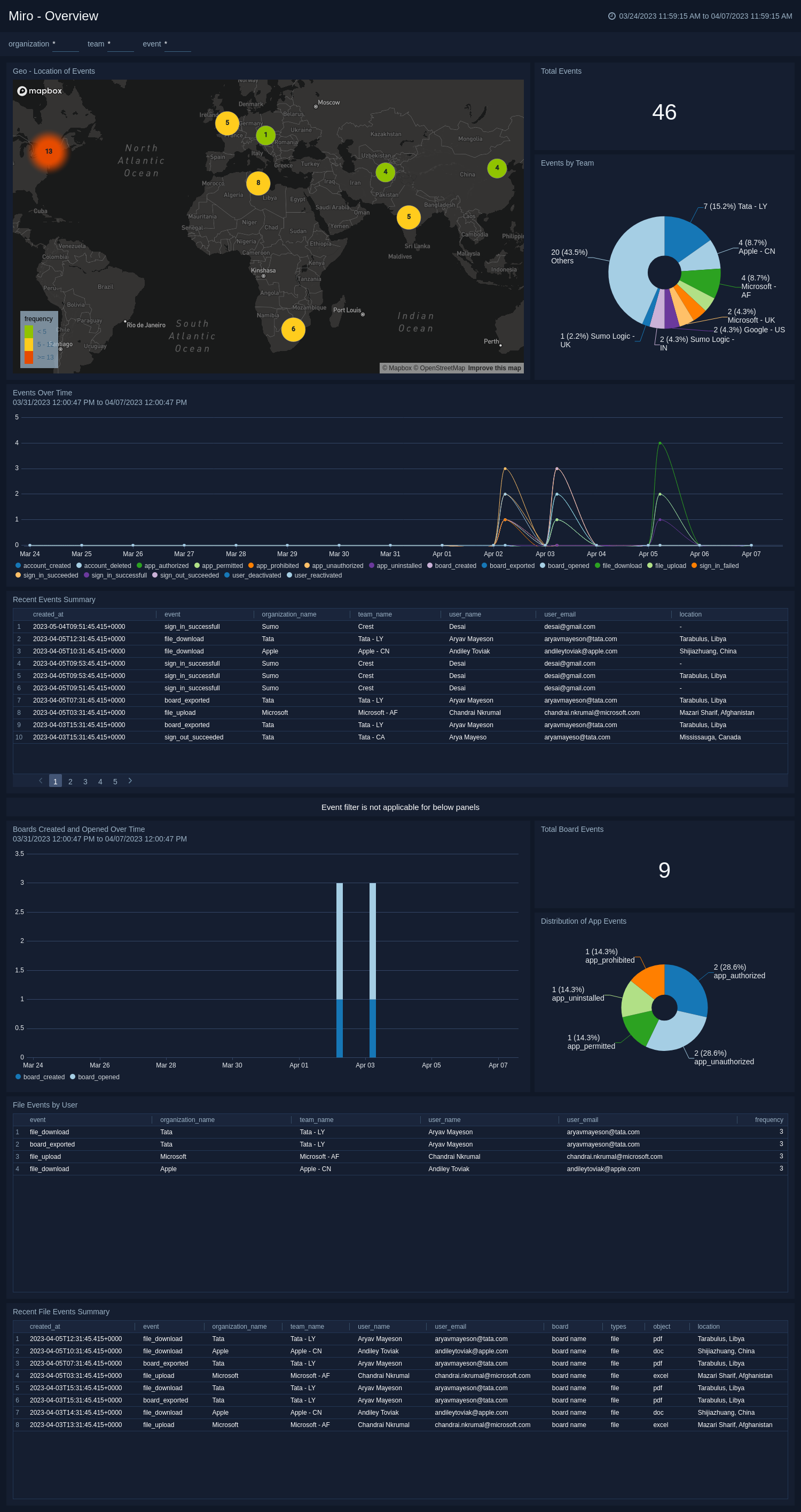
The **Miro - Overview** dashboard provides a comprehensive overview of events related to Miro. The dashboard features various widgets, including Total Events, Total Board Events, Distribution of App Events, Events By Team, Boards Created and Opened over Time, Events Over Time, Geo-Location of Events, Recent File Event Summary, and Recent Event Summary.
The widgets allow you to track and analyze event-related information, including the total number of events, their distribution, team-wise breakdown, creation and opening of boards over time, and their geographical locations. The Recent File Event Summary and Recent Event Summary widgets provide a summary of the latest events for quick reference. A dashboard is a useful tool for monitoring and improving event management by providing quick access to relevant information.
The Sumo Logic app for Miro provides visibility into Miro audit logs to ensure the security and compliance of your Miro environment. The app leverages the [Miro cloud-to-cloud source](/docs/send-data/hosted-collectors/cloud-to-cloud-integration-framework/miro-source) to collect audit log data and provides pre-built dashboards and visualizations to enable security teams to easily monitor and investigate potential security threats.
The app provides a comprehensive overview of key security events and user activity. It includes widgets that track key metrics such as total events, board events, team events, sign-in security events, and more. Additionally, it offers insights into the distribution of sign-in security events and sign-ins over time by authentication methods. The dashboard also highlights sign-ins from risky geo-locations, which helps you to quickly identify potential security threats and take appropriate actions to mitigate them. These widgets help you to monitor your account performance, identify improvement areas, and ensure their data's security. With these widgets, you can easily monitor and manage their security posture, ensuring your data and systems remain secure and protected.
With the Sumo Logic app for Miro, security teams can stay on top of potential security threats, proactively identify vulnerabilities, and respond quickly to security incidents.
## Log types
This App uses Sumo Logic’s Miro Source to collect [Audit Logs](https://developers.miro.com/v1.0/reference/get-logs) from Miro.
## Sample log messages
```json title="Audit Log"
{
"type": "event",
"event": "board_opened",
"details": {
"role": "OWNER"
},
"createdAt": "2018-10-19T23:59:45Z",
"createdBy": {
"type": "user",
"name": "Test",
"id": "3074457346235995512",
},
"object": {
"id": "3074457346235995523",
"name": "BoardName"
},
"context": {
"organization": {
"type": "organization",
"name": "CompanyName",
"id": "3074457345821140123"
},
"team": {
"type": "team",
"name": "TeamName",
"id": "3074457345710755694"
},
"ip": "10.10.10.10"
},
"id": "450256789"
}
```
## Sample queries
```sumo title="Total Phishing Security Tests"
_sourceCategory=miro
| json "id", "type", "context.team.name", "context.organization.name", "context.ip", "createdAt", "event", "createdBy.name", "createdBy.email" as id, type, team_name, organization_name, ip, createdAt, event, user_name, user_email nodrop
| where organization_name matches "{{organization}}"
| where team_name matches "{{team}}"
| where event matches "{{event}}"
| count_distinct (id)
```
## Collection configuration and app installation
import CollectionConfiguration from '../../reuse/apps/collection-configuration.md';
:::important
Use the [Cloud-to-Cloud Integration for Miro](/docs/send-data/hosted-collectors/cloud-to-cloud-integration-framework/miro-source) to create the source and use the same source category while installing the app. By following these steps, you can ensure that your Miro app is properly integrated and configured to collect and analyze your Miro data.
:::
### Create a new collector and install the app
import AppCollectionOPtion1 from '../../reuse/apps/app-collection-option-1.md';
### Use an existing collector and install the app
import AppCollectionOPtion2 from '../../reuse/apps/app-collection-option-2.md';
### Use an existing source and install the app
import AppCollectionOPtion3 from '../../reuse/apps/app-collection-option-3.md';
## Viewing Miro dashboards
import ViewDashboards from '../../reuse/apps/view-dashboards.md';
### Overview
The **Miro - Overview** dashboard provides a comprehensive overview of events related to Miro. The dashboard features various widgets, including Total Events, Total Board Events, Distribution of App Events, Events By Team, Boards Created and Opened over Time, Events Over Time, Geo-Location of Events, Recent File Event Summary, and Recent Event Summary.
The widgets allow you to track and analyze event-related information, including the total number of events, their distribution, team-wise breakdown, creation and opening of boards over time, and their geographical locations. The Recent File Event Summary and Recent Event Summary widgets provide a summary of the latest events for quick reference. A dashboard is a useful tool for monitoring and improving event management by providing quick access to relevant information.
 ### Security Events
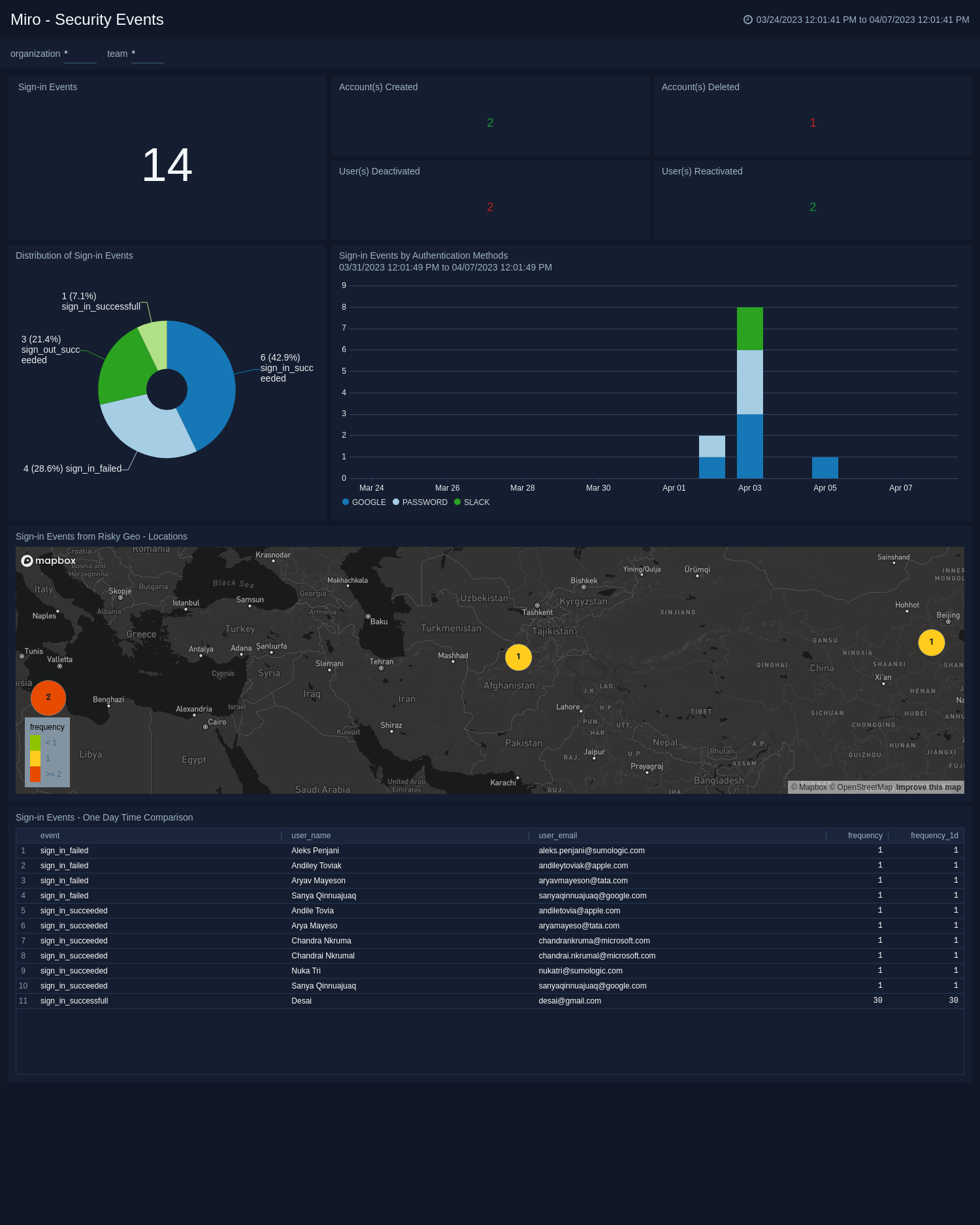
The **Miro - Security Events** dashboard provides a comprehensive overview of your security events related to Miro. The dashboard features various widgets, including Sign-in Security Events, Account(s) Created, Account(s) Deleted, User(s) Deactivated, User(s) Reactivated, Distribution of Sign-in Security Events, Sign-In over time by Authentication Methods, and Sign-in from Risky Geo-Locations.
The widgets allow you to track and analyze your security events, including the number of sign-in security events, account creation, deletion, deactivation, and reactivation. The Distribution of Sign-in Security Events widget provides an overview of sign-in patterns across different events, while the Sign-in over time by Authentication Methods widget offers a breakdown of sign-ins by the authentication method. The Sign-in from Risky Geo-Locations widget helps you to identify geographic locations that pose a higher risk to your security. A dashboard is a useful tool for monitoring and improving your security by providing quick access to relevant information.
### Security Events
The **Miro - Security Events** dashboard provides a comprehensive overview of your security events related to Miro. The dashboard features various widgets, including Sign-in Security Events, Account(s) Created, Account(s) Deleted, User(s) Deactivated, User(s) Reactivated, Distribution of Sign-in Security Events, Sign-In over time by Authentication Methods, and Sign-in from Risky Geo-Locations.
The widgets allow you to track and analyze your security events, including the number of sign-in security events, account creation, deletion, deactivation, and reactivation. The Distribution of Sign-in Security Events widget provides an overview of sign-in patterns across different events, while the Sign-in over time by Authentication Methods widget offers a breakdown of sign-ins by the authentication method. The Sign-in from Risky Geo-Locations widget helps you to identify geographic locations that pose a higher risk to your security. A dashboard is a useful tool for monitoring and improving your security by providing quick access to relevant information.
 ## Upgrade/Downgrade the Miro app (Optional)
import AppUpdate from '../../reuse/apps/app-update.md';
## Uninstalling the Miro app (Optional)
import AppUninstall from '../../reuse/apps/app-uninstall.md';
## Upgrade/Downgrade the Miro app (Optional)
import AppUpdate from '../../reuse/apps/app-update.md';
## Uninstalling the Miro app (Optional)
import AppUninstall from '../../reuse/apps/app-uninstall.md';