---
id: openai
title: OpenAI
sidebar_label: OpenAI
description: The Sumo Logic app for OpenAI provides visibility into your OpenAI organization's cost, usage, security, and audit activity.
slug: /help/docs/integrations/saas-cloud/openai/
canonical: https://www.sumologic.com/help/docs/integrations/saas-cloud/openai/
---
import useBaseUrl from '@docusaurus/useBaseUrl';
 The Sumo Logic app for OpenAI provides visibility into your OpenAI organization's cost, usage, security, and audit activity. It monitors API spend by model and project, tracks authentication events and failed login patterns, analyzes identity and access management changes, and provides geographic and threat intelligence insights. Use this app to optimize costs, detect anomalous behavior, and maintain governance across your OpenAI environment.
## Log types
This app uses the [OpenAI Source](/docs/send-data/hosted-collectors/cloud-to-cloud-integration-framework/openai-source/) to collect data from the OpenAI Administration API. The source collects:
- **Audit Logs**. A chronological record of user actions and configuration changes within the organization, including authentication events, API key operations, project changes, and role modifications.
- **Organization Usage Costs**. Aggregated API spend broken down by model, project, and API key.
### Sample log messages
The Sumo Logic app for OpenAI provides visibility into your OpenAI organization's cost, usage, security, and audit activity. It monitors API spend by model and project, tracks authentication events and failed login patterns, analyzes identity and access management changes, and provides geographic and threat intelligence insights. Use this app to optimize costs, detect anomalous behavior, and maintain governance across your OpenAI environment.
## Log types
This app uses the [OpenAI Source](/docs/send-data/hosted-collectors/cloud-to-cloud-integration-framework/openai-source/) to collect data from the OpenAI Administration API. The source collects:
- **Audit Logs**. A chronological record of user actions and configuration changes within the organization, including authentication events, API key operations, project changes, and role modifications.
- **Organization Usage Costs**. Aggregated API spend broken down by model, project, and API key.
### Sample log messages
Audit Log
```json
{
"id": "audit_log-yyy__20240101",
"type": "api_key.updated",
"effective_at": 1720804190,
"actor": {
"type": "session",
"session": {
"user": {
"id": "user-xxx",
"email": "user@example.com"
},
"ip_address": "127.0.0.1",
"user_agent": "Mozilla/5.0 (Windows NT 10.0; Win64; x64) AppleWebKit/537.36 (KHTML, like Gecko) Chrome/91.0.4472.124 Safari/537.36",
"ja3": "a497151ce4338a12c4418c44d375173e",
"ja4": "q13d0313h3_55b375c5d22e_c7319ce65786",
"ip_address_details": {
"country": "US",
"city": "San Francisco",
"region": "California",
"region_code": "CA",
"asn": "1234",
"latitude": "37.77490",
"longitude": "-122.41940"
}
}
},
"api_key.updated": {
"id": "key_xxxx",
"data": {
"scopes": ["resource_2.operation_2"]
}
}
}
```
Cost Log
```json
{
"object": "organization.costs.result",
"amount": { "value": 100, "currency": "usd" },
"line_item": "images",
"project_id": "proj_001",
"api_key_id": "key_001",
"quantity": 1,
"start_time": 1791284283,
"end_time": 1791284283
}
```
### Sample queries
```sumo title="Successful Logins Over Time"
_sourceCategory={{Logsdatasource}} organization.audit_log login.succeeded
| json "id", "object", "type", "actor.type", "actor.session.user.email", "actor.api_key.user.email" as id, object_type, event_type, actor_type, session_user_email, api_key_user_email nodrop
| where object_type = "organization.audit_log" and event_type = "login.succeeded"
| if(isBlank(session_user_email),api_key_user_email,session_user_email) as user_email
// global filters
| where if ("{{user_email}}" = "*", true, user_email matches "{{user_email}}")
| where if("{{actor_type}}" = "*", true, actor_type matches "{{actor_type}}")
// Panel specific
| count by id, _messagetime
| timeslice 1d
| count by _timeslice
| fillmissing timeslice(1d)
```
```sumo title="Total Spend"
_sourceCategory={{Logsdatasource}} organization.costs.result amount line_item
| json "object", "amount.value", "line_item", "project_id", "api_key_id" as object_type, cost_value, line_item, project_id, api_key_id nodrop
| where object_type = "organization.costs.result"
| where !isBlank(cost_value)
// global filters
| where if ("{{project_id}}" = "*", true, project_id matches "{{project_id}}")
| where if ("{{line_item}}" = "*", true, line_item matches "{{line_item}}")
| where if ("{{api_key_id}}" = "*", true, api_key_id matches "{{api_key_id}}")
| todouble(cost_value) as cost_value
| count by cost_value, _messagetime
| sum(cost_value) as total_spend
```
## Collection configuration and app installation
import CollectionConfiguration from '../../reuse/apps/collection-configuration.md';
:::tip
Use the [OpenAI Source](/docs/send-data/hosted-collectors/cloud-to-cloud-integration-framework/openai-source/) to create the source and use the same source category while installing the app.
:::
### Create a new collector and install the app
import AppCollectionOPtion1 from '../../reuse/apps/app-collection-option-1.md';
### Use an existing collector and install the app
import AppCollectionOPtion2 from '../../reuse/apps/app-collection-option-2.md';
### Use an existing source and install the app
import AppCollectionOPtion3 from '../../reuse/apps/app-collection-option-3.md';
## Viewing OpenAI dashboards
import ViewDashboards from '../../reuse/apps/view-dashboards.md';
### Audit Overview
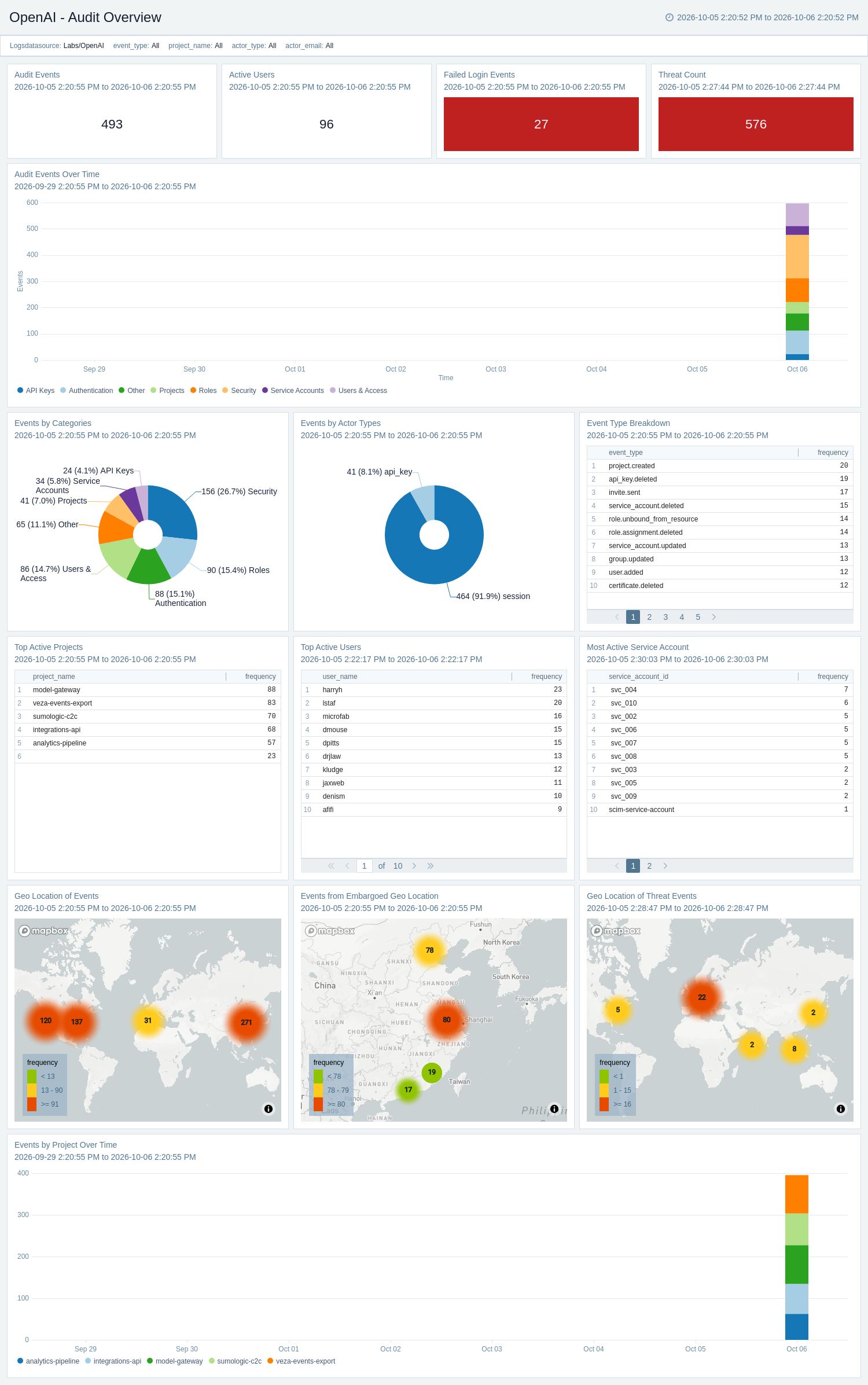
The **OpenAI - Audit Overview** dashboard provides a unified view of audit activity across the OpenAI organization. It visualizes event volume, top actors, event categories, and project activity while highlighting geographic threats and access from embargoed locations. Use this dashboard to identify anomalous activity and monitor overall audit health.
 ### Cost Monitoring
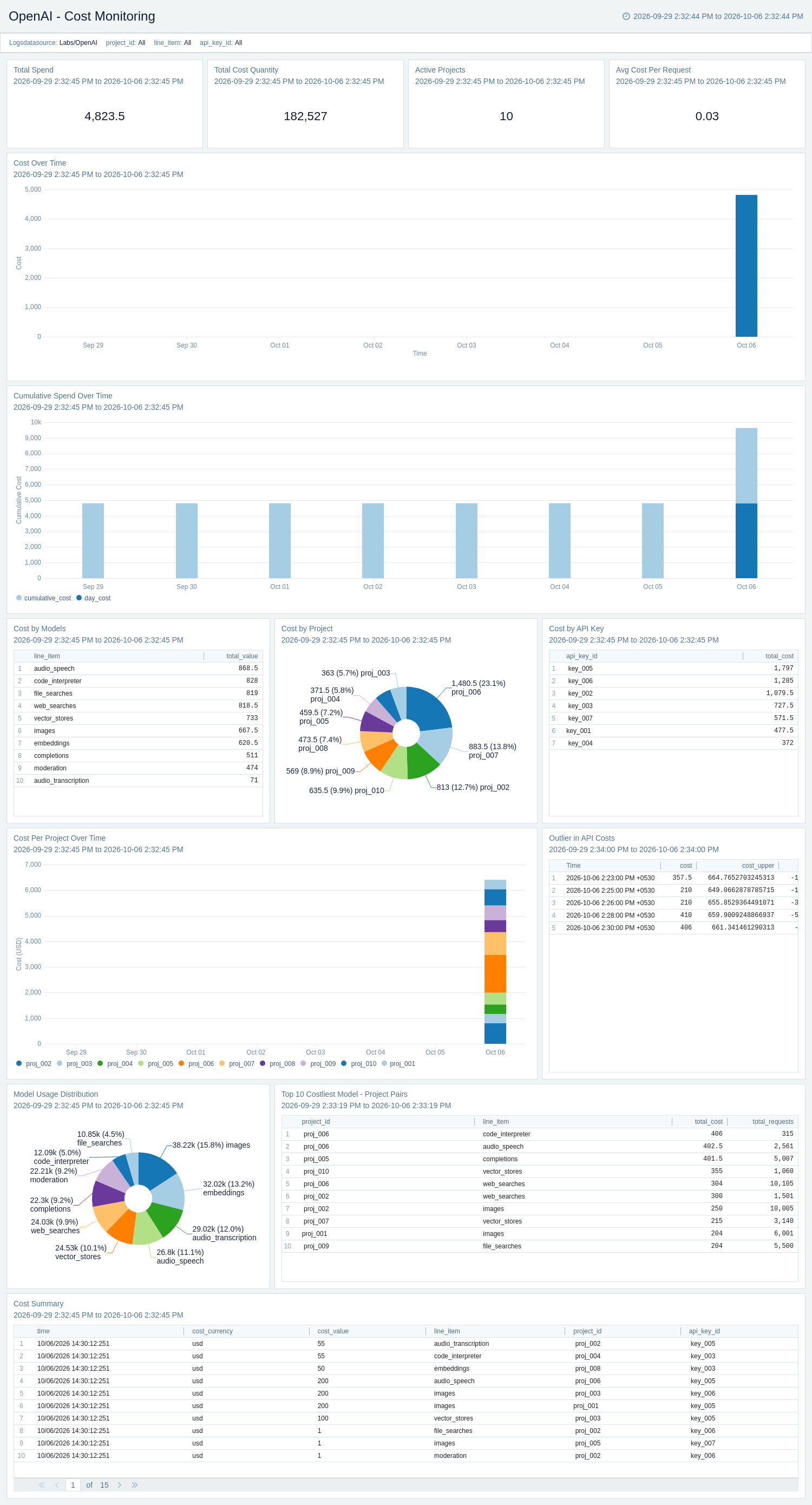
The **OpenAI - Cost Monitoring** dashboard provides an overview of total spend, cost trends, and budget health across the organization. It tracks cost by model, project, and API key, highlights unusual spending patterns, and shows cumulative spend over time. Use this dashboard to identify cost anomalies and major cost drivers.
### Cost Monitoring
The **OpenAI - Cost Monitoring** dashboard provides an overview of total spend, cost trends, and budget health across the organization. It tracks cost by model, project, and API key, highlights unusual spending patterns, and shows cumulative spend over time. Use this dashboard to identify cost anomalies and major cost drivers.
 ### Failed Login Monitoring
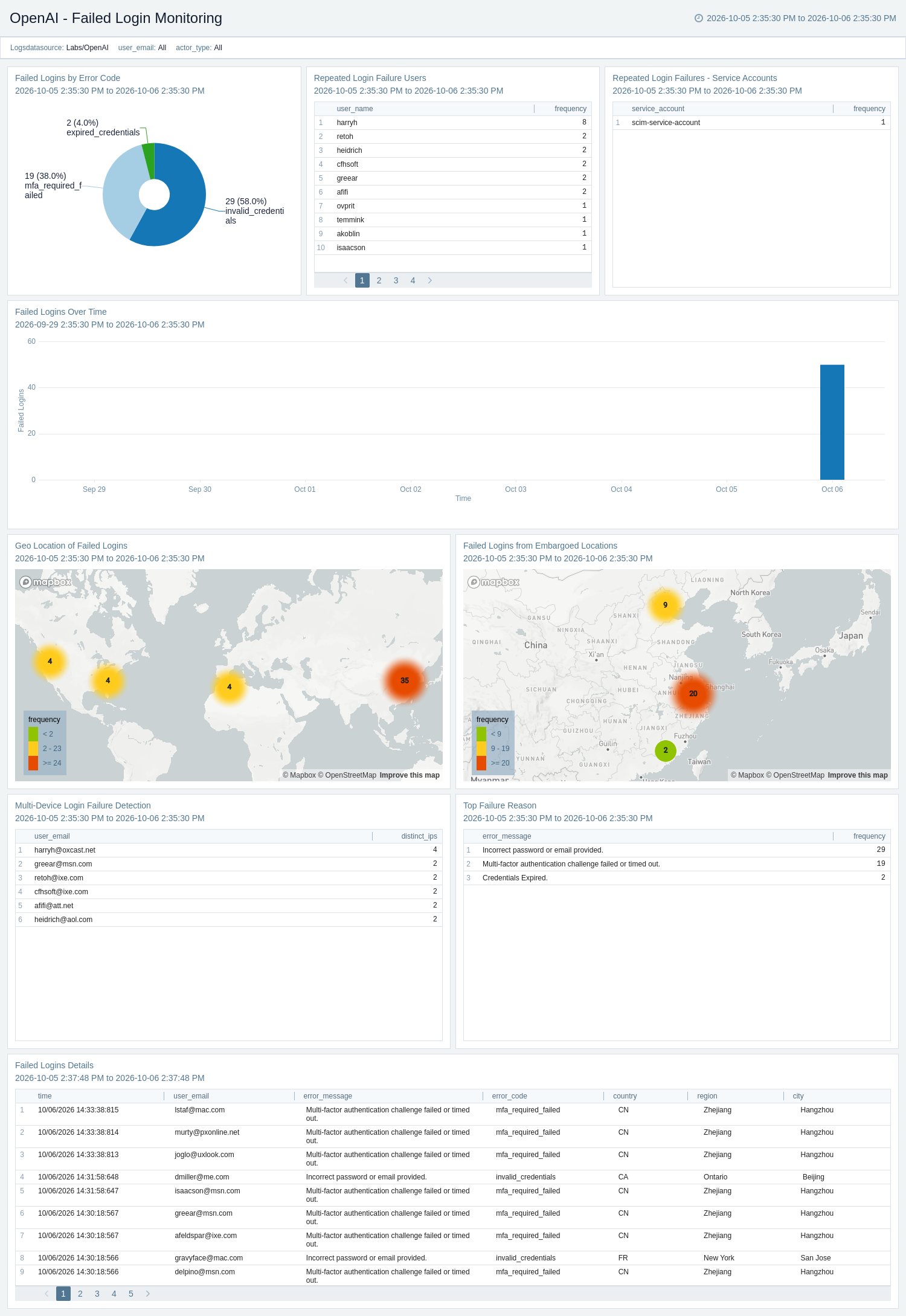
The **OpenAI - Failed Login Monitoring** dashboard focuses on failed authentication events to help identify brute-force attempts, suspicious IP addresses, and credential-related issues. It provides insights into failure reasons, error codes, geographic activity, multi-device login patterns, and repeated authentication failures.
### Failed Login Monitoring
The **OpenAI - Failed Login Monitoring** dashboard focuses on failed authentication events to help identify brute-force attempts, suspicious IP addresses, and credential-related issues. It provides insights into failure reasons, error codes, geographic activity, multi-device login patterns, and repeated authentication failures.
 ### Identity and Access Management
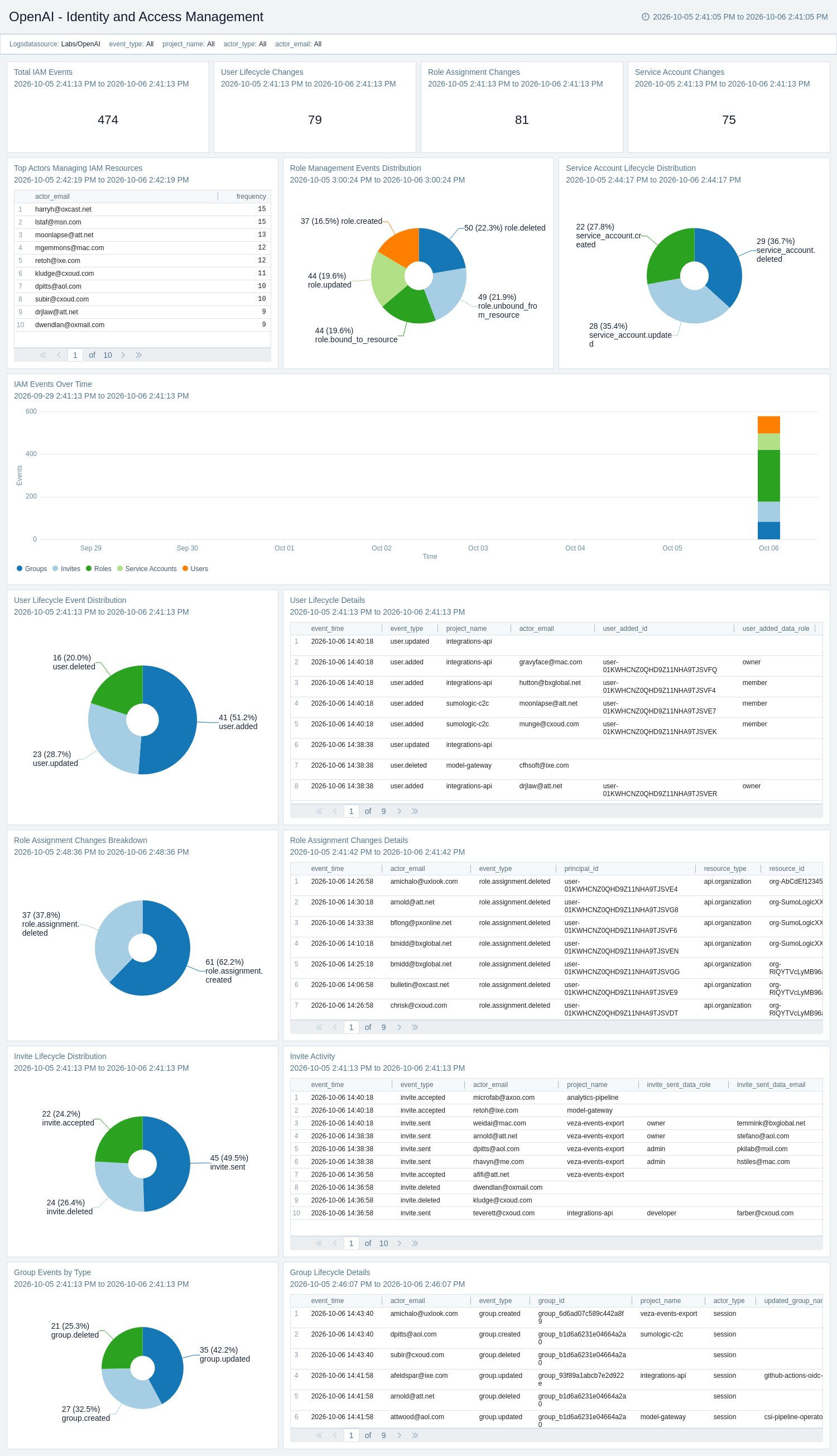
The **OpenAI - Identity and Access Management** dashboard monitors user lifecycle changes, invitations, group management, role assignments, and service account activity across the organization. It tracks IAM activity over time, highlights top actors, and provides detailed audit information for user, role, and group operations.
### Identity and Access Management
The **OpenAI - Identity and Access Management** dashboard monitors user lifecycle changes, invitations, group management, role assignments, and service account activity across the organization. It tracks IAM activity over time, highlights top actors, and provides detailed audit information for user, role, and group operations.
 ### Security and Infrastructure Configuration
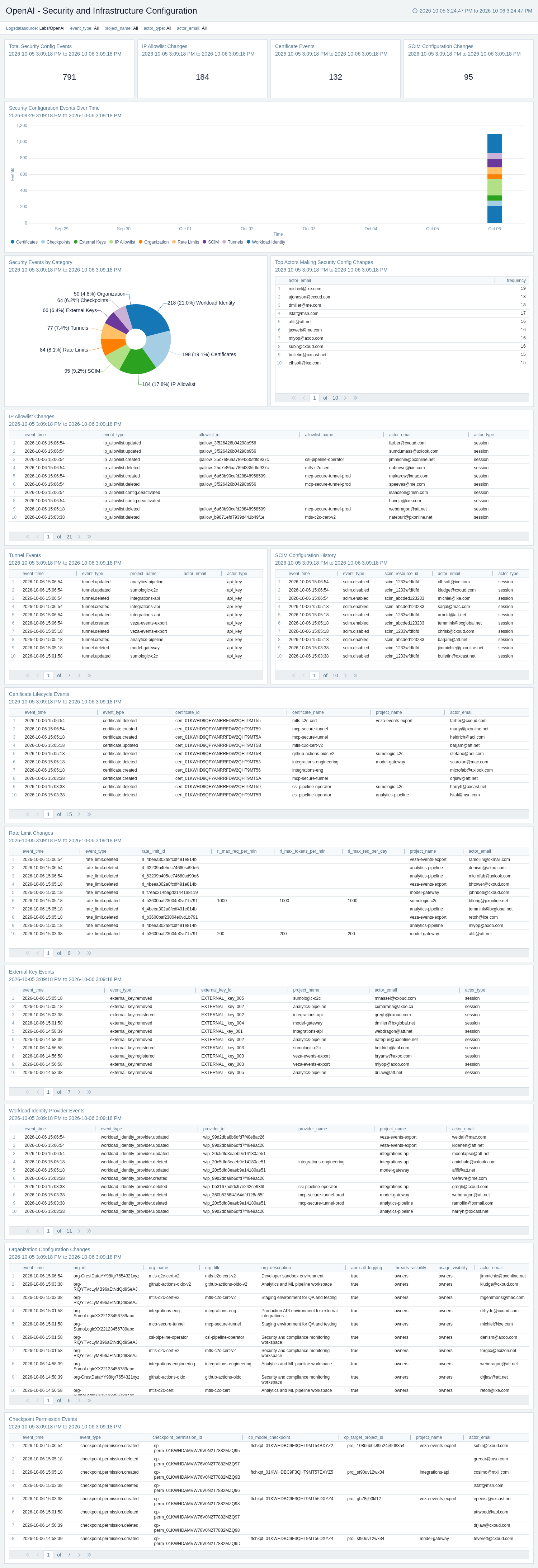
The **OpenAI - Security and Infrastructure Configuration** dashboard monitors security and infrastructure configuration changes, including IP allowlists, rate limits, SCIM configuration, certificates, tunnels, workload identity providers, checkpoint permissions, and organization-level settings. It categorizes security events, highlights the top actors, and provides detailed audit information for each configuration area.
### Security and Infrastructure Configuration
The **OpenAI - Security and Infrastructure Configuration** dashboard monitors security and infrastructure configuration changes, including IP allowlists, rate limits, SCIM configuration, certificates, tunnels, workload identity providers, checkpoint permissions, and organization-level settings. It categorizes security events, highlights the top actors, and provides detailed audit information for each configuration area.
 ### Successful Login Monitoring
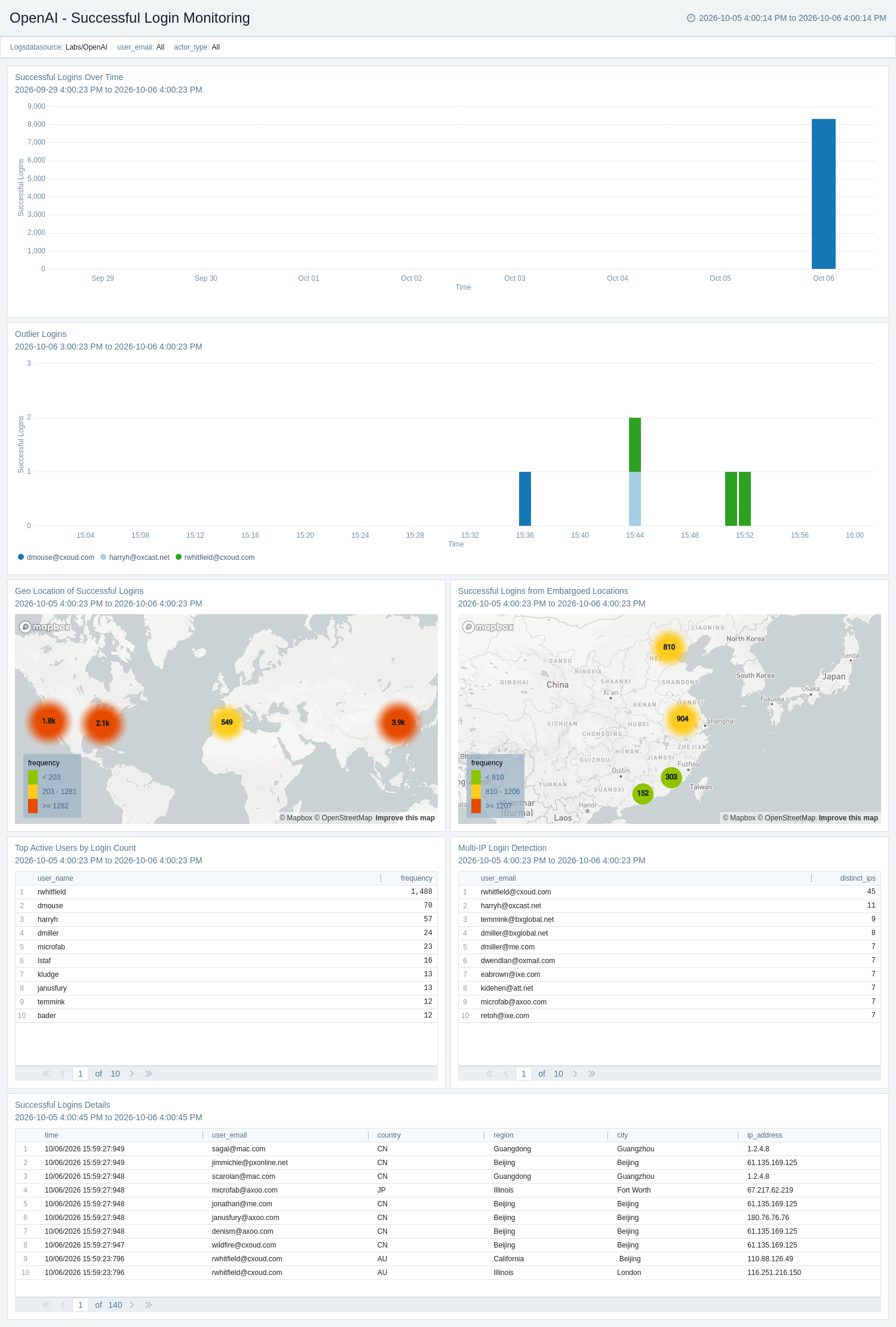
The **OpenAI - Successful Login Monitoring** dashboard provides visibility into successful authentication activity across the OpenAI organization. It shows login trends, geographic distribution, multi-IP login patterns, and access from embargoed locations to help identify unusual activity.
### Successful Login Monitoring
The **OpenAI - Successful Login Monitoring** dashboard provides visibility into successful authentication activity across the OpenAI organization. It shows login trends, geographic distribution, multi-IP login patterns, and access from embargoed locations to help identify unusual activity.
 ### User Agent Analysis
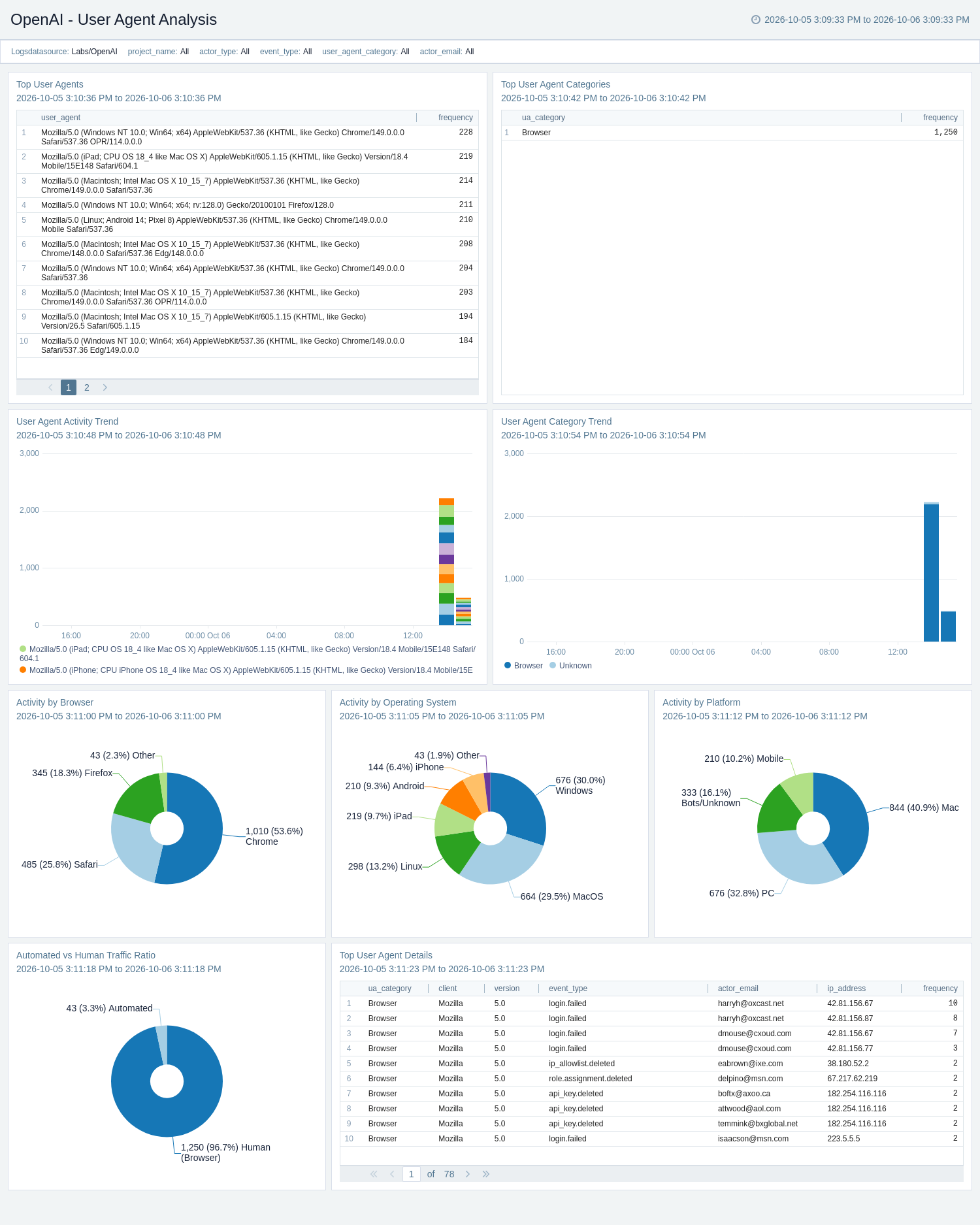
The **OpenAI - User Agent Analysis** dashboard analyzes the clients and platforms accessing the OpenAI environment. It provides visibility into browser, operating system, platform, and automated versus human activity, while highlighting user agents associated with failed or potentially suspicious activity.
### User Agent Analysis
The **OpenAI - User Agent Analysis** dashboard analyzes the clients and platforms accessing the OpenAI environment. It provides visibility into browser, operating system, platform, and automated versus human activity, while highlighting user agents associated with failed or potentially suspicious activity.
 ## Create monitors for the OpenAI app
import CreateMonitors from '../../reuse/apps/create-monitors.md';
## Upgrading/Downgrading the OpenAI app (Optional)
import AppUpdate from '../../reuse/apps/app-update.md';
## Uninstalling the OpenAI app (Optional)
import AppUninstall from '../../reuse/apps/app-uninstall.md';
## Create monitors for the OpenAI app
import CreateMonitors from '../../reuse/apps/create-monitors.md';
## Upgrading/Downgrading the OpenAI app (Optional)
import AppUpdate from '../../reuse/apps/app-update.md';
## Uninstalling the OpenAI app (Optional)
import AppUninstall from '../../reuse/apps/app-uninstall.md';