---
id: sumo-collection
title: Sumo Collection
sidebar_label: Sumo Collection
description: The Sumo Collection app for Sumo Logic provides insights into health and status of Sumo Logic collectors and sources, allowing you to effectively manage and monitor collectors and sources within Sumo Logic.
slug: /help/docs/integrations/saas-cloud/sumo-collection/
canonical: https://www.sumologic.com/help/docs/integrations/saas-cloud/sumo-collection/
---
import useBaseUrl from '@docusaurus/useBaseUrl';
}) The Sumo Collection app is a comprehensive tool that offers detailed insights into the health and status of Sumo Logic collectors and sources. It enables efficient management and monitoring by tracking key parameters such as collector types, versions, operational status, and source metrics through intuitive analytics and visualizations. By providing organizations with the data they need to make informed decisions and optimize their data management strategies, the app enhances operational efficiency and facilitates proactive issue identification within the Sumo Logic ecosystem.
With its comprehensive overview of collector and source activities, the app strengthens data collection infrastructure. Leveraging its analytics and visualization capabilities, organizations can make data-driven decisions, optimize performance, and ensure seamless data collection within the Sumo Logic environment.
:::info
This app includes [built-in monitors](#sumo-collection-monitors). For details on creating custom monitors, refer to [Create monitors for Sumo Collection app](#create-monitors-for-sumo-collection-app).
:::
:::tip
For related info on collector health events, see [this doc](/docs/manage/health-events).
:::
## Log types
This app uses Sumo Logic’s [Sumo Collection Source](/docs/send-data/hosted-collectors/cloud-to-cloud-integration-framework/sumo-collection-source/) to collect the collectors and source logs from the Sumo Logic platform.
### Sample log messages
The Sumo Collection app is a comprehensive tool that offers detailed insights into the health and status of Sumo Logic collectors and sources. It enables efficient management and monitoring by tracking key parameters such as collector types, versions, operational status, and source metrics through intuitive analytics and visualizations. By providing organizations with the data they need to make informed decisions and optimize their data management strategies, the app enhances operational efficiency and facilitates proactive issue identification within the Sumo Logic ecosystem.
With its comprehensive overview of collector and source activities, the app strengthens data collection infrastructure. Leveraging its analytics and visualization capabilities, organizations can make data-driven decisions, optimize performance, and ensure seamless data collection within the Sumo Logic environment.
:::info
This app includes [built-in monitors](#sumo-collection-monitors). For details on creating custom monitors, refer to [Create monitors for Sumo Collection app](#create-monitors-for-sumo-collection-app).
:::
:::tip
For related info on collector health events, see [this doc](/docs/manage/health-events).
:::
## Log types
This app uses Sumo Logic’s [Sumo Collection Source](/docs/send-data/hosted-collectors/cloud-to-cloud-integration-framework/sumo-collection-source/) to collect the collectors and source logs from the Sumo Logic platform.
### Sample log messages
Collector Log
```json
{
"id": 106288931,
"name": "dc-windows-client2",
"timeZone": "Etc/UTC",
"fields": {},
"links": [
{
"rel": "sources",
"href": "/v1/collectors/106288231/sources"
}
],
"ephemeral": false,
"targetCpu": -1,
"sourceSyncMode": "UI",
"installedCollectorSubtype": "Installed",
"collectorType": "Installable",
"collectorVersion": "19.376-1",
"osVersion": "10.0",
"osName": "Windows Server 2019",
"osArch": "amd64",
"lastSeenAlive": 1741775145414,
"alive": false
}
```
Source Log
```json
{
"id": 116630551,
"schemaRef": {
"type": "Universal Connector"
},
"config": {
"name": "YL UC continuation",
"paginationContinuationTokenType": "body",
"paginationContinuationTokenKey": "token",
"responseLogsJsonPaths": [
{
"logTimestampFormat": "2025-03-12T15:55:35.405Z",
"logsPath": "$.data[*]",
"logTimestampPath": "$.modifiedAt"
}
],
"authBasicUsername": "NEWWWNAME",
"requestEndpoint": "https://daorsXYCahaxe.xyz/api/v1/roles",
"paginationContinuationTokenLocation": "headers",
"paginationContinuationTokenJsonPath": "$.next",
"clientRateLimitBurst": 1000,
"authCategory": "Basic",
"clientTimeoutRetries": 5,
"parserPath": "",
"requestBody": "",
"requestMethod": "GET",
"fields": {
"_siemForward": false
},
"authBasicPassword": "********",
"category": "yl/continuation",
"clientRateLimitDuration": "1m",
"pollingInterval": "1h",
"requestParams": [
{
"paramName": "limit",
"paramValue": "1"
}
],
"clientTimeoutDuration": "5m",
"responseLogsType": "json",
"paginationType": "ContinuationToken",
"progressType": "none",
"clientRateLimitReqs": 1000
},
"state": {
"state": "Collecting"
},
"sourceType": "Universal",
"alive": true
}
```
### Sample queries
```sumo title="Total Sources"
_sourceCategory="Labs/SumoCollection" sourceType
| json "id", "sourceType", "alive", "schemaRef.type", "state.state", "state.errorType", "state.errorInfo", "config.name", "state.errorCode", "config.fields._siemForward", "name", "category", "hostName", "automaticDateParsing", "multilineProcessingEnabled", "useAutolineMatching", "forceTimeZone", "encoding", "fields._siemForward" as id, source_type, alive, c2c_source, state, error_type, error_info, name, error_code, siem_forward, source_name, category, host_name, automatic_date_parsing, multiline_processing_enabled, use_autoline_matching, force_time_zone, encoding, source_siem_forward nodrop
| where source_type matches "{{source_type}}"
| where if ("{{c2c_source}}" = "*", true, c2c_source matches "{{c2c_source}}")
| where if ("{{state}}" = "*", true, state matches "{{state}}")
| where if ("{{error_type}}" = "*", true, error_type matches "{{error_type}}")
| where if ("{{error_code}}" = "*", true, error_code matches "{{error_code}}")
| where alive matches "{{alive}}"
| count by id
| count
```
## Collection configuration and app installation
import CollectionConfiguration from '../../reuse/apps/collection-configuration.md';
:::important
Use the [Cloud-to-Cloud Integration for Sumo Collection](/docs/send-data/hosted-collectors/cloud-to-cloud-integration-framework/sumo-collection-source/) to create the source and use the same source category while installing the app. By following these steps, you can ensure that your Sumo Collection app is properly integrated and configured to collect and analyze your Sumo Logic data.
:::
### Create a new collector and install the app
import AppCollectionOPtion1 from '../../reuse/apps/app-collection-option-1.md';
### Use an existing collector and install the app
import AppCollectionOPtion2 from '../../reuse/apps/app-collection-option-2.md';
### Use an existing source and install the app
import AppCollectionOPtion3 from '../../reuse/apps/app-collection-option-3.md';
## Viewing the Sumo Collection dashboards
import ViewDashboards from '../../reuse/apps/view-dashboards.md';
### Collectors Overview
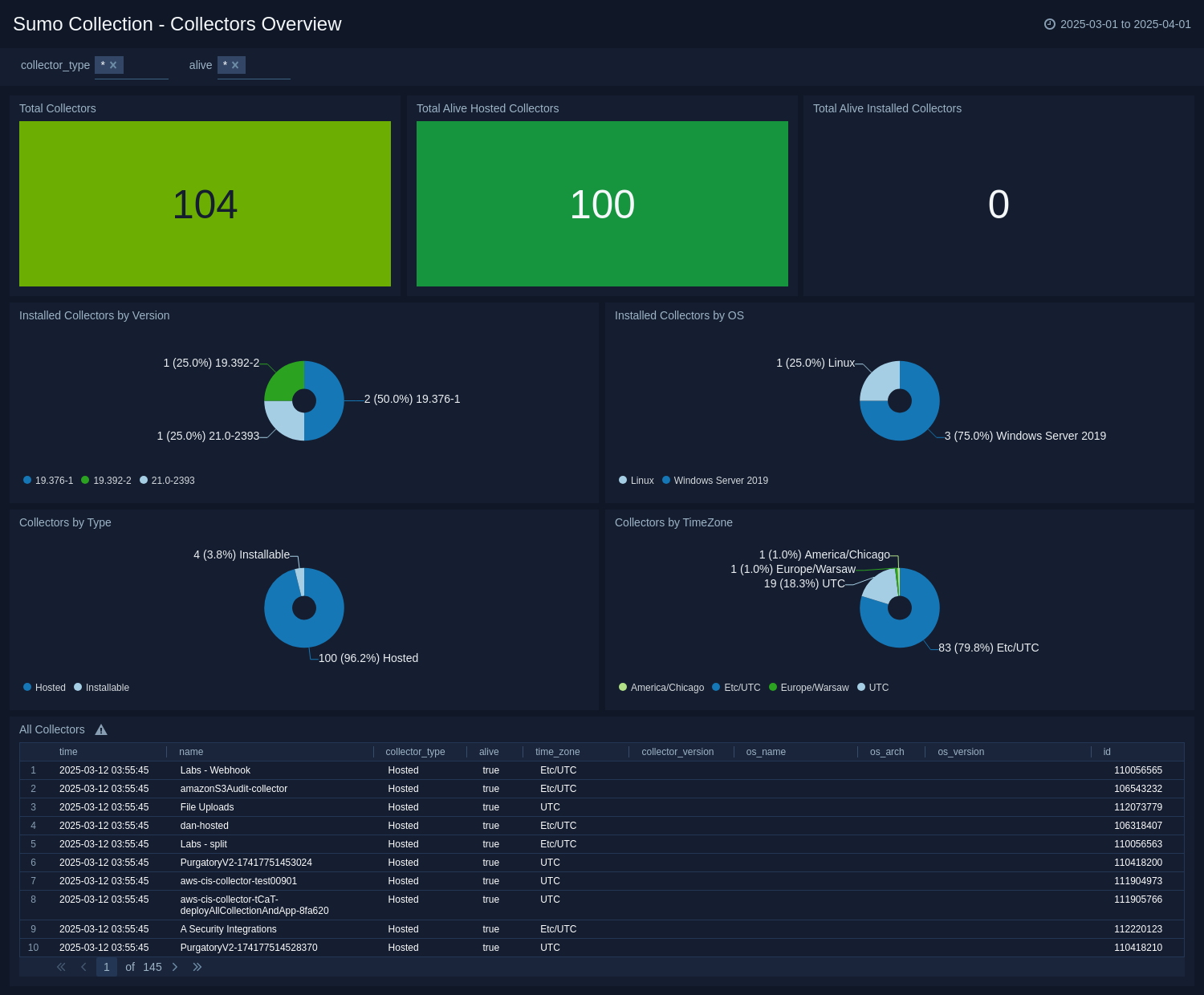
The **Sumo Collection - Collectors Overview** dashboard provides a comprehensive view of data collection processes within Sumo Logic. It offers insights into total collectors, their distribution by type and version, the operational status of installed and hosted collectors, and collector-source relationships. You can track collectors by time zone, operating system, and associated sources, streamlining management and monitoring. With detailed health and performance metrics, the dashboard enables you to optimize data collection, make informed decisions, and ensure smooth operations. By offering real-time visibility and trend analysis, it empowers you to improve data collection infrastructure and prioritize actions for better performance and reliability.
 ### Sources Overview
The **Sumo Collection - Sources Overview** dashboard provides offers a detailed view of data sources within Sumo Logic, enabling effective monitoring and management of data ingestion. It displays metrics such as total sources, source categorization, distribution of Cloud-to-Cloud (C2C) sources, and the health status of C2C sources. You can analyze sources by error states, identify top C2C vendors, and track error counts to resolve issues quickly. The dashboard also highlights specific error types like THIRD-PARTY-CONFIG and THIRD-PARTY-GENERIC, providing insights to optimize data flow and improve data quality. With its analytics and visualizations, you can proactively manage data sources, make informed decisions, and ensure reliable data ingestion within the Sumo Logic ecosystem.
### Sources Overview
The **Sumo Collection - Sources Overview** dashboard provides offers a detailed view of data sources within Sumo Logic, enabling effective monitoring and management of data ingestion. It displays metrics such as total sources, source categorization, distribution of Cloud-to-Cloud (C2C) sources, and the health status of C2C sources. You can analyze sources by error states, identify top C2C vendors, and track error counts to resolve issues quickly. The dashboard also highlights specific error types like THIRD-PARTY-CONFIG and THIRD-PARTY-GENERIC, providing insights to optimize data flow and improve data quality. With its analytics and visualizations, you can proactively manage data sources, make informed decisions, and ensure reliable data ingestion within the Sumo Logic ecosystem.
 ### Sources Time Lag
The **Sumo Collection - Sources Time Lag** dashboard offers a comprehensive view of time delaysthat are affecting Cloud-to-Cloud (C2C) sources within the Sumo Logic platform. This dashboard is designed to help you to monitor data transmission efficiency by highlighting metrics such as average, maximum, and minimum time lags, while also identifying the top 10 sources with significant delays.
### Sources Time Lag
The **Sumo Collection - Sources Time Lag** dashboard offers a comprehensive view of time delaysthat are affecting Cloud-to-Cloud (C2C) sources within the Sumo Logic platform. This dashboard is designed to help you to monitor data transmission efficiency by highlighting metrics such as average, maximum, and minimum time lags, while also identifying the top 10 sources with significant delays.
 ## Create monitors for Sumo Collection app
import CreateMonitors from '../../reuse/apps/create-monitors.md';
### Sumo Collection monitors
| Name | Description | Trigger Type (Critical / Warning / MissingData) | Alert Condition |
|:--|:--|:--|:--|
| `C2C Sources with THIRD-PARTY-CONFIG Errors` | This alert is triggered when Cloud-to-Cloud (C2C) sources encounter THIRD-PARTY-CONFIG errors, causing potential issues in the data ingestion process. | Critical | Count > 0 |
## Upgrading the Sumo Collection app (Optional)
import AppUpdate from '../../reuse/apps/app-update.md';
## Uninstalling the Sumo Collection app (Optional)
import AppUninstall from '../../reuse/apps/app-uninstall.md';
## Create monitors for Sumo Collection app
import CreateMonitors from '../../reuse/apps/create-monitors.md';
### Sumo Collection monitors
| Name | Description | Trigger Type (Critical / Warning / MissingData) | Alert Condition |
|:--|:--|:--|:--|
| `C2C Sources with THIRD-PARTY-CONFIG Errors` | This alert is triggered when Cloud-to-Cloud (C2C) sources encounter THIRD-PARTY-CONFIG errors, causing potential issues in the data ingestion process. | Critical | Count > 0 |
## Upgrading the Sumo Collection app (Optional)
import AppUpdate from '../../reuse/apps/app-update.md';
## Uninstalling the Sumo Collection app (Optional)
import AppUninstall from '../../reuse/apps/app-uninstall.md';