---
id: trellix-mvision-epo
title: Trellix mVision ePO
sidebar_label: Trellix mVision ePO
description: The Trellix mVision ePO app for Sumo Logic enables security analysts to detect, analyze, and respond to threats to reduce false negatives, accelerate investigations, and strengthen endpoint protection.
slug: /help/docs/integrations/saas-cloud/trellix-mvision-epo/
canonical: https://www.sumologic.com/help/docs/integrations/saas-cloud/trellix-mvision-epo/
---
import useBaseUrl from '@docusaurus/useBaseUrl';
}) The Sumo Logic app for Trellix mVision ePO provides centralized visibility into endpoint threats, enabling security teams to detect, analyze, and respond to risks across their environment. It aggregates data on detections, remediation failures, severity, and suspicious behaviors to highlight high-priority incidents and defense gaps.
By analyzing threat categories, attack types, geolocation, and detection methods, the app reveals patterns of malicious activity, risky endpoints, and unusual network behavior. Features such as C2 callback detection, embargoed region activity, file quarantines, and user-targeted attacks offer actionable insights into threat propagation and impacted assets.
With comprehensive summaries, trend analysis, geographical mapping, and device-level detail, the app helps organizations prioritize threats, reduce false negatives, accelerate investigations, and strengthen endpoint protection.
:::info
This app includes [built-in monitors](#trellix-mvision-epo-alerts). For details on creating custom monitors, refer to [Create monitors for Trellix mVision ePO app](#create-monitors-for-the-trellix-mvision-epo-app).
:::
## Log types
This app uses Sumo Logic’s [Trellix Source](/docs/send-data/hosted-collectors/cloud-to-cloud-integration-framework/trellix-source/) to collect event logs from the Trellix platform.
## Sample log message
The Sumo Logic app for Trellix mVision ePO provides centralized visibility into endpoint threats, enabling security teams to detect, analyze, and respond to risks across their environment. It aggregates data on detections, remediation failures, severity, and suspicious behaviors to highlight high-priority incidents and defense gaps.
By analyzing threat categories, attack types, geolocation, and detection methods, the app reveals patterns of malicious activity, risky endpoints, and unusual network behavior. Features such as C2 callback detection, embargoed region activity, file quarantines, and user-targeted attacks offer actionable insights into threat propagation and impacted assets.
With comprehensive summaries, trend analysis, geographical mapping, and device-level detail, the app helps organizations prioritize threats, reduce false negatives, accelerate investigations, and strengthen endpoint protection.
:::info
This app includes [built-in monitors](#trellix-mvision-epo-alerts). For details on creating custom monitors, refer to [Create monitors for Trellix mVision ePO app](#create-monitors-for-the-trellix-mvision-epo-app).
:::
## Log types
This app uses Sumo Logic’s [Trellix Source](/docs/send-data/hosted-collectors/cloud-to-cloud-integration-framework/trellix-source/) to collect event logs from the Trellix platform.
## Sample log message
Event Log
```json
{
"id": "b311da30-82ef-40ae-a1c7-74h6s4",
"type": "MVEvents",
"links": {
"self": "/epo/v2/events/b311da30-82ef-40ae-a1c7-74h6s4"
},
"attributes": {
"timestamp": "2023-06-09T16:40:49.510Z",
"autoguid": "b04478e5-424c-44b0-ba78-f5e27dff4b3c",
"detectedutc": "1686285700000",
"receivedutc": "1686328849509",
"agentguid": "a8c0a97d-f57c-43fc-b611-92499cb40846",
"analyzer": "ENDP_AM_1070",
"analyzername": "Trellix Endpoint Security",
"analyzerversion": "10.7.0.5786",
"analyzerhostname": "DESKTOP",
"analyzeripv4": "172.20.10.2",
"analyzeripv6": "/0:0:0:0:0:ffff:ac14:a02",
"analyzermac": "a87eeabc2b1d",
"analyzerdatversion": "5186.0",
"analyzerengineversion": "6600.9927",
"analyzerdetectionmethod": "On-Access Scan",
"sourcehostname": null,
"sourceipv4": "172.20.10.2",
"sourceipv6": "/0:0:0:0:0:ffff:ac14:a02",
"sourcemac": null,
"sourceusername": null,
"sourceprocessname": "C:\\Windows\\explorer.exe",
"sourceurl": null,
"targethostname": null,
"targetipv4": "172.20.10.2",
"targetipv6": "/0:0:0:0:0:ffff:ac14:a02",
"targetmac": null,
"targetusername": "DESKTOP\\Sumo",
"targetport": null,
"targetprotocol": null,
"targetprocessname": null,
"targetfilename": "C:\\Users\\Sumo\\AppData\\Local\\Temp\\Temp1_7ev3n.zip\\Endermanch@7ev3n.exe",
"threatcategory": "av.detect",
"threateventid": 1027,
"threatseverity": "2",
"threatname": "Ransomware-HIZ!9F8BC96C96D4",
"threattype": "trojan",
"threatactiontaken": "IDS_ALERT_ACT_TAK_DEL",
"threathandled": true,
"nodepath": "1\\1048078\\1116857",
"targethash": "9f8bc96c96d43ecb69f883388d228754",
"sourceprocesshash": null,
"sourceprocesssigned": null,
"sourceprocesssigner": null,
"sourcefilepath": null
}
}
```
## Sample queries
```sumo title="Total Threat Detections"
_sourceCategory="Trellix-mVision-ePO"
| json "id", "attributes.threathandled", "attributes.threatseverity", "attributes.threattype", "attributes.threatcategory", "attributes.analyzerdetectionmethod", "attributes.targethostname", "attributes.threatname", "attributes.analyzeripv4", "attributes.timestamp", "attributes.sourcehostname", "attributes.sourceusername", "attributes.sourceprocessname", "attributes.targetprocessname", "attributes.threatactiontaken", "attributes.targetfilename", "attributes.targethash", "attributes.sourceipv4", "attributes.targetipv4", "attributes.targetport", "attributes.targetprotocol", "attributes.sourceurl", "attributes.targetusername", "attributes.targetipv6" as id, threat_handled, threat_severity, threat_type, threat_category, analyzer_detection_method, target_hostname, threat_name, analyzer_ipv4, timestamp, source_hostname, source_username, source_processname, target_processname, threat_action_taken, target_filename, target_hash, source_ipv4, target_ipv4, target_port, target_protocol, source_url, target_username, target_ipv6 nodrop
| if ((threat_severity matches "1"), "Low", threat_severity) as threat_severity
| if ((threat_severity matches "2" or threat_severity matches "3"), "Medium", threat_severity) as threat_severity
| if ((threat_severity matches "4"), "High", threat_severity) as threat_severity
| where threat_severity matches "{{threat_severity}}"
| where threat_name matches "{{threat_name}}"
| where threat_category matches "{{threat_category}}"
| where threat_type matches "{{threat_type}}"
| count by id
| count
```
## Collection configuration and app installation
import CollectionConfiguration from '../../reuse/apps/collection-configuration.md';
:::important
Use the [Cloud-to-Cloud Integration for Trellix](/docs/send-data/hosted-collectors/cloud-to-cloud-integration-framework/trellix-source/) to create the source and use the same source category while installing the app. By following these steps, you can ensure that your Trellix mVision ePO app is properly integrated and configured to collect and analyze your Trellix mVision ePO data.
:::
### Create a new collector and install the app
import AppCollectionOPtion1 from '../../reuse/apps/app-collection-option-1.md';
### Use an existing collector and install the app
import AppCollectionOPtion2 from '../../reuse/apps/app-collection-option-2.md';
### Use an existing source and install the app
import AppCollectionOPtion3 from '../../reuse/apps/app-collection-option-3.md';
## Viewing the Trellix mVision ePO dashboards
import ViewDashboards from '../../reuse/apps/view-dashboards.md';
### Security
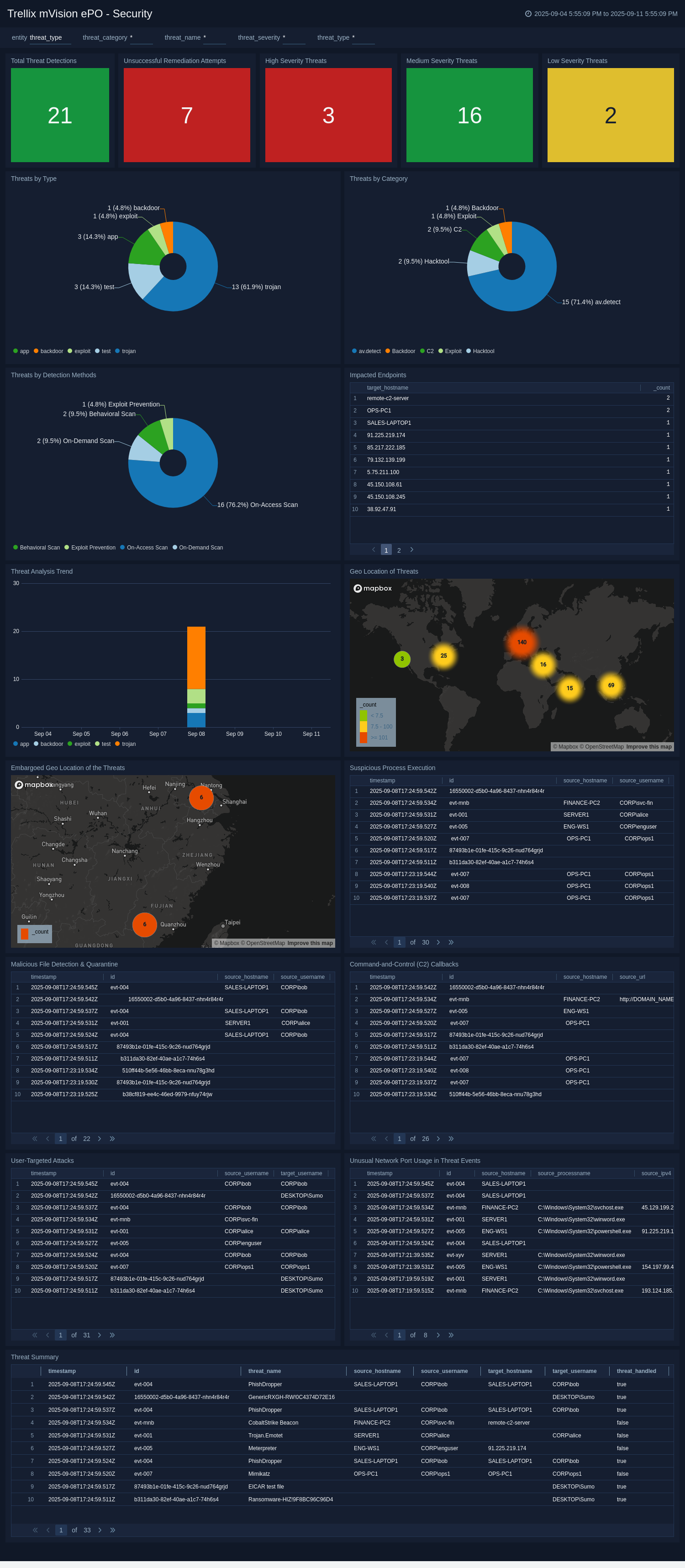
The **Trellix mVision ePO - Security** dashboard offers a unified view of endpoint threat activity and overall security posture. It tracks total detections, failed remediations, severity levels, and detection trends, helping teams quickly assess threat impact and scale.
The dashboard provides real-time insights into suspicious processes, malicious file quarantines, C2 callbacks, user-targeted attacks, and unusual network port usage. It highlights threat activity by type, category, detection method, and affected endpoints, with geographical visualizations, including threats from embargoed regions, for added context.
By consolidating this information, the dashboard enables faster threat detection, analysis, and response, reducing dwell time and enhancing endpoint defenses.
 ## Create monitors for the Trellix mVision ePO app
import CreateMonitors from '../../reuse/apps/create-monitors.md';
### Trellix mVision ePO alerts
| Name | Description | Trigger Type (Critical / Warning / MissingData) | Alert Condition |
|:--|:--|:--|:--|
| `Trellix mVision ePO - High-Severity Malware Detected` | This alert is triggered when malware with critical severity is detected. It helps prioritize threats that require immediate attention and investigation. | Critical | Count > 0 |
| `Trellix mVision ePO – High-Severity Threat Not Remediated` | This alert is triggered when high-severity threats are detected but not successfully remediated. This alert helps you to identify persistent threats or failed containment efforts. | Critical | Count > 0|
| `Trellix mVision ePO – Unusual Network Port Used in Malicious Activity` | This alert is triggered when high-severity threat events use unusual network ports outside standard ranges (80, 22, 443, 53, 3389). This alert helps you detect potential secret communication channels. | Critical | Count > 0|
| `Trellix mVision ePO - Repeated Infections on Same Host` | This alert is triggered when more than three threat events occur on the same endpoint within one hour. This alert helps you to detect repeated compromise or reinfection of a host. | Critical | Count > 0|
| `Trellix mVision ePO - Multiple Hosts Affected by Same Threat` | This alert is triggered when the same threat indicator appears across more than five unique hosts within 30 minutes. This alert helps you to detect a widespread or rapidly propagating attack. | Critical | Count > 0|
## Upgrading/Downgrading the Trellix mVision ePO app (Optional)
import AppUpdate from '../../reuse/apps/app-update.md';
## Uninstalling the Trellix mVision ePO app (Optional)
import AppUninstall from '../../reuse/apps/app-uninstall.md';
## Create monitors for the Trellix mVision ePO app
import CreateMonitors from '../../reuse/apps/create-monitors.md';
### Trellix mVision ePO alerts
| Name | Description | Trigger Type (Critical / Warning / MissingData) | Alert Condition |
|:--|:--|:--|:--|
| `Trellix mVision ePO - High-Severity Malware Detected` | This alert is triggered when malware with critical severity is detected. It helps prioritize threats that require immediate attention and investigation. | Critical | Count > 0 |
| `Trellix mVision ePO – High-Severity Threat Not Remediated` | This alert is triggered when high-severity threats are detected but not successfully remediated. This alert helps you to identify persistent threats or failed containment efforts. | Critical | Count > 0|
| `Trellix mVision ePO – Unusual Network Port Used in Malicious Activity` | This alert is triggered when high-severity threat events use unusual network ports outside standard ranges (80, 22, 443, 53, 3389). This alert helps you detect potential secret communication channels. | Critical | Count > 0|
| `Trellix mVision ePO - Repeated Infections on Same Host` | This alert is triggered when more than three threat events occur on the same endpoint within one hour. This alert helps you to detect repeated compromise or reinfection of a host. | Critical | Count > 0|
| `Trellix mVision ePO - Multiple Hosts Affected by Same Threat` | This alert is triggered when the same threat indicator appears across more than five unique hosts within 30 minutes. This alert helps you to detect a widespread or rapidly propagating attack. | Critical | Count > 0|
## Upgrading/Downgrading the Trellix mVision ePO app (Optional)
import AppUpdate from '../../reuse/apps/app-update.md';
## Uninstalling the Trellix mVision ePO app (Optional)
import AppUninstall from '../../reuse/apps/app-uninstall.md';