---
id: trend-micro-vision-one
title: Trend Micro Vision One
sidebar_label: Trend Micro Vision One
description: The Trend Micro Vision One app for Sumo Logic is designed to enhance the efficiency and effectiveness of security teams, offering a powerful solution for proactive threat monitoring and rapid incident response.
slug: /help/docs/integrations/saas-cloud/trend-micro-vision-one/
canonical: https://www.sumologic.com/help/docs/integrations/saas-cloud/trend-micro-vision-one/
---
import useBaseUrl from '@docusaurus/useBaseUrl';
}) The Trend Micro Vision One app for Sumo Logic is designed to enhance the efficiency and effectiveness of security teams, offering a powerful solution for proactive threat monitoring and rapid incident response. With this app, you can gain real-time visibility into security events and incidents within your organization's infrastructure, allowing them to detect and react to potential threats quickly. It offers a suite of interactive dashboards with pre-configured visual tools like charts, graphs, and tables that provide a thorough view of all alerts and indicators. These features make it easier for teams to discern trends, patterns, and anomalies in your security data, ultimately strengthening your organization's security posture and protecting against advanced threats and attacks.
:::info
This app includes [built-in monitors](#trend-micro-vision-one-monitors). For details on creating custom monitors, refer to the [Create monitors for Trend Micro Vision One app](#create-monitors-for-the-trend-micro-vision-one-app).
:::
## Log types
This app uses Sumo Logic’s Trend Micro Vision One Source to collect [alert logs](/docs/send-data/hosted-collectors/cloud-to-cloud-integration-framework/trend-micro-source/) from the Trend Micro platform.
## Sample log message
The Trend Micro Vision One app for Sumo Logic is designed to enhance the efficiency and effectiveness of security teams, offering a powerful solution for proactive threat monitoring and rapid incident response. With this app, you can gain real-time visibility into security events and incidents within your organization's infrastructure, allowing them to detect and react to potential threats quickly. It offers a suite of interactive dashboards with pre-configured visual tools like charts, graphs, and tables that provide a thorough view of all alerts and indicators. These features make it easier for teams to discern trends, patterns, and anomalies in your security data, ultimately strengthening your organization's security posture and protecting against advanced threats and attacks.
:::info
This app includes [built-in monitors](#trend-micro-vision-one-monitors). For details on creating custom monitors, refer to the [Create monitors for Trend Micro Vision One app](#create-monitors-for-the-trend-micro-vision-one-app).
:::
## Log types
This app uses Sumo Logic’s Trend Micro Vision One Source to collect [alert logs](/docs/send-data/hosted-collectors/cloud-to-cloud-integration-framework/trend-micro-source/) from the Trend Micro platform.
## Sample log message
Alert Log
```json
{
"schemaVersion": "1.15",
"id": "WB-13276-20241108-00002",
"investigationStatus": "New",
"status": "Open",
"investigationResult": "No Findings",
"workbenchLink": "https://portal.in.xdr.trendmicro.com/index.html#/workbench/alerts/WB-13276-20241108-00002?ref=0c12e642ca5b7ed4436e5f23f568ae10066608d3",
"alertProvider": "SAE",
"modelId": "3cdd0c01-e0f1-4264-b013-4ff96ea4adb6",
"model": "Hacking Tool Detection - Blocked",
"modelType": "preset",
"score": 21,
"severity": "low",
"createdDateTime": "2024-11-08T09:51:33Z",
"updatedDateTime": "2024-11-08T09:51:39Z",
"ownerIds": [],
"incidentId": "IC-13276-20241108-00000",
"impactScope": {
"desktopCount": 1,
"serverCount": 0,
"accountCount": 0,
"emailAddressCount": 0,
"containerCount": 0,
"cloudIdentityCount": 0,
"entities": [
{
"entityType": "host",
"entityValue": {
"guid": "A7AD7812-BF2B-4AAA-B963-ABFC57E58A6E",
"name": "desktop-hj8smna",
"ips": [
"10.50.10.212"
]
},
"entityId": "A7AD7812-BF2B-4AAA-B963-ABFC57E58A6E",
"relatedEntities": [],
"relatedIndicatorIds": [
1,
2,
3,
4,
5,
6
],
"provenance": [
"Alert"
],
"managementScopeGroupId": "f70f8654-d627-42eb-8c1c-9762b5760db0"
}
]
},
"description": "A hacking tool, which is generally used for cracking computer and network security or by system administrators to test security, was detected and blocked on an endpoint.",
"matchedRules": [
{
"id": "7310dc1a-49c4-4859-a851-c941f511009a",
"name": "Hacking Tool Detection - Blocked",
"matchedFilters": [
{
"id": "a665ee2c-1568-466c-8a99-4744e02b180e",
"name": "Hacking Tool Detection - Blocked",
"matchedDateTime": "2024-11-08T09:43:02.000Z",
"mitreTechniqueIds": [],
"matchedEvents": [
{
"uuid": "b028b186-f775-4e15-8654-01bab37bcf6b",
"matchedDateTime": "2024-11-08T09:43:02.000Z",
"type": "PRODUCT_EVENT_LOG"
}
]
}
]
}
],
"indicators": [
{
"id": 1,
"type": "detection_name",
"field": "malName",
"value": "HKTL_MIMIKATZ",
"relatedEntities": [
"A7AD7812-BF2B-4AAA-B963-ABFC57E58A6E"
],
"filterIds": [
"a665ee2c-1568-466c-8a99-4744e02b180e"
],
"provenance": [
"Alert"
]
},
{
"id": 2,
"type": "file_sha1",
"field": "fileHash",
"value": "",
"relatedEntities": [
"A7AD7812-BF2B-4AAA-B963-ABFC57E58A6E"
],
"filterIds": [
"a665ee2c-1568-466c-8a99-4744e02b180e"
],
"provenance": [
"Alert"
]
},
{
"id": 3,
"type": "filename",
"field": "fileName",
"value": "C:\\Users\\Crest\\Downloads\\Unconfirmed 198655.crdownload(mimikatz-master\\Win32\\mimidrv.sys)",
"relatedEntities": [
"A7AD7812-BF2B-4AAA-B963-ABFC57E58A6E"
],
"filterIds": [
"a665ee2c-1568-466c-8a99-4744e02b180e"
],
"provenance": [
"Alert"
]
},
{
"id": 4,
"type": "fullpath",
"field": "fullPath",
"value": "C:\\Users\\Crest\\Downloads\\Unconfirmed 198655.crdownload(mimikatz-master\\Win32\\mimidrv.sys)",
"relatedEntities": [
"A7AD7812-BF2B-4AAA-B963-ABFC57E58A6E"
],
"filterIds": [
"a665ee2c-1568-466c-8a99-4744e02b180e"
],
"provenance": [
"Alert"
]
},
{
"id": 5,
"type": "text",
"field": "actResult",
"value": "File cleaned",
"relatedEntities": [
"A7AD7812-BF2B-4AAA-B963-ABFC57E58A6E"
],
"filterIds": [
"a665ee2c-1568-466c-8a99-4744e02b180e"
],
"provenance": [
"Alert"
]
},
{
"id": 6,
"type": "text",
"field": "scanType",
"value": "Real-time Scan",
"relatedEntities": [
"A7AD7812-BF2B-4AAA-B963-ABFC57E58A6E"
],
"filterIds": [
"a665ee2c-1568-466c-8a99-4744e02b180e"
],
"provenance": [
"Alert"
]
}
]
}
```
## Sample queries
```sumo title="Total Alerts"
_sourceCategory="Labs/TrendMicroVisionOne"
| json "id", "status", "investigationResult", "workbenchLink", "alertProvider", "model", "modelType", "score", "severity", "createdDateTime", "updatedDateTime", "incidentId", "impactScope.desktopCount","impactScope.serverCount","impactScope.accountCount","impactScope.emailAddressCount","impactScope.containerCount","impactScope.cloudIdentityCount","description","indicators","impactScope.entities[*].entityType","matchedRules","matchedRules[*].matchedFilters[*].mitreTechniqueIds" as id,status,investigation_result,workbench_link,alert_provider,model,model_type,score,severity,created_date_time,updated_date_time, incident_id,desktop_count,server_count,account_count,email_address_count,container_count,cloud_identity_count,description,indicators,entity_types,matched_rules,mitre_techniques nodrop
// extracting parameters
| extract field=indicators "(?\{[^}]*\})" multi nodrop
| extract field=matched_rules "(?\{[^}]*\})" multi nodrop
| extract field=entity_types "\"?(?[\w\s\-&.,]*)\"?[,\n\]]" multi nodrop
| json field=updated_indicators "provenance" as provenance nodrop
| extract field=provenance "\"?(?[\w\s\-&.,]*)\"?[,\n\]]" multi nodrop
| extract field=mitre_techniques "\"?(?[\w\s\-&.,]*)\"?[,\n\]]" multi nodrop
// global filters
| where severity matches "{{severity}}"
| where status matches "{{status}}"
| where investigation_result matches "{{investigation_result}}"
| where alert_provider matches "{{alert_provider}}"
| where model_type matches "{{model_type}}"
| where model matches "{{model}}"
| where incident_id matches "{{incident_id}}"
// panel specific
| count by id
| count
```
## Collection configuration and app installation
import CollectionConfiguration from '../../reuse/apps/collection-configuration.md';
:::important
Use the [Cloud-to-Cloud Integration for Trend Micro Vision One](/docs/send-data/hosted-collectors/cloud-to-cloud-integration-framework/trend-micro-source) to create the source and use the same source category while installing the app. By following these steps, you can ensure that your Trend Micro Vision One app is properly integrated and configured to collect and analyze your Trend Micro Vision One data.
:::
### Create a new collector and install the app
import AppCollectionOPtion1 from '../../reuse/apps/app-collection-option-1.md';
### Use an existing collector and install the app
import AppCollectionOPtion2 from '../../reuse/apps/app-collection-option-2.md';
### Use an existing source and install the app
import AppCollectionOPtion3 from '../../reuse/apps/app-collection-option-3.md';
## Viewing the Trend Micro Vision One dashboards
import ViewDashboards from '../../reuse/apps/view-dashboards.md';
### Overview
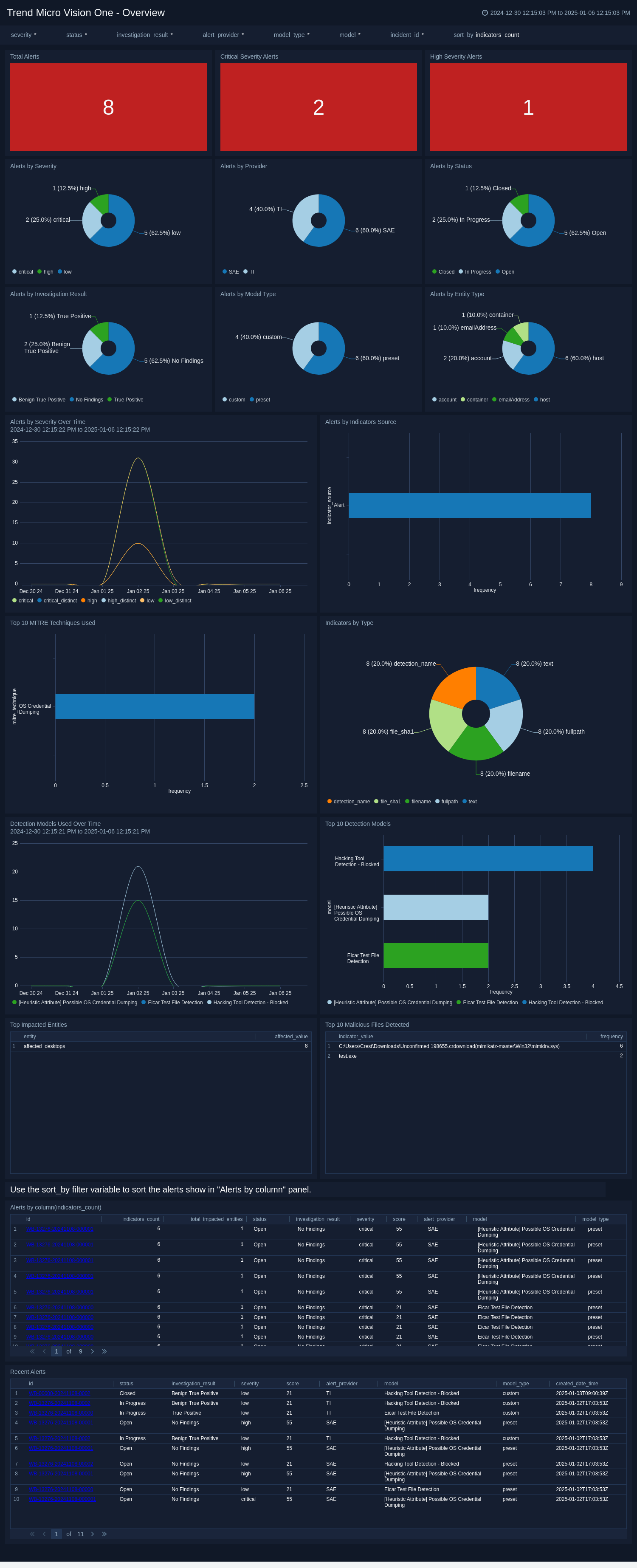
The **Trend Micro Vision One - Overview** dashboard provides details on security alerts, their severity, status, and distribution across different categories and time periods.
Use this dashboard to:
- Monitor the number and severity of security alerts in real-time, allowing for quick identification of high-priority threats.
- Analyze the distribution of alerts by provider, status, and investigation result to prioritize response efforts and allocate resources effectively.
- Track alert trends over time and correlate them with specific event types or indicators to identify patterns or emerging threats.
- Review the top affected entities and detection models to focus on the most critical assets and effective detection mechanisms.
 ## Create monitors for the Trend Micro Vision One app
import CreateMonitors from '../../reuse/apps/create-monitors.md';
### Trend Micro Vision One monitors
The Trend Micro Vision One monitors serve as a security tool, concentrating on observing essential operations and unusual occurrences within the Trend Micro Platform. These notifications offer instantaneous insight into significant events, allowing security personnel to swiftly react to deviations or breaches.
| Name | Description | Trigger Type (Critical / Warning / MissingData) | Alert Condition |
|:--|:--|:--|:--|
| `Trend Micro Vision One - Credential Dumping Detection` | This alert is triggered if techniques aligned with MITRE ATT&CK `T1003` (Credential Dumping) is detected. Helps for early detection of compromised credentials. | Critical | Count > 0 |
| `Trend Micro Vision One - Critical Severity Alerts` | This alert is triggered if critical and high-severity alerts are detected that need urgent attention. | Critical | Count > 0|
| `Trend Micro Vision One - Endpoint Infection Impact Scope` | This alert is triggered if threats affecting multiple endpoints is detected. This helps teams to respond to potential spread. | Critical | Count > 0|
| `Trend Micro Vision One - Hacking Tools Detected and Blocked` | This alert is triggered if any unauthorized tools such as Mimikatz used for reconnaissance or attacks is identified. | Critical | Count > 0|
| `Trend Micro Vision One - Unresolved Alerts Aging Beyond SLA` | This alert is triggered if any overdue alerts that require escalation or follow-up is identified. | Critical | Count > 0|
## Upgrading/Downgrading the Trend Micro Vision One app (Optional)
import AppUpdate from '../../reuse/apps/app-update.md';
## Uninstalling the Trend Micro Vision One app (Optional)
import AppUninstall from '../../reuse/apps/app-uninstall.md';
## Create monitors for the Trend Micro Vision One app
import CreateMonitors from '../../reuse/apps/create-monitors.md';
### Trend Micro Vision One monitors
The Trend Micro Vision One monitors serve as a security tool, concentrating on observing essential operations and unusual occurrences within the Trend Micro Platform. These notifications offer instantaneous insight into significant events, allowing security personnel to swiftly react to deviations or breaches.
| Name | Description | Trigger Type (Critical / Warning / MissingData) | Alert Condition |
|:--|:--|:--|:--|
| `Trend Micro Vision One - Credential Dumping Detection` | This alert is triggered if techniques aligned with MITRE ATT&CK `T1003` (Credential Dumping) is detected. Helps for early detection of compromised credentials. | Critical | Count > 0 |
| `Trend Micro Vision One - Critical Severity Alerts` | This alert is triggered if critical and high-severity alerts are detected that need urgent attention. | Critical | Count > 0|
| `Trend Micro Vision One - Endpoint Infection Impact Scope` | This alert is triggered if threats affecting multiple endpoints is detected. This helps teams to respond to potential spread. | Critical | Count > 0|
| `Trend Micro Vision One - Hacking Tools Detected and Blocked` | This alert is triggered if any unauthorized tools such as Mimikatz used for reconnaissance or attacks is identified. | Critical | Count > 0|
| `Trend Micro Vision One - Unresolved Alerts Aging Beyond SLA` | This alert is triggered if any overdue alerts that require escalation or follow-up is identified. | Critical | Count > 0|
## Upgrading/Downgrading the Trend Micro Vision One app (Optional)
import AppUpdate from '../../reuse/apps/app-update.md';
## Uninstalling the Trend Micro Vision One app (Optional)
import AppUninstall from '../../reuse/apps/app-uninstall.md';