---
id: auth0
title: Auth0
sidebar_label: Auth0
description: The Sumo Logic App for Auth0 makes it easy to analyze and visualize your Auth0 event logs and provides insight into security and operational issues.
slug: /help/docs/integrations/saml/auth0/
canonical: https://www.sumologic.com/help/docs/integrations/saml/auth0/
---
import useBaseUrl from '@docusaurus/useBaseUrl';
}) Auth0 is a cloud-based, extensible identity provider for applications. The Sumo Logic App for Auth0 makes it easy to analyze and visualize your Auth0 event logs and provides insight into security and operational issues.
For more information, see [Use Auth0 App for Sumo Logic](https://auth0.com/docs/customize/log-streams/sumo-logic-dashboard) in the Auth0 documentation.
## Collecting logs for Auth0
This procedure explains how to collect error logs from Auth0.
Sumo Logic collects the following log types:
* Logins, both successes and failures
* Token exchanges, both successes and failures
* Warnings during logins
* User deletion
* Login failure reasons
* Connection errors
* User signup events
* Verification email events
* Password changes
* Rate limiting events
* Other operational events and errors
For more information about Auth0 logs, see [Search Log Events](https://auth0.com/docs/api/management/v2#!/Logs/get_logs) in the Auth0 documentation.
### Prerequisites
Use the Auth0 Management Portal to configure the extension. For more information, see [Sumo Logic](https://marketplace.auth0.com/integrations/sumo-logic-log-streaming) in the Auth0 documentation.
### Configure a collector
Configure a hosted collector. Follow the directions in [Configure a Hosted Collector and Source](/docs/send-data/hosted-collectors/configure-hosted-collector/).
### Configure a source
Configure a source on the collector. Follow the directions in [Configure an HTTP Logs and Metrics Source](/docs/send-data/hosted-collectors/http-source/logs-metrics/#configure-an-httplogs-and-metrics-source).
Provide the required details in the fields below:
* **Name**
* **Source Category**
* Select **Forward to SIEM** if you have [Cloud SIEM](/docs/cse) installed and you want to forward log data to Cloud SIEM. If you select **Forward to SIEM**, also click the **+Add** link and add a field whose name is `_parser` with value */Parsers/System/Auth0/Auth0*.
* **Timestamp Parsing**
* Select **Extract timestamp information from log file entries**.
* **Default Timezone**. Select the default time zone to use. Logs are sent in UTC by default and can be automatically detected.
* **Timestamp Format**. Select **Specify a format**. Click **Add Timestamp Format** and enter the following:
* **Format**: `yyyy-MM-dd'T'HH:mm:ss.SSS'Z'`
* **Timestamp locator**: `"date":"(.*?)\","`
* **Message Processing**
* Select **Multiline Processing**.
* For **Infer Message Boundaries** select **Detect Automatically**.
### Use Field Extraction Rules
Parse Expression: `json "date", "type", "client_id", "client_name", "ip", "user_id"`
## Sample log messages
```json title="Example"
{
"log_id": "17809212622791780921262279178092126227917809212622794542",
"data": {
"date": "2026-06-08T17:51:02.279Z",
"type": "s",
"connection": "enterprise-db",
"connection_id": "con_nD3XkfFNuYUPnmbp",
"client_id": "7RyK6txXYPZTQGOAwwln6Eoie0gVZ2cu",
"client_name": "CloudSync Platform",
"ip": "fd64:3716:2209:2708::2273",
"user_agent": "Mozilla/5.0 (Windows NT 10.0; Win64; x64) AppleWebKit/537.36 (KHTML, like Gecko) Chrome/142.132.236.84 Safari/537.36",
"details": {
"prompts": [
{
"name": "prompt-authenticate",
"completedAt": 1780921262279,
"connection": "enterprise-db",
"connection_id": "con_nD3XkfFNuYUPnmbp",
"strategy": "auth0",
"identity": 99716766,
"stats": {
"loginsCount": 42
},
"elapsedTime": null
},
{
"name": "login",
"flow": "universal-login",
"initiatedAt": 1780921262279,
"completedAt": 1780921262279,
"user_id": "auth0|31148744",
"user_name": "system_proc",
"timers": {
"rules": 70
},
"elapsedTime": 5864
}
],
"initiatedAt": 1780921262279,
"completedAt": 1780921262279,
"elapsedTime": 6110,
"actions": {
"executions": [
"jp8LFtSdXIVcIeKjcTXnTNJ75zZ3h7kBftk1n1Vu8BD2LTbzx7JZqh4u"
]
},
"session_id": "95W6HDLrCRBtqevKPcQlvkphsqHoTh6w",
"riskAssessment": {
"confidence": "high",
"version": "1",
"assessments": {
"UntrustedIP": {
"confidence": "high",
"code": "not_found_on_deny_list"
},
"NewDevice": {
"confidence": "high",
"code": "match",
"details": {
"device": "known",
"useragent": "known"
}
},
"ImpossibleTravel": {
"confidence": "high",
"code": "location_history_not_found"
},
"PhoneNumber": {
"confidence": "neutral",
"code": "phone_number_not_provided"
}
}
},
"transaction_id": "vTQ7fuKBzA1709dk1J50WcGZotESeIlr",
"session": {
"cookie": {
"mode": "persistent"
}
},
"form": {
"ulp-rememberUsername": "on"
},
"stats": {
"loginsCount": 42
}
},
"security_context": {
"ja3": "a1ffa339ba0853d979d34a96ac9e4b6b",
"ja4": "ca390ac92e1f55546a8faaacc6d553bcd190"
},
"hostname": "auth.acmecorp.com",
"user_id": "auth0|31148744",
"user_name": "system_proc",
"strategy": "auth0",
"strategy_type": "database",
"location_info": {
"latitude": 32.6713,
"longitude": -111.5766,
"country_code": "US",
"country_name": "United States",
"city_name": "Tucson",
"subdivision_code": "AZ",
"subdivision_name": "Arizona",
"continent_code": "NA",
"time_zone": "America/Phoenix",
"country_code3": "USA"
},
"$event_schema": {
"version": "1.0.0"
},
"environment_name": "env-region-4",
"log_id": "17809212622791780921262279178092126227917809212622794542",
"tenant_name": "nova-prod02"
}
}
```
## Sample queries
```sumo title="Total Events"
_sourceCategory={{Logsdatasource}} log_id
| json "data", "log_id", "detail.data", "detail.log_id" as data, log_id, data2, log_id2 nodrop
| if (!isEmpty(data), data, data2) as data
| if (!isEmpty(log_id), log_id, log_id2) as log_id
| json field=data "type", "user_name", "client_name", "connection", "ip" as type, user_name, client_name, connection, ip nodrop
// global filters
| where type matches "{{type}}" and user_name matches "{{user_name}}" and client_name matches "{{client_name}}" and connection matches "{{connection}}" and ip matches "{{ip}}"
// panel specific
| count by log_id
| count
```
```sumo title="Login Status Over Time"
_sourceCategory={{Logsdatasource}} log_id type ("s" OR "fp" OR "fu")
| json "data", "log_id", "detail.data", "detail.log_id" as data, log_id, data2, log_id2 nodrop
| if (!isEmpty(data), data, data2) as data
| if (!isEmpty(log_id), log_id, log_id2) as log_id
| json field=data "type", "user_name", "client_name", "connection", "ip" as type, user_name, client_name, connection, ip nodrop
// global filters
| where type matches "{{type}}" and ip matches "{{ip}}"
| where if ("{{user_name}}" = "*", true, user_name matches "{{user_name}}")
| where if ("{{client_name}}" = "*", true, client_name matches "{{client_name}}")
// panel specific
| where !isBlank(type) and type in ("s", "fp", "fu")
| if(type = "s", "success", "failure") as login_result
| timeslice 1h
| count by log_id, _timeslice, login_result
| count by _timeslice, login_result
| fillmissing timeslice, values all in login_result
| transpose row _timeslice column login_result
```
```sumo title="Top User Agents"
_sourceCategory={{Logsdatasource}} user_agent
| json "data", "log_id", "detail.data", "detail.log_id" as data, log_id, data2, log_id2 nodrop
| if (!isEmpty(data), data, data2) as data
| if (!isEmpty(log_id), log_id, log_id2) as log_id
| json field=data "type", "user_name", "user_agent" as type, user_name, user_agent nodrop
// Global filter
| where if("{{type}}" = "*", true, type matches "{{type}}")
| where if("{{user_name}}" = "*", true, user_name matches "{{user_name}}")
// Panel specific
| where !isBlank(user_agent)
| count by log_id, user_agent
| count as frequency by user_agent
| sort by frequency, user_agent asc
```
## Installing the Auth0 App
Now that you have set up collection for Auth0, install the Sumo Logic App for Auth0 to use the preconfigured searches and dashboards that provide insight into your data.
import AppInstall from '../../reuse/apps/app-install.md';
## Viewing the Auth0 dashboards
import ViewDashboards from '../../reuse/apps/view-dashboards.md';
### Overview
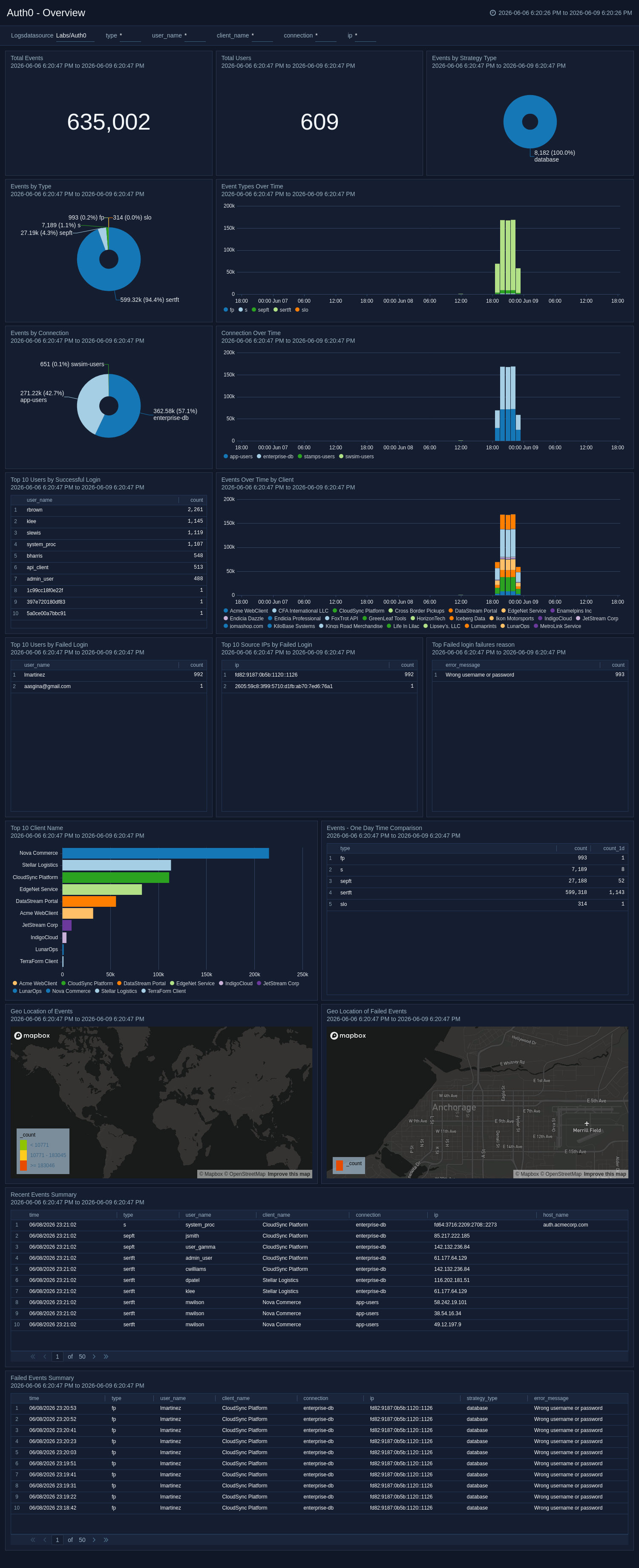
The **Auth0 - Overview** dashboard provides insights into authentication activity, tracking login geo locations on a world map and visualizing login attempts per hour over the last seven days. It highlights the top users by successful and failed logins, as well as the most frequent source IPs for failed logins, helping to identify potential security threats.
Auth0 is a cloud-based, extensible identity provider for applications. The Sumo Logic App for Auth0 makes it easy to analyze and visualize your Auth0 event logs and provides insight into security and operational issues.
For more information, see [Use Auth0 App for Sumo Logic](https://auth0.com/docs/customize/log-streams/sumo-logic-dashboard) in the Auth0 documentation.
## Collecting logs for Auth0
This procedure explains how to collect error logs from Auth0.
Sumo Logic collects the following log types:
* Logins, both successes and failures
* Token exchanges, both successes and failures
* Warnings during logins
* User deletion
* Login failure reasons
* Connection errors
* User signup events
* Verification email events
* Password changes
* Rate limiting events
* Other operational events and errors
For more information about Auth0 logs, see [Search Log Events](https://auth0.com/docs/api/management/v2#!/Logs/get_logs) in the Auth0 documentation.
### Prerequisites
Use the Auth0 Management Portal to configure the extension. For more information, see [Sumo Logic](https://marketplace.auth0.com/integrations/sumo-logic-log-streaming) in the Auth0 documentation.
### Configure a collector
Configure a hosted collector. Follow the directions in [Configure a Hosted Collector and Source](/docs/send-data/hosted-collectors/configure-hosted-collector/).
### Configure a source
Configure a source on the collector. Follow the directions in [Configure an HTTP Logs and Metrics Source](/docs/send-data/hosted-collectors/http-source/logs-metrics/#configure-an-httplogs-and-metrics-source).
Provide the required details in the fields below:
* **Name**
* **Source Category**
* Select **Forward to SIEM** if you have [Cloud SIEM](/docs/cse) installed and you want to forward log data to Cloud SIEM. If you select **Forward to SIEM**, also click the **+Add** link and add a field whose name is `_parser` with value */Parsers/System/Auth0/Auth0*.
* **Timestamp Parsing**
* Select **Extract timestamp information from log file entries**.
* **Default Timezone**. Select the default time zone to use. Logs are sent in UTC by default and can be automatically detected.
* **Timestamp Format**. Select **Specify a format**. Click **Add Timestamp Format** and enter the following:
* **Format**: `yyyy-MM-dd'T'HH:mm:ss.SSS'Z'`
* **Timestamp locator**: `"date":"(.*?)\","`
* **Message Processing**
* Select **Multiline Processing**.
* For **Infer Message Boundaries** select **Detect Automatically**.
### Use Field Extraction Rules
Parse Expression: `json "date", "type", "client_id", "client_name", "ip", "user_id"`
## Sample log messages
```json title="Example"
{
"log_id": "17809212622791780921262279178092126227917809212622794542",
"data": {
"date": "2026-06-08T17:51:02.279Z",
"type": "s",
"connection": "enterprise-db",
"connection_id": "con_nD3XkfFNuYUPnmbp",
"client_id": "7RyK6txXYPZTQGOAwwln6Eoie0gVZ2cu",
"client_name": "CloudSync Platform",
"ip": "fd64:3716:2209:2708::2273",
"user_agent": "Mozilla/5.0 (Windows NT 10.0; Win64; x64) AppleWebKit/537.36 (KHTML, like Gecko) Chrome/142.132.236.84 Safari/537.36",
"details": {
"prompts": [
{
"name": "prompt-authenticate",
"completedAt": 1780921262279,
"connection": "enterprise-db",
"connection_id": "con_nD3XkfFNuYUPnmbp",
"strategy": "auth0",
"identity": 99716766,
"stats": {
"loginsCount": 42
},
"elapsedTime": null
},
{
"name": "login",
"flow": "universal-login",
"initiatedAt": 1780921262279,
"completedAt": 1780921262279,
"user_id": "auth0|31148744",
"user_name": "system_proc",
"timers": {
"rules": 70
},
"elapsedTime": 5864
}
],
"initiatedAt": 1780921262279,
"completedAt": 1780921262279,
"elapsedTime": 6110,
"actions": {
"executions": [
"jp8LFtSdXIVcIeKjcTXnTNJ75zZ3h7kBftk1n1Vu8BD2LTbzx7JZqh4u"
]
},
"session_id": "95W6HDLrCRBtqevKPcQlvkphsqHoTh6w",
"riskAssessment": {
"confidence": "high",
"version": "1",
"assessments": {
"UntrustedIP": {
"confidence": "high",
"code": "not_found_on_deny_list"
},
"NewDevice": {
"confidence": "high",
"code": "match",
"details": {
"device": "known",
"useragent": "known"
}
},
"ImpossibleTravel": {
"confidence": "high",
"code": "location_history_not_found"
},
"PhoneNumber": {
"confidence": "neutral",
"code": "phone_number_not_provided"
}
}
},
"transaction_id": "vTQ7fuKBzA1709dk1J50WcGZotESeIlr",
"session": {
"cookie": {
"mode": "persistent"
}
},
"form": {
"ulp-rememberUsername": "on"
},
"stats": {
"loginsCount": 42
}
},
"security_context": {
"ja3": "a1ffa339ba0853d979d34a96ac9e4b6b",
"ja4": "ca390ac92e1f55546a8faaacc6d553bcd190"
},
"hostname": "auth.acmecorp.com",
"user_id": "auth0|31148744",
"user_name": "system_proc",
"strategy": "auth0",
"strategy_type": "database",
"location_info": {
"latitude": 32.6713,
"longitude": -111.5766,
"country_code": "US",
"country_name": "United States",
"city_name": "Tucson",
"subdivision_code": "AZ",
"subdivision_name": "Arizona",
"continent_code": "NA",
"time_zone": "America/Phoenix",
"country_code3": "USA"
},
"$event_schema": {
"version": "1.0.0"
},
"environment_name": "env-region-4",
"log_id": "17809212622791780921262279178092126227917809212622794542",
"tenant_name": "nova-prod02"
}
}
```
## Sample queries
```sumo title="Total Events"
_sourceCategory={{Logsdatasource}} log_id
| json "data", "log_id", "detail.data", "detail.log_id" as data, log_id, data2, log_id2 nodrop
| if (!isEmpty(data), data, data2) as data
| if (!isEmpty(log_id), log_id, log_id2) as log_id
| json field=data "type", "user_name", "client_name", "connection", "ip" as type, user_name, client_name, connection, ip nodrop
// global filters
| where type matches "{{type}}" and user_name matches "{{user_name}}" and client_name matches "{{client_name}}" and connection matches "{{connection}}" and ip matches "{{ip}}"
// panel specific
| count by log_id
| count
```
```sumo title="Login Status Over Time"
_sourceCategory={{Logsdatasource}} log_id type ("s" OR "fp" OR "fu")
| json "data", "log_id", "detail.data", "detail.log_id" as data, log_id, data2, log_id2 nodrop
| if (!isEmpty(data), data, data2) as data
| if (!isEmpty(log_id), log_id, log_id2) as log_id
| json field=data "type", "user_name", "client_name", "connection", "ip" as type, user_name, client_name, connection, ip nodrop
// global filters
| where type matches "{{type}}" and ip matches "{{ip}}"
| where if ("{{user_name}}" = "*", true, user_name matches "{{user_name}}")
| where if ("{{client_name}}" = "*", true, client_name matches "{{client_name}}")
// panel specific
| where !isBlank(type) and type in ("s", "fp", "fu")
| if(type = "s", "success", "failure") as login_result
| timeslice 1h
| count by log_id, _timeslice, login_result
| count by _timeslice, login_result
| fillmissing timeslice, values all in login_result
| transpose row _timeslice column login_result
```
```sumo title="Top User Agents"
_sourceCategory={{Logsdatasource}} user_agent
| json "data", "log_id", "detail.data", "detail.log_id" as data, log_id, data2, log_id2 nodrop
| if (!isEmpty(data), data, data2) as data
| if (!isEmpty(log_id), log_id, log_id2) as log_id
| json field=data "type", "user_name", "user_agent" as type, user_name, user_agent nodrop
// Global filter
| where if("{{type}}" = "*", true, type matches "{{type}}")
| where if("{{user_name}}" = "*", true, user_name matches "{{user_name}}")
// Panel specific
| where !isBlank(user_agent)
| count by log_id, user_agent
| count as frequency by user_agent
| sort by frequency, user_agent asc
```
## Installing the Auth0 App
Now that you have set up collection for Auth0, install the Sumo Logic App for Auth0 to use the preconfigured searches and dashboards that provide insight into your data.
import AppInstall from '../../reuse/apps/app-install.md';
## Viewing the Auth0 dashboards
import ViewDashboards from '../../reuse/apps/view-dashboards.md';
### Overview
The **Auth0 - Overview** dashboard provides insights into authentication activity, tracking login geo locations on a world map and visualizing login attempts per hour over the last seven days. It highlights the top users by successful and failed logins, as well as the most frequent source IPs for failed logins, helping to identify potential security threats.
 ### Security Analysis
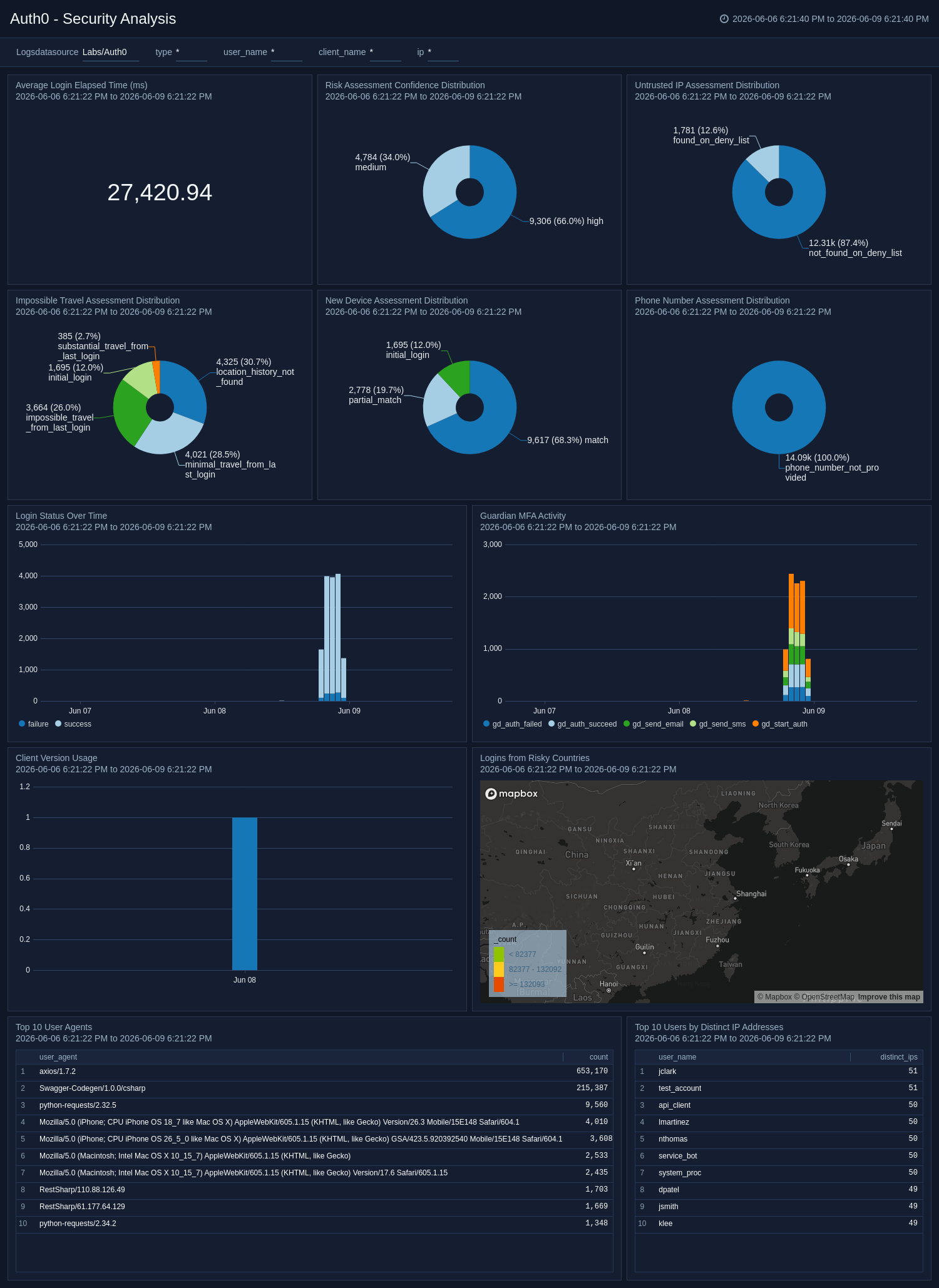
The **Auth0 - Security Analysis** dashboard delivers security-focused analysis of Auth0 authentication events, including risk assessments, new device detection, impossible travel indicators, and login performance, to identify compromised accounts and suspicious access patterns.
### Security Analysis
The **Auth0 - Security Analysis** dashboard delivers security-focused analysis of Auth0 authentication events, including risk assessments, new device detection, impossible travel indicators, and login performance, to identify compromised accounts and suspicious access patterns.
 ### User Agent Analysis
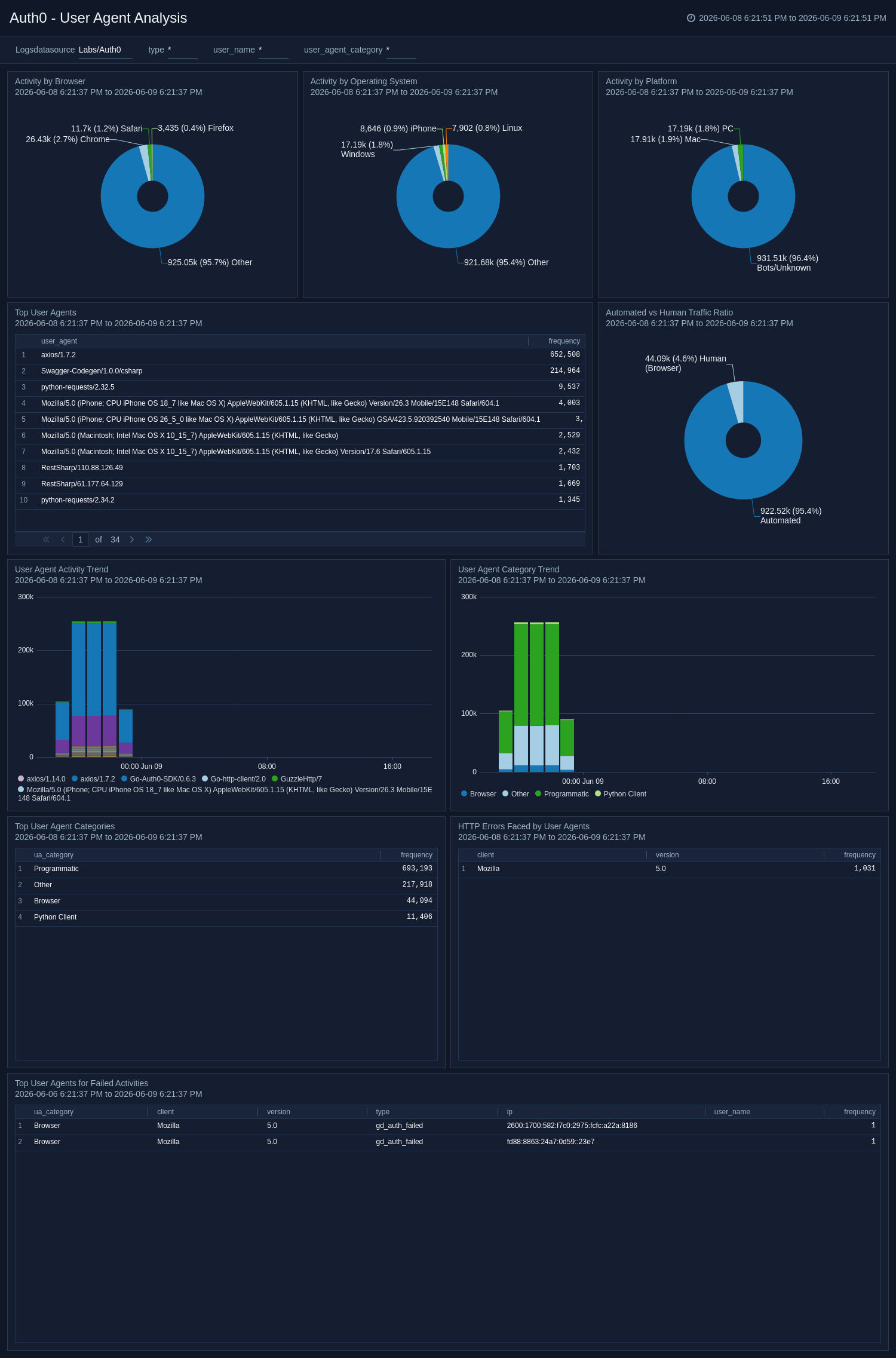
The **Auth0 - User Agent Analysis** dashboard analyzes user agents, categorizing traffic by browser, operating system, platform, and whether it is automated or human-generated. It tracks user-agent activity trends, surfaces the top agents associated with failed activities, and highlights HTTP errors encountered by different client types. Category trend analysis helps teams identify unusual or unauthorized client tooling over time. Use this dashboard to detect bot activity, investigate suspicious client behaviour, and ensure that only approved tools and platforms access your environment.
### User Agent Analysis
The **Auth0 - User Agent Analysis** dashboard analyzes user agents, categorizing traffic by browser, operating system, platform, and whether it is automated or human-generated. It tracks user-agent activity trends, surfaces the top agents associated with failed activities, and highlights HTTP errors encountered by different client types. Category trend analysis helps teams identify unusual or unauthorized client tooling over time. Use this dashboard to detect bot activity, investigate suspicious client behaviour, and ensure that only approved tools and platforms access your environment.
 ## Create monitors for Auth0 app
import CreateMonitors from '../../reuse/apps/create-monitors.md';
### Auth0 alerts
| Name | Description | Trigger Type (Critical / Warning / MissingData) | Alert Condition |
|:--|:--|:--|:--|
| `Auth0 - Events from Embargoed Locations` | This alert is triggered when a login attempt or user action originates from an embargoed location, potentially indicating unauthorized access. Investigate the activity to verify its legitimacy and take appropriate action if malicious behavior is suspected. | Critical | Count > 0 |
| `Auth0 - Multiple Failed Authentication From Single User` | This alert is triggered when multiple authentication failures are detected for a single user within a short time frame, which may indicate a brute-force attack, credential misuse, or user login issues. | Critical | Count > 3 |
| `Auth0 - Untrusted IP Detected` | This alert is triggered when activity is observed from an untrusted IP address that is present on the configured deny list, indicating a potentially malicious or unauthorized source. | Critical | Count > 0 |
## Upgrading the Auth0 app (optional)
import AppUpdate from '../../reuse/apps/app-update.md';
## Uninstalling the Auth0 app (Optional)
import AppUninstall from '../../reuse/apps/app-uninstall.md';
## Create monitors for Auth0 app
import CreateMonitors from '../../reuse/apps/create-monitors.md';
### Auth0 alerts
| Name | Description | Trigger Type (Critical / Warning / MissingData) | Alert Condition |
|:--|:--|:--|:--|
| `Auth0 - Events from Embargoed Locations` | This alert is triggered when a login attempt or user action originates from an embargoed location, potentially indicating unauthorized access. Investigate the activity to verify its legitimacy and take appropriate action if malicious behavior is suspected. | Critical | Count > 0 |
| `Auth0 - Multiple Failed Authentication From Single User` | This alert is triggered when multiple authentication failures are detected for a single user within a short time frame, which may indicate a brute-force attack, credential misuse, or user login issues. | Critical | Count > 3 |
| `Auth0 - Untrusted IP Detected` | This alert is triggered when activity is observed from an untrusted IP address that is present on the configured deny list, indicating a potentially malicious or unauthorized source. | Critical | Count > 0 |
## Upgrading the Auth0 app (optional)
import AppUpdate from '../../reuse/apps/app-update.md';
## Uninstalling the Auth0 app (Optional)
import AppUninstall from '../../reuse/apps/app-uninstall.md';