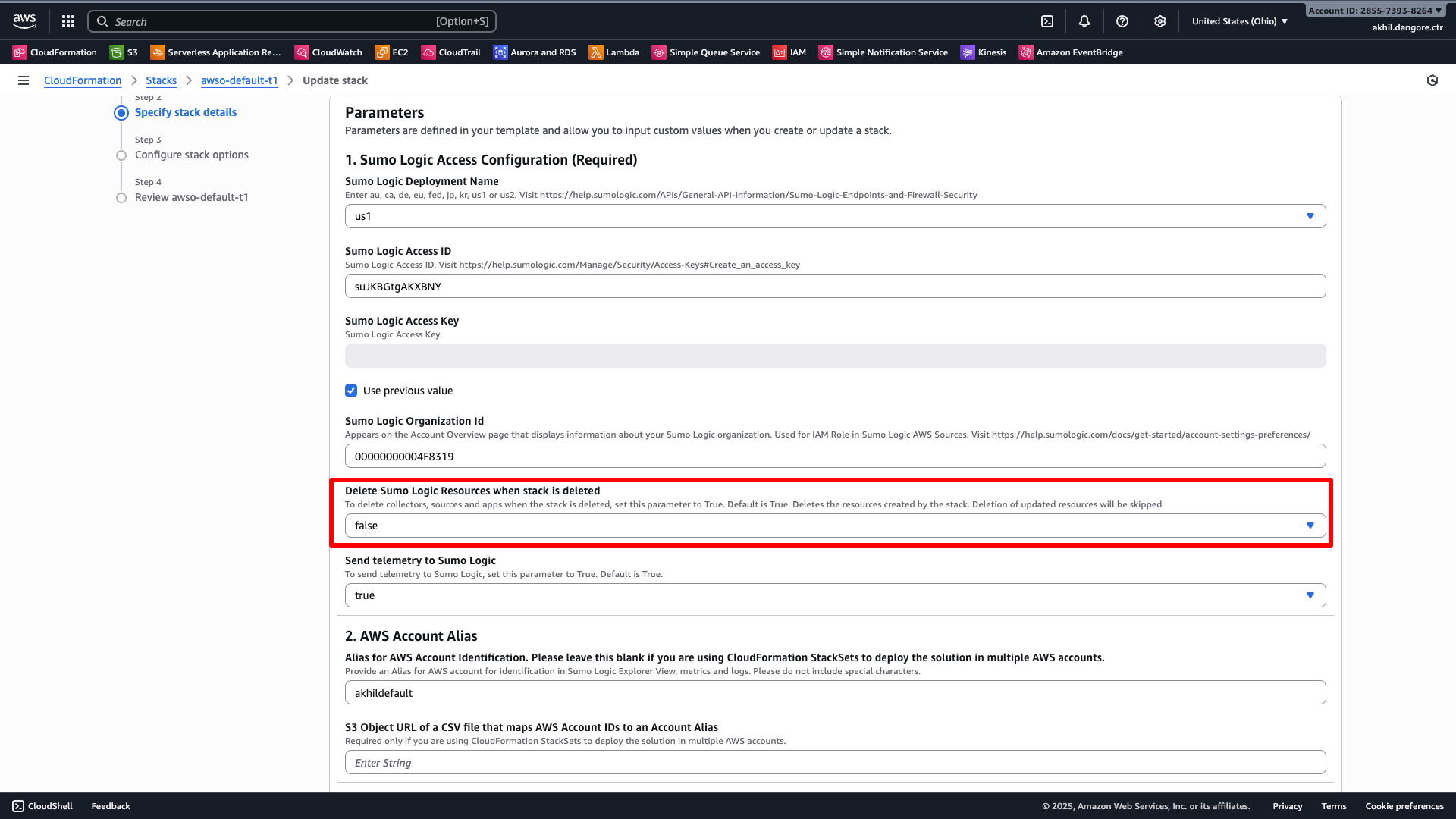
 5. Click through the remaining steps and submit the update.
6. Wait for the stack to reach `UPDATE_COMPLETE` before proceeding.
## Step 2: Delete the v2.x stack
1. Go to **AWS Console > CloudFormation > Stacks**.
2. Select your v2.x stack and click **Delete**.
3. Confirm the deletion.
4. Wait for the stack to reach `DELETE_COMPLETE`. If the deletion gets stuck in `DELETE_FAILED`, this is expected — the S3 bucket cannot be deleted because it contains logs. In this case, use **Force delete** to complete the deletion while leaving the bucket intact.
## Step 3: Verify your Sumo Logic resources are intact
After the stack is deleted, verify that your collector and sources are still present in Sumo Logic:
1. Go to **Manage Data > Collection > Collection**.
2. Find the collector named `aws-observability-
5. Click through the remaining steps and submit the update.
6. Wait for the stack to reach `UPDATE_COMPLETE` before proceeding.
## Step 2: Delete the v2.x stack
1. Go to **AWS Console > CloudFormation > Stacks**.
2. Select your v2.x stack and click **Delete**.
3. Confirm the deletion.
4. Wait for the stack to reach `DELETE_COMPLETE`. If the deletion gets stuck in `DELETE_FAILED`, this is expected — the S3 bucket cannot be deleted because it contains logs. In this case, use **Force delete** to complete the deletion while leaving the bucket intact.
## Step 3: Verify your Sumo Logic resources are intact
After the stack is deleted, verify that your collector and sources are still present in Sumo Logic:
1. Go to **Manage Data > Collection > Collection**.
2. Find the collector named `aws-observability-| v2.x Parameter | v3.0.0 Parameter | Notes |
|---|---|---|
Section1aSumoLogicDeployment | Section1aSumoLogicDeployment | Same value |
Section1bSumoLogicAccessID | Section1bSumoLogicAccessID | Same value |
Section1cSumoLogicAccessKey | Section1cSumoLogicAccessKey | Same value (re-enter — masked in CFN) |
Section1dSumoLogicOrganizationId | Section1dSumoLogicOrganizationId | Same value |
Section1eSumoLogicResourceRemoveOnDeleteStack | Section1eSumoLogicResourceRemoveOnDeleteStack | Set to false |
Section1fSumoLogicSendTelemetry | Section1fSumoLogicSendTelemetry | Same value |
Section2aAccountAlias | Section2aAccountAlias | Same value |
Section2bAccountAliasMappingS3URL | Section2bAccountAliasMappingS3URL | Same value |
Section3aInstallObservabilityApps | Section3aInstallObservabilityApps | Same value |
Section4aCreateMetricsSourceOptions | Section4aCreateMetricsSourceOptions | Same value |
Section4bMetricsNameSpaces | Section4bMetricsNameSpaces | Same value |
Section4cCloudWatchExistingSourceAPIUrl | Section4cCloudWatchExistingSourceAPIUrl | Leave empty (create new) |
Section4dAWSMetricsTagFilters | Section4dAWSMetricsTagFilters | Same value |
Section5aAutoEnableS3LogsALBResourcesOptions | Section5aAutoEnableS3LogsALBResourcesOptions | Same value |
Section5bALBCreateLogSource | Section5bALBCreateLogSource | Same value |
Section5cALBLogsSourceUrl | Section5cALBLogsSourceUrl | Leave empty (create new) |
Section5dALBS3LogsBucketName | Section5dALBS3LogsBucketName | Use the existing bucket name from your v2.x stack |
Section5eALBS3BucketPathExpression | Section5eALBS3BucketPathExpression | Same value |
Section6aCreateCloudTrailLogSource | Section6aCreateCloudTrailLogSource | Same value |
Section6bCloudTrailLogsSourceUrl | Section6bCloudTrailLogsSourceUrl | Leave empty (create new) |
Section6cCloudTrailLogsBucketName | Section6cCloudTrailLogsBucketName | Use the existing bucket name from your v2.x stack |
Section6dCloudTrailBucketPathExpression | Section6dCloudTrailBucketPathExpression | Same value |
Section7aLambdaCreateCloudWatchLogsSourceOptions | Section7aCreateCloudWatchLogsSourceOptions | Renamed — drop Lambda from key name |
Section7bLambdaCloudWatchLogsSourceUrl | Section7bCloudWatchLogsSourceUrl | Renamed — drop Lambda; leave empty (create new) |
Section7cAutoSubscribeLogGroupsOptions | Section7cAutoSubscribeLogGroupsOptions | Same value |
Section7dAutoSubscribeLogGroupPattern | Section7dAutoSubscribeLogGroupPattern | Same value |
Section7eAutoSubscribeLogGroupByTags | Section7eAutoSubscribeLogGroupByTags | Same value |
Section9aAutoEnableS3LogsELBResourcesOptions | Section8aAutoEnableS3LogsELBResourcesOptions | Renamed — Section 9 → Section 8 |
Section9bELBCreateLogSource | Section8bELBCreateLogSource | Renamed — Section 9 → Section 8 |
Section9cELBLogsSourceUrl | Section8cELBLogsSourceUrl | Renamed — Section 9 → Section 8; leave empty (create new) |
Section9dELBS3LogsBucketName | Section8dELBS3LogsBucketName | Renamed — Section 9 → Section 8; use existing bucket name |
Section9eELBS3BucketPathExpression | Section8eELBS3BucketPathExpression | Renamed — Section 9 → Section 8 |
Section10aAppInstallLocation | (removed) | Removed in v3.0.0 — do not include |
Section10bShare | (removed) | Removed in v3.0.0 — do not include |
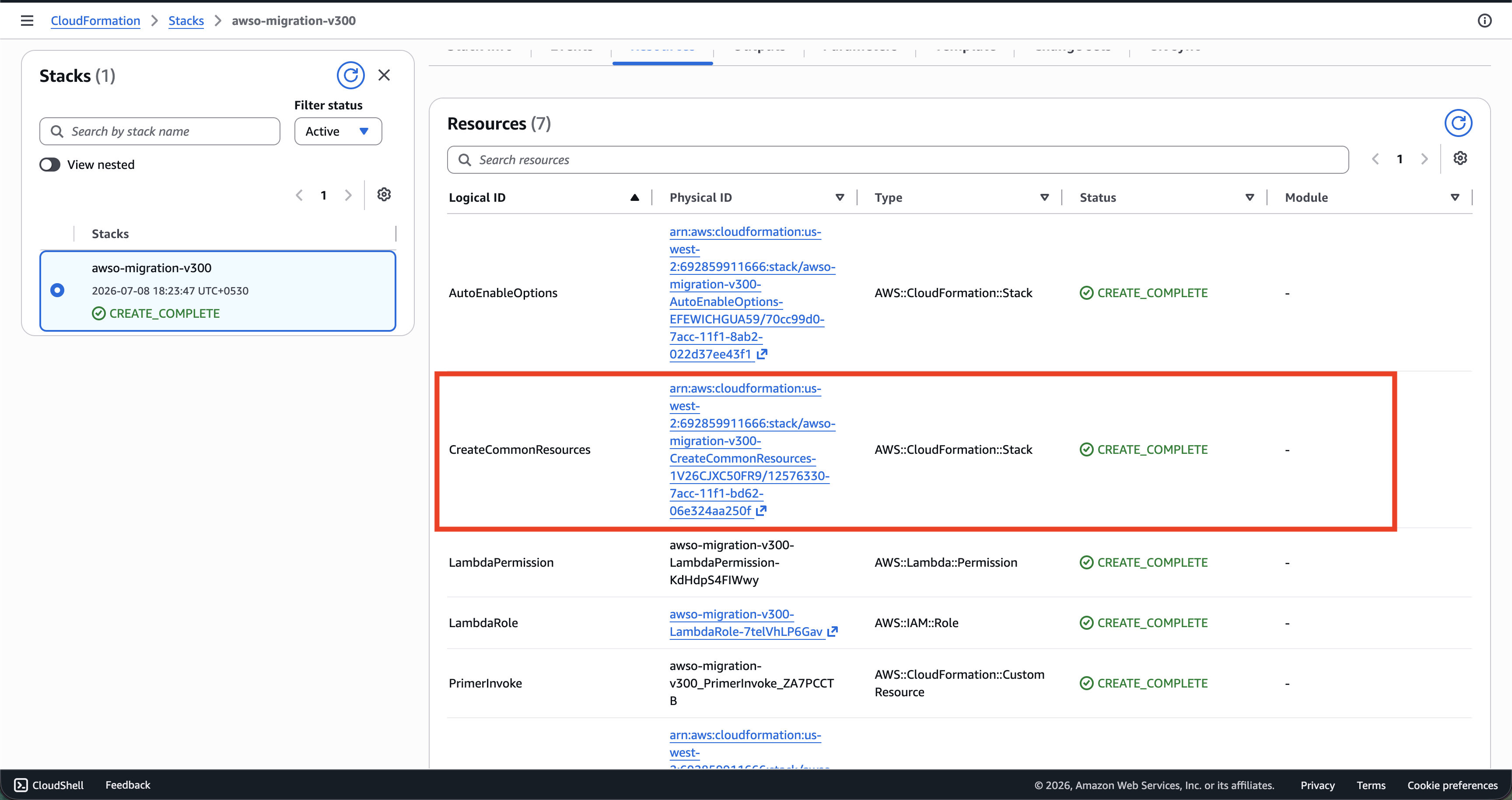 3. In the `CreateCommonResources` stack, go to the **Resources** tab and search for `SumoLogicSourceRole`. Click the **Physical ID** link to open the IAM role.
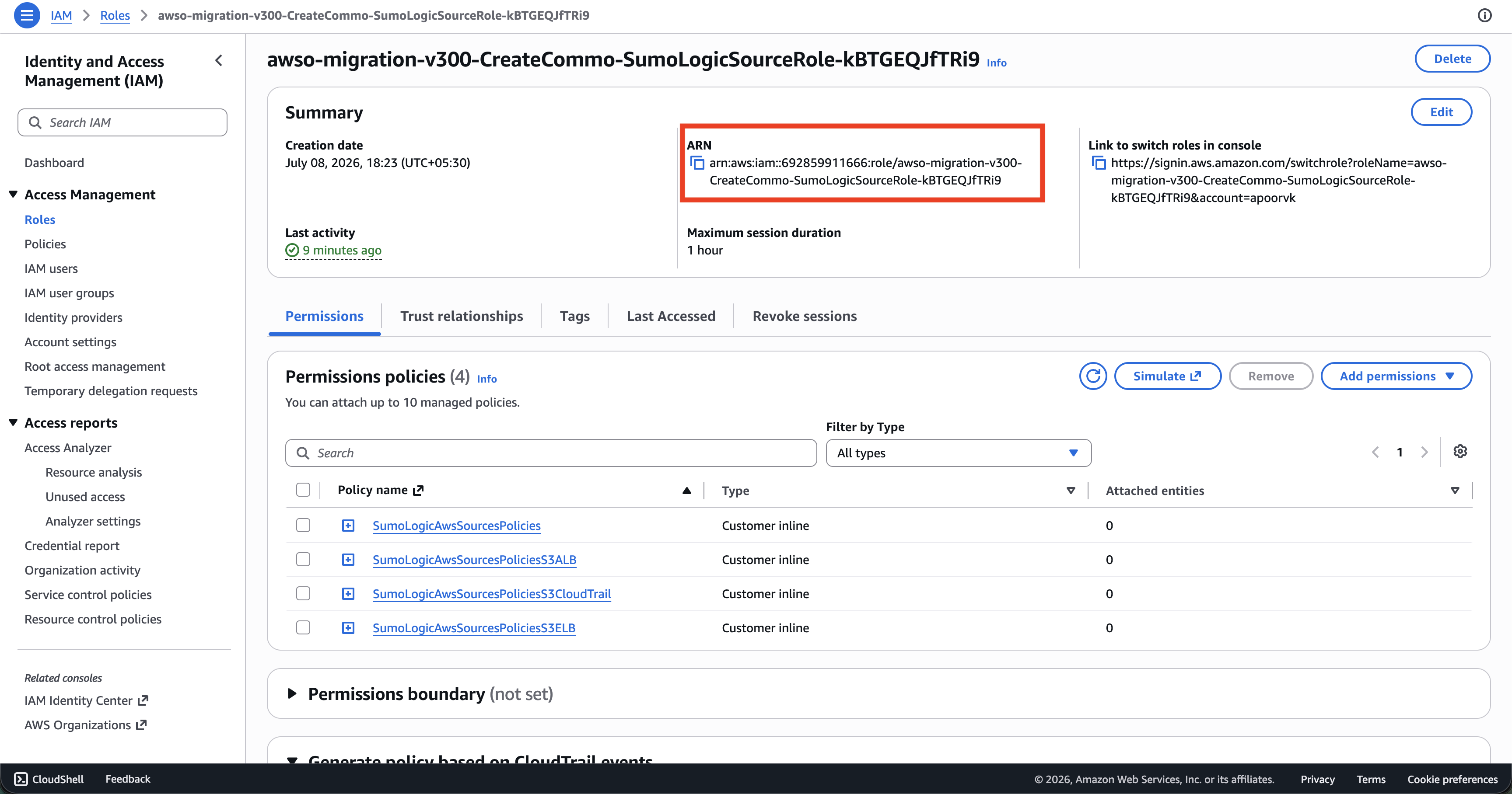
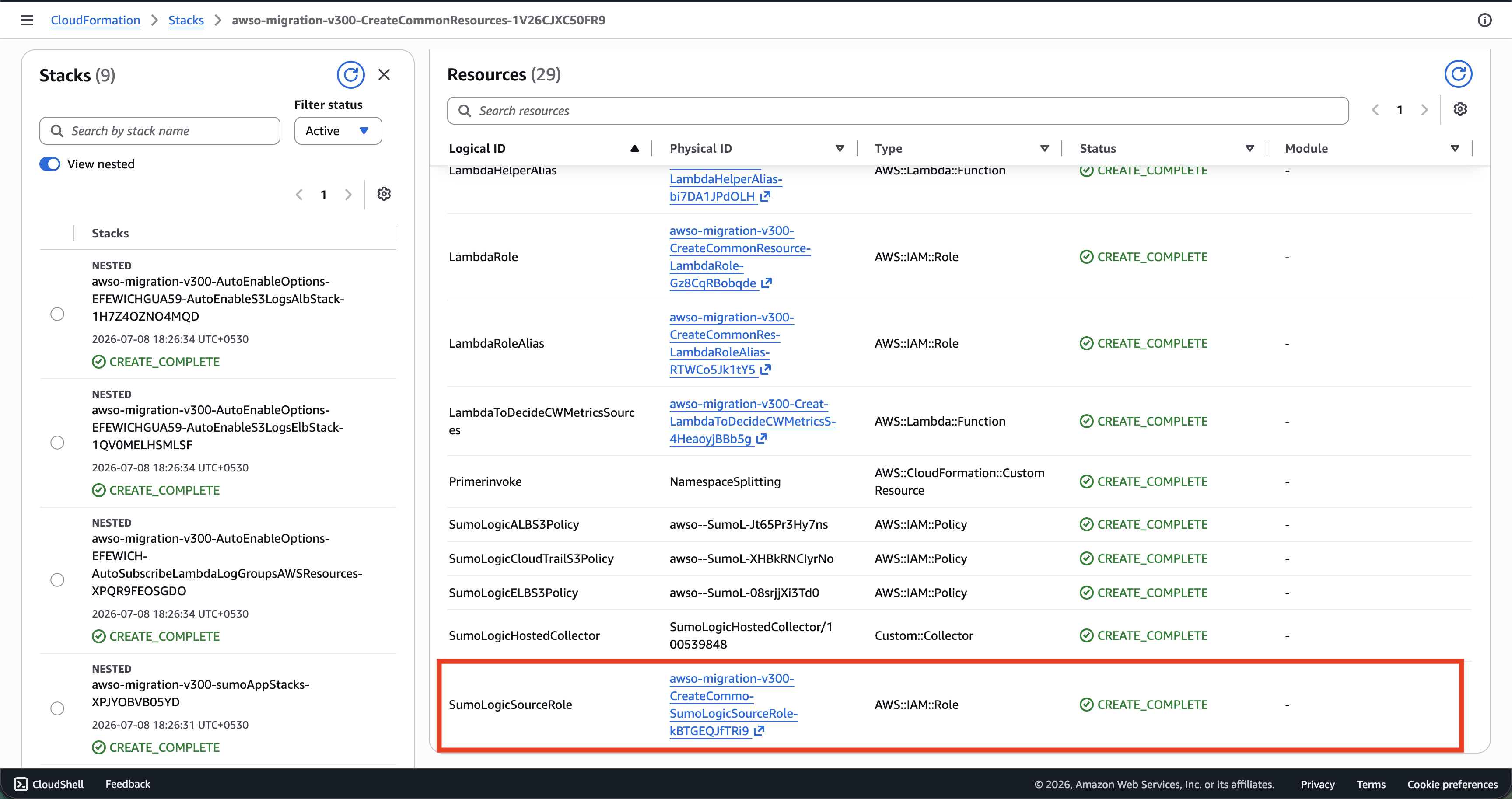 4. On the IAM role page, copy the **ARN** shown in the Summary section.
 ### Update the role ARN in Sumo Logic
For each S3-based source on your collector (`alb-logs`, `classic-lb-logs`, `cloudtrail-logs`):
1. Go to **Manage Data > Collection > Collection**.
2. Find your AWSO collector and click on the source.
3. Update the **AWS Role ARN** field with the new ARN from the step above.
4. Save the source.
## Step 8: Verify the migration
1. Go to **Manage Data > Collection > Collection** and confirm all sources show a green status.
2. Check that logs and metrics are flowing into Sumo Logic by running a search:
- `_sourceCategory=aws/observability/cloudtrail/logs`
- `_sourceCategory=aws/observability/cloudwatch/metrics`
### Additional checks
**S3 bucket policies** — verify each log bucket grants the required service principals:
- CloudTrail bucket must allow `cloudtrail.amazonaws.com` to write.
- ALB and ELB buckets must allow `delivery.logs.amazonaws.com` to write.
The v3.0.0 stack only creates a bucket policy when it creates a new bucket. Since migration reuses existing buckets, the policy must already exist. If log delivery is silently failing, check the bucket policy in **AWS Console > S3 > your bucket > Permissions > Bucket policy**.
**CloudTrail trail** — the `Aws-Observability-*` trail created by v2.x is deleted with the old stack. v3.0.0 does not recreate a trail when reusing an existing bucket. If no active trail is writing to your CloudTrail bucket, create one manually from **AWS Console > CloudTrail > Trails**.
**S3 bucket notifications** — the SNS topic that notifies Sumo Logic of new S3 objects is also deleted with the v2.x stack. If your S3 sources stop receiving new events, check the bucket notification configuration in **AWS Console > S3 > your bucket > Properties > Event notifications** and verify the SNS topic exists. If the topic was deleted, you will need to create a new one, subscribe the Sumo Logic source endpoint to it, and update the bucket notification configuration.
## Troubleshooting
| Issue | Cause | Resolution |
|:--|:--|:--|
| Stack deletion stuck in `DELETE_FAILED` | S3 bucket is non-empty and cannot be deleted by CloudFormation | Use **Force delete** on the stack — the bucket will be preserved. This is expected when the bucket contains existing log data. |
| v3.0.0 deploy fails with `fer:invalid_extraction_rule` | AWSO Field Extraction Rules from v2.x still exist | Complete [Step 4](#step-4-clean-up-field-extraction-rules) and retry. |
| v3.0.0 deploy fails due to FER quota limit | Fewer than 17 free FER slots available | Delete or consolidate unused Field Extraction Rules until 17 slots are free, then retry. |
| v3.0.0 deploy fails with `metrics:rule_already_exists` | AWSO Metric Rules from v2.x still exist | Complete [Step 5](#step-5-clean-up-metric-rules) and retry. Note that v2.x metric rule names differ from v3.0.0 — check both name variants listed in Step 5. |
| Sources show errors after migration | Sources still reference the old deleted IAM role ARN | Complete [Step 7](#step-7-update-source-iam-role-arns). |
| Collector or sources not found after stack deletion | `RemoveOnDeleteStack` was `true` when the stack was deleted | Resources cannot be recovered — redeploy v3.0.0 with fresh sources. |
| S3 sources not receiving new log data | Bucket policy missing required service principal, or SNS notification topic was deleted with the v2.x stack | Check the bucket policy and S3 event notification configuration as described in [Step 8](#step-8-verify-the-migration). |
| No CloudTrail data after migration | The v2.x `Aws-Observability-*` trail was deleted with the old stack | Create a new CloudTrail trail pointing at the same S3 bucket from **AWS Console > CloudTrail > Trails**. |
---
## StackSet migration (manual)
Use this section if AWSO is deployed via a CloudFormation StackSet across multiple accounts and/or regions and you prefer not to use the automation script.
:::note
For the automated approach, see the [StackSet migration section in the automation guide](/docs/observability/aws/deploy-use-aws-observability/migration/cloudformation/migration-strategy-v2x-to-v300-cloudformation/#stackset-migrationmulti-regions-and-accounts).
:::
### Step 1: Set RemoveOnDeleteStack to false on all instances
Before deleting any instances, ensure `RemoveOnDeleteStack=false` is set on every stack instance. If `true` at deletion time, the Sumo Logic Lambda helper will permanently delete the collector and all sources.
From the **StackSet management account**, update all instances in the affected accounts and regions:
1. Go to **AWS Console > CloudFormation > StackSets** and select your v2.x StackSet.
2. Click **Actions > Edit StackSet details**.
3. On the **Parameters** screen, set **Delete Sumo Logic Resources when stack is deleted** to **false**.
4. On the **Deployment options** screen, scope the update to the specific accounts and regions you intend to migrate.
5. Submit the update and wait for all instances to reach `CURRENT`.
### Step 2: Delete stack instances
1. Go to **AWS Console > CloudFormation > StackSets** and select your StackSet.
2. Click **Actions > Delete stacks from StackSet**.
3. Enter the account IDs and regions to migrate.
4. Under **Retain stacks**, select **No** to fully delete the CloudFormation stacks in each account/region (your Sumo Logic resources are preserved because `RemoveOnDeleteStack=false`).
5. Submit and wait for the operation to reach `SUCCEEDED`.
If the operation ends in `FAILED` for any account/region (commonly caused by a non-empty S3 bucket), go to the affected account/region, use **Force delete** on the stuck stack, then remove the instance from the StackSet using **Delete stacks from StackSet** with **Retain stacks = Yes** for that specific account/region.
### Step 3: Verify Sumo Logic resources are intact
For each migrated account, follow [Step 3 of the single-stack guide](#step-3-verify-your-sumo-logic-resources-are-intact) to confirm the collector and sources are still present.
### Step 4: Clean up Field Extraction Rules
Follow [Step 4 of the single-stack guide](#step-4-clean-up-field-extraction-rules). This is an org-level operation — do it once, not once per account.
### Step 5: Clean up Metric Rules
Follow [Step 5 of the single-stack guide](#step-5-clean-up-metric-rules). This is also org-level — do it once.
### Step 6: Update the StackSet to v3.0.0
You have two options depending on whether you want to reuse the existing StackSet name or create a new one.
**Option A — Update the existing StackSet in-place**
1. Go to **AWS Console > CloudFormation > StackSets** and select your StackSet.
2. Click **Actions > Edit StackSet details**.
3. On the **Template** screen, select **Replace current template** and enter:
```
https://sumologic-appdev-aws-sam-apps.s3.us-east-1.amazonaws.com/aws-observability-versions/v3.0.0/templates/sumologic_observability.master.template.yaml
```
4. Apply the v3.0.0 parameter mapping from the [single-stack parameter table](#parameter-mapping). Set `Section1eSumoLogicResourceRemoveOnDeleteStack` to `false`.
5. On the deployment options screen, choose **No overrides** — there are no instances yet, so the update is definition-only.
6. Submit and wait for `SUCCEEDED`.
**Option B — Create a new StackSet**
1. Go to **AWS Console > CloudFormation > StackSets** and click **Create StackSet**.
2. Enter the v3.0.0 template URL above.
3. Provide a new StackSet name (for example, `SUMO-LOGIC-AWS-OBSERVABILITY-V300`).
4. Apply the v3.0.0 base parameters from the parameter mapping table above.
5. Do not add any deployment targets yet — you will add instances in the next step.
### Step 7: Create new stack instances
For each account/region pair, create a new stack instance with the correct per-account alias and S3 bucket names.
1. Go to **AWS Console > CloudFormation > StackSets** and select your v3.0.0 StackSet.
2. Click **Actions > Add stacks to StackSet**.
3. Enter the target account IDs and regions.
4. Under **Parameter overrides**, set at minimum:
- `Section2aAccountAlias` — the account alias (for example, `prod`)
- `Section5dALBS3LogsBucketName` — ALB log bucket for this region (if used)
- `Section6cCloudTrailLogsBucketName` — CloudTrail log bucket for this region (if used)
- `Section8dELBS3LogsBucketName` — ELB log bucket for this region (if used)
5. Submit and wait for `SUCCEEDED`.
Repeat for each unique account/region combination. Each region requires its own instance because S3 bucket names differ per region.
### Step 8: Update source IAM role ARNs
For each account/region, follow [Step 7 of the single-stack guide](#step-7-update-source-iam-role-arns) to find the new `SumoLogicSourceRole` ARN from the v3.0.0 nested stack and update it on each Sumo Logic source.
:::note
The `CreateCommonResources` nested stack and `SumoLogicSourceRole` exist inside each member account's deployed CloudFormation stack. Assume the appropriate IAM role in each member account to access them.
:::
### Step 9: Verify the migration
For each account/region, follow [Step 8 of the single-stack guide](#step-8-verify-the-migration) to confirm sources are healthy and data is flowing.
### Update the role ARN in Sumo Logic
For each S3-based source on your collector (`alb-logs`, `classic-lb-logs`, `cloudtrail-logs`):
1. Go to **Manage Data > Collection > Collection**.
2. Find your AWSO collector and click on the source.
3. Update the **AWS Role ARN** field with the new ARN from the step above.
4. Save the source.
## Step 8: Verify the migration
1. Go to **Manage Data > Collection > Collection** and confirm all sources show a green status.
2. Check that logs and metrics are flowing into Sumo Logic by running a search:
- `_sourceCategory=aws/observability/cloudtrail/logs`
- `_sourceCategory=aws/observability/cloudwatch/metrics`
### Additional checks
**S3 bucket policies** — verify each log bucket grants the required service principals:
- CloudTrail bucket must allow `cloudtrail.amazonaws.com` to write.
- ALB and ELB buckets must allow `delivery.logs.amazonaws.com` to write.
The v3.0.0 stack only creates a bucket policy when it creates a new bucket. Since migration reuses existing buckets, the policy must already exist. If log delivery is silently failing, check the bucket policy in **AWS Console > S3 > your bucket > Permissions > Bucket policy**.
**CloudTrail trail** — the `Aws-Observability-*` trail created by v2.x is deleted with the old stack. v3.0.0 does not recreate a trail when reusing an existing bucket. If no active trail is writing to your CloudTrail bucket, create one manually from **AWS Console > CloudTrail > Trails**.
**S3 bucket notifications** — the SNS topic that notifies Sumo Logic of new S3 objects is also deleted with the v2.x stack. If your S3 sources stop receiving new events, check the bucket notification configuration in **AWS Console > S3 > your bucket > Properties > Event notifications** and verify the SNS topic exists. If the topic was deleted, you will need to create a new one, subscribe the Sumo Logic source endpoint to it, and update the bucket notification configuration.
## Troubleshooting
| Issue | Cause | Resolution |
|:--|:--|:--|
| Stack deletion stuck in `DELETE_FAILED` | S3 bucket is non-empty and cannot be deleted by CloudFormation | Use **Force delete** on the stack — the bucket will be preserved. This is expected when the bucket contains existing log data. |
| v3.0.0 deploy fails with `fer:invalid_extraction_rule` | AWSO Field Extraction Rules from v2.x still exist | Complete [Step 4](#step-4-clean-up-field-extraction-rules) and retry. |
| v3.0.0 deploy fails due to FER quota limit | Fewer than 17 free FER slots available | Delete or consolidate unused Field Extraction Rules until 17 slots are free, then retry. |
| v3.0.0 deploy fails with `metrics:rule_already_exists` | AWSO Metric Rules from v2.x still exist | Complete [Step 5](#step-5-clean-up-metric-rules) and retry. Note that v2.x metric rule names differ from v3.0.0 — check both name variants listed in Step 5. |
| Sources show errors after migration | Sources still reference the old deleted IAM role ARN | Complete [Step 7](#step-7-update-source-iam-role-arns). |
| Collector or sources not found after stack deletion | `RemoveOnDeleteStack` was `true` when the stack was deleted | Resources cannot be recovered — redeploy v3.0.0 with fresh sources. |
| S3 sources not receiving new log data | Bucket policy missing required service principal, or SNS notification topic was deleted with the v2.x stack | Check the bucket policy and S3 event notification configuration as described in [Step 8](#step-8-verify-the-migration). |
| No CloudTrail data after migration | The v2.x `Aws-Observability-*` trail was deleted with the old stack | Create a new CloudTrail trail pointing at the same S3 bucket from **AWS Console > CloudTrail > Trails**. |
---
## StackSet migration (manual)
Use this section if AWSO is deployed via a CloudFormation StackSet across multiple accounts and/or regions and you prefer not to use the automation script.
:::note
For the automated approach, see the [StackSet migration section in the automation guide](/docs/observability/aws/deploy-use-aws-observability/migration/cloudformation/migration-strategy-v2x-to-v300-cloudformation/#stackset-migrationmulti-regions-and-accounts).
:::
### Step 1: Set RemoveOnDeleteStack to false on all instances
Before deleting any instances, ensure `RemoveOnDeleteStack=false` is set on every stack instance. If `true` at deletion time, the Sumo Logic Lambda helper will permanently delete the collector and all sources.
From the **StackSet management account**, update all instances in the affected accounts and regions:
1. Go to **AWS Console > CloudFormation > StackSets** and select your v2.x StackSet.
2. Click **Actions > Edit StackSet details**.
3. On the **Parameters** screen, set **Delete Sumo Logic Resources when stack is deleted** to **false**.
4. On the **Deployment options** screen, scope the update to the specific accounts and regions you intend to migrate.
5. Submit the update and wait for all instances to reach `CURRENT`.
### Step 2: Delete stack instances
1. Go to **AWS Console > CloudFormation > StackSets** and select your StackSet.
2. Click **Actions > Delete stacks from StackSet**.
3. Enter the account IDs and regions to migrate.
4. Under **Retain stacks**, select **No** to fully delete the CloudFormation stacks in each account/region (your Sumo Logic resources are preserved because `RemoveOnDeleteStack=false`).
5. Submit and wait for the operation to reach `SUCCEEDED`.
If the operation ends in `FAILED` for any account/region (commonly caused by a non-empty S3 bucket), go to the affected account/region, use **Force delete** on the stuck stack, then remove the instance from the StackSet using **Delete stacks from StackSet** with **Retain stacks = Yes** for that specific account/region.
### Step 3: Verify Sumo Logic resources are intact
For each migrated account, follow [Step 3 of the single-stack guide](#step-3-verify-your-sumo-logic-resources-are-intact) to confirm the collector and sources are still present.
### Step 4: Clean up Field Extraction Rules
Follow [Step 4 of the single-stack guide](#step-4-clean-up-field-extraction-rules). This is an org-level operation — do it once, not once per account.
### Step 5: Clean up Metric Rules
Follow [Step 5 of the single-stack guide](#step-5-clean-up-metric-rules). This is also org-level — do it once.
### Step 6: Update the StackSet to v3.0.0
You have two options depending on whether you want to reuse the existing StackSet name or create a new one.
**Option A — Update the existing StackSet in-place**
1. Go to **AWS Console > CloudFormation > StackSets** and select your StackSet.
2. Click **Actions > Edit StackSet details**.
3. On the **Template** screen, select **Replace current template** and enter:
```
https://sumologic-appdev-aws-sam-apps.s3.us-east-1.amazonaws.com/aws-observability-versions/v3.0.0/templates/sumologic_observability.master.template.yaml
```
4. Apply the v3.0.0 parameter mapping from the [single-stack parameter table](#parameter-mapping). Set `Section1eSumoLogicResourceRemoveOnDeleteStack` to `false`.
5. On the deployment options screen, choose **No overrides** — there are no instances yet, so the update is definition-only.
6. Submit and wait for `SUCCEEDED`.
**Option B — Create a new StackSet**
1. Go to **AWS Console > CloudFormation > StackSets** and click **Create StackSet**.
2. Enter the v3.0.0 template URL above.
3. Provide a new StackSet name (for example, `SUMO-LOGIC-AWS-OBSERVABILITY-V300`).
4. Apply the v3.0.0 base parameters from the parameter mapping table above.
5. Do not add any deployment targets yet — you will add instances in the next step.
### Step 7: Create new stack instances
For each account/region pair, create a new stack instance with the correct per-account alias and S3 bucket names.
1. Go to **AWS Console > CloudFormation > StackSets** and select your v3.0.0 StackSet.
2. Click **Actions > Add stacks to StackSet**.
3. Enter the target account IDs and regions.
4. Under **Parameter overrides**, set at minimum:
- `Section2aAccountAlias` — the account alias (for example, `prod`)
- `Section5dALBS3LogsBucketName` — ALB log bucket for this region (if used)
- `Section6cCloudTrailLogsBucketName` — CloudTrail log bucket for this region (if used)
- `Section8dELBS3LogsBucketName` — ELB log bucket for this region (if used)
5. Submit and wait for `SUCCEEDED`.
Repeat for each unique account/region combination. Each region requires its own instance because S3 bucket names differ per region.
### Step 8: Update source IAM role ARNs
For each account/region, follow [Step 7 of the single-stack guide](#step-7-update-source-iam-role-arns) to find the new `SumoLogicSourceRole` ARN from the v3.0.0 nested stack and update it on each Sumo Logic source.
:::note
The `CreateCommonResources` nested stack and `SumoLogicSourceRole` exist inside each member account's deployed CloudFormation stack. Assume the appropriate IAM role in each member account to access them.
:::
### Step 9: Verify the migration
For each account/region, follow [Step 8 of the single-stack guide](#step-8-verify-the-migration) to confirm sources are healthy and data is flowing.