---
title: DFIR-IRIS
description: ''
slug: /help/docs/platform-services/automation-service/app-central/integrations/dfir-iris/
canonical: https://www.sumologic.com/help/docs/platform-services/automation-service/app-central/integrations/dfir-iris/
---
import useBaseUrl from '@docusaurus/useBaseUrl';
 ***Version: 1.0
Updated: August 21, 2026***
DFIR-IRIS is an open-source collaborative incident response platform that enables security teams to manage cases, track indicators of compromise (IOCs), document assets, and maintain detailed incident timelines.
## Actions
* **Add Asset to Case** *(Notification)* - Adds an asset to an existing case for tracking and analysis.
* **Add IOC to Case** *(Notification)* - Adds an indicator of compromise (IP address, domain, hash, etc.) to an existing case.
* **Add Note to Case** *(Notification)* - Adds a note or comment to an existing case.
* **Add Timeline Event** *(Notification)* - Adds a timeline event to document the chronology of an incident.
* **Close Case** *(Notification)* - Closes an existing incident response case.
* **Create Alert** *(Notification)* - Creates a new alert in DFIR-IRIS.
* **Create Case** *(Notification)* - Creates a new incident response case.
* **Escalate Alert to Case** *(Notification)* - Escalates an existing alert into a full incident case.
* **Get Case** *(Enrichment)* - Retrieves details of a specific case.
* **List Cases** *(Enrichment)* - Lists all cases.
* **List IOCs for Case** *(Enrichment)* - Lists all indicators of compromise associated with a specific case.
* **Update Case** *(Notification)* - Updates the details of an existing case.
## DFIR-IRIS configuration
1. Log in to your DFIR-IRIS instance.
1. Click your username in the top-right corner and select **My Settings**.
1. Copy the **API key** shown on the profile settings page.
## Configure DFIR-IRIS in Automation Service and Cloud SOAR
import IntegrationsAuth from '../../../../reuse/integrations-authentication.md';
import IntegrationCertificate from '../../../../reuse/automation-service/integration-certificate.md';
import IntegrationEngine from '../../../../reuse/automation-service/integration-engine.md';
import IntegrationLabel from '../../../../reuse/automation-service/integration-label.md';
import IntegrationProxy from '../../../../reuse/automation-service/integration-proxy.md';
import IntegrationTimeout from '../../../../reuse/automation-service/integration-timeout.md';
*
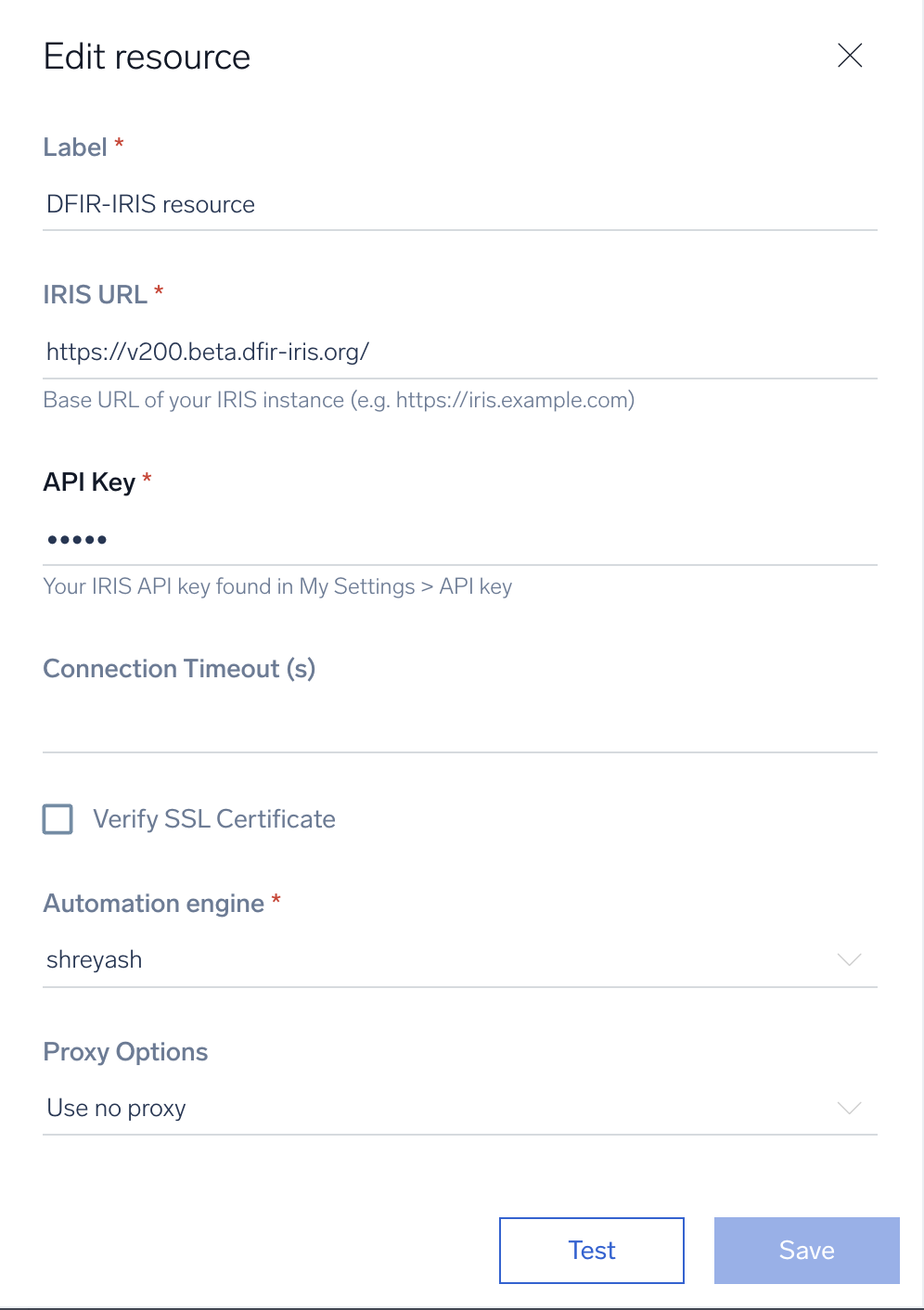
* **IRIS URL**. Enter the base URL of your DFIR-IRIS instance (e.g., `https://iris.example.com`).
* **API Key**. Enter the DFIR-IRIS API key you [copied earlier](#dfir-iris-configuration).
*
*
*
*
***Version: 1.0
Updated: August 21, 2026***
DFIR-IRIS is an open-source collaborative incident response platform that enables security teams to manage cases, track indicators of compromise (IOCs), document assets, and maintain detailed incident timelines.
## Actions
* **Add Asset to Case** *(Notification)* - Adds an asset to an existing case for tracking and analysis.
* **Add IOC to Case** *(Notification)* - Adds an indicator of compromise (IP address, domain, hash, etc.) to an existing case.
* **Add Note to Case** *(Notification)* - Adds a note or comment to an existing case.
* **Add Timeline Event** *(Notification)* - Adds a timeline event to document the chronology of an incident.
* **Close Case** *(Notification)* - Closes an existing incident response case.
* **Create Alert** *(Notification)* - Creates a new alert in DFIR-IRIS.
* **Create Case** *(Notification)* - Creates a new incident response case.
* **Escalate Alert to Case** *(Notification)* - Escalates an existing alert into a full incident case.
* **Get Case** *(Enrichment)* - Retrieves details of a specific case.
* **List Cases** *(Enrichment)* - Lists all cases.
* **List IOCs for Case** *(Enrichment)* - Lists all indicators of compromise associated with a specific case.
* **Update Case** *(Notification)* - Updates the details of an existing case.
## DFIR-IRIS configuration
1. Log in to your DFIR-IRIS instance.
1. Click your username in the top-right corner and select **My Settings**.
1. Copy the **API key** shown on the profile settings page.
## Configure DFIR-IRIS in Automation Service and Cloud SOAR
import IntegrationsAuth from '../../../../reuse/integrations-authentication.md';
import IntegrationCertificate from '../../../../reuse/automation-service/integration-certificate.md';
import IntegrationEngine from '../../../../reuse/automation-service/integration-engine.md';
import IntegrationLabel from '../../../../reuse/automation-service/integration-label.md';
import IntegrationProxy from '../../../../reuse/automation-service/integration-proxy.md';
import IntegrationTimeout from '../../../../reuse/automation-service/integration-timeout.md';
*
* **IRIS URL**. Enter the base URL of your DFIR-IRIS instance (e.g., `https://iris.example.com`).
* **API Key**. Enter the DFIR-IRIS API key you [copied earlier](#dfir-iris-configuration).
*
*
*
*
 For information about DFIR-IRIS, see [DFIR-IRIS documentation](https://docs.dfir-iris.org/).
## Category
Incident Management
## Change Log
* August 21, 2026 (v1.0) - First upload
For information about DFIR-IRIS, see [DFIR-IRIS documentation](https://docs.dfir-iris.org/).
## Category
Incident Management
## Change Log
* August 21, 2026 (v1.0) - First upload