---
title: LaunchDarkly
description: ''
slug: /help/docs/platform-services/automation-service/app-central/integrations/launchdarkly/
canonical: https://www.sumologic.com/help/docs/platform-services/automation-service/app-central/integrations/launchdarkly/
---
import useBaseUrl from '@docusaurus/useBaseUrl';
 ***Version: 1.2
Updated: August 14, 2026***
[LaunchDarkly](https://launchdarkly.com/) is a feature management platform that enables teams to control feature flag rollouts, targeting rules, and environments. This integration correlates feature flag changes with production incidents, inspects flag and environment state across projects, and executes remediation actions such as toggling flags or updating targeting rules.
## Actions
* **Get Audit Log Entry** *(Enrichment)* - Retrieve details of a specific audit log entry, including who made a change, what was changed, and when.
* **Get Environment** *(Enrichment)* - Retrieve configuration details for a specific environment within a project to determine which environment is impacted during an incident.
* **Get Feature Flag** *(Enrichment)* - Retrieve the targeting configuration and variations for a specific feature flag.
* **Get Flag Status** *(Enrichment)* - Retrieve the current status of a feature flag (active, launched, or inactive) for quick triage.
* **List Audit Log Entries** *(Enrichment)* - Retrieve a list of audit log entries to correlate feature flag changes with incident timelines.
* **List Environments** *(Enrichment)* - Retrieve a list of environments for a project to map environment names to Sumo Logic source categories.
* **List Feature Flags** *(Enrichment)* - Retrieve all feature flags for a project to identify how many flags exist and which ones changed within an incident window.
* **List Flag Changes** *(Enrichment)* - Retrieve the audit log filtered by a specific flag key to surface all changes made to that flag during an incident window.
* **List Projects** *(Enrichment)* - Retrieve a list of LaunchDarkly projects to discover and map services.
* **Toggle Feature Flag** *(Containment)* - Disable or enable a feature flag as a kill switch to stop an offending flag from affecting production.
* **Update Feature Flag Targeting** *(Containment)* - Revert targeting rules for a feature flag, such as rolling back percentage rollouts or segment targeting.
## LaunchDarkly configuration
The following steps show how to create a LaunchDarkly API access token for use with Sumo Logic automation.
1. Log in to your [LaunchDarkly](https://app.launchdarkly.com) account.
1. Click your profile icon in the upper-right corner, then select **Account settings**.
1. Select the **Authorization** tab.
1. Click **Create token**.
1. Enter a name for the token and select a role. For full integration capabilities, select the **Writer** role or higher.
1. Click **Save token**.
1. Copy the token value. This is only displayed once — store it securely.
## Configure LaunchDarkly in Automation Service and Cloud SOAR
import IntegrationsAuth from '../../../../reuse/integrations-authentication.md';
import IntegrationCertificate from '../../../../reuse/automation-service/integration-certificate.md';
import IntegrationEngine from '../../../../reuse/automation-service/integration-engine.md';
import IntegrationLabel from '../../../../reuse/automation-service/integration-label.md';
import IntegrationProxy from '../../../../reuse/automation-service/integration-proxy.md';
import IntegrationTimeout from '../../../../reuse/automation-service/integration-timeout.md';
*
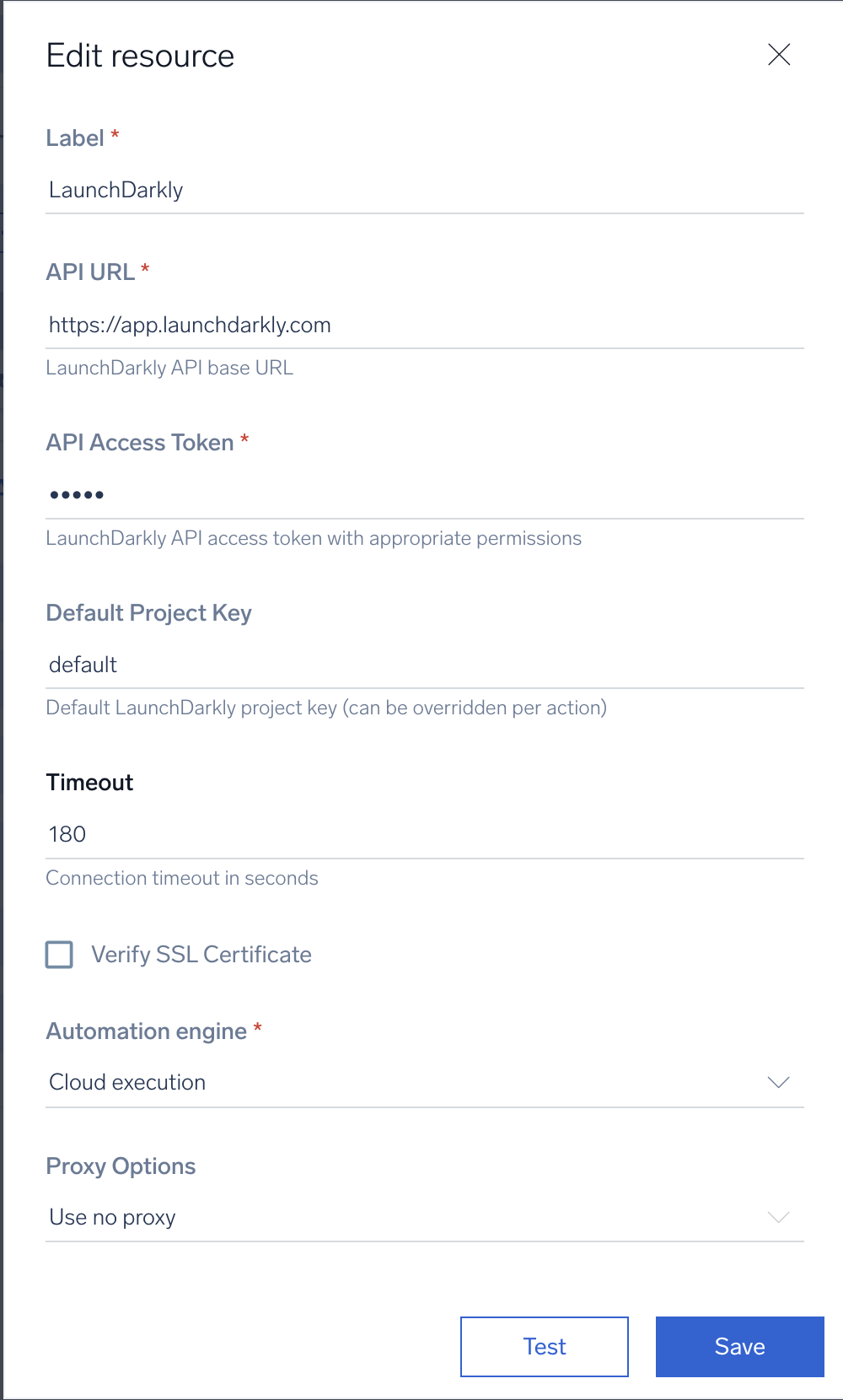
* **API URL**. Enter the LaunchDarkly API URL. The default is `https://app.launchdarkly.com`.
* **API Access Token**. Enter the API access token you created in the [LaunchDarkly configuration](#launchdarkly-configuration) section above.
* **Project Key**. Enter the default LaunchDarkly project key.
*
*
*
*
***Version: 1.2
Updated: August 14, 2026***
[LaunchDarkly](https://launchdarkly.com/) is a feature management platform that enables teams to control feature flag rollouts, targeting rules, and environments. This integration correlates feature flag changes with production incidents, inspects flag and environment state across projects, and executes remediation actions such as toggling flags or updating targeting rules.
## Actions
* **Get Audit Log Entry** *(Enrichment)* - Retrieve details of a specific audit log entry, including who made a change, what was changed, and when.
* **Get Environment** *(Enrichment)* - Retrieve configuration details for a specific environment within a project to determine which environment is impacted during an incident.
* **Get Feature Flag** *(Enrichment)* - Retrieve the targeting configuration and variations for a specific feature flag.
* **Get Flag Status** *(Enrichment)* - Retrieve the current status of a feature flag (active, launched, or inactive) for quick triage.
* **List Audit Log Entries** *(Enrichment)* - Retrieve a list of audit log entries to correlate feature flag changes with incident timelines.
* **List Environments** *(Enrichment)* - Retrieve a list of environments for a project to map environment names to Sumo Logic source categories.
* **List Feature Flags** *(Enrichment)* - Retrieve all feature flags for a project to identify how many flags exist and which ones changed within an incident window.
* **List Flag Changes** *(Enrichment)* - Retrieve the audit log filtered by a specific flag key to surface all changes made to that flag during an incident window.
* **List Projects** *(Enrichment)* - Retrieve a list of LaunchDarkly projects to discover and map services.
* **Toggle Feature Flag** *(Containment)* - Disable or enable a feature flag as a kill switch to stop an offending flag from affecting production.
* **Update Feature Flag Targeting** *(Containment)* - Revert targeting rules for a feature flag, such as rolling back percentage rollouts or segment targeting.
## LaunchDarkly configuration
The following steps show how to create a LaunchDarkly API access token for use with Sumo Logic automation.
1. Log in to your [LaunchDarkly](https://app.launchdarkly.com) account.
1. Click your profile icon in the upper-right corner, then select **Account settings**.
1. Select the **Authorization** tab.
1. Click **Create token**.
1. Enter a name for the token and select a role. For full integration capabilities, select the **Writer** role or higher.
1. Click **Save token**.
1. Copy the token value. This is only displayed once — store it securely.
## Configure LaunchDarkly in Automation Service and Cloud SOAR
import IntegrationsAuth from '../../../../reuse/integrations-authentication.md';
import IntegrationCertificate from '../../../../reuse/automation-service/integration-certificate.md';
import IntegrationEngine from '../../../../reuse/automation-service/integration-engine.md';
import IntegrationLabel from '../../../../reuse/automation-service/integration-label.md';
import IntegrationProxy from '../../../../reuse/automation-service/integration-proxy.md';
import IntegrationTimeout from '../../../../reuse/automation-service/integration-timeout.md';
*
* **API URL**. Enter the LaunchDarkly API URL. The default is `https://app.launchdarkly.com`.
* **API Access Token**. Enter the API access token you created in the [LaunchDarkly configuration](#launchdarkly-configuration) section above.
* **Project Key**. Enter the default LaunchDarkly project key.
*
*
*
*
 For information about LaunchDarkly, see [LaunchDarkly documentation](https://launchdarkly.com/docs/api).
## Change Log
* August 14, 2026 (v1.2) - First upload
For information about LaunchDarkly, see [LaunchDarkly documentation](https://launchdarkly.com/docs/api).
## Change Log
* August 14, 2026 (v1.2) - First upload