---
title: Mimecast V2
description: ''
slug: /help/docs/platform-services/automation-service/app-central/integrations/mimecast-v2/
canonical: https://www.sumologic.com/help/docs/platform-services/automation-service/app-central/integrations/mimecast-v2/
---
import useBaseUrl from '@docusaurus/useBaseUrl';
 ***Version: 1.2
Updated: Sep 8, 2026***
[Mimecast V2](https://www.mimecast.com/) is a cloud-based cybersecurity and risk management platform designed to protect enterprise email infrastructure from viruses, malware, phishing, and emerging deepfake attacks. It employs a layered cyber resilience solution to prevent email-borne threats and minimise data loss through secure email archiving.
## Actions
* **Get Account** *(Enrichment)* - Get the details about the used Mimecast account.
* **Create Remediation Incident** *(Containment)* - Create a new remediation incident to trigger email purge/removal from user mailboxes.
* **Get TTP URL Click Logs** *(Enrichment)* - Retrieve click tracking and URL events, including who clicked a URL, which URL was clicked, and when.
* **Get Remediation Incident** *(Enrichment)* - Get the details of a remediation incident, including containment and audit logs confirming whether a domain was blocked and emails were removed from user mailboxes.
* **Get Audit Events** *(Enrichment)* - Get the attacks that have already occurred or are in progress.
* **Get Internal Domain** *(Enrichment)* - Get the internal domain inside the account.
* **Get Internal Users** *(Enrichment)* - Get the internal users inside a specific account domain.
* **Permit Block Emails** *(Containment)* - Permit and block sending email.
* **Send Email** *(Notification)* - Send an email for end-user notification.
## Mimecast configuration
To configure Mimecast V2, see [Mimecast API v2.0 documentation](https://developer.services.mimecast.com/api-overview).
## Configure Mimecast V2 in Automation Service and Cloud SOAR
import IntegrationsAuth from '../../../../reuse/integrations-authentication.md';
import IntegrationCertificate from '../../../../reuse/automation-service/integration-certificate.md';
import IntegrationEngine from '../../../../reuse/automation-service/integration-engine.md';
import IntegrationLabel from '../../../../reuse/automation-service/integration-label.md';
import IntegrationProxy from '../../../../reuse/automation-service/integration-proxy.md';
import IntegrationTimeout from '../../../../reuse/automation-service/integration-timeout.md';
*
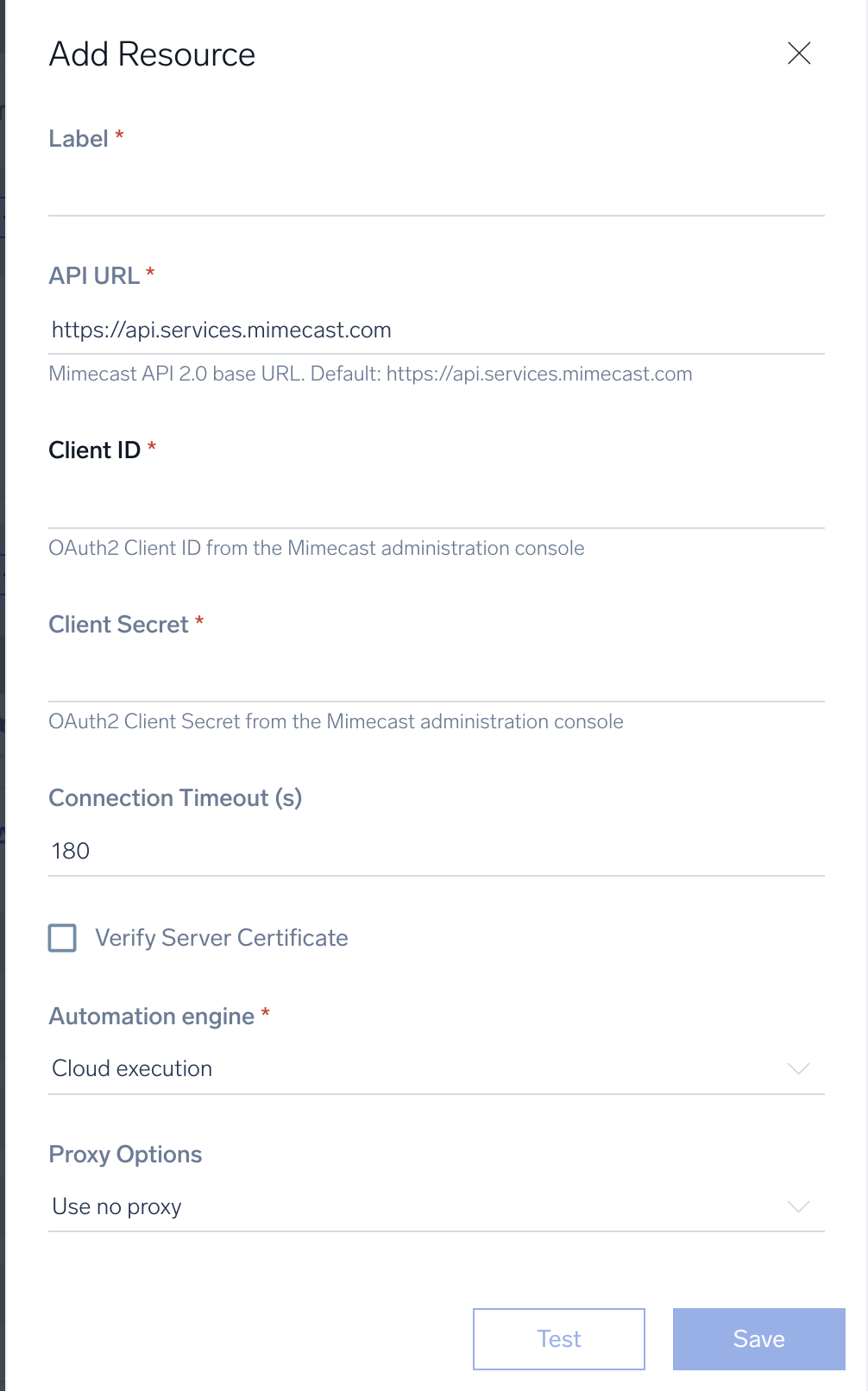
* **URL**. Enter the Mimecast base URL including region. For example, `https://us-api.mimecast.com`
* **Client ID**. Enter the Mimecast [client ID](https://developer.services.mimecast.com/api-overview) obtained from your Mimecast API v2.0 application.
* **Client Secret**. Enter the Mimecast client secret associated with the client ID.
*
*
*
*
***Version: 1.2
Updated: Sep 8, 2026***
[Mimecast V2](https://www.mimecast.com/) is a cloud-based cybersecurity and risk management platform designed to protect enterprise email infrastructure from viruses, malware, phishing, and emerging deepfake attacks. It employs a layered cyber resilience solution to prevent email-borne threats and minimise data loss through secure email archiving.
## Actions
* **Get Account** *(Enrichment)* - Get the details about the used Mimecast account.
* **Create Remediation Incident** *(Containment)* - Create a new remediation incident to trigger email purge/removal from user mailboxes.
* **Get TTP URL Click Logs** *(Enrichment)* - Retrieve click tracking and URL events, including who clicked a URL, which URL was clicked, and when.
* **Get Remediation Incident** *(Enrichment)* - Get the details of a remediation incident, including containment and audit logs confirming whether a domain was blocked and emails were removed from user mailboxes.
* **Get Audit Events** *(Enrichment)* - Get the attacks that have already occurred or are in progress.
* **Get Internal Domain** *(Enrichment)* - Get the internal domain inside the account.
* **Get Internal Users** *(Enrichment)* - Get the internal users inside a specific account domain.
* **Permit Block Emails** *(Containment)* - Permit and block sending email.
* **Send Email** *(Notification)* - Send an email for end-user notification.
## Mimecast configuration
To configure Mimecast V2, see [Mimecast API v2.0 documentation](https://developer.services.mimecast.com/api-overview).
## Configure Mimecast V2 in Automation Service and Cloud SOAR
import IntegrationsAuth from '../../../../reuse/integrations-authentication.md';
import IntegrationCertificate from '../../../../reuse/automation-service/integration-certificate.md';
import IntegrationEngine from '../../../../reuse/automation-service/integration-engine.md';
import IntegrationLabel from '../../../../reuse/automation-service/integration-label.md';
import IntegrationProxy from '../../../../reuse/automation-service/integration-proxy.md';
import IntegrationTimeout from '../../../../reuse/automation-service/integration-timeout.md';
*
* **URL**. Enter the Mimecast base URL including region. For example, `https://us-api.mimecast.com`
* **Client ID**. Enter the Mimecast [client ID](https://developer.services.mimecast.com/api-overview) obtained from your Mimecast API v2.0 application.
* **Client Secret**. Enter the Mimecast client secret associated with the client ID.
*
*
*
*
 For information about Mimecast, see [Mimecast documentation](https://developer.services.mimecast.com/).
## Change Log
* Sep 8, 2026 (v1.2) - Initial release of the Mimecast V2 integration
For information about Mimecast, see [Mimecast documentation](https://developer.services.mimecast.com/).
## Change Log
* Sep 8, 2026 (v1.2) - Initial release of the Mimecast V2 integration