

Security teams often start by writing rules. But over time, those rules multiply, drift, and lose consistency. What begins as a few detections quickly becomes an operational challenge: overlapping logic, inconsistent names, and limited visibility into who made the changes.
Detection engineering changes that. By managing detections as code, teams can version, review, test, and deploy SIEM content the same way they ship software.
This guide shows you how to:
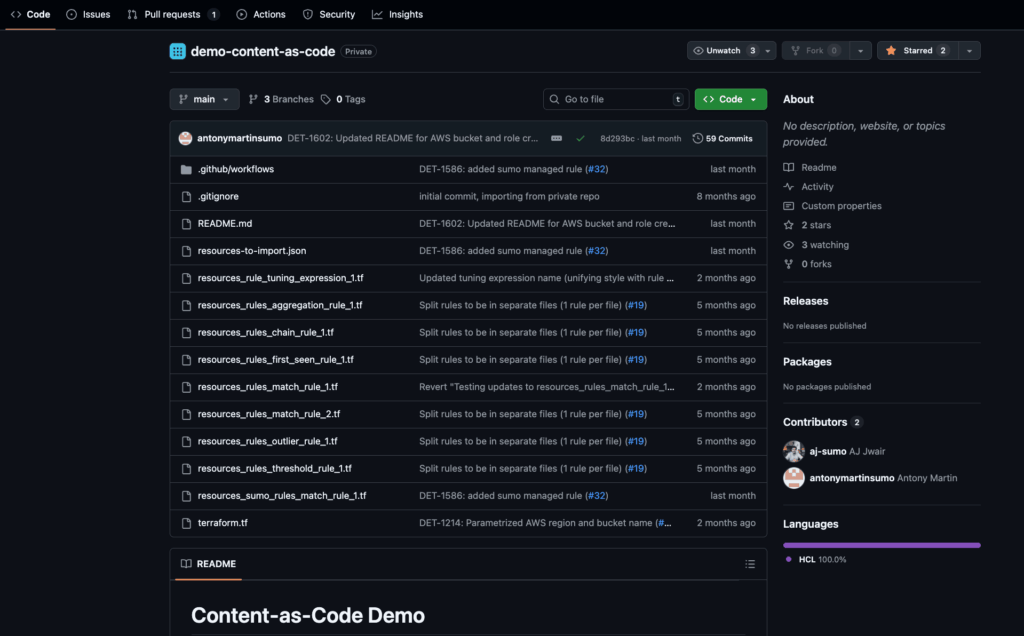
- Store Sumo Logic SIEM rules in a GitHub repository
- Use Terraform for consistent deployment
- Apply GitHub Actions for validation and automation
- Store Terraform state securely in AWS S3 with OIDC
Goal: Bring the rigor of DevOps to your SOC. Every detection becomes version-controlled, testable, and repeatable.
Why detection-as-code matters
| Challenge | What detection-as-code solves |
| Rule drift and inconsistency | Centralized version control enforces consistency |
| Manual deployment and human error | Automated CI/CD pipelines ensure predictable rollout |
| Limited collaboration | Pull requests make every rule auditable and reviewable |
| Difficult rollback or testing | Version history enables safe promotion and instant rollback |
Detection-as-Code transforms your SIEM from a static configuration into a living system—designed, tested, and deployed with engineering discipline.
What you’ll build
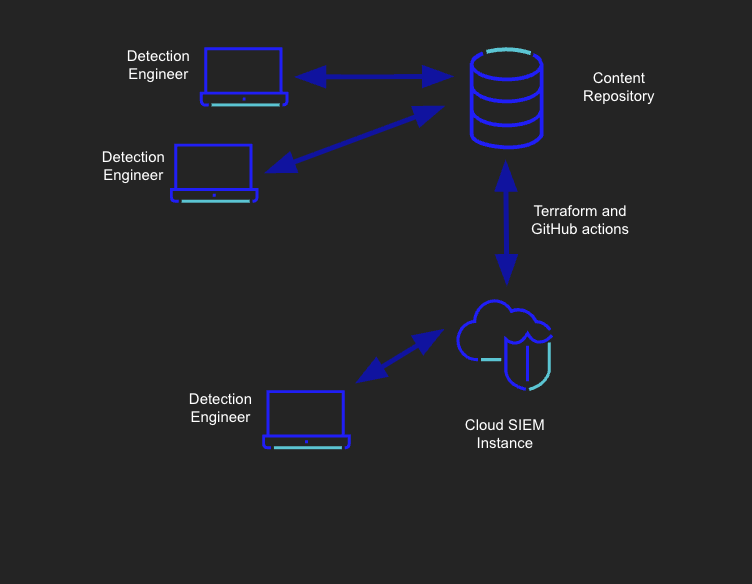
You’ll create a GitHub repository that:
- Stores SIEM detections as code (in YAML or JSON format).
- Uses Terraform to apply changes to your Sumo Logic environment.
- Automates deployments through GitHub Actions.
- Keeps Terraform state in an AWS S3 bucket using OIDC (no static credentials).
This architecture eliminates manual errors, accelerates iteration, and provides your SOC with full auditability across all environments.
Setup steps
We recommend that the Github repository for rules management be set up under an organization’s account. We recommend that the rules management repository not be shared with any other capabilities or products.
Prerequisites
- AWS account with S3 bucket for state management
- Github account and repository – Creating a new repository – GitHub Docs
- Sumo Logic account
Credentials
AWS credentials and Sumo Logic credentials are stored in GitHub Secrets. Terraform uses these credentials to authenticate with AWS and Sumo Logic.
Sumo API credentials
Here are instructions to fetch your Sumo Logic credentials for Sumo Logic
AWS setup
Bucket creation and credentials for AWS can be obtained by following the below set of steps:
- On the AWS console, go to the S3 page (by searching for S3 in the search bar) and click on Create bucket.
- Enter your preferred name for the bucket and leave the rest of the options as their defaults, then create the bucket.
- Go to IAM>Policies page and click on Create Policy.
- In the policy editor, switch to JSON view and replace the “Statement” field with the one given below, replacing “bucket-name” with the name of the bucket created in step 2 and click on next:
"Statement": [
        {
            "Sid": "VisualEditor0",
            "Effect": "Allow",
            "Action": "s3:ListBucket",
            "Resource": "arn:aws:s3:::bucket-name",
            "Condition": {
                "StringEquals": {
                    "s3:prefix": "terraform-state"
                }
            }
        },
        {
            "Sid": "VisualEditor1",
            "Effect": "Allow",
            "Action": [
                "s3:PutObject",
                "s3:GetObject"
            ],
            "Resource": "arn:aws:s3:::bucket-name/terraform-state"
        },
        {
            "Sid": "VisualEditor2",
            "Effect": "Allow",
            "Action": [
                "s3:PutObject",
                "s3:GetObject",
                "s3:DeleteObject"
            ],
            "Resource": "arn:aws:s3:::bucket-name/terraform-state.tflock"
        }
    ]
- On the next page, enter any name for the policy and click on Create Policy.
- Add an Identity Provider to AWS by following the steps here: https://docs.aws.amazon.com/IAM/latest/UserGuide/id_roles_providers_create_oidc.html#manage-oidc-provider-console
- For the provider URL: Use https://token.actions.githubusercontent.com
- For the “Audience”: Use sts.amazonaws.com
- Go to IAM>Roles page and click on Create Role.
- Under Trusted entity type, click on Web Identity and choose identity provider as token.actions.githubusercontent.com and audience as sts.amazonaws.com. Enter the name of your GitHub organization to which this repo is forked to and click on next.
- On the Add Permissions page, select the policy we created in step 5.
- Enter an appropriate role name and click on Create Role.
- In the GitHub repo, under Settings > Secrets and variables – Actions > Variables, replace/add the variable for
AWS_ROLE_ARN, BUCKET_NAME, BUCKET_REGIONwith the ARN of the role, bucket name and region of the bucket you just created. - GitHub Actions Secrets
- Credentials for Sumo Logic (Personal Access Keys) are stored in the repository secrets and accessed by the Terraform GitHub Action. Similarly, the AWS Role used for accessing the S3 backend, along with the bucket name and bucket region, are stored in the repository variables section. You can update those secrets/variables in the repository settings under Secrets and variables> Actions.
SUMOLOGIC_ACCESSID
SUMOLOGIC_ACCESSKEY
AWS_ROLE_ARN
BUCKET_NAME
BUCKET_REGION
Running locally
When running from local, the above-mentioned AWS setup would not work and instead, we will need to use AWS access credentials, which can be created using the following steps (these steps assume you have already created an S3 bucket and policy; if not, follow steps 1-5 in AWS Setup):
- Go to IAM > Users page and click on ‘Create User’.
- Enter an appropriate username, and click on next.
- On the Set Permissions page, click Attach Policies Directly, then select the policy you created earlier. On the next page, click “Create User.”
- Return to the IAM > Users page and click on the newly created user.
- Under the Security Credentials tab, click on Create Access Key in the Access Keys section
- Select the use case as CLI, tick the check box and click on next
- Set the tag if needed, and then click Next. This step creates an AWS access key and secret access key. Export them as environment variables named
AWS_ACCESS_KEY_IDandAWS_SECRET_ACCESS_KEY, respectively.
Promoting and testing detections
Use branching and environment isolation to manage rule promotion:
- Feature branches → development and validation
- Pull requests → peer review and plan approval
- Main branch → automatic deployment to dev
- Manual workflow trigger → promote to test or prod
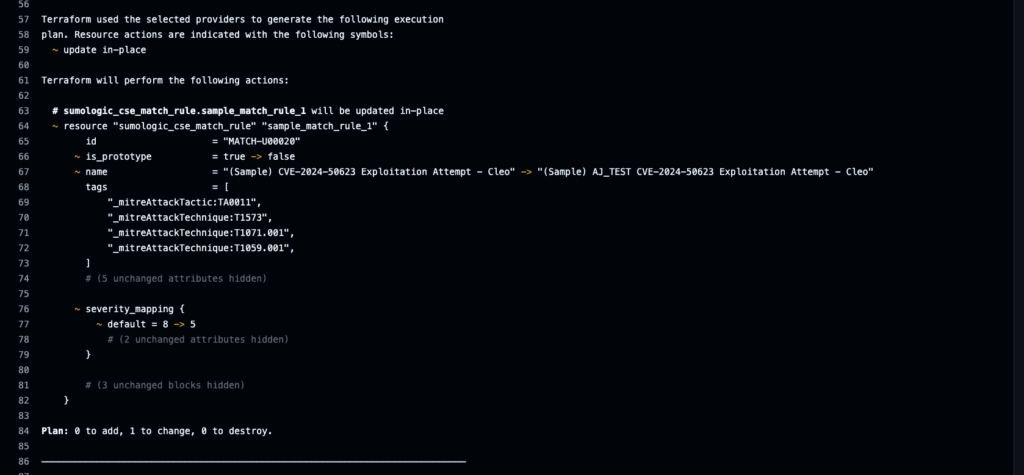
Add YAML linting, policy tests, or metadata validation to maintain quality.
This DevSecOps-style workflow reduces false positives, accelerates iteration, and builds organizational trust in your detections.
Operational discipline
Every mature detection program depends on operational consistency.
Adopt conventions such as:
- Including metadata fields such as
owner, use case, andrunbook URL. - Using
enabled: falsefor temporarily disabled rules. - Enforcing naming standards and maintenance windows.
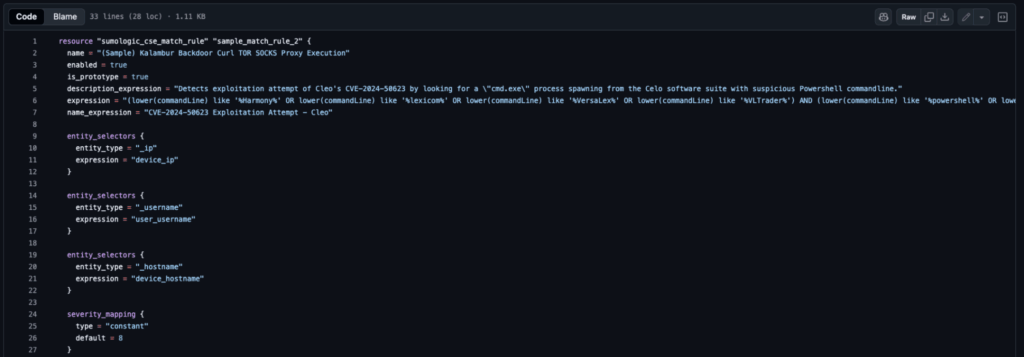
- Running nightly drift checks with
Terraform plan.
Strong process discipline transforms detection management from a reactive rule-tuning approach into a continuous detection improvement process.
Troubleshooting and recovery
Common issues:
- Unexpected deletions: check state backend configuration.
- Authentication errors: verify OIDC and API secrets.
Drift warnings: Verify that no manual edits have been made in the Sumo Logic UI.
Rollback: revert a commit and reapply; Terraform state ensures full recovery.
Value: These safeguards make detection engineering resilient—mistakes become learning opportunities, not crises.
Important note
Sumo Logic is only responsible for the support and maintenance of the SIEM service, the APIs, and published Terraform resources related to the rules and other configurations within the SIEM service. You, the customer, are responsible for your own GitHub repository and the support and maintenance of the security and processes that occur within the repository. This guide is provided without guarantee, and you are responsible for ensuring that the setup and support of the repository meet all relevant organizational requirements.
From process to practice
Managing SIEM rules in GitHub marks a significant turning point, transitioning from manual tuning to measurable progress. With version control, automation, and CI/CD, every detection becomes part of a living system, one that learns, adapts, and improves.
Powered by Sumo Logic SIEM, this system evolves into Intelligent Security Operations, connecting detections to context, context to action, and action to outcomes.
See SIEM in action with our recorded demo.