

If shadow IT was the SaaS era’s guilty pleasure, shadow AIT is GenAI’s sugar rush: unsanctioned AI models, tools, and autonomous agents quietly wired into business workflows—often without approvals, logging, or controls. It’s fast, it’s useful, and it can bite.
Netskope’s 2025 GenAI report finds orgs now use nearly six GenAI apps on average; the top quartile uses 13+, and they’re tracking 300+ distinct GenAI apps overall. They also measured a >30× increase in data sent to GenAI apps year-over-year. Menlo Security’s AI report flags a 68% surge in shadow GenAI, turning “helpful” into hazardous. Cisco’s 2025 Readiness Index says ~60% of orgs lack confidence in identifying unapproved AI tools, reinforcing the need to monitor. Gartner ties this to GenAI data programs gone rogue.
Shadow AI is spreading across orgs and job functions, bringing real data-exposure and governance risks—especially when employees bring their own AI.
This article is a practical, telemetry-first guide to spotting and governing shadow AIT. We’ll map detections to MITRE ATLAS, OWASP Top 10 for LLM Apps, and NIST AI RMF, and we’ll get specific about the logs you should collect (CloudTrail, CloudWatch, endpoint, app logs, and Model Context Protocol/MCP telemetry). We’ll also show Sumo Logic-style queries you can drop into your SIEM today.
Respond faster with Sumo Logic DojoAI
Cut through the noise, detect threats faster, and resolve issues before they disrupt your operations.
What is shadow AIT?
Shadow AIT is any unauthorized use of AI services, AI tools and the agentic glue (plugins/tools, MCP servers, Bedrock Agents, LangChain tools, etc.) that can touch production data and systems—often beyond security’s line of sight.
The AI train has left the station, and the predicament businesses find themselves in is that if they don’t allow AI tools, they are incentivising shadow AI. Employees have experienced the value AI brings to all aspects of our lives, and to tell them it can’t be used just pushes its usage into the shadows. It’s the AI equivalent of shadow IT, but on steroids, because AI doesn’t just process data; it learns from it, hallucinates wild outputs, has access to the most sensitive systems and sometimes spills secrets like a tipsy uncle at a family reunion.
Why the surge? Blame it on the democratizing power of AI – tools are now so accessible that even non-techies can spin up an agent to automate tasks or a copilot to code like a pro. But without oversight, it’s creating risk blind spots across enterprises, from data leaks to compliance nightmares.
In the near future, I expect to hear of post-incident meetings where leaders say, “I didn’t know that application used AI.” Or “who authorized AI to be used that way?”. To bring light to darkness, you need to lean in with the team’s AI strategy, support innovation, but wrap controls and governance around it without introducing too much friction.
If you’re mature enough to conduct AI red team or pen test assessments, you get bonus points. Work with those assessors to capture the log telemetry during their tests, so when they get in, you can create detections to capture future adversarial behaviors or AI abuse.
Frameworks to anchor your program
AI TRiSM
AI TRiSM stands for Artificial Intelligence Trust, Risk, and Security Management. Coined by Gartner, it’s a framework designed to ensure that AI systems are trustworthy, compliant, and secure throughout their lifecycle. In plain English, Trust asks can you explain how the AI makes decisions? Is it fair, reliable, and free from bias? Risk addresses what could go wrong? Think of data leaks, hallucinations, adversarial hacks, or regulatory issues. Security tackles how you protect the model, data, and its infrastructure from attacks, misuse, or unauthorized access?
NIST AI RMF 1.0 + Generative AI Profile (AI 600-1)
NIST’s AI Risk Management Framework is your governance GPS, with core functions like Map (identify risks), Measure (quantify them), Manage (mitigate), and Govern (oversee everything). Apply it to Shadow AI by mapping unauthorized AI usage in your environment, then measuring risks via metrics like data exposure rates while following incident response requirements for AI systems.
MITRE ATLAS
This is your adversarial playbook for AI systems, like MITRE ATT&CK but tailored for machine learning threats. It maps out tactics like data poisoning (where bad actors tamper with training data) or model evasion (tricking AI into wrong decisions). Use ATLAS to assess Shadow AI risks by cross-referencing your logs against its matrices – for instance, spotting unusual API calls that might indicate an evasion technique in a rogue copilot.
OWASP Top 10 for LLM Apps (2025 refresh)
This gem lists vulnerabilities specific to large language models (LLMs), like prompt injection (crafty inputs that hijack the model) or sensitive information disclosure (leaking PII in outputs). In Shadow AI scenarios, employees might unwittingly trigger these – e.g., a marketing team using an unsanctioned LLM app that’s vulnerable to overreliance (blindly trusting hallucinatory outputs), leading to bad business decisions.
What to log (and why)
Cloud/Model APIs
Start by hooking into API logs from services like AWS Bedrock (a hotbed for Shadow AI experiments). For example, monitor converse and converse_stream calls. Track metrics like input/output tokens, latency, and calls per minute.
Most cloud providers have documented telemetry. For example with AWS, Bedrock you have the following instrumentation:
- CloudTrail management/data events for InvokeModel / Converse / ConverseStream and Agents (InvokeAgent). Great for identity, model IDs, and cross-region anomalies.
- CloudWatch Agents metrics: invocations, token counts, time-to-first-token (TTFT), throttles, client/server errors—perfect for guardrail block rates and cost/abuse outliers.
- Invocation logging (inputs/outputs) to CloudWatch Logs/S3—critical for forensics and red-team prompts (with careful PII governance).
Sumo Logic ships a Bedrock app that stitches CloudTrail + CloudWatch + invocation logs into dashboards and queries out of the box.
Regardless of the model, you don’t need a heavy, proprietary stack to monitor GenAI usage. OpenAI-style APIs already return the telemetry you care about (latency, errors, token counts, moderation results). If your devs roll their own AI features, instrument the SDK calls. For example, wrap your SDK calls with a small Python “agent,” emit structured events, and forward them to any SIEM/observability platform you use. The telemetry commonly includes call rate, error rate, input and output token counts, and (optionally) sampled prompts/responses. Forward JSON events to your SIEM via an HTTPS collector. (OpenTelemetry’s emerging GenAI semantic conventions can standardize these fields if you want trace/span context, but it’s optional.)
Detect unauthorized agents
Agents (those autonomous AI doers) love to chat with APIs. Use log patterns to flag unusual behaviors, like unexpected API keys or geolocations. Tie this to MITRE ATLAS by alerting on tactics like “ML Supply Chain Compromise” – e.g., logs showing downloads from shady model hubs. On the endpoint/CLI/proxy, capture shell history and egress DNS/HTTP to catch unsanctioned calls to public LLMs or agent backends (e.g., api.openai.com, api.anthropic.com, *.hf.space, *.perplexity.ai, *.deepseek.com).
MCP (Model Context Protocol) audit
MCP standardizes how LLM apps connect to tools, resources, and prompts over JSON-RPC. That’s gold for auditing: log tools/list, tools/call, resources/read, prompts/get, user approvals, and correlation IDs across client/server. The latest spec explicitly calls out logging, capability negotiation, and security considerations—use them.
What shadow AIT looks like in telemetry: three real-world patterns
It’s important to highlight here that the line between shadow AIT and insider threats can get blurry pretty quickly. Sometimes employees are innovating with AI and are unaware of potential security risks, or perhaps they fall victim to malicious actors using AI. These patterns and detections can help your team, regardless of the intent behind the patterns.
Pattern one — Prompt-to-Tool Pivot (OWASP LLM07/LLM08; ATLAS: prompt injection)
A benign-looking prompt causes the agent to call high-risk tools (e.g., read secrets, execute actions). You’ll see a normal chat request immediately followed by sensitive tools/call or Bedrock Agent actions.
What to log and alert on
- MCP
tools/callto sensitive tools (secrets, prod APIs) without matching business context or user approval flag - Bedrock InvokeAgent spikes or new action groups creation by “first-seen” identities (UEBA).
Pattern two — Cost/DoS via Token Flood (OWASP LLM04; ATLAS: resource exhaustion)
A tampered prompt or loop causes runaway tokens or repeated retries.
What to log and alert on
- CloudWatch InputTokenCount/OutputTokenCount outliers per identity/model; rising InvocationThrottles.
- Invocation logging showing expanding context windows (sudden 4× input size).
Pattern three — Unsanctioned GenAI usage (Shadow AIT “classic”)
Endpoints talk to consumer AI APIs from corporate networks, then copy/paste results into enterprise systems.
What to log and alert on
- Egress/DNS for known LLM domains by identities not in an allowlist; keyboard macros/copy buffers appear in helpdesk investigations. Industry surveys show teams often lack visibility into what AI services are running—your logs fix that.
Sumo Logic-style detections you can drop in
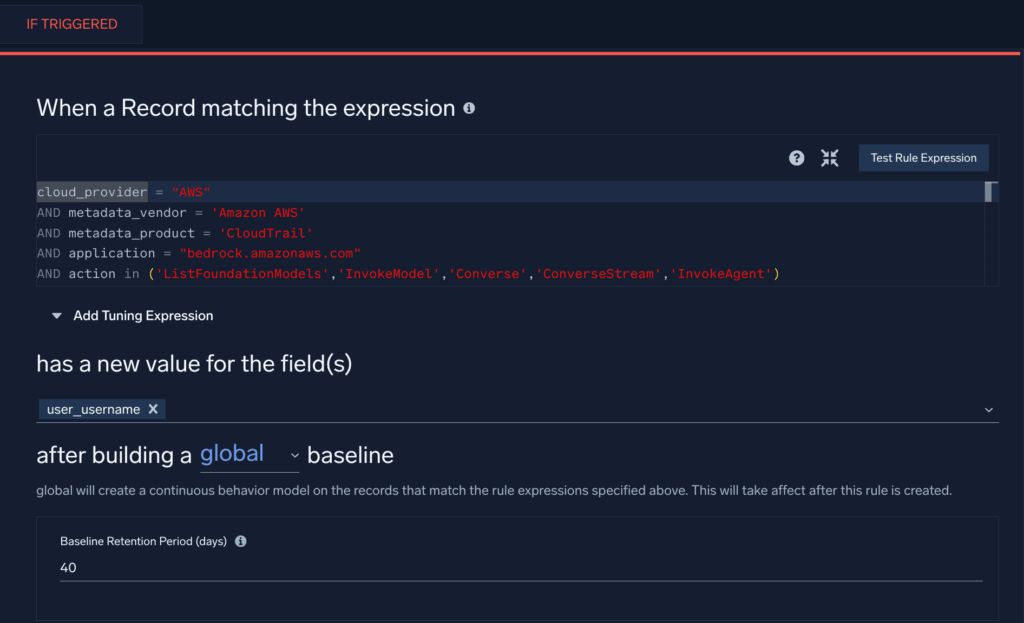
Bedrock API usage by new identities (Recon/Enumeration) → ATLAS TA0002; OWASP LLM10
This Cloud SIEM First Seen Rule, adapted from our Bedrock defender guidance, will trigger when a new user is observed using certain Bedrock API calls in your AWS environment.
Cross-region InvokeModel from long-lived keys (Account Misuse) → ATLAS Initial Access; OWASP LLM10
This search query will identify potential reuse of access keys to instantiate Bedrock resources in more than one region:
_sourceCategory=aws/observability/cloudtrail/logs
| json "eventName","userIdentity.accessKeyId","awsRegion","userIdentity.type" as en, key, region, utype
| where en="InvokeModel" and utype in ("IAMUser","AssumedRole")
| timeslice 1h
| count as c by key, region, _timeslice
| count_distinct(region) as regions by key, _timeslice
| where regions > 2
Guardrail/Trace anomalies on Bedrock Agents (OWASP LLM06, LLM04)
The following query checks for unusual rates of errors or throttling activity from Bedrock Agents, indicating potential misuse of agents:
_sourceCategory=aws/observability/cloudwatch/metrics
(metric=ModelInvocationClientErrors or metric=ModelInvocationServerErrors or metric=InvocationThrottles)
| quantize to 5m
| sum by metric, agentAliasArn, modelId, account, region
| outlier window=1d threshold=3 // flag unusual error/throttle bursts
Shadow AIT egress (unsanctioned LLM endpoints)
The following query will search proxy and firewall logs for connections to unsanctioned LLM endpoints. If desired, create a lookup table of users allowed to connect to these endpoints and add the lookup table path:
(_sourceCategory=proxy OR _sourceCategory=fw)
| parse regex field=url "(?i)https?://(?<host>[^/]+)"
| where host in ("api.openai.com","api.anthropic.com","*.hf.space","*.perplexity.ai","*.deepseek.com")
| lookup user as u1 from path://{path_to_lookup_table} on user=user
| where isNull(u1)
| count by user, host, src_ip
MCP audit: high-risk tool calls without approval (OWASP LLM07/LLM08)
Assuming you emit app logs like the below:
{
  "ts":"2025-08-20T15:01:12Z",
  "event":"mcp.tools.call",
  "session_id":"s-9a2f",
  "client_id":"webapp-01",
  "server_uri":"secrets://v1",
  "tool":"secrets.read",
  "inputs":{"path":"prod/db/password"},
  "approved":"false",
  "user":"dba_alice"
}
Query:
_sourceCategory=app/mcp
| json "event","tool","approved","user","server_uri" as evt,tool,ok,u,server nodrop
| where evt="mcp.tools.call" and tool matches /(secrets|prod|delete|exec)/ and ok="false"
| count by u, tool, server
(Backed by MCP’s JSON-RPC spec and server concepts; instrument tools/list/call, resources/read, prompts/get, and user approvals.)
ChatGPT monitoring case study
One of Sumo Logic’s strengths is its versatility. While we offer turnkey apps and detections, the real value comes from how customers extend the platform. To illustrate, I asked Bill Milligan, one of our lead professional services engineers, to share a recent project where he helped a customer monitor their use of OpenAI’s ChatGPT—end-to-end, from log ingestion to actionable insights.
The customer’s challenge: Can Sumo Logic track ChatGPT prompt exchanges to identify potential insider threats, or even early signs of mental health concerns that could potentially lead to workplace violence, based on conversation context?
Step one – Data ingest
Enterprise customers of OpenAI can use the ChatGPT Compliance API to access detailed logs and metadata, including user inputs, system messages, outputs, uploaded files, and GPT configuration data. However, there’s currently no pre-built cloud-to-cloud connector or catalog app for this feed (yet!).
Bill solved this using Sumo Logic’s Universal API Collector, which can ingest any data source with an API endpoint. The collector also supports JPath, letting you extract specific JSON fields (e.g., $.user.id, $.message.text) and map them directly into searchable fields in Sumo.
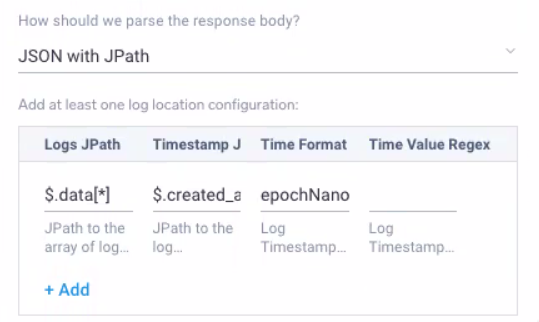
Step two – Building a simple parser
Once the data was flowing in successfully from the OpenAI API, Bill turned to Sumo Logic’s powerful built-in parsing language. It allows customers to identify timestamps, assign metadata values like product and vendor, and slice and transform the messages in various ways. Fortunately, parsers can be developed and tested directly in the UI with historical data, making iteration fast and visible.
The “parser” parses raw logs as they are forwarded to Cloud SIEM, extracting fields of interest along with the vendor, product, and event id.
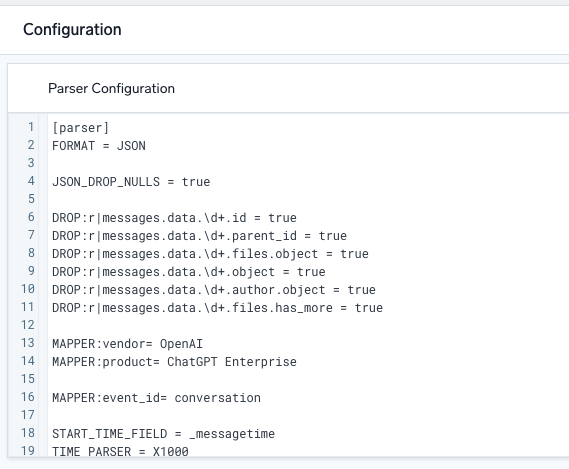
Step three – Mapping to our schema or data model
Parsing and mapping are distinct steps in Sumo Logic. After parsing, Bill created a custom mapper to align fields with Sumo’s data model. He also concatenated multiple prompt/response pairs into a single conversation field (description) for easier keyword detection.
Pro-tip: by default, a Sumo Logic tenant restricts log messages to 64kb. Because these conversations can get quite large, requesting that limit be increased to 256kb did the trick to avoid unnecessary truncation of logs.
When a “log mapper” matches the vendor, product, and event id, it will map the extracted fields from the parser to a normalized record, before it is analyzed by the rules engine.
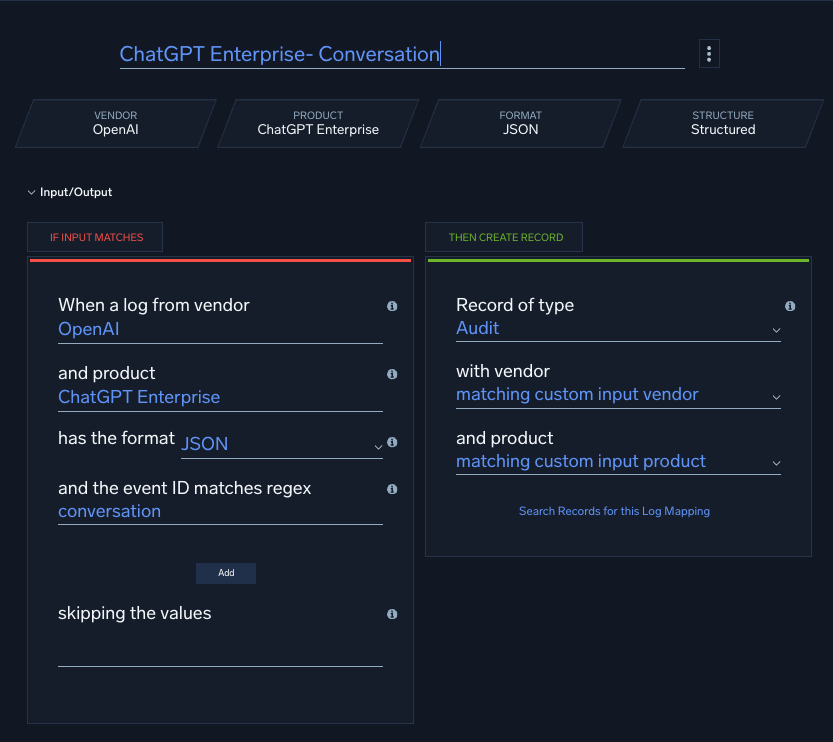
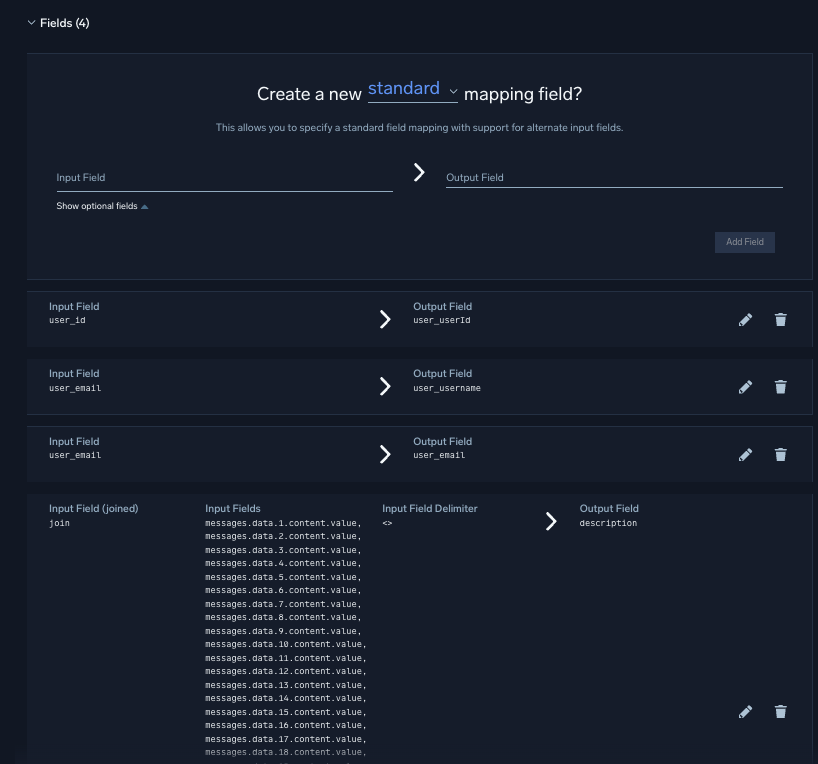
Step four – Writing a custom rule
Finally, Bill implemented a custom match rule to monitor for sensitive keywords. Rules are scoped to entities (users) to reduce noise and tuned with MITRE tags for context. Following best practices, rules are first deployed in prototype mode before going live. This allows the rules to fire against any entity (users in this case), without blowing up the alert triage that security analysts are monitoring.
This is an example of a rule expression for a “match” rule, one of the six powerful rule types that may be written in Cloud SIEM.
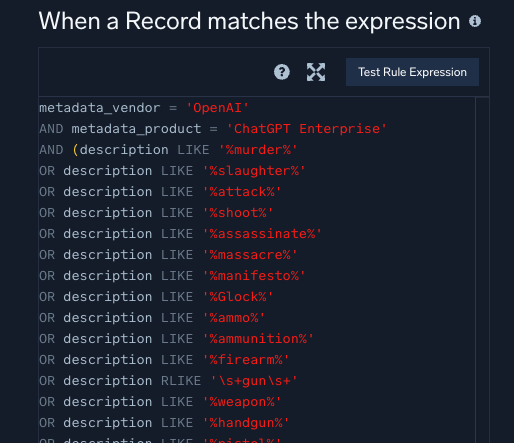
By adding MITRE tags to his custom rule, Bill ensured that when it fired, the resulting signals carried meaningful context. Because Sumo Logic automatically ties signals and behaviors back to individual entities, this rule could combine with others to elevate a user’s activity into a high-fidelity, actionable alert.
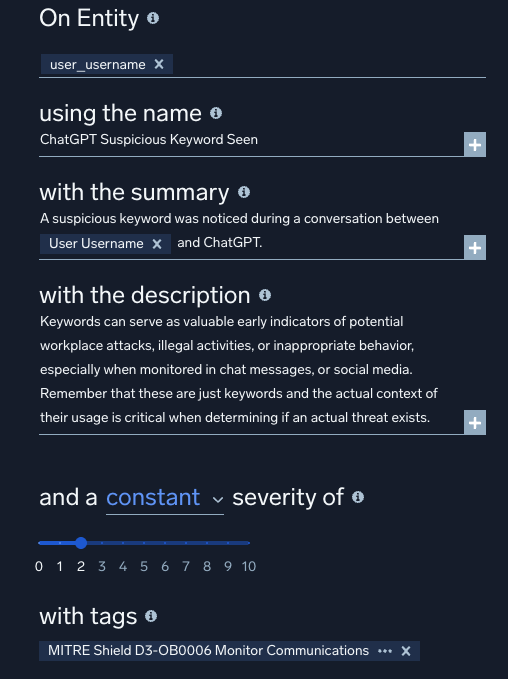
Although the workflow may look complex at first glance, breaking it down into clear steps makes it very straightforward to ingest custom log sources and tackle even the most advanced use cases.
Bottom line
The average org now runs a surprising number of gen-AI apps, many unsanctioned. Expect more of this, not less. Shadow IT and its edgier cousin, shadow AI: the sneaky underbelly where teams deploy unvetted tools (or free AI chats) without a whisper to IT, risking leaks and biases galore.
Solution? Your logs are the snitch: monitor network flows and app usage in Sumo Logic dashboards to unearth shadows early. Educate, don’t dictate—turn rogues into allies with governed AI sandboxes. Need some direction? Use cloud proxy/CASB logs to enumerate AI usage, apply AI TRiSM-style governance, and create SIEM detections for risky combinations (e.g., sensitive data classes → unsanctioned AI domains; sudden spikes in agent tool calls). This is less about blocking all AI and more about replacing the unknown with the observable and governed.