


PHP (a recursive acronym for PHP: Hypertext Preprocesser) is a free, open-source, server-side scripting language used primarily for web development. According to web technology tracker W3Techs, PHP is said to run “nearly 70% of all websites whose programming language can be identified.”
PHP2Shell is a pair of critical flaws in the PHP interpreter itself, each with a CVSS v4.0 score of 9.2. Both let an unauthenticated attacker run code on a web server with a single crafted web request, or a pair of them, before any application code runs.
- CVE-2026-109618 abuses PHP’s out-of-memory handling;
- CVE-2026-109619 abuses state left over from an earlier failed request on the same worker.
Because the bug lives in PHP, not in WordPress, Drupal or Magento, every reachable PHP endpoint on an affected server is exposed, including login pages, static forms, and health checks.
Every PHP release from the last decade is affected (back to 5.4). Fixed versions are 8.5.12, 8.4.27, 8.3.36, 8.2.35. PHP 8.1 and older get only minimal source backports.
PHP2Shell disclosure timeline
Two critical PHP vulnerabilities, CVE-2026-109618 and CVE-2026-109619, went from private research to active exploitation in a matter of days. Below is the timeline of events:
- August 2026: Calif finds the first remote code execution (RCE) paths during an LLM-assisted audit and reports them to PHP. Wiz independently finds the flaws and reports to PHP.
- Early October 2026: Cloudflare starts building Web Application Firewall (WAF) protections.
- Oct. 17, 2026: AWS reports first known exploit attempts against Amazon MadPot, four days before the planned coordinated disclosure.
- Oct. 20, 2026: Details of the two critical remote code vulnerabilities in PHP, CVE-2026-109618 and CVE-2026-109619, were leaked prior to the coordinated disclosure by the PHP Foundation, planned for Oct. 22, 2026.
- Oct. 21, 2026: The PHP Foundation officially discloses the vulnerabilities early and advises everyone to update. Emergency updates for the affected software versions ship later that day.
- Oct. 21, 2026 onward: Researchers report broad exploitation attempts.
How to search for PHP2Shell activity in your environment?
Let’s search for PHP2Shell activity using Sumo Logic. For each type of activity, you’ll find two searches: one against raw logs of various types, and one against normalized records for customers who have Sumo Logic Cloud SIEM.
Two notes before you start:
- Raw log searches need tuning. The raw log search examples include parsing operations specific to a log source type, such as Apache access logs. They also scope to a log categorization (such as
_sourceCategory=linux/system webserver) that you assign when you onboard the log source. If you want to use the raw log search examples included here, you will likely need to customize them for your environment. - Record searches work as written. They’re based on the Sumo Logic Cloud SIEM normalized schema, so they’re usable without modification.
These searches look for behavior on the web server after the initial exploit. They don’t search for HTTP transactions that could contain exploit payloads. In many cases, you’ll have security products such as web application firewalls “in front” of your Internet-exposed web servers, and those products will have their own set of detections around web server exploits using HTTP analysis. The telemetry from those products should be ingested into Sumo Logic for correlation, alerting and further analysis.
The detection engineering focus in this blog is on behavioral observations on the web server related to the initial exploit and follow-up activity from a successful attack. These observations can then be correlated to the telemetry from your other security products.
Look for spikes in web server errors
The PHP2Shell vulnerabilities stem from flaws in PHP error handling, so exploit attempts will show up as errors on your web servers. Using Sumo Logic’s timeslice search operator, you can easily assess whether there have been spikes in error activity on your web servers.
In the example below, we’re counting the number of server-side errors (those that generate an HTTP response code in the 500-599 range) per hour. We can visually scan the results for spikes.
Example 1: (Syslog-wrapped) Apache Access Logs
(_sourceCategory=linux/system webserver_system=apache webserver_farm=* OR _sourceCategory=linux/syslog) httpd-access HTTP (50* OR 51* OR 52* OR 53* OR 54* OR 55* OR 59*)
| parse "httpd-access: *" as mesg nodrop
| parse regex field=mesg "^(?<src_ip>\d{1,3}\.\d{1,3}\.\d{1,3}\.\d{1,3})\s+(?<vhost>\S+)" nodrop
| parse regex field=mesg "\"(?<method>[A-Z]+)\s(?<uri>\S+)\sHTTP\/[\d\.]+\"\s(?<status_code>\d+)\s(?<size>[\d-]+)" nodrop
| where !isNull(status_code) and status_code >= 500 and status_code <= 599
| timeslice 1h
| count by _timeslice, _sourceHost
| sort by _timeslice, _count desc
Example 2: Sumo Logic Cloud SIEM Records
Note that the query below depends on either the web_servers or http_servers standard match lists being created and populated in your deployment.
_index=sec_record*
| where http_response_statusCode >= 500 and http_response_statusCode <= 599
| where jsonArrayContains(listMatches, "web_servers") or jsonArrayContains(listMatches, "http_servers")
| timeslice 1h
| count by _timeslice, dstDevice_ip
| sort by _timeslice, _count desc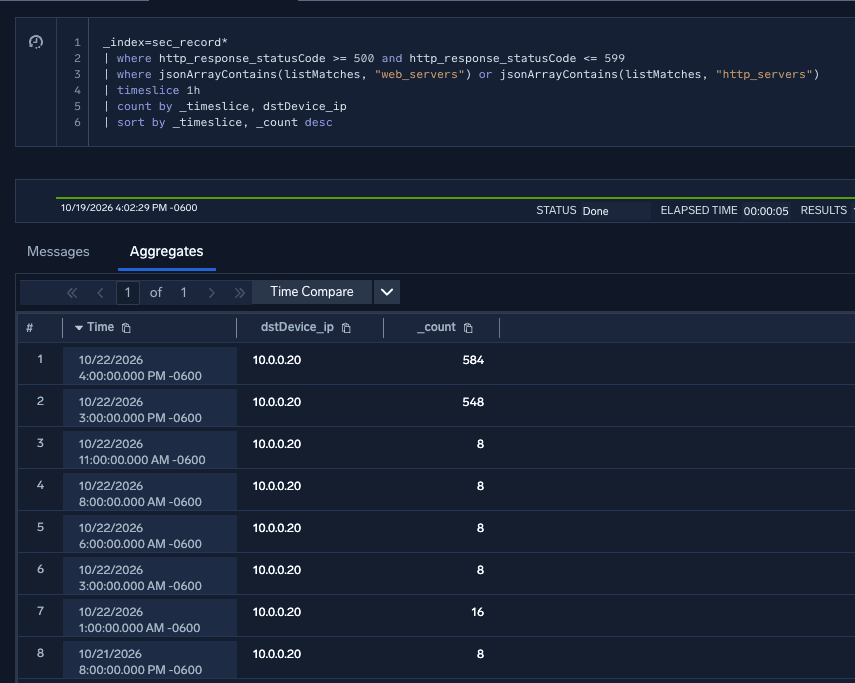
Figure 1: spike in web server error activity
Identify web server processes spawning a shell
If an attacker successfully exploits PHP2Shell, they may execute malicious code through a child process of the web server or the PHP process. The query below identifies common web server processes launching a full OS shell in both Windows and Linux environments.
Example 1: Windows process logs
_sourceCategory ="windows/eventlogs"
| parse "<EventID>*</EventID>" as eventId
| where eventId = "4688"
| parse "<Data Name='ParentProcessName'>*</Data>" as parentBaseImage nodrop
| parse "<Data Name='NewProcessName'>*</Data>" as baseImage nodrop
| parse "<Data Name='CommandLine'>*</Data>" as commandLine nodrop
| parse "<Data Name='SubjectUserName'>*</Data>" as user_username nodrop
| parse "<Data Name='SubjectDomainName'>*</Data>" as user_domain nodrop
| parse regex "<Computer>(?<device_hostname>[^<]+)</Computer>" nodrop
| where parentBaseImage matches /(?i).*(w3wp\.exe|httpd\.exe|nginx\.exe|php-cgi\.exe|tomcat\.exe)$/
| where baseImage matches /(?i).*(cmd\.exe|powershell\.exe|bitsadmin\.exe|pwsh\.exe|powershell_ise\.exe)$/
| fields device_hostname, user_domain, user_username, parentBaseImage, baseImage, commandLine
Example 2: Sumo Logic Cloud SIEM records
_index=sec_record*
| where parentBaseImage matches /(?i).*(w3wp\.exe|httpd\.exe|nginx\.exe|php-cgi\.exe|tomcat\.exe|\/httpd|\/nginx|\/php-cgi|\/tomcat|\/apache2|\/apache)$/
| where baseImage matches /(?i).*(cmd\.exe|sh\.exe|bash\.exe|powershell\.exe|bitsadmin\.exe|pwsh\.exe|powershell_ise\.exe|\/bash|\/sh|\/dash|\/zsh|\/ksh|\/csh|\/python3?|\/perl)$/
| fields device_hostname, device_ip, user_username, parentBaseImage, baseImage, commandLine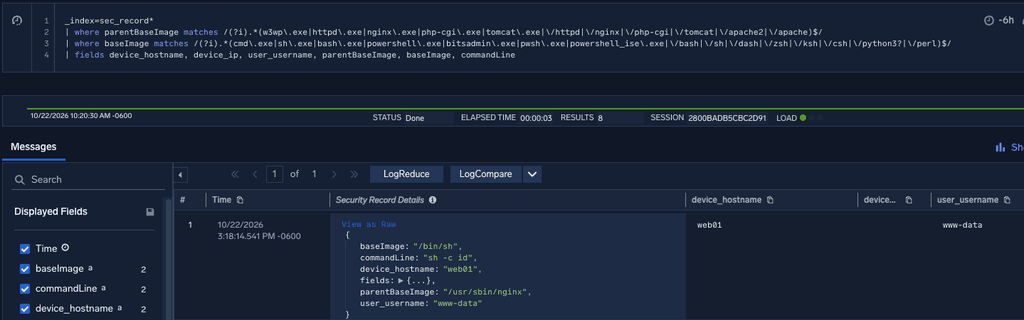
Figure 2: Finding a shell being launched from nginx
Look for web server processes executing common web shell commands
The web server might also execute shell commands directly rather than via a full OS shell. The query below will identify common discovery, credential harvesting and exfiltration commands run as child processes of the web server process.
Example 1: Windows process logs
_sourceCategory ="windows/eventlogs"
| parse "<EventID>*</EventID>" as eventId
| where eventId = "4688"
| parse "<Data Name='ParentProcessName'>*</Data>" as parentBaseImage nodrop
| parse "<Data Name='NewProcessName'>*</Data>" as baseImage nodrop
| parse "<Data Name='CommandLine'>*</Data>" as commandLine nodrop
| parse "<Data Name='SubjectUserName'>*</Data>" as user_username nodrop
| parse "<Data Name='SubjectDomainName'>*</Data>" as user_domain nodrop
| parse regex "<Computer>(?<device_hostname>[^<]+)</Computer>" nodrop
| where parentBaseImage matches /(?i).*(w3wp\.exe|httpd\.exe|nginx\.exe|php-cgi\.exe|tomcat\.exe|apache).*/
| where commandLine matches /(?i).*(whoami|net user |ping |systeminfo |netstat |arp -a|ipconfig |ifconfig |curl |wget ).*/
| fields device_hostname, user_domain, user_username, parentBaseImage, baseImage, commandLine
Example 2: Sumo Logic Cloud SIEM records
_index=sec_record*
| where parentBaseImage matches /(?i).*(w3wp\.exe|httpd\.exe|nginx\.exe|php-cgi\.exe|tomcat\.exe|apache|\/httpd|\/nginx|\/php-cgi|\/tomcat|\/apache2).*/
| where commandLine matches /(?i).*(whoami|net user |ping |systeminfo |netstat |arp -a|ipconfig |ifconfig |curl |wget |id |uname |cat \/etc\/passwd|nc -).*/
| fields device_hostname, device_ip, user_username, parentBaseImage, commandLine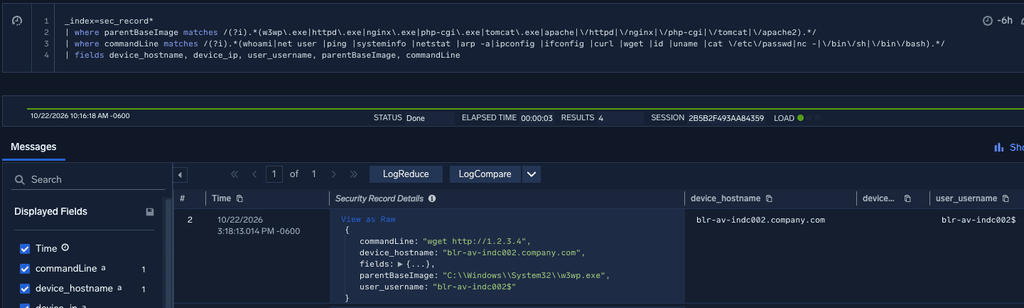
Figure 3: a remote wget command as a child process of Internet Information Server
Sumo Logic Cloud SIEM detections
There are several out-of-the-box Sumo Logic Cloud SIEM rules designed to detect web shell activity and help identify web servers that have been successfully exploited by PHP2Shell. The rules’ detection theories are the same as the queries discussed above: unusual child processes of web server processes and spikes in error rates on web servers.
The following detections can help you investigate potential compromise:
| Cloud SIEM Rule ID | Rule Name |
|---|---|
| MATCH-S00164 | Suspicious Shells Spawned by Web Servers |
| MATCH-S00174 | Web Services Executing Common Web Shell Commands |
| MATCH-S00539 | Web Servers Executing Suspicious Processes* |
| OUTLIER-S00036 (new) | Spike in HTTP Server Errors from Source IP |
| OUTLIER-S00037 (new) | Spike in HTTP Server Errors to Destination IP |
As mentioned earlier, you can build a higher-fidelity detection around successful PHP2Shell exploits by creating CHAIN rules. A CHAIN rule correlates an edge-device observation of PHP2Shell (such as a WAF alert) for an entity with the web shell detection logic in the table above.
Note that these rules require the creation and population of standard match lists. MATCH-S00539 uses the “web_servers” match list to scope detection to process execution on your web servers.
OUTLIER-S00036 and OUTLIER-S00037 need the “web_servers” or “http_servers” match lists to track server-side errors. Learn how to create and populate a match list.
Recommendations to fix and mitigate PHP2Shell
The PHP Group’s guidance is clear: update now.
“Who is at risk: all PHP installations serving web requests, including PHP-FPM, Apache with mod_php, php-cgi, FrankenPHP and LiteSpeed. We consider the risk highest for mod_php, with a demonstrated exploit where an unauthenticated request can trigger the attack before any application code runs.” Read PHP Group’s full advisory here.
Community analysis shows that successful exploitation gives attackers command execution in the web server user context. From there, they can deploy web shells, harvest API and database credentials from configuration files, and move into internal networks.
Updating immediately is the recommendation. If you can’t update yet, use the searches and detections above to monitor impacted servers for post-exploitation activity indicating successful exploitation.
If you don’t yet have Cloud SIEM and want to understand how it can help you detect and respond to threats like these, book a demo to learn more.
References and further resources
NIST vulnerability information
PHP’s guidance
Cybersecurity community resources and reports
- https://calif.io/php2shell/
- https://www.wiz.io/blog/php2shell-php-rce
- https://www.huntress.com/blog/php2shell-leaked-critical-php-vulnerabilities
- https://www.crowdstrike.com/en-us/blog/crowdstrike-protects-customers-from-php-rce-zero-days/
- https://thehackernews.com/2026/10/someone-tried-to-exploit-php2shell-4.html
- https://openai.com/index/coordinated-disclosure-of-critical-vulnerabilities/
- https://aws.amazon.com/blogs/security/amazon-threat-intelligence-identifies-php2shell-exploitation-prior-to-public-disclosure-in-madpot/
- https://blog.checkpoint.com/security/php2shell-what-we-know-about-the-leaked-critical-php-vulnerabilities-cve-2026-109618-cve-2026-109619/
- https://blog.cloudflare.com/php-vulnerabilities-waf-protection
- https://research.jfrog.com/post/php2shell-all-you-need-to-know-about-cve-2026-109618-and-cve-2026-109619/
- https://www.reuters.com/technology/what-is-php-why-did-it-take-government-websites-offline-2026-10-21/