
Sumo Logic’s log analytics capabilities have always provided the greatest insights to help you secure, monitor and troubleshoot your environment. Now, with our Query Agent, as part of Dojo AI, creating optimized log searches with natural language is even easier.
Query Agent works with a wide variety of operators, including the join operator, for parsing, aggregation, data transformation, filtering, advanced analysis and lookup. The join operator brings the essence of a SQL JOIN to your stream of unstructured data, giving you even more flexibility.
What is the join operator?
In a standard relational join, the datasets in the tables to be joined are fixed at query time. However, matching IDs across log messages from different days within your search timeframe is likely to produce the wrong result, because actions performed yesterday shouldn’t be associated with a login event that occurred today.
For this reason, our join operator provides a specified moving timeframe for joining log messages.
In the diagram below, the pink and orange represent two streams of disparate log messages. They both contain a key/value pair we want to match on, and the messages are joined on that key/value when they both occur within the time window indicated by the black box.

Join operator in practice
Now let’s put this to use. Suppose an application has both real and machine-controlled users. You want to know which users are which so you can keep an eye out for any machine-controlled users that might be impacting performance.
As it turns out, human users create requests at a reasonably low rate, while machine-controlled users (accessing via an API) can generate several requests per second, and always immediately after the login event.
In these logs, several different messages are coming in with varying purposes and values. Using the join operator, you can query for both login and request events and then restrict the time window of the matching logic to combine the two message streams. The two sub-queries in my search will look for request/query events and login events, respectively.
The match window is limited to just 15 seconds to identify requests that occur very close to the login event. Then, you can filter out users who made fewer than ten requests in that 15-second time frame following a login. The result is a clear view of users actively issuing a large volume of requests via the API immediately upon logging in.
Here is my example query:
(login or (creating query))
| join
 (parse "Creating query: '*'" as query, "auth=User:*:" as user) as query,
 (parse "Login success for: '*'" as user) as login
 on query.user = login.user
 timewindow 15s
| count by query_user
| where _count > 10
| sort _count
As you can see from the above syntax, the subqueries use the same syntax as standard log searches and even support aggregates (count, sum, average, etc), so that you can join complex results together and achieve the insights you need.
And Sumo Logic supports joining more than just two streams of logs, so you can combine all your favorite data into one query.
What is the Dojo AI Query Agent?
Writing a join query with the right syntax, time window, and matching logic can be tricky, especially when you’re working with multiple log streams. The Query Agent makes this process easier.
Part of our team of Dojo AI agents, the Query Agent, accessed through Mobot, translates your natural-language questions into Sumo Logic log search queries to help you create optimized queries with a prompt.
The following example shows how a user can prompt the Query Agent via Mobot to create a join command, making it easy to join logs for a search. In the screenshot below, the user prompts the Query Agent to associate the changelog logs for a service with the application logs to check for a status code.
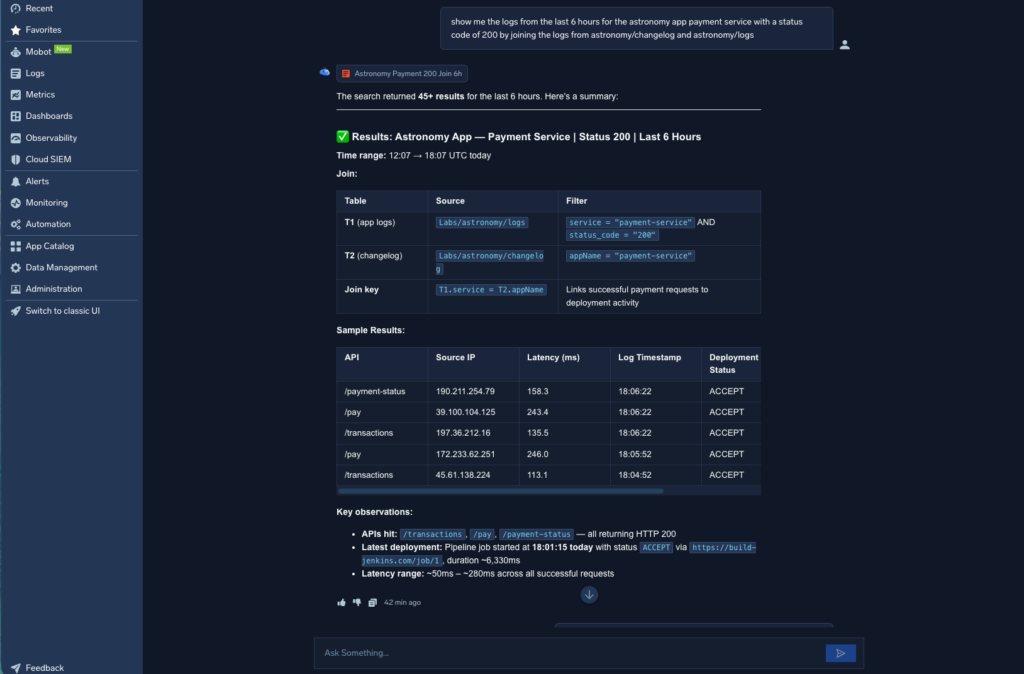
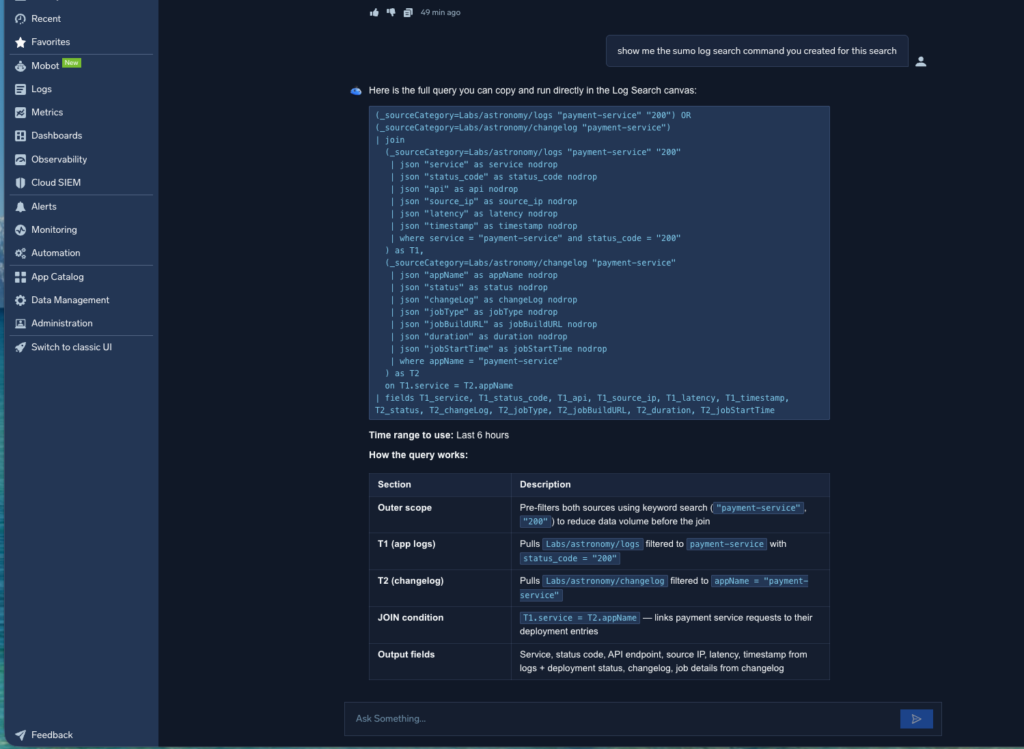
In addition to displaying the results, the Query Agent indicates that a join was used and surfaces key observations, such as latency. It also provides the exact search command, which can be easily used or modified in the log search canvas. To make the query more understandable, the Query Agent includes a clear explanation of the search, outlining its key components and how they relate to one another.
Final note
The join operator allows you to combine records from two or more data streams into a single result set dynamically, functioning similarly to a SQL inner join. And the join operator, and other operators, are enhanced with Dojo AI agents.
Learn how Dojo AI can help you monitor, troubleshoot and secure your environment. See it in action.